
Listen to this Post
Introduction:
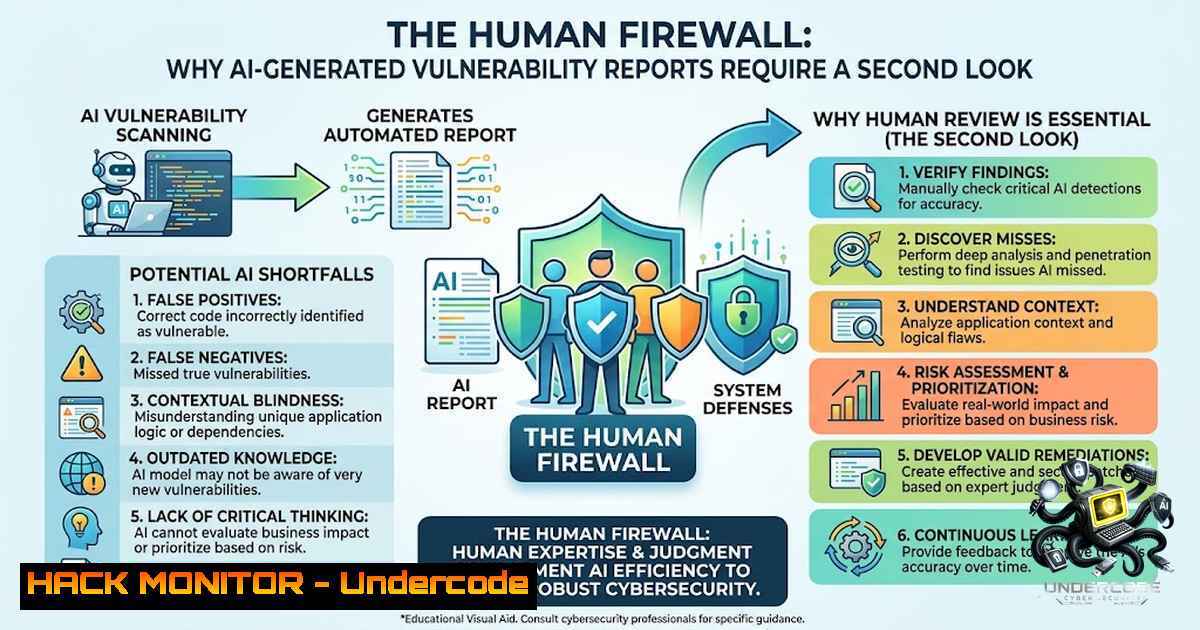
The integration of Artificial Intelligence (AI) into cybersecurity workflows is accelerating, promising speed and efficiency in threat detection and reporting. However, the recent incident involving a penetration tester receiving a vulnerability report riddled with residual AI prompt instructions serves as a critical wake-up call. While AI excels at drafting initial content and summarizing complex logs, it lacks the contextual security awareness to vet its own output, introducing risks of misinformation, misinterpretation, and data leakage that can undermine the integrity of the vulnerability management lifecycle.
Learning Objectives & Secrets:
- Objective 1: AI Output Quality Assurance – Learn to implement a rigorous validation layer for all AI-generated security reports to prevent the dissemination of fabricated vulnerabilities or hallucinated code snippets that could waste engineering resources.
- Objective 2 Secret Tips – Create a “Reviewer Mindset” checklist that includes verifying proof-of-concept (PoC) code syntax against the target environment and cross-referencing CVE databases to ensure the reported flaw is not a duplicate or a false positive.
- Objective 3 Secret Tips – Master the art of “Prompt Sanitization” to ensure that internal security protocols, proprietary business logic, and submission procedures are not inadvertently exposed in the final output sent to stakeholders or clients.
You Should Know:
1. Verification of AI-Generated Exploit Proof-of-Concepts (PoCs)
One of the most dangerous pitfalls of relying on AI for vulnerability reports is the generation of non-functional or weaponized PoC code. To avoid sending a report based on a faulty premise, security analysts must validate the technical accuracy of the scripts provided.
- Step-by-step guide:
- Isolate the Environment: Spin up a controlled virtual machine (VM) or container (e.g., using Vagrant or Docker) that mirrors the target system’s OS and application version.
- Extract the Code: Copy the PoC code provided by the AI into a test file (e.g., `exploit_test.py` or
payload.js). - Syntax Check: Run the code through a linter. For Python, use
python -m pyflakes exploit_test.py. For JavaScript, usenode -c payload.js. - Sandbox Execution: Execute the script in the test environment while monitoring network traffic via `tcpdump` or Wireshark to ensure it only attempts to connect to the intended target IP.
- Analyze Output: Compare the actual output (e.g., HTTP 500 errors, time delays, or data exfiltration attempts) against the report’s claims. If the AI claimed a Remote Code Execution (RCE) but the script only triggers a memory leak, the report needs correction.
-
The Bug Bounty Submission Process and Tool Configurations
Submitting a vulnerability report requires strict adherence to the platform’s (e.g., HackerOne, Bugcrowd) formatting rules. AI often generates overly verbose or vague descriptions. The secret to a successful submission is a clean, structured template that integrates automated testing data.
- Step-by-step guide:
- Reconnaissance Scripting: Use `nmap` for port scanning:
nmap -sC -sV -oA scan_results <target_ip>. - Automated Scanner Logic: Run specific directory brute-forcing using
gobuster dir -u <target> -w /usr/share/wordlists/dirbuster/directory-list-2.3-medium.txt -x php,html,js. - Burp Suite Configuration: In Burp Suite, configure the “Logger” or “Repeater” to capture the exact HTTP request that triggers the vulnerability.
- Exporting Evidence: Use the “Copy as cURL” function in Burp or the browser’s DevTools to get a precise replication string.
- Report Drafting: Instruct the AI to structure the output strictly as:
| Affected URL | Steps to Reproduce (using the cURL command) | Impact | Remediation. Review to ensure the AI hasn’t added excessive marketing language or system metadata. -
Incident Response and Log Analysis for AI Audits
When investigating if a report is AI-generated (or flawed by AI logic), analysts should look at the timestamps and contexts of system logs. AI often hallucinates command outputs that don’t match the system’s actual state.
- Step-by-step guide (Linux/Windows):
- Linux (Log Verification): Extract specific authentication logs to verify if a claimed brute-force attack occurred using
sudo grep "Failed password" /var/log/auth.log | wc -l. Compare this to the AI’s claim of “thousands of attempts.” - Windows (Event Viewer via PowerShell): Retrieve security event IDs (e.g., 4625 for failed logons) using
Get-WinEvent -LogName Security -FilterXPath "[System[EventID=4625]]". Cross-reference the count and timestamps. - Network Traffic Validation: If the report mentions a data exfiltration endpoint, verify it using `tcpdump -i eth0 -1n -A ‘port 443’ > traffic.pcap` and analyze the `pcap` for outbound DNS queries to domains mentioned in the report.
- API Response Verification: If the vulnerability is API-based (e.g., IDOR), use `curl -X GET “https://api.target.com/v1/user/123” -H “Authorization: Bearer
“` and compare the response JSON against the AI’s written description of the output.
4. Cloud Hardening Against AI-Inferred Misconfigurations
AI may scan the web and infer misconfigurations (like open S3 buckets). However, it often fails to account for region-specific APIs. The following command ensures your AWS environment is locked down before AI scanners flag them.
- Step-by-step guide:
- Install AWS CLI: Ensure the latest version is installed:
pip install awscli --upgrade. - Configure Credentials: Run `aws configure` to set up security keys (use IAM roles with least privilege).
- Check S3 Permissions: Use `aws s3api get-bucket-acl –bucket
` to list permissions. - Block Public Access: If the AI report claims “Public Access,” execute
aws s3api put-public-access-block --bucket <your-bucket> --public-access-block-configuration BlockPublicAcls=true,IgnorePublicAcls=true,BlockPublicPolicy=true,RestrictPublicBuckets=true. - Audit Security Groups: Run `aws ec2 describe-security-groups –group-ids
` to ensure ports like 22 and 3389 are restricted to specific IPs rather than `0.0.0.0/0` as the AI might have erroneously flagged.
5. API Security and Vulnerability Exploitation/Mitigation
AI often generates payloads for SQLi or XSS that are outdated. Securing APIs requires dynamic analysis. A modern approach involves using custom headers to detect injection attempts.
- Step-by-step guide:
- Run a Basic WAF Bypass Attempt: Use
sqlmap -u "https://target.com/product?id=1" --level=3 --risk=2 --batch. However, do not run this without authorization. - Windows Command for Header Validation: Use `Invoke-WebRequest -Uri “https://api.target.com/v2” -Headers @{“X-Custom-Auth”=”test”}` to see if the server leaks stack traces.
- Rate Limiting Check: Write a simple bash loop:
for i in {1..1000}; do curl -s -o /dev/null -w "%{http_code}\n" https://api.target.com/endpoint; done. Sort the results to check for a 429 status code (Too Many Requests). If missing, your report should highlight this as a Denial of Service vector. - Data Sanitization: Implement server-side whitelisting rather than blacklisting, as AI models often provide regex filters that are easily bypassed.
6. Securing Training Materials and Sensitive Course Data
If you are training employees or using AI to generate course materials (like the source post suggests), ensuring that internal IP isn’t leaked is vital. Treat `config` and `.env` files with extreme caution.
- Step-by-step guide:
- Git Secrets Scan: Use `trufflehog –entropy=True –regex –entropy=False https://github.com/your-repo.git` to detect if any API keys were accidentally committed.
2. Environment Variable Extraction: On Linux, ensure your shell history is cleared of commands containing passwords: `history -c && history -w`. - Windows Credential Manager: Run `cmdkey /list` to see what stored credentials are available. Unnecessary ones should be removed using `cmdkey /delete:
` to prevent AI scrapers from reading them in case of a screen capture tool. - File Integrity Monitoring: Use `aide –check` (Linux) or `sfc /scannow` (Windows) to verify that course binaries haven’t been tampered with by an automated attacker bot.
What Undercode Say:
- Key Takeaway 1: AI is a powerful co-pilot for drafting vulnerability reports, but it is not a substitute for the human capacity to contextualize risk. The presence of AI instructions in the response is a symptom of a larger issue: a failure in the final security review process.
- Key Takeaway 2: The “burden of proof” lies with the reporter. Just because a report is generated by an advanced language model does not mean it is accurate. Analysts must possess the hands-on skills to run live commands and verify outputs before escalating a ticket.
Analysis:
The incident highlights a systemic gap in modern cybersecurity operations—the “automation trust” fallacy. As Security Operations Centers (SOCs) adopt AI for triage, there is a growing tendency to accept machine-generated outputs as ground truth. However, AI hallucinations can lead to “alert fatigue” or, worse, “false negatives” where a novel exploitation path is ignored because the AI didn’t identify it. The essence of bug bounty and penetration testing is adversarial thinking, a trait that current AI lacks. This case underscores the need for “Human-in-the-Loop” validation, where every command, IP address, and code snippet is manually verified. It also serves as a reminder that professionalism in cybersecurity is defined by meticulousness, not speed.
Prediction:
- +1 The bug bounty industry will likely introduce new guidelines requiring researchers to explicitly label if AI was used for drafting, leading to more transparent and rigorous cross-verification methods.
- -1 The ease of generating “believable” reports via AI will flood platforms with low-quality submissions, potentially causing platforms to implement stricter triage acceptance criteria and increasing turnaround times for legitimate researchers.
- +1 There will be a surge in demand for “AI Auditor” roles, where security professionals are specifically trained to audit machine-generated logic and configuration outputs, creating a new specialized career niche.
- -1 We may witness an increase in legal disputes regarding liability when AI-generated steps cause a Denial of Service (DoS) because the “theoretical” exploit did not account for production database resilience.
▶️ Related Video (86% Match):
🎯Let’s Practice For Free:
🎓 Live Courses & Certifications:
Join Undercode Academy for Verified Certifications
🚀 Request a Custom Project:
Secure, high-velocity infrastructure and disruptive technological engineering. Contact our engineering team for high-tier development and proprietary systems:
[email protected]
💎 Smart Architecture | 🛡️ Secure by Design | ⭐ Trusted by Thousands
IT/Security Reporter URL:
Reported By: https://lnkd.in/p/eQsvk7kU – Hackers Feeds
Extra Hub: Undercode MoN
Basic Verification: Pass ✅


