Listen to this Post
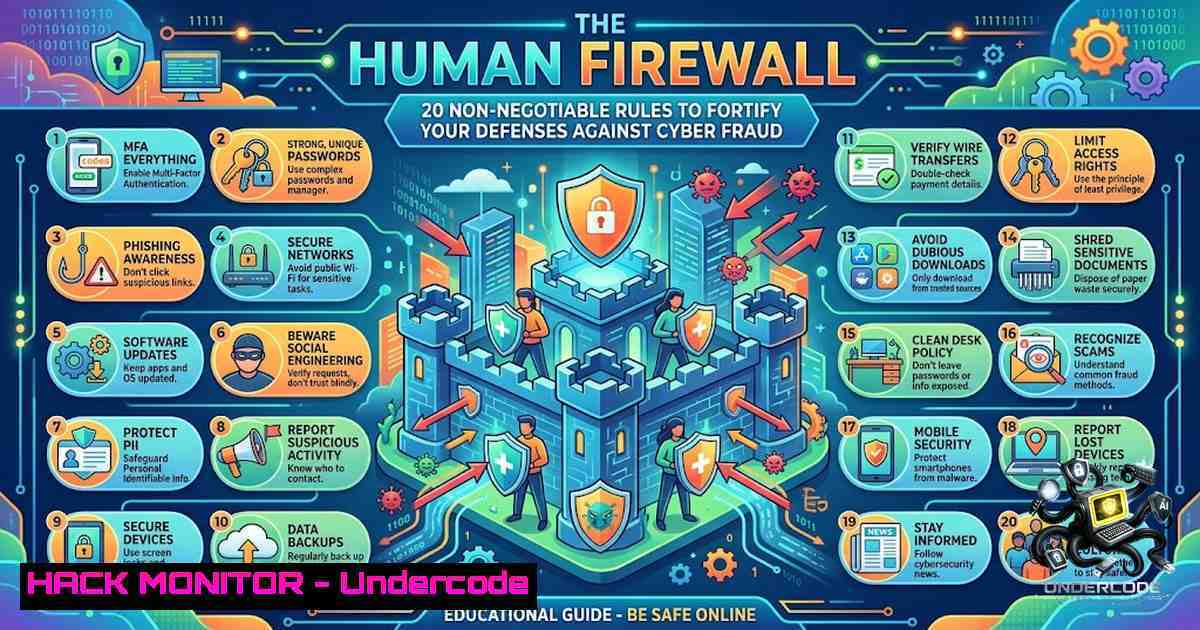
Introduction:
In the modern threat landscape, advanced persistent threats (APTs) and zero-day exploits often dominate headlines, yet the most prevalent attack vector remains the human element. Cyber fraud leverages psychological manipulation and social engineering to bypass even the most sophisticated technical controls, targeting the user’s trust and urgency rather than system vulnerabilities. This article dissects 20 fundamental rules for preventing cyber fraud, transforming them from simple advice into actionable technical and behavioral controls that build a resilient “human firewall” for both personal and enterprise security.
Learning Objectives:
- Recognize and mitigate social engineering tactics that bypass technical security measures.
- Implement specific technical controls, such as verified websites and secure configurations, to prevent fraud.
- Establish standard operating procedures for verifying requests and reporting incidents.
You Should Know:
1. Authentication Hygiene: Passwords, OTPs, and Credential Management
The bedrock of personal security lies in how you manage and protect your credentials. The rule “Never share OTPs, PINs, or passwords” is foundational, but implementing it requires a robust technical framework. For Linux and Windows administrators, enforcing this often involves Group Policy Objects (GPO) or PAM (Pluggable Authentication Modules) to enforce password complexity and history. However, for the individual user, it means adopting a password manager. This tool allows you to generate and store unique, complex passwords for each service, mitigating the risk of credential stuffing attacks. If a breach occurs on one platform, your other accounts remain secure.
Step‑by‑step guide explaining what this does and how to use it:
1. Adopt a Password Manager: Choose a reputable password manager like Bitwarden, 1Password, or KeepassXC. Install the browser extension and mobile app.
2. Generate Strong Passwords: Use the built-in generator to create passwords that are at least 16 characters long, combining uppercase, lowercase, numbers, and symbols. This ensures a high entropy level, making brute-force attacks computationally impractical.
3. Enable Two-Factor Authentication (2FA): Configure 2FA on all critical accounts (email, banking, social media). Use an authenticator app (Google Authenticator, Authy) instead of SMS when possible, as SIM-swapping attacks can intercept SMS codes.
4. Check for Breaches: Use the password manager’s “breach report” feature or services like Have I Been Pwned to check if your credentials have been compromised. If so, change them immediately.
- Network and Device Hardening: Mitigating Public Wi-Fi and Update Risks
Public Wi-Fi networks are inherently insecure, often operating without encryption, making them a prime target for Man-in-the-Middle (MITM) attacks. The rule “Avoid banking on public Wi-Fi” is critical. If you must use it, always use a Virtual Private Network (VPN) that encrypts all traffic from your device to the VPN server. Additionally, “Update Your Devices” is a technical necessity. Outdated software contains known vulnerabilities (CVEs) that are often weaponized by attackers.
Step‑by‑step guide explaining what this does and how to use it:
1. VPN Configuration (Windows/Linux): On Windows, navigate to `Settings > Network & Internet > VPN` to set up a connection. On Linux (Ubuntu), use the Network Manager GUI or the command line to configure OpenVPN (e.g., sudo openvpn --config client.ovpn).
2. Automate Updates: Set operating systems and applications to update automatically. On Windows, this is managed via Windows Update. On Linux, use cron jobs for automated updates (e.g., `sudo apt update && sudo apt upgrade -y` for Debian-based systems).
3. Verify App Sources: Only download applications from official stores (Apple App Store, Google Play Store, or official vendor websites). Avoid sideloading APKs or using pirated software, as these are common vectors for malware distribution.
3. Verification Protocols for Digital Communication
Scammers excel at creating a sense of urgency to bypass rational thought. The rules “Verify Websites” and “Verify Callers” are proactive verification protocols. Before clicking a link or taking action, you must independently verify the source. This is a Zero Trust principle in action: never trust, always verify.
Step‑by‑step guide explaining what this does and how to use it:
1. URL Analysis: Hover over a link to see the true destination. Look for subtle misspellings (e.g., g00gle.com). On Linux/Windows, you can use the `nslookup` or `ping` command to check if the domain resolves to an expected IP address.
2. Telephone Verification: If someone calls claiming to be from your bank, do not engage. Hang up and call the official customer service number listed on your bank’s card or website. This ensures you are speaking to a legitimate representative.
3. Check URL Protocols: Ensure the website uses HTTPS. The ‘S’ stands for Secure, indicating the connection is encrypted. Click the padlock icon in the address bar to verify the site’s certificate details.
4. Proactive Monitoring and Incident Response
The rules “Check Bank Statements” and “Enable SMS Alerts” are about establishing a feedback loop to detect fraud early. This is analogous to a SIEM (Security Information and Event Management) system for your personal finances.
Step‑by‑step guide explaining what this does and how to use it:
1. Transaction Alerts: Log into your bank’s mobile app and enable real-time SMS and email alerts for all transactions. This allows you to identify fraudulent charges immediately.
2. Regular Review: Set a calendar reminder to review your monthly bank and credit card statements. Compare them against your receipts and known expenditures.
3. Reporting Fraud: If you spot a suspicious transaction, call your bank immediately. For Indian citizens, report the incident to the national cybercrime helpline at 1930 or file a complaint at cybercrime.gov.in. This rapid response can halt the fraudster’s financial trail.
5. Advanced Threat Recognition and Social Engineering
The final layer of defense is recognizing the psychological tactics of scammers. The rule “Don’t Trust Urgency” is a critical component of this. These attacks often involve “social engineering,” where the attacker manipulates the target’s emotions.
Step‑by‑step guide explaining what this does and how to use it:
1. Deconstruct the Message: If you receive an urgent message (e.g., “Your account will be closed,” “Your package is undeliverable”), stop. Do not click any links or call the provided number.
2. Analyze the Sender: Check the sender’s email address. Look for discrepancies between the “Display Name” and the “Email Address.”
3. Look for Spoofing: In a command-line environment (Linux/macOS), you can use the `dig` or `host` command to check the SPF (Sender Policy Framework) and DKIM (DomainKeys Identified Mail) records of a domain to see if the email is likely legitimate. For example:
`dig TXT _spf.example.com`
A “softfail” or “fail” result indicates the email may be spoofed.
What Undercode Say:
- Key Takeaway 1: Cyber fraud often succeeds by exploiting human emotions and trust, not technical vulnerabilities; the “pause and verify” mindset is the most critical security control.
- Key Takeaway 2: Many of the listed rules translate directly into technical actions, such as using a VPN, enabling 2FA, and verifying URLs, which actively harden your digital footprint.
Analysis: The challenge of cybersecurity isn’t just about coding a firewall; it’s about building a culture of security where users are empowered to question and verify. While tools like VPNs and password managers are vital, they are rendered useless if a user willingly hands over credentials to a convincing imposter. The primary takeaway from this list is the shift from a “password” to a “passphrase” or “pausephrase” mentality. By taking a mandatory 10-second pause before acting on a request, you create a cognitive gap that allows logical scrutiny to override emotional panic. This process, combined with technical validations like checking the URL or enabling two-factor authentication, creates a multi-layered defense that is highly effective against social engineering attacks.
Prediction:
- +1 The increasing awareness and adoption of these “human firewall” principles, driven by posts like this, will create a more resilient user base, making phishing and social engineering attacks less cost-effective for cybercriminals.
- -1 As users become more aware of basic phishing tactics, attackers will escalate their sophistication, employing AI-generated voice and video clones (deepfakes) to convincingly impersonate family members or executives, bypassing these simple verification rules.
- +1 The integration of these rules into corporate security awareness training programs will become a standard compliance requirement, improving the overall security posture of organizations and reducing data breach costs.
- -1 The rapid adoption of GenAI tools will also empower scammers to craft hyper-personalized and grammatically correct spear-phishing emails at scale, making it harder for users to detect “urgency” based on poor spelling alone.
- +1 We will see a rise in “Zero Trust” architectures applied to personal devices, where the concept of “never trust, always verify” extends to all incoming communications, potentially automating many of these checks.
▶️ Related Video (82% Match):
🎯Let’s Practice For Free:
🎓 Live Courses & Certifications:
Join Undercode Academy for Verified Certifications
🚀 Request a Custom Project:
Secure, high-velocity infrastructure and disruptive technological engineering. Contact our engineering team for high-tier development and proprietary systems:
[email protected]
💎 Smart Architecture | 🛡️ Secure by Design | ⭐ Trusted by Thousands
IT/Security Reporter URL:
Reported By: https://lnkd.in/p/eNqcVENn – Hackers Feeds
Extra Hub: Undercode MoN
Basic Verification: Pass ✅


