
Listen to this Post
Introduction:
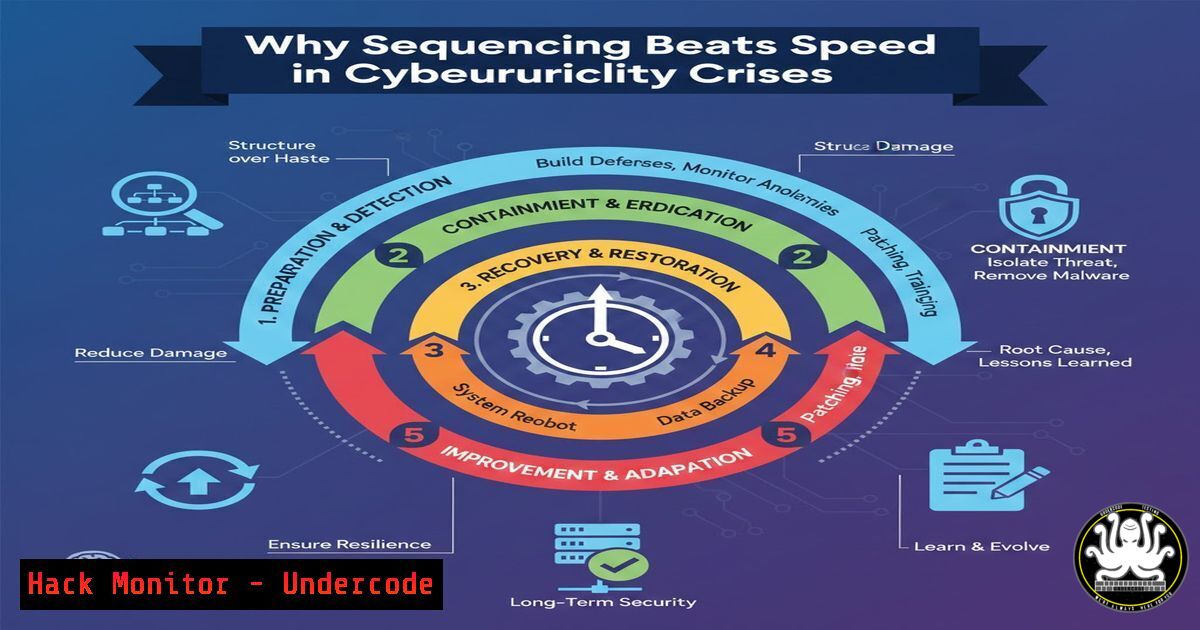
In the chaotic realm of cybersecurity incidents, the pressure to act immediately is immense. However, true leadership and effective containment hinge not on raw speed, but on deliberate, strategic sequencing. This article translates the principle of “sequencing over speed” into a actionable technical and procedural framework for security teams, transforming crisis pressure into a structured advantage.
Learning Objectives:
- Understand the critical, sequential phases of a mature incident response (IR) lifecycle and how to enforce them under pressure.
- Learn technical commands and procedures that align with each sequenced step, from initial triage to eradication.
- Integrate communication and leadership sequencing with technical actions to minimize dwell time and business impact.
You Should Know:
- Phase 1: Triage & Initial Diagnosis – The “Understand First” Command Line
The instinct is to start killing processes or disconnecting systems. The sequenced approach mandates diagnosis first. This phase is about gathering immutable forensic data before altering the state of the system.
Step‑by‑step guide explaining what this does and how to use it.
Isolate the Scope, Not the System: Unless facing a rapidly propagating worm, avoid full network disconnection. Instead, logically isolate the segment or host using firewall rules.
Linux (nftables): `sudo nft add rule inet filter output ip daddr
Windows (Firewall via CLI): `netsh advfirewall firewall add rule name=”Isolate_Compromised” dir=out action=block remoteip=
Capture Volatile Data: This is your “first understanding.” Create a timeline of running processes and network connections.
Linux: `ps auxf; netstat -tunap; lsof -i; ss -tunap; date; uptime` – Redirect output to a secure, timestamped log file.
Windows (PowerShell): `Get-Process | Select-Object Name, Id, Path; Get-NetTCPConnection | Where-Object State -EQ Established; Get-WinEvent -LogName Security -MaxEvents 20 | Format-List` – Use Out-File -FilePath C:\Evidence\initial_triage.txt.
Snapshot Memory: If advanced tools are available, take a memory dump for later deep analysis.
Linux (using LiME): `insmod /path/to/lime.ko “path=/tmp/memdump.lime format=lime”`
Windows (using DumpIt): `DumpIt.exe /output C:\Evidence\memory.raw`
- Phase 2: Strategic Containment – The “Risk Reduction” Decision
Containment is not a single action but a sequence of escalating decisions. The goal is to choose the action that contains the threat with the least business impact, preserving evidence for root cause analysis.
Step‑by‑step guide explaining what this does and how to use it.
Decision Tree in Action: Ask, “What action reduces risk now?”
1. Credential Compromise: Immediately rotate credentials (local admin, service accounts, domain) and revoke session tokens. For Azure/M365: Revoke-AzureADUserAllRefreshToken -ObjectId <user_object_id>.
2. Specific Malicious Process: Kill the process and delete the persistence mechanism.
Linux: `kill -9
Windows: Stop-Process -Id <PID> -Force; Remove-Item -Path "HKCU:\Software\Microsoft\Windows\CurrentVersion\Run\MaliciousEntry" -Force.
3. Lateral Movement: Implement micro-segmentation rules on internal firewalls or network controllers to block traffic from the compromised host to critical assets.
- Phase 3: Evidence Collection & Forensics – The “Unlocks the Next Step” Discipline
Eradication cannot be blind. You must understand the root cause, entry point, and scope to prevent immediate re-infection. This step sequences analysis before cleanup.
Step‑by‑step guide explaining what this does and how to use it.
Acquire Disk Image: Use `dd` (Linux) or FTK Imager (Windows CLI) to create a forensic image for offline analysis.
Analyze Persistence Locations: Systematically check auto-start extensibility points (ASEPs).
Windows Comprehensive Check (PowerShell): Review Get-CimInstance Win32_StartupCommand, Scheduled Tasks (Get-ScheduledTask), and all registry Run keys.
Linux: Check crontab -l, /etc/init.d/, /etc/systemd/system/, .bashrc, and `.profile` files for affected users.
Hunt for IOCs: Query your SIEM or EDR with gathered indicators (hashes, IPs, domains).
Splunk Query Example: `index=edr_logs malicious_hash= | stats count by host_name`
4. Phase 4: Eradication & Recovery – The “Direction Before Acceleration” Action
With evidence preserved and the attack understood, execute a thorough cleanup. This is a controlled, comprehensive action, not a frantic one.
Step‑by‑step guide explaining what this does and how to use it.
Systematic Removal: Based on forensics, remove all malware components, backdoors, and anomalous user accounts.
Patch & Harden: Apply the specific patch for the exploited vulnerability. Harden the configuration to prevent recurrence (e.g., disable unnecessary services, enforce least privilege).
Linux (Example – disable vulnerable service): `sudo systemctl disable –now avahi-daemon`
Windows (Enable LSA Protection via Registry): `REG ADD “HKLM\SYSTEM\CurrentControlSet\Control\Lsa” /v RunAsPPL /t REG_DWORD /d 1 /f`
Validate from Golden Image: If possible, rebuild the host from a known-good, hardened image—the most secure form of eradication.
- Phase 5: Post-Incident Activity – The “Calm Before Communication” Follow-Through
The technical fix is not the end. The sequenced response mandates a lessons-learned review and documentation to close the loop and improve the security posture.
Step‑by‑step guide explaining what this does and how to use it.
Conduct a Blameless Retrospective: Document the timeline, actions taken, and decisions made.
Update Playbooks: Integrate new IOCs, TTPs, and successful containment steps into your IR playbooks.
Implement Compensating Controls: If a permanent patch isn’t available, deploy WAF rules, IDS signatures, or additional monitoring to detect future exploitation attempts.
What Undercode Say:
- Sequencing is a Force Multiplier, Not a Delay: A methodical IR process, guided by sequencing, leads to faster true resolution by eliminating re-work, misdiagnosis, and missed persistence. Chaos is the enemy of speed.
- Technical Commands Follow Leadership Decisions: Every shell command or script executed should be the direct result of a sequenced decision in the IR lifecycle framework. Tooling must serve the process, not drive it.
Analysis:
The post highlights a critical failure mode in cybersecurity: the “action bias” under pressure. Technically skilled responders often jump to the most familiar or dramatic tool (e.g., disconnecting a server, deleting a file) without establishing context. This often destroys evidence, expands downtime, and leaves backdoors intact. The proposed sequencing model formalizes what elite IR teams do instinctively. It integrates leadership judgment with technical action, ensuring that each command-line intervention is purposeful, documented, and contributes to a strategic outcome rather than just tactical activity. This is the difference between being “technically busy” and being “operationally effective.”
Prediction:
The integration of AI into Security Operations Centers (SOCs) will amplify the value of sequencing. AI-powered tools will not only automate initial triage and IOC hunting but will also recommend sequenced response actions based on playbooks and real-time context. Leaders who master the discipline of sequencing will be best positioned to govern these AI co-pilots effectively, using them to execute the “what” with immense speed, while human judgment retains control over the “when” and “why”—the crucial sequence. The future of cyber resilience belongs to leaders who can architect and maintain this human-AI decision sequence under extreme pressure.
▶️ Related Video (84% Match):
🎯Let’s Practice For Free:
IT/Security Reporter URL:
Reported By: Raj S – Hackers Feeds
Extra Hub: Undercode MoN
Basic Verification: Pass ✅


