
Listen to this Post
Introduction:
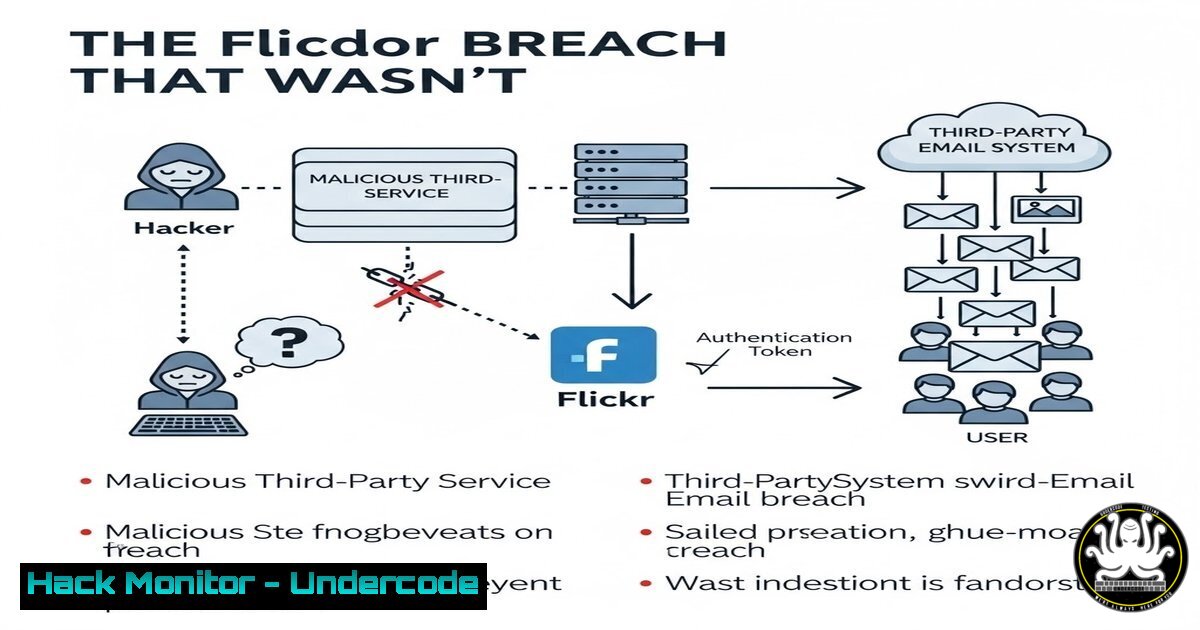
The recent security incident involving Flickr underscores a critical shift in modern cyber-attacks: the breach doesn’t always start at the front door. Attackers, instead of directly compromising the core platform, exploited a vulnerable third-party email service to dispatch legitimate-looking password reset messages. This incident exemplifies an APEX (Adversarial Pretexting & External Exploitation) strategy, where risk becomes actionable through the weakest link in the digital trust chain—often a service outside the primary application’s direct control.
Learning Objectives:
- Understand the mechanics of third-party email system exploitation and how it bypasses traditional platform security.
- Learn to forensically analyze email headers to identify fraudulent but legitimate-looking account alerts.
- Implement practical technical and procedural controls to mitigate risks associated with digital exhaust and supply-chain vulnerabilities.
You Should Know:
- Deconstructing the Attack: It’s All About the Email Header
The core of this attack vector is the abuse of a legitimate, but poorly secured, email delivery service (like SendGrid, Mailgun, or an enterprise SMTP server) used by the target platform. Attackers either compromise these services or spoof them convincingly to send emails that pass basic “From:” address checks. The email content is crafted to generate urgency, mimicking official password reset or security alert workflows.
Step‑by‑step guide explaining what this does and how to use it.
To investigate such an email, you must analyze its full header. This reveals the true routing path and authentication results.
In Gmail: Open the email → Click the three dots → “Show original”.
In Outlook: Open the email → File → Properties → Internet Headers.
Critically examine these headers:
Return-Path: Should align with the sending domain.
Received-SPF: Check for `pass` status.
DKIM-Signature: Verify the `d=` domain matches the sender.
DMARC Authentication: Look for `p=pass` and `sp=pass`.
A command-line analysis tool like `rfc822-parse` can automate this. On a Linux system with parsed email saved as email.txt:
cat email.txt | grep -E "(Return-Path:|Received-SPF:|DKIM-Signature:|Authentication-Results:)" | head -20
Any misalignment between the “From:” address you see and the domains authenticated by SPF/DKIM is a major red flag.
2. Hardening Your Defenses: Beyond the Password
The goal of these emails is to capture credentials or session tokens. The primary mitigation is to render stolen passwords useless through robust Multi-Factor Authentication (MFA). Avoid SMS-based codes if possible; use authenticator apps (like Google Authenticator, Microsoft Authenticator, or Authy) or hardware security keys.
Step‑by‑step guide explaining what this does and how to use it.
Enforce MFA using a script or policy. For a Windows Active Directory environment, you can use PowerShell to check MFA registration status for users in Azure AD:
Connect-MsolService
Get-MsolUser -All | Select-Object UserPrincipalName, StrongAuthenticationMethods | Where-Object {$_.StrongAuthenticationMethods -eq $null}
This lists users without MFA configured, allowing admins to target enforcement policies. For cloud services, always enable Conditional Access policies that require MFA from unfamiliar locations or new devices.
3. Auditing Third-Party Risk: Knowing Your Digital Exhaust
“Digital exhaust” refers to the data trails and integrations your organization relies on, like email vendors, CDNs, and analytics platforms. You must inventory all third-party services with access to your user communication channels and assess their security posture.
Step‑by‑step guide explaining what this does and how to use it.
Create a vendor risk assessment framework. For each vendor, ask:
1. Do they enforce mandatory MFA for their admin consoles?
2. What is their history of security incidents?
- Do they provide SOC 2 Type II or ISO 27001 certifications?
Use a command to check the security headers of a vendor’s web portal, which can indicate their security rigor:curl -I https://vendor-portal.example.com | grep -i "strict-transport-security|x-frame-options|content-security-policy"
Strong headers like `Strict-Transport-Security` and `Content-Security-Policy` are positive indicators.
-
Simulating the Threat: Phishing Campaigns with a Twist
Train your users by simulating sophisticated phishing attacks that mimic third-party breaches. The focus should be on scrutinizing unexpected password reset emails, even if they look authentic.
Step‑by‑step guide explaining what this does and how to use it.
Use an open-source phishing framework like GoPhish to set up a campaign. The key is to configure the email server settings to use a trusted-but-unrelated SMTP relay (in a controlled, ethical environment) to mimic the attack. Craft an email that appears to come from a common service like “[email protected]” with a link to a cloned login page. Track who clicks and who enters credentials, then provide immediate, interactive training.
5. Implementing Domain Monitoring and Brand Protection
Attackers often register typosquatting domains to host their phishing kits or to configure malicious email servers. Proactive domain monitoring can provide early warning.
Step‑by‑step guide explaining what this does and how to use it.
Utilize tools like `whois` and `dig` to look for newly registered domains resembling yours. Automate this with a simple script:
!/bin/bash
DOMAIN="yourcompany.com"
TYPOS=("youcompany" "yourrcompany" "your-company")
for t in "${TYPOS[@]}"; do
whois $t.com | grep -q "Creation Date" && echo "ALERT: $t.com is registered!"
done
For broader monitoring, subscribe to brand protection services or use APIs from SecurityTrails or WhoisXML.
What Undercode Say:
- The Perimeter is Now the Supply Chain. The most significant takeaway is that your security perimeter extends to every third-party service in your stack. A vulnerability in your email delivery provider is now functionally equivalent to a vulnerability in your own login server.
- Detection Shifts to User and Log Analysis. Since the attack originates from a “legitimate” external service, detection must focus on anomalous user behavior (e.g., a surge in password reset requests) and thorough analysis of application logs for suspicious patterns following an email blast, rather than just blocking malicious IPs.
Analysis: This incident is a masterclass in lateral threat movement. APEX methodologies are becoming standard because they exploit the inherent trust between integrated services. The attack cost is low, the technical barrier is diminishing with phishing-as-a-service platforms, and the success rate remains high due to user trust in official communication channels. Organizations that focus security purely on their own codebase while neglecting the security practices of their vendors are building a fortress with a paper gate. The future of defense lies in zero-trust architecture applied to the entire supply chain, continuous vendor security assessments, and cultivating a user culture of verification, not just awareness.
Prediction:
In the next 12-24 months, we will see a dramatic rise in automated “supply-chain phishing” campaigns. Attackers will leverage AI to analyze a target’s digital exhaust—identifying their email vendor, CRM, and support platforms—and launch hyper-personalized, context-aware phishing at scale. Furthermore, as platforms harden their direct security, threat actors will increasingly exploit the seams between services, leading to more incidents attributed to “business process compromises.” The countermeasure will be the widespread adoption of cryptographic protocols like BIMI (Brand Indicators for Message Identification) coupled with verified logos in email clients, and a move toward decentralized identity standards (e.g., FIDO2, WebAuthn) that drastically reduce the efficacy of intercepted password resets.
🎯Let’s Practice For Free:
IT/Security Reporter URL:
Reported By: Kandyzabka Important – Hackers Feeds
Extra Hub: Undercode MoN
Basic Verification: Pass ✅


