Listen to this Post
Introduction:
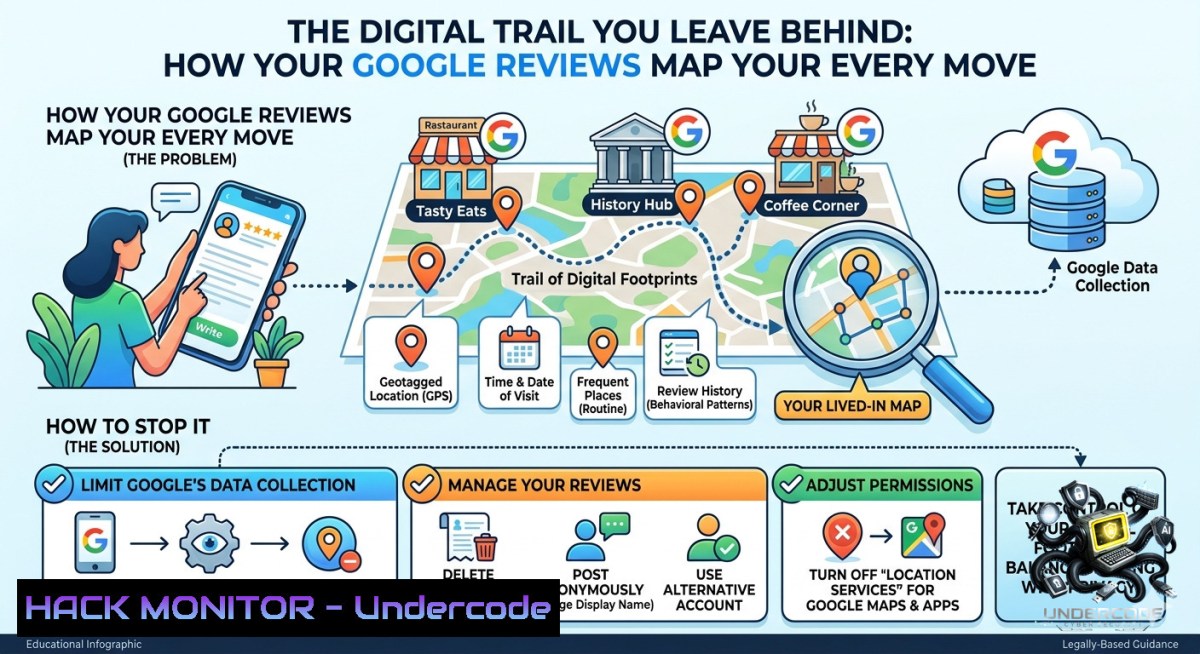
Every public review you post under your real name acts as a geolocated timestamp, creating a chronicle of your movements that any OSINT investigator—or malicious actor—can trivially correlate. From dentist appointments confirming your home radius to hotel reviews exposing travel patterns, these seemingly harmless opinions build a precise behavioral map that undermines operational security (OPSEC) and personal privacy.
Learning Objectives:
– Identify how location metadata from online reviews can be aggregated to profile your daily routines and relationships.
– Implement pseudonymous strategies and technical controls to decouple real-world identity from review platforms.
– Use command-line OSINT tools to audit your own digital footprint and mitigate exposure.
You Should Know:
1. Auditing Your Existing Review Footprint Across Platforms
Before you can protect your location privacy, you must discover what you’ve already exposed. Start by systematically collecting every review tied to your real name using Google dorks and platform-specific search operators.
Step‑by‑step guide – Linux / Windows OSINT audit:
1. Google dorks for review discovery – Use your real name in quotes with site limitations:
 Linux (using curl + grep to simulate search, but manual browser search is safer)
 Example search strings to enter in Google:
site:google.com/maps "Your Full Name"
site:yelp.com "Your Full Name" review
site:tripadvisor.com "Your Full Name"
2. Automated footprint collection with `theHarvester` (Linux):
sudo apt install theHarvester
theHarvester -d google.com -l 500 -b google -s "Your Full Name reviews"
3. Windows PowerShell – extract your own review URLs (if logged into accounts):
 Fetch Google Takeout data (export your Google Maps activity)
Invoke-WebRequest -Uri "https://takeout.google.com/settings/takeout" -Method Get -UseDefaultCredentials
 Then parse the exported JSON reviews:
Get-ChildItem -Path "C:\Takeout\Maps\" -Recurse -Filter .json | ForEach-Object { Get-Content $_.FullName | Select-String "reviewText" }
What this does: Identifies every publicly linked review, the timestamp, and location coordinates. Use this list to decide which reviews to delete or anonymize.
2. Creating and Managing Pseudonymous Review Accounts Without Leaking Identity
Platforms like Google require phone verification; Yelp flags new accounts without history. This section provides a hardened workflow for pseudonymous posting.
Step‑by‑step guide – OPSEC-safe account creation:
1. Isolated browser environment – Use Firefox with `about:config` disabling WebRTC and canvas fingerprinting, or run a dedicated container:
 Linux – firejail sandbox with no persistent storage
firejail --1et=eth0 --private firefox
2. Email aliasing service – Use SimpleLogin or AnonAddy (free tier). Generate a unique alias like `[email protected]`.
3. Phone verification bypass – For platforms that demand SMS, use a burner VoIP number (e.g., Google Voice via a fresh Google account created over Tor, or TextNow with a VPN). Never use your real mobile number.
4. VPN + Tor double-hop (Linux):
 Start Tor service
sudo systemctl start tor
 Route VPN through Tor using iptables (advanced)
 Or simpler: use Tor Browser Bundle with a VPN provider that supports SOCKS5
5. Account seeding – Post 2–3 generic, low-risk reviews (e.g., “good coffee” at a major chain) to build history before leaving a review that could be correlated.
3. Removing or De-Anonymizing Existing Reviews Tied to Your Real Name
If you’ve already posted under your real name, you have three options: deletion, name change (where allowed), or requesting removal under privacy laws (GDPR/CCPA).
Step‑by‑step guide – permanent removal workflow:
1. Google Maps reviews – Go to maps.google.com → Menu → Your contributions → Reviews → Click three dots → Delete or Edit name to a pseudonym (note: Google may revert to real name if profile is verified).
2. Bulk deletion using Google Takeout + script (Linux):
 Export all Maps data from takeout.google.com
 Extract review IDs from the JSON:
jq '.reviews[].reviewId' MyMapsData.json > review_ids.txt
 Use Google's My Business API (requires OAuth) to batch delete
 Alternative: manual deletion is safer for non-developers
3. Legal removal request template – For platforms without self-serve deletion, submit a GDPR Art. 17 “right to be forgotten” request if you’re in the EU, or CCPA request for California:
To Privacy Officer – [Platform Name]
I request immediate deletion of the review posted on [bash] under the name [Your Real Name] at [bash]. This data reveals my precise location history and poses a personal security risk under GDPR 17(1)(d).
4. Proactive Location Obfuscation When You Must Post Verified Reviews
Some platforms (e.g., Amazon Vine, Google Local Guides) require verified identity for badges. If you accept that trade‑off, you can still reduce location leakage.
Step‑by‑step guide – timing and content sanitization:
1. Delay posting – Wait at least 48–72 hours after visiting a location before writing the review. This breaks temporal correlation for anyone monitoring live movements.
2. Stagger your check‑ins – For Google Maps, turn off Location History before posting a review. On Android/iOS:
– Settings → Google → Manage Google Account → Data & privacy → Location History → Pause.
– Then clear existing Location History for the relevant date range.
3. Redact photo metadata – Any image you upload with a review contains EXIF data (GPS, timestamp, device ID). Strip it using:
 Linux – using exiftool
exiftool -all= your_photo.jpg
 Windows – using PowerShell
(Get-Item your_photo.jpg).LastWriteTime = (Get-Date).AddDays(-3)
 But EXIF removal requires third-party tool: exiftool.exe -all= photo.jpg
4. Use generic language – Avoid saying “I live 5 minutes from here” or “I’m just visiting from
.” Describe the service without anchoring your home or travel location.

5. Monitoring for Unauthorized Aggregation of Your Review Data
Attackers and stalkers can scrape review platforms to build movement profiles. Set up automated alerts to detect when your pseudonym or real name appears in search results.

<h2 style="color: yellow;">Step‑by‑step guide – continuous monitoring with open-source tools:</h2>

1. Google Alerts for your real name + “review” – Create an alert at google.com/alerts.

<h2 style="color: yellow;">2. Use `trafilatura` to scrape and compare (Linux):</h2>
[bash]
pip install trafilatura
 Scrape all reviews from a Yelp page (replace URL)
trafilatura --url "https://www.yelp.com/user_details?userid=example" --output reviews.txt
 Then use grep to check for location keywords
grep -i "near\|walk\|drive\|live\|neighbor" reviews.txt
3. Windows – PowerShell monitor with scheduled task (checks for new mentions of your name on Google):
$query = "Your Name review site:yelp.com"
$url = "https://www.google.com/search?q=$([bash]::EscapeDataString($query))"
$response = Invoke-WebRequest -Uri $url
if ($response.Content -match "Your Name") {
Send-MailMessage -To "[email protected]" -Subject "New review mention" -SmtpServer smtp.gmail.com
}
4. Proactive takedown – If you find your real name on an unauthorized aggregator (e.g., reviewinsider.com), submit a DMCA or privacy complaint.
6. Hardening Review Platform Account Security Against Account Takeover
An attacker who compromises your review account gains access to your entire location history. Apply platform-specific security controls.
Step‑by‑step guide – API security & MFA enforcement:
1. Google – Enable Advanced Protection Program (requires two physical security keys). Disable less secure app access.
2. Yelp – Use app‑based 2FA (Google Authenticator). Revoke any API tokens you don’t recognize under Account Settings → Applications.
3. TripAdvisor – No native 2FA; use a unique, 20+ character password generated by Bitwarden. Store password in encrypted vault.
4. General cloud hardening – For any review platform that uses OAuth (login with Google/Facebook), audit connected apps:
 Check Google OAuth tokens via command line (using gcloud CLI)
gcloud auth list
gcloud auth revoke [unused-token-id]
5. Windows – Use Windows Credential Manager to clear saved review platform passwords:
cmdkey /list
cmdkey /delete:TargetName="https://accounts.google.com"
What Sam Bent Says:
– Every review is a breadcrumb. A single dentist review narrows your home location to a 2‑mile radius. Three reviews over six months reveal your daily commute, favorite gym, and when you’re on vacation.
– Pseudonymity is not anonymity. Even under a fake name, platform telemetry (IP address, browser fingerprint, payment method) can link back to you if you don’t use a threat model that includes VPN, Tor, and isolated payment cards.
Analysis: The post correctly identifies that user-generated content is an overlooked OSINT goldmine. Most people assume reviews are trivial, but when correlated with Google Timeline or social media check‑ins, they become a precise surveillance feed. The rise of AI‑powered aggregation tools (e.g., Maltego transforms for review platforms) means even a handful of old reviews can be used to predict future movements. The OPSEC solution isn’t to stop reviewing—it’s to adopt a “need‑to‑know” basis for location data, treating each review like a classified document.
Prediction:
– -1 Negative impact: By 2028, review platforms will face mandatory identity verification laws in major economies (e.g., EU Digital Services Act amendments), forcing real‑name disclosure and eliminating pseudonymous options. This will weaponize location histories for corporate surveillance, insurance risk profiling, and law enforcement without warrants.
– +1 Positive counter-trend: Decentralized, anonymous review protocols built on zero‑knowledge proofs (e.g., using the Lens Protocol on blockchain) will emerge, allowing users to prove they visited a location (via cryptographic receipts) without revealing who they are or precisely when. Early adopters will shift to these platforms, marginalizing traditional review giants.
▶️ Related Video (68% Match):
🎯Let’s Practice For Free:
🎓 Live Courses & Certifications:
[Join Undercode Academy for Verified Certifications](https://undercode.co.uk/certifications/)
🚀 Request a Custom Project:
Secure, high-velocity infrastructure and disruptive technological engineering. Contact our engineering team for high-tier development and proprietary systems:
[[email protected]](mailto:[email protected])
💎 Smart Architecture | 🛡️ Secure by Design | ⭐ Trusted by Thousands
IT/Security Reporter URL:
Reported By: [Sam Bent](https://www.linkedin.com/posts/sam-bent_opsec365-share-7469251847619383296-Lv6U/) – Hackers Feeds
Extra Hub: Undercode MoN
Basic Verification: Pass ✅
🔐JOIN OUR CYBER WORLD [ CVE News • HackMonitor • UndercodeNews ]
[💬 Whatsapp](https://undercode.help/whatsapp) | [💬 Telegram](https://t.me/UndercodeCommunity)
📢 Follow UndercodeTesting & Stay Tuned:
[𝕏 formerly Twitter 🐦](https://x.com/undercodeupdate) | [@ Threads](https://www.threads.net/@undercodetesting) | [🔗 Linkedin](https://www.linkedin.com/company/undercodetesting/) | [🦋BlueSky](https://bsky.app/profile/undercode.bsky.social)


