
Listen to this Post
Introduction:
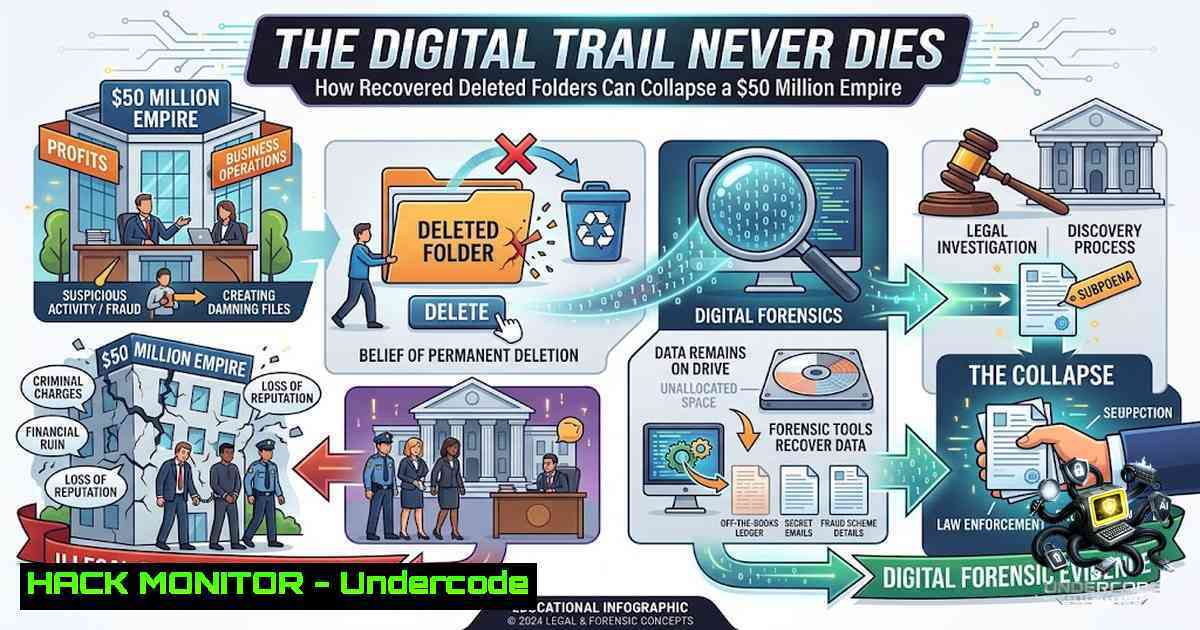
In an era where smart cities are powered by AI-driven traffic systems and connected energy grids, the digital infrastructure that controls urban life becomes both a prize and a vulnerability. The fictional fall of Don Price—whose $50 million autonomous infrastructure contract was jeopardized by the recovery of a deleted folder—highlights a critical cybersecurity reality: deleted data is rarely truly gone. Digital forensics and ethical hacking are no longer optional disciplines; they are the frontline defenses protecting the systems that run our cities, our economies, and our lives.
Learning Objectives & Secrets:
- Objective 1: Master the Art of Data Recovery – Understand how file systems handle deletion and learn to use forensic tools like
extundelete,testdisk, and `Scalpel` to recover seemingly lost evidence from Linux and Windows environments. -
Objective 2 Secret Tip: The “Recovery Before Overwrite” Window – The single most critical factor in successful data recovery is time. Immediately stop all write operations to the affected drive. Every new file saved, every log written, increases the chance that the deleted data will be permanently overwritten.
-
Objective 3 Secret Tip: Leverage File Carving – When file system metadata is corrupt or missing, forensic analysts use “file carving” to recover data based on file signatures (magic bytes). Tools like `PhotoRec` and `Foremost` scan raw disk blocks to reconstruct files by recognizing headers and footers, bypassing the file system entirely.
You Should Know:
- Linux Data Recovery: The `extundelete` & `testdisk` Workflow
When a file or folder is deleted on a Linux ext3/ext4 filesystem using the `rm` command, the inode pointers are removed, but the actual data blocks remain on the disk until overwritten. This is the principle that allows recovery.
Step‑by‑step guide:
- Immediately unmount the partition or remount it as read‑only to prevent further writes:
sudo umount /dev/sda1
sudo mount -o ro /dev/sda1 /mnt
2. Install recovery tools (Debian/Ubuntu):
sudo apt-get install extundelete testdisk
3. Recover a specific directory using `extundelete`:
sudo extundelete /dev/sda1 --restore-directory /path/to/deleted/folder
This creates a `RECOVERED_FILES` directory in your current working directory.
- For deeper scans or partition recovery, use
testdisk:sudo testdisk
Navigate the wizard to select the disk, choose “Analyse”, and search for lost partitions or files.
-
Forensic Tip: For raw disk imaging before recovery (critical for evidence integrity), use
dd:sudo dd if=/dev/sda1 of=disk_image.dd bs=4096
Then analyze the image with `fls` from The Sleuth Kit to list deleted files:
fls -o 2048 -r disk_image.dd
-
Windows Data Recovery: Leveraging Windows File Recovery (WinFR)
Microsoft provides a built‑in command‑line tool, Windows File Recovery (WinFR), available for free from the Microsoft Store. This tool is essential for recovering deleted folders from NTFS, FAT, and exFAT drives.
Step‑by‑step guide:
- Download and install “Windows File Recovery” from the Microsoft Store.
2. Open Command Prompt as Administrator.
3. Understand the two recovery modes:
/regular: Use for files deleted recently (default)./extensive: Use for files deleted some time ago; performs a deeper, slower scan.
4. Basic recovery syntax:
winfr source-drive: destination-folder /mode /switches
Example: Recover all `.pdf` files from the `C:` drive to a folder on D::
winfr C: D:\Recovery /regular /n .pdf
5. To recover a specific folder:
winfr C: D:\Recovery /regular /n \Users\Username\Documents\ProjectFolder\
- Critical Rule: Never recover files to the same drive from which they were deleted. This risks overwriting the very data you are trying to save.
-
Digital Forensics with Autopsy and The Sleuth Kit (TSK)
For professional incident response and forensic investigations, Autopsy—a GUI platform built on The Sleuth Kit—provides a comprehensive environment for disk imaging, file recovery, and timeline analysis.
Step‑by‑step guide:
1. Install Autopsy:
- On Windows: Download the installer from
sleuthkit.org/autopsy/. - On Linux (Debian/Ubuntu):
sudo apt-get install autopsy sleuthkit.
- Create a new case: Launch Autopsy, click “New Case”, and fill in case details (Case Name, Base Directory, Examiner Name).
-
Add a data source: Click “Add Data Source” and select your disk image (
.dd,.raw,.e01) or a physical drive. -
Run analysis modules: Select modules like File Explorer (to browse and recover deleted files), Timeline (to view file operations chronologically), and Keyword Search (to hunt for specific evidence).
-
Recover files: In the File Explorer view, right‑click on any deleted file (indicated by a red “X”) and select “Extract” to save it.
-
Command‑line power: For advanced users, TSK commands like `icat` extract files by inode number:
icat -o 2048 disk_image.dd 12345 > recovered_evidence.pdf
-
Ethical Hacking: Finding the Weakness Before the Attacker Does
The story of Don Price underscores that the most devastating attacks often come from within or from those who have studied the target’s digital footprint. Ethical hacking is about proactively identifying these vulnerabilities.
Step‑by‑step guide for a basic penetration test:
- Reconnaissance: Use tools like `nmap` to scan for open ports and services:
nmap -sV -p- 192.168.1.0/24
-
Vulnerability Scanning: Deploy `nikto` for web server vulnerabilities:
nikto -h http://target-ip
-
Exploitation (Simulated): Use `metasploit` to test for known exploits. Always obtain proper authorization.
msfconsole
use exploit/windows/smb/ms17_010_eternalblue
-
Post‑Exploitation Forensics: After gaining access, check for deleted files or logs that an attacker might have tried to erase. Use `lsof | grep ‘(deleted)’` on Linux to find files still held open by running processes.
-
API Security and Cloud Hardening for Smart City Infrastructure
Don’s project involved an “AI-powered traffic” and “connected energy grids”—a digital nervous system for the city. Securing such infrastructure requires rigorous API security and cloud hardening.
Key practices:
- API Gateways: Implement rate limiting, authentication (OAuth 2.0/JWT), and input validation to prevent injection attacks.
- Cloud Hardening:
- AWS: Use Security Groups to restrict traffic, enable CloudTrail for logging, and enforce S3 bucket policies to prevent public exposure.
- Azure: Utilize Azure Security Center for threat detection and Azure Key Vault for secrets management.
- Zero Trust Architecture: Assume breach; verify every request. Use micro‑segmentation to limit lateral movement.
6. Vulnerability Exploitation and Mitigation: The Insider Threat
Don’s downfall was caused by someone who knew about the “folder deleted on March 14”. This points to an insider threat or a highly targeted attack.
Mitigation strategies:
- Data Loss Prevention (DLP): Monitor and block unauthorized access to sensitive folders.
- User and Entity Behavior Analytics (UEBA): Use AI to detect anomalous behavior, such as accessing files outside normal working hours.
- Regular Audits: Conduct periodic reviews of file access logs. On Windows, use `Get-WinEvent` in PowerShell to filter Security logs for access events:
Get-WinEvent -LogName Security | Where-Object { $_.Id -eq 4663 } - Immutable Backups: Maintain write‑once, read‑many (WORM) backups to ensure that even if an attacker deletes data, a clean copy exists.
What Undercode Say:
- Key Takeaway 1: Deleted is Not Destroyed – The core lesson from the Don Price story is that digital evidence persists. Whether through `extundelete` on Linux or `winfr` on Windows, forensic tools can recover data long after it was “permanently” deleted. Organizations must assume that any data ever stored can be recovered and act accordingly.
-
Key Takeaway 2: Proactive Defense is the Only Defense – The attack succeeded because no one was watching the digital trail. Ethical hacking, continuous monitoring, and a robust incident response plan are not just best practices; they are existential requirements for any organization managing critical infrastructure. The question is not if an attack will come, but when—and whether you will be ready.
-
Analysis: The fusion of AI, IoT, and urban infrastructure creates an unprecedented attack surface. A single compromised API or recovered credential could paralyze a city. The cybersecurity industry is shifting from reactive patching to proactive threat hunting. Professionals skilled in digital forensics, ethical hacking, and cloud security are no longer niche experts—they are the new frontline defenders of modern civilization. KK Modi University’s focus on these disciplines, as highlighted in their upcoming webinar, reflects this urgent industry demand.
Prediction:
-
+1 The demand for cybersecurity professionals, particularly in digital forensics and ethical hacking, will outpace supply by over 3 million globally by 2028, driving salaries and career opportunities to new heights.
-
+1 AI‑driven security operations centers (SOCs) will become standard, using machine learning to detect anomalies and automate incident response, reducing breach detection times from days to minutes.
-
-1 As smart city projects proliferate, the number of successful cyber‑attacks on critical infrastructure will increase exponentially, with nation‑state actors and cybercriminal syndicates targeting energy grids, traffic systems, and water supplies.
-
-1 The “insider threat” will become the most costly and difficult‑to‑detect vector, as employees with privileged access—like Don Price—become prime targets for blackmail and coercion.
-
-1 Regulatory frameworks will struggle to keep pace with technological advancements, leaving gaps in compliance and enforcement that attackers will exploit until new laws and standards are enacted.
▶️ Related Video (78% Match):
https://www.youtube.com/watch?v=AaQ_0V_zAew
🎯Let’s Practice For Free:
🎓 Live Courses & Certifications:
Join Undercode Academy for Verified Certifications
🚀 Request a Custom Project:
Secure, high-velocity infrastructure and disruptive technological engineering. Contact our engineering team for high-tier development and proprietary systems:
[email protected]
💎 Smart Architecture | 🛡️ Secure by Design | ⭐ Trusted by Thousands
IT/Security Reporter URL:
Reported By: https://lnkd.in/p/eQqpHMvt – Hackers Feeds
Extra Hub: Undercode MoN
Basic Verification: Pass ✅


