Listen to this Post
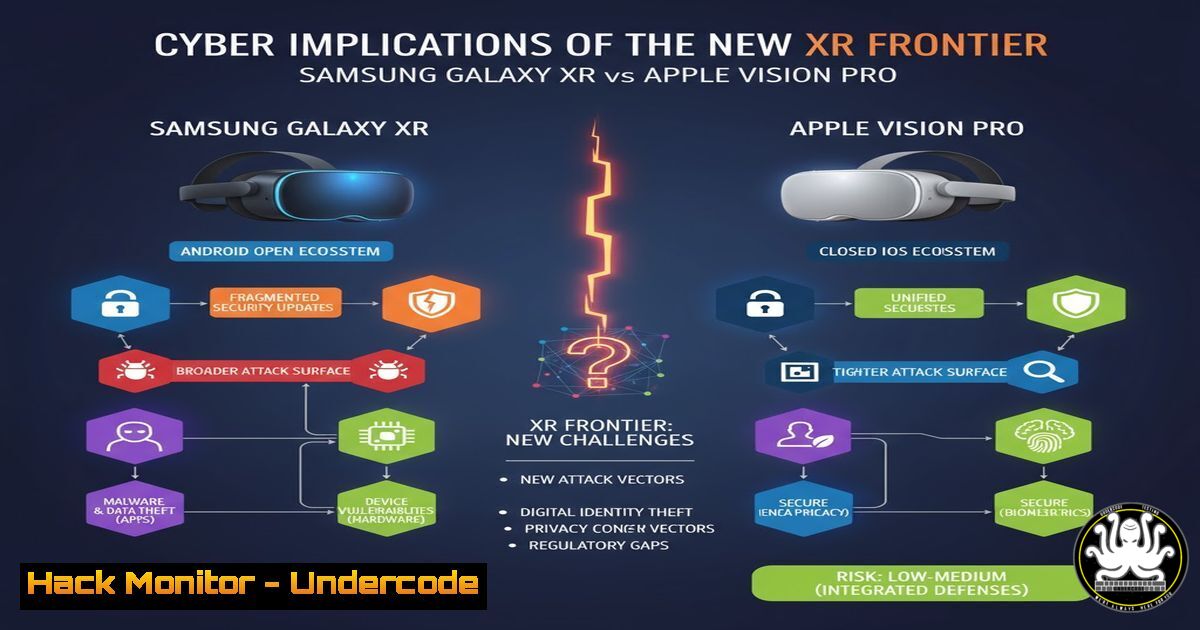
Introduction:
The launch of Samsung’s Galaxy XR and Apple’s VisionPro marks a significant expansion of the enterprise and consumer attack surface. These Extended Reality (XR) devices, blending the physical and digital worlds, introduce novel security and privacy challenges that cybersecurity professionals must immediately address. This article deconstructs the core technologies and provides actionable hardening guidance.
Learning Objectives:
- Understand the unique threat models introduced by XR platforms, including sensor data exploitation and spatial phishing.
- Learn to secure the underlying Android and xrOS operating systems against privilege escalation and data exfiltration.
- Develop a mitigation strategy for network, API, and biometric data vulnerabilities inherent to always-on, sensor-rich devices.
You Should Know:
1. Hardening the Android Subsystem on Galaxy XR
The Samsung Galaxy XR is built upon a customized Android core, inheriting its vulnerabilities. Securing the device begins with locking down the operating system and its communication channels.
`adb shell pm disable-user –user 0 com.samsung.android.bixby.agent` (Disables the Bixby voice agent, a potential audio snooping vector)
`adb shell settings put global adb_enabled 0` (Disables ADB debugging after setup to prevent unauthorized access)
`adb shell settings put secure install_non_market_apps 0` (Blocks installation of apps from unknown sources)
`nmap -sS -sV -O -p-
`iptables -A INPUT -p tcp –dport 5555 -j DROP` (Drops incoming connections to the ADB port on the device itself, if rooted)
Step-by-step guide: To reduce the attack surface, connect the Galaxy XR to a workstation via USB with debugging enabled. Use the Android Debug Bridge (ADB) to issue these commands. The `pm disable-user` command debloats the OS by disabling non-essential system packages. Following this, use a network scanning tool like `nmap` from a separate machine to audit which network services the device is running. Any unexpected open ports should be investigated and closed via firewall rules.
2. Auditing Network Traffic for Spatial Data Leaks
XR devices constantly transmit spatial mapping, camera, and microphone data. Monitoring this traffic is crucial to prevent leakage of sensitive environmental information.
`tcpdump -i any -s 0 -w xr_capture.pcap host not
`Wireshark` (Open `xr_capture.pcap` and use the filter http.request.uri contains "map" or http.request.uri contains "location")
`tshark -r xr_capture.pcap -Y “ssl.handshake” -T fields -e ip.dst` (Extracts IP addresses involved in SSL/TLS handshakes)
`mitmproxy –mode transparent –showhost` (Sets up a transparent proxy to intercept and decrypt HTTP/HTTPS traffic for analysis)
Step-by-step guide: Place a monitoring machine with two network interfaces on the same network as the XR headset. Enable IP forwarding and set up an `iptables` rule to redirect traffic to mitmproxy. Start a packet capture with `tcpdump` to get a raw log. In mitmproxy, you can inspect API calls in real-time, looking for unencrypted transmissions of geometric data or telemetry. Analyze the packet capture in Wireshark to identify beaconing behavior to unknown external IPs.
3. Securing the xrOS Sandbox and Privacy Controls
Apple’s VisionPro runs on xrOS, a derivative of iOS. Its security relies heavily on sandboxing and strict privacy controls that must be actively managed.
`sudo privacy_services_manager deny
`codesign -dv /path/to/app.app` (Displays the code signing authority and entitlements of an app, revealing its requested permissions)
`log stream –level info –source –predicate ‘subsystem contains “com.apple.arkit”‘` (Streams ARKit-related system logs to monitor for anomalous spatial data access)
`defaults read /path/to/app.app/Contents/Info.plist` (Inspects the application’s property list for declared entitlements and usage descriptions)
Step-by-step guide: Regularly audit installed applications through Settings > Privacy & Security. Check the permissions for Camera, Microphone, and Location. For enterprise management, use Mobile Device Management (MDM) profiles to enforce these settings. From a Mac connected to the device for development, the `log` command is invaluable for real-time monitoring of the AR subsystem, allowing you to see if an app is attempting to access spatial data outside of user-initiated sessions.
4. Exploiting and Mitigating Insecure API Endpoints
XR applications rely heavily on cloud APIs for rendering and data synchronization. Insecure APIs are a primary vector for data compromise.
`curl -H “Authorization: Bearer
`ffuf -w /usr/share/wordlists/seclists/Discovery/Web-Content/common.txt -u https://target-api.com/FUZZ -recursion` (Fuzzes for hidden API endpoints)
`sqlmap -u “https://api.xr-service.com/v1/items?id=1” –batch –dbs` (Automates SQL injection testing against a vulnerable parameter)
`nuclei -t exposures/apis/ -u https://target-api.com -o api_scan_results.txt` (Runs a pre-built template scan for common API vulnerabilities)
Step-by-step guide: Intercept the network traffic from an XR app using `mitmproxy` or Burp Suite. Identify the API endpoints and the authentication method (e.g., JWT tokens). Use a tool like `curl` to manually test if these endpoints are susceptible to Broken Object Level Authorization (BOLA) by changing resource IDs in the request. Automate the discovery of other endpoints with `ffuf` and then scan these endpoints with `nuclei` to identify misconfigurations like excessive data exposure or missing security headers.
5. Biometric Data Protection and Encryption at Rest
XR devices collect eye-tracking and hand-movement biometrics. This data is highly sensitive and must be encrypted.
`adb shell getprop ro.crypto.state` (Checks if device encryption is enabled on Android-based XR)
`openssl enc -aes-256-cbc -salt -in biometric_data.bin -out biometric_data.enc -k
`grep -r “EYE_TRACKING” /data/data/
`sqlcipher “biometric.db” “PRAGMA key=’my_passphrase’; SELECT FROM tracking_data;”` (Accesses an encrypted SQLite database containing biometric information)
Step-by-step guide: Assume all biometric data collected by the device is Personally Identifiable Information (PII). For developers, ensure this data is never logged to plaintext files. Use hardware-backed keystores (Android KeyStore or iOS Secure Enclave) to generate and store encryption keys. When storing data locally, use libraries like SQLCipher for databases and `CryptoKit` on xrOS for file encryption. The `grep` command can be used during security testing to find developers who have accidentally stored raw data.
6. Mitigating Social Engineering in Immersive Environments
“Spatial Phishing” involves placing a malicious virtual object in a user’s environment that, when selected, triggers a malicious action.
Conceptual Code Snippet for a Malicious Spatial Anchor:
`// Pseudo-code: A malicious spatial anchor that triggers a phishing site`
`OnSelect() {`
` LaunchBrowser(“https://evil.com/login-spoof”);`
`}`
`adb shell pm list packages -f | grep phishing` (Hypothetical: Scans for known phishing app packages)
`iptables -A FORWARD -m string –string “evil.com” –algo bm -j DROP` (Drops network packets containing the string “evil.com” at the network gateway)
User Training: The primary mitigation is non-technical: train users to scrutinize virtual objects from unverified sources.
Step-by-step guide: Mitigation is multi-layered. At the platform level, report malicious applications. At the network level, use DNS filtering services or gateway firewalls to block known malicious domains. The most critical step is user awareness. Train users to be skeptical of unsolicited virtual content and to verify the source of any spatial element that requests credentials or personal data.
7. Cloud Hardening for XR Backend Services
The cloud infrastructure supporting XR experiences must be fortified against attacks aiming to compromise user data or disrupt service.
`aws iam create-policy –policy-name XRReadOnly –policy-document file://XRReadOnly.json` (Creates a least-privilege IAM policy for an XR service)
`terraform plan -var-file=production.tfvars` (Previews infrastructure changes to ensure security groups are correctly configured before deployment)
`gcloud kms keys list –keyring=my-keyring –location=global` (Lists encryption keys used for data-at-rest encryption in Google Cloud)
`az storage account generate-sas –permissions rw –resource-types sco –services b –expiry
`nc -zv
Step-by-step guide: Adopt an Infrastructure as Code (IaC) approach using Terraform or CloudFormation to ensure consistent and auditable deployments. The principle of least privilege is paramount; create custom IAM roles that grant only the permissions absolutely necessary for the XR backend to function. Regularly run configuration audits using tools like AWS Config or Azure Policy to detect deviations from your security baseline, such as storage containers being set to public access.
What Undercode Say:
- The battle for XR supremacy is, at its core, a battle over who can be trusted with your most intimate data.
- Security is not a feature but the foundational layer upon which mass adoption of XR depends.
The strategic divergence between Samsung’s more open Android-based platform and Apple’s walled-garden xrOS creates two distinct security landscapes. Samsung’s approach offers flexibility for enterprise customization but presents a larger attack surface that requires active hardening. Apple’s model provides stronger default privacy controls but limits an organization’s ability to deploy advanced security monitoring agents directly on the OS. The immediate focus for security teams must be on the data pipeline: securing the device sensors, the local data storage, the network transmission, and the cloud APIs that process this new category of spatial and biometric information. Failure to secure any single link in this chain could lead to breaches of unprecedented intimacy.
Prediction:
The inherent data richness of XR will make these devices prime targets for advanced persistent threats (APTs) and state-sponsored actors within the next 18-24 months. We will see the first major headline-grabbing breach originating from a vulnerability in a spatial mapping API or via a sophisticated spatial phishing campaign, leading to stringent new data protection regulations specifically governing biometric and environmental data collected by always-on wearable technology.
🎯Let’s Practice For Free:
IT/Security Reporter URL:
Reported By: Marknvena Samsung – Hackers Feeds
Extra Hub: Undercode MoN
Basic Verification: Pass ✅


