Listen to this Post
Introduction:
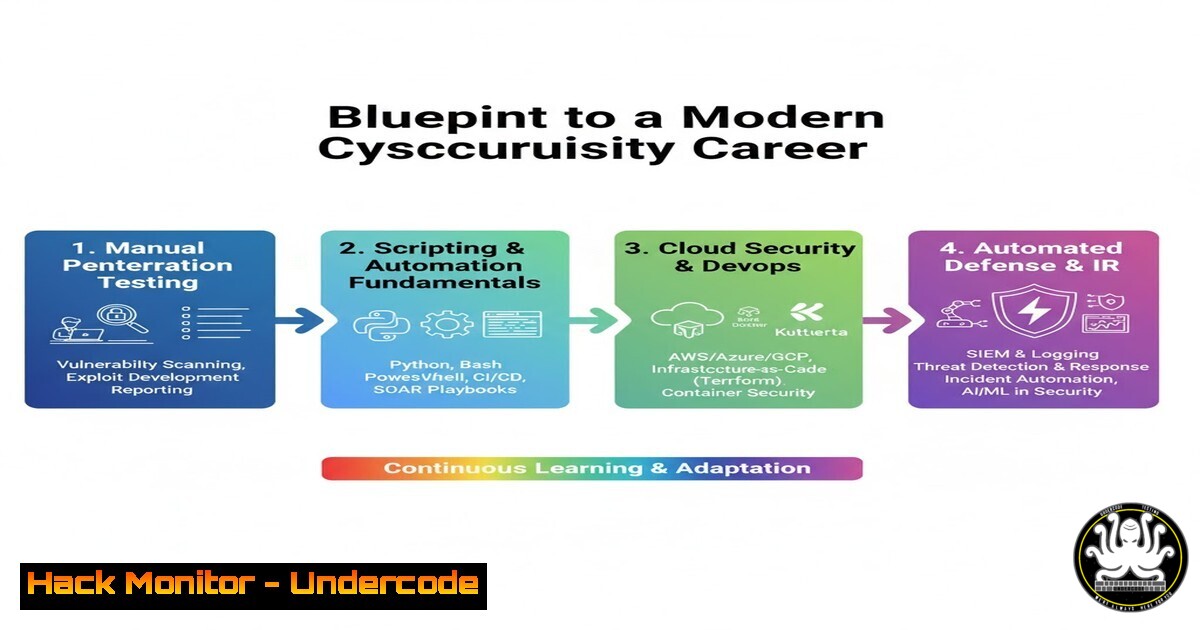
The landscape of cybersecurity and IT is perpetually evolving, demanding a workforce skilled not just in foundational principles but in the automated tools and scripting required for proactive defense. The transition from manual processes to automated security testing and incident response is critical for protecting modern web, mobile, and API-driven infrastructures.
Learning Objectives:
- Understand the core technical skills required for entry-level cybersecurity and IT operations roles.
- Learn and apply over 25 essential commands for system administration, vulnerability assessment, and network analysis.
- Develop a practical workflow for integrating automated testing and security checks into a development lifecycle.
You Should Know:
1. Web Application Reconnaissance with Command Line Tools
Before testing can begin, understanding a target’s footprint is essential. These commands help map the application’s structure and identify potential entry points.
 Discover subdomains
subfinder -d example.com
 Fetch HTTP headers to identify server and security policies
curl -I https://example.com
 Perform a directory brute-force scan (using a wordlist)
gobuster dir -u https://example.com -w /usr/share/wordlists/dirb/common.txt
Step-by-step guide:
- Install the tools (
subfinder,gobuster) via your package manager (e.g., `apt` orbrew). - Run `subfinder -d example.com` to enumerate subdomains, which can reveal hidden or development endpoints.
- Use `curl -I` to inspect the HTTP headers of the main application and its subdomains, looking for information like the server version and the presence of security headers like
Content-Security-Policy. - Execute `gobuster` to find hidden directories and files. Always ensure you have explicit permission before scanning any target.
2. API Security Testing with Postman and cURL
APIs are the backbone of modern applications and a prime target for attackers. Testing them requires both GUI and command-line proficiency.
 Testing an API endpoint for SQL Injection using cURL
curl -X GET "https://api.example.com/v1/users?id=1' OR '1'='1'" -H "Authorization: Bearer <token>"
 Using jq to parse and format JSON responses
curl -s https://api.example.com/v1/users | jq
Step-by-step guide:
- In Postman, create a new collection for your API tests. Set up environment variables for base URLs and authentication tokens.
- For each endpoint (GET, POST, PUT, DELETE), design tests that probe for common vulnerabilities. For a login endpoint, send a POST request with a payload like `{“username”:”admin’ –“, “password”:”anything”}` to test for SQL injection.
- Use the Postman “Tests” tab to write scripts that validate the response status codes, time, and data integrity.
- From the command line, use `cURL` to replicate these tests, especially for CI/CD integration. Pipe the output to `jq` for readable JSON to analyze the structure and content of the response effectively.
3. Windows System Hardening and Audit
Securing a Windows environment involves using PowerShell to audit configurations, user permissions, and network settings.
 Get a list of all user accounts on the system
Get-LocalUser
 Check the status of the Windows Firewall for all profiles
Get-NetFirewallProfile | Select-Object Name, Enabled
 List all running processes and their associated services
Get-WmiObject Win32_Service | Where-Object {$_.State -eq 'Running'} | Select-Object Name, DisplayName, PathName
Step-by-step guide:
1. Open PowerShell with administrative privileges.
- Run `Get-LocalUser` to audit all local accounts. Look for dormant or unauthorized accounts that should be disabled.
- Execute `Get-NetFirewallProfile` to ensure the firewall is active on Domain, Private, and Public profiles. A robust firewall is the first line of defense.
- Use the WMI query to list all running services. Investigate any services with unusual or overly long path names, as this is a common technique to hide malware.
4. Linux Privilege Escalation and Mitigation
Understanding how attackers gain elevated privileges is key to defending Linux systems. These commands help identify common misconfigurations.
 Find all SUID binaries (common privilege escalation vector)
find / -perm -4000 2>/dev/null
 Check for processes running as root
ps aux | grep root
 View the sudo privileges for the current user
sudo -l
 Check for world-writable files
find / -perm -o=w -type f 2>/dev/null
Step-by-step guide:
- The `find / -perm -4000` command searches the entire filesystem for files with the SUID bit set, which allows them to run with the owner’s privileges. Compare the list against a known-good baseline to spot anomalies.
2. `ps aux | grep root` shows all processes running under the root user. An abundance of unknown processes could indicate a compromise. - Always run `sudo -l` after gaining initial access to a system to see what commands the user is allowed to run with elevated privileges. A user allowed to run `vi` or `nmap` with sudo can easily escalate to a root shell.
- Mitigation involves regularly auditing these findings and applying the principle of least privilege: remove unnecessary SUID bits and limit sudo access.
5. Database Security with SQL Queries
Direct database access is often a target. Proficiency in SQL is crucial for both testing applications and securing database servers.
-- Identify all users and their privileges in a MySQL database
SELECT user, host, authentication_string FROM mysql.user;
-- Query to detect potential SQL injection in application code (example)
-- SELECT  FROM users WHERE username = '' OR '1'='1' -- ' AND password = 'anything';
-- Check for failed login attempts (PostgreSQL example)
SELECT datname, usename, client_addr, backend_start FROM pg_stat_activity WHERE state = 'active';
Step-by-step guide:
- Connect to your database (e.g., `mysql -u root -p` or
psql -U postgres). - Run the user privilege query to audit who has access and from which hosts. Ensure there are no generic or default accounts with excessive privileges.
- To test for SQL injection, manually craft inputs in web forms that break the intended SQL query logic, like the `’ OR ‘1’=’1’` example. This demonstrates how an attacker could bypass authentication.
- Regularly monitor active connections and logs for unusual patterns, such as many failed logins from a single IP address, which could indicate a brute-force attack.
6. Network Analysis for Incident Response
When a security incident occurs, the ability to analyze network traffic is invaluable for identifying the scope and method of an attack.
 Capture a small number of packets on a specific interface
tcpdump -i eth0 -c 10
 Analyze a PCAP file for HTTP traffic
tshark -r capture.pcap -Y "http"
 Check for established network connections on a local machine
netstat -tulpn | grep ESTABLISHED
 The ss command (modern netstat)
ss -tuln
Step-by-step guide:
- Use `tcpdump` to perform a live capture on a server’s network interface. The `-c 10` flag limits the capture to 10 packets, useful for a quick check.
- For deeper analysis, capture traffic to a file (
tcpdump -i eth0 -w capture.pcap) and open it in a tool like Wireshark, or use the command-line `tshark` to filter for specific protocols (e.g.,-Y "http"). - On a potentially compromised host, run `netstat -tulpn` or `ss -tuln` to list all listening ports and established connections. Investigate any unknown processes or connections to suspicious foreign IP addresses.
7. Automating Security Tasks with Python Scripts
Automation is the force multiplier in cybersecurity. Basic Python scripts can handle repetitive tasks like log parsing and vulnerability scanning.
!/usr/bin/env python3
 A simple log parser to find failed SSH attempts
with open('/var/log/auth.log', 'r') as logfile:
for line in logfile:
if 'Failed password' in line:
print(line.strip())
 A script to check for weak file permissions
import os
import stat
for root, dirs, files in os.walk('/etc'):
for file in files:
path = os.path.join(root, file)
st = os.stat(path)
if st.st_mode & stat.S_IROTH:
print(f"World-readable file: {path}")
Step-by-step guide:
- The first script reads an authentication log file (common on Linux systems) and prints every line containing “Failed password,” which helps identify SSH brute-force attacks.
- The second script uses `os.walk` to traverse the `/etc` directory, which contains critical system configuration files. It checks if each file is world-readable (
stat.S_IROTH), a common misconfiguration that could leak sensitive data. - To run these, save them as `.py` files, make them executable with
chmod +x script.py, and execute them. These scripts can be scheduled with `cron` to run regularly, providing continuous monitoring.
What Undercode Say:
- The Bar for Entry-Level is Now Automation. Simply understanding manual testing is no longer sufficient. The ability to script interactions with APIs, automate security scans, and parse data with tools like Python and jq is the new baseline for a competitive candidate.
- Defense Requires Offensive Knowledge. The most effective security professionals think like attackers. Understanding privilege escalation vectors on Linux, crafting SQL injection payloads, and using reconnaissance tools are not just offensive skills—they are fundamental to building robust defensive controls and conducting thorough audits.
The post highlights a skillset that is perfectly aligned with modern SecOps and application security (AppSec) roles. The individual’s experience with Selenium and Python provides a direct bridge to writing automated security regression tests. Their work with API testing via Postman is a direct analog to testing for vulnerabilities in microservices architectures. The key is to pivot the “QA” mindset to a “Security Assurance” mindset, where the goal is not just to find functional bugs but to systematically identify and help remediate security flaws before they can be exploited. This foundational knowledge is more valuable than deep, specialized knowledge in a single tool, as it demonstrates the capacity to learn and adapt to the ever-changing threat landscape.
Prediction:
The convergence of QA and security disciplines, often termed “Quality Security,” will become the standard within the next three to five years. The manual, siloed security tester will be largely obsolete, replaced by engineers who embed security controls and automated tests directly into the CI/CD pipeline. Professionals who can bridge the gap between development, operations, and security—using the precise mix of manual and automated skills outlined here—will be in extremely high demand to build secure software from the ground up, fundamentally changing how organizations approach product security and resilience.
🎯Let’s Practice For Free:
IT/Security Reporter URL:
Reported By: Lior German – Hackers Feeds
Extra Hub: Undercode MoN
Basic Verification: Pass ✅


