Listen to this Post
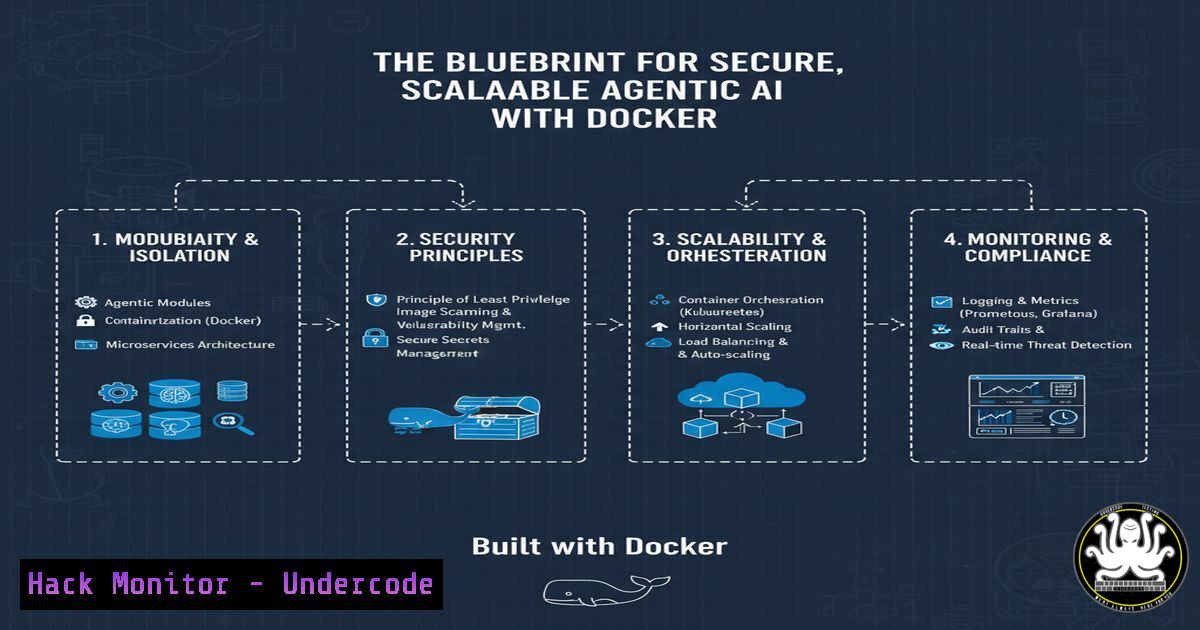
Introduction:
The rapid adoption of Agentic AI, where LLMs function as autonomous decision-makers, introduces a new frontier of cybersecurity challenges. Securing these complex, multi-component systems requires a robust and repeatable infrastructure strategy from the outset. This article deconstructs a professional blueprint for building, deploying, and hardening these applications using Docker, providing a foundational security posture for modern AI development.
Learning Objectives:
- Architect a secure, containerized environment for Agentic AI components, including the Agent API, Vector Databases, and caching layers.
- Implement critical security controls within the Dockerfile and runtime configuration to mitigate supply chain and runtime attacks.
- Establish a comprehensive observability stack to monitor, trace, and alert on anomalous agent behavior and performance issues.
You Should Know:
1. Hardening Your Dockerfile Against Supply Chain Attacks
The Dockerfile is your first line of defense. A vulnerable base image or leaked secrets can compromise your entire AI application.
 Use a minimal, verified base image from a trusted registry
FROM --platform=linux/amd64 python:3.11-slim-bookworm

Create a non-root user and switch to it
RUN groupadd -r agent && useradd -r -g agent agent

Set working directory and copy requirements first for better layer caching
WORKDIR /app
COPY requirements.txt .

Install dependencies securely, no cache and clean up
RUN pip install --no-cache-dir --upgrade pip && \
pip install --no-cache-dir -r requirements.txt

Copy application code as the non-root user
COPY --chown=agent:agent . .

Drop privileges
USER agent

Expose the application port
EXPOSE 8000

Define the health check
HEALTHCHECK --interval=30s --timeout=3s --start-period=5s --retries=3 \
CMD curl -f http://localhost:8000/health || exit 1

Use a secure, non-shell form CMD to prevent injection
CMD ["gunicorn", "--bind", "0.0.0.0:8000", "app:api"]
Step-by-step guide:
- Line 2: The `slim` variant reduces the attack surface. Specifying `–platform` ensures consistent builds.
- Lines 5-6: Always run your application as a non-root user to limit the impact of a container breakout.
- Lines 9-12: Copying `requirements.txt` first leverages Docker’s build cache. Using `–no-cache-dir` prevents pip from storing packages, reducing image size and potential secrets leakage.
- Line 15: The `–chown` flag ensures the application files are owned by the non-root user.
- Line 21: The `HEALTHCHECK` instruction allows the orchestrator to determine container liveness automatically.
- Line 24: Using the JSON array form of `CMD` prevents shell injection attacks from environment variables.
2. Securing Inter-Service Communication with Docker Compose
An Agentic AI app is a network of services. Isolating and controlling traffic between them is paramount.
 docker-compose.security.yml
version: '3.8'

services:
agent-api:
build: ./agent
ports:
- "8000:8000"
networks:
- agent-frontend
- agent-backend
healthcheck:
test: ["CMD", "curl", "-f", "http://localhost:8000/health"]
interval: 30s
timeout: 10s
retries: 3

vector-db:
image: ankane/pgvector:latest
environment:
POSTGRES_DB: vectordb
POSTGRES_USER: agent_user
POSTGRES_PASSWORD_FILE: /run/secrets/db_password
networks:
- agent-backend
secrets:
- db_password

redis-cache:
image: redis:7-alpine
command: redis-server --requirepass /run/secrets/redis_pass
networks:
- agent-backend
secrets:
- redis_pass

networks:
agent-frontend:
 Public-facing network for the reverse proxy
agent-backend:
internal: true  Critical: Isolates backend services from external access

secrets:
db_password:
file: ./secrets/db_password.txt
redis_pass:
file: ./secrets/redis_pass.txt
Step-by-step guide:
- Line 10-12, 23, 30: The `networks` key segments services. The `agent-backend` network is marked
internal: true, meaning it is inaccessible from the Docker daemon’s external interface, isolating the database and cache. - Lines 19, 27: Secrets are passed via Docker Secrets (
secrets:), which are mounted as temporary files in `/run/secrets/` and are never exposed in environment variables or the image history. - Line 25: The Redis command uses the secret file for authentication, preventing the password from appearing in `ps` output.
3. Implementing Runtime Security and Resource Limits
Prevent resource exhaustion attacks and limit the blast radius of a compromised container.
 docker-compose.prod.yml
services:
agent-api:
deploy:
resources:
limits:
memory: 1G
cpus: '1.0'
reservations:
memory: 256M
cpus: '0.25'
security_opt:
- no-new-privileges:true
read_only: true
tmpfs:
- /tmp:rw,noexec,nosuid,size=64m
Step-by-step guide:
- Lines 5-9: `resources.limits` prevent a single container from consuming all host resources (a common DoS vector). `reservations` guarantee a minimum amount of resources.
- Line 10: `no-new-privileges:true` is a critical security flag that prevents the container process from gaining new privileges, mitigating privilege escalation bugs.
- Line 11: `read_only: true` mounts the container’s root filesystem as read-only, protecting against malicious binary drops or configuration changes.
- Lines 12-13: A `tmpfs` volume for `/tmp` is mounted with `noexec` and `nosuid` flags, preventing execution of binaries from the temporary directory and blocking suid attacks.
- Vulnerability Scanning and Image Signing with Docker Buildx
Integrate security directly into your CI/CD pipeline to catch vulnerabilities before deployment.
 Build the image with Buildx, targeting a multi-stage build for a smaller final image
docker buildx build --platform linux/amd64 --tag myregistry/agentic-app:v1.0 --push .

Scan the image for vulnerabilities using Docker Scout (or Trivy, Grype)
docker scout cves myregistry/agentic-app:v1.0

Sign the image using Docker Content Trust (DCT) to ensure integrity
export DOCKER_CONTENT_TRUST=1
docker push myregistry/agentic-app:v1.0
Step-by-step guide:
- Line 2: `docker buildx build` is the modern builder, supporting multi-platform builds and more efficient caching.
- Line 5: `docker scout cves` (or
trivy image myregistry/agentic-app:v1.0) analyzes the built image against known vulnerability databases (CVEs). This should be a mandatory gate in your pipeline. - Lines 8-9: Setting `DOCKER_CONTENT_TRUST=1` enables image signing. The push will fail if the image is not signed, guaranteeing that the image you pull in production is the one you built and scanned.
5. Configuring Observability for Threat Detection
Monitoring agent actions and API performance is non-negotiable for detecting prompt injection, data exfiltration, or performance degradation.
 docker-compose.observability.yml
services:
prometheus:
image: prom/prometheus:latest
ports: ["9090:9090"]
command:
- '--config.file=/etc/prometheus/prometheus.yml'
volumes:
- ./prometheus.yml:/etc/prometheus/prometheus.yml

grafana:
image: grafana/grafana-enterprise:latest
ports: ["3000:3000"]
environment:
- GF_SECURITY_ADMIN_PASSWORD_FILE=/run/secrets/grafana_admin_pass
secrets:
- grafana_admin_pass

jaeger:
image: jaegertracing/all-in-one:latest
ports: ["16686:16686", "14268:14268"]
Step-by-step guide:
- Prometheus: Scrapes metrics from your agent API (e.g., request count, latency, error rate). Alerts can be configured on sudden spikes in error rates or request volumes.
- Grafana: Visualizes the metrics from Prometheus. Dashboards should track token usage, response times per agent, and calls to external tools.
- Jaeger: Provides distributed tracing. By instrumenting your agent, you can trace a single user request through the entire workflow (LLM call, vector search, tool use), which is invaluable for debugging complex agent behavior and identifying performance bottlenecks or unexpected execution paths from a prompt injection.
6. Leveraging Docker Secrets for AI API Keys
Never hardcode API keys for OpenAI, Anthropic, or other model providers. Docker Secrets manages them securely.
 Create a secret from a file
echo "sk-your-super-secret-openai-key" > ./secrets/openai_api_key.txt
docker secret create openai_api_key ./secrets/openai_api_key.txt

Then, in your docker-compose.yml
services:
agent-api:
...
secrets:
- openai_api_key
environment:
- OPENAI_API_KEY_FILE=/run/secrets/openai_api_key
Step-by-step guide:
- Line 2-3: The API key is stored in a file, and `docker secret create` adds it to the swarm’s secret store. The secret is encrypted at rest and in transit.
- Lines 8-11: The service is granted access to the secret, which is mounted as a file in the container. Your application code should read the key from the specified file path (
/run/secrets/openai_api_key) instead of an environment variable. This prevents the key from being logged or exposed in debugging tools.
7. Production-Grade Deployment with Docker Swarm
For production environments, Swarm provides built-in security and high availability features.
 Initialize the Docker Swarm (on manager node)
docker swarm init

Deploy the stack with the compose files
docker stack deploy -c docker-compose.security.yml -c docker-compose.prod.yml -c docker-compose.observability.yml agentic-app

View the service status and logs
docker service ls
docker service logs agentic-app_agent-api

Rotate a secret without downtime
echo "new-super-secret-key" > ./secrets/openai_api_key.txt
docker secret create openai_api_key_v2 ./secrets/openai_api_key.txt
docker service update --secret-rm openai_api_key --secret-add source=openai_api_key_v2,target=openai_api_key agentic-app_agent-api
Step-by-step guide:
- Line 2: `docker swarm init` creates a secure, clustered environment with a built-in CA for node certificates.
- Line 5: Deploying with multiple compose files allows for a clean separation of concerns (base config, security, production overrides, observability).
- Lines 12-14: This demonstrates a zero-downtime secret rotation. A new secret is created and then swapped into the running service, a critical operational security practice.
What Undercode Say:
- Key Takeaway 1: Containerization is not just a deployment convenience; it is a fundamental security control for Agentic AI. By enforcing resource limits, filesystem read-only policies, and non-root execution, you build a hardened runtime environment that significantly reduces the attack surface of your intelligent applications.
- Key Takeaway 2: The complexity of Agentic AI systems demands a “secure-by-design” infrastructure. This blueprint demonstrates that security must be woven into every layer: from the supply chain (vulnerability-scanned base images) and build process (signed images) to the network (internal-only backends) and runtime (secrets management, observability). Treating your AI infrastructure with the same rigor as your most critical microservices is the only path to operational resilience and trust.
Prediction:
The future of AI security will see a convergence of traditional infrastructure hardening and novel AI-specific threats. As Agentic systems gain the ability to perform actions and spend resources, a compromised agent could lead to direct financial loss, data corruption, or reputational damage. The practices outlined here—immutable, scanned images; granular secret management; and comprehensive tracing—will become the baseline standard. We will see the emergence of specialized security tools that monitor agent behavior in real-time, detecting prompt injection, jailbreaks, and policy violations by analyzing the traces and logs generated by these containerized workflows, making observability the cornerstone of AI security.
🎯Let’s Practice For Free:
IT/Security Reporter URL:
Reported By: Activity 7380778284973834240 – Hackers Feeds
Extra Hub: Undercode MoN
Basic Verification: Pass ✅


