Listen to this Post
Introduction:
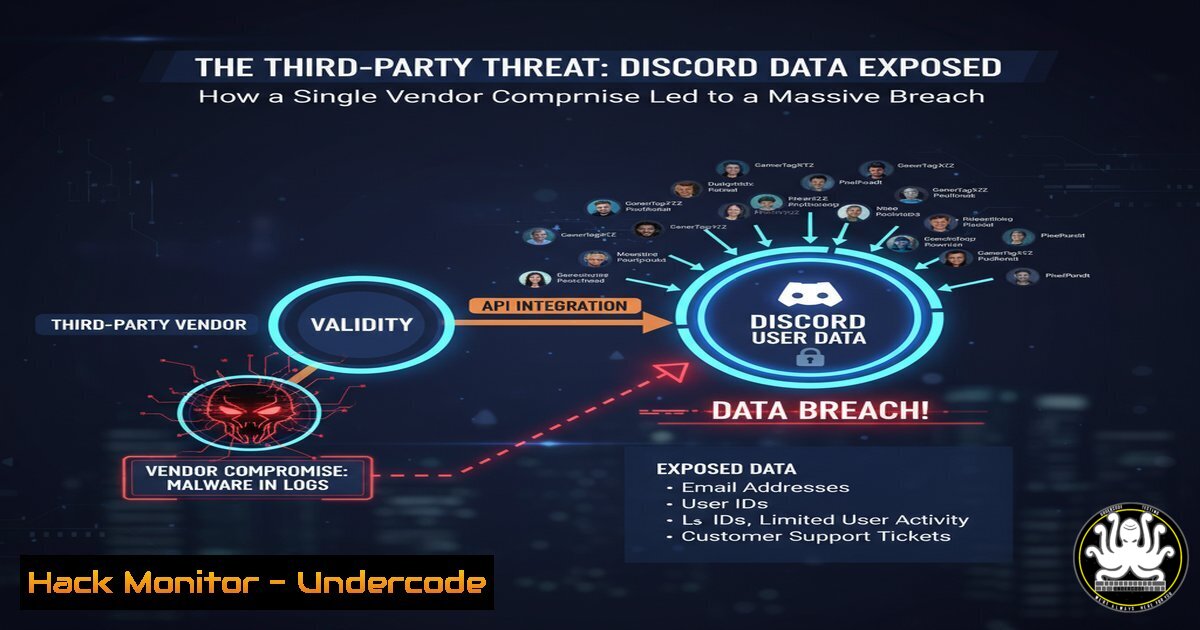
A sophisticated cyberattack targeting a third-party customer service provider has led to a significant data breach at Discord, exposing sensitive user information. This incident, claimed by the Scattered Lapsus$ Hunters group, highlights the escalating risk posed by supply-chain attacks, where a vulnerability in a partner’s system can be leveraged to infiltrate a major platform’s user data, even when its core infrastructure remains secure.
Learning Objectives:
- Understand the attack vectors and methodologies used in third-party vendor compromises.
- Learn critical commands and techniques for incident response and digital forensics following a data breach.
- Master security hardening practices for protecting PII and mitigating similar threats.
You Should Know:
1. Incident Response: Initial Triage & Log Analysis
When a breach is suspected, the immediate priority is to scope the incident. Security teams must rapidly analyze authentication and access logs.
Verified Command List:
`grep “Failed password” /var/log/auth.log | awk ‘{print $11}’ | sort | uniq -c | sort -nr` (Linux) – This command parses authentication logs to identify IP addresses with the most failed login attempts, highlighting potential brute-force attacks.
`Get-WinEvent -FilterHashtable @{LogName=’Security’; ID=4625} | Select-Object -First 20 | Format-Table TimeCreated, Message` (Windows) – This PowerShell cmdlet retrieves the most recent failed logon events (Event ID 4625) from the Windows Security log.
`journalctl _SYSTEMD_UNIT=sshd.service –since “2 hours ago” | grep “Failed”` (Linux) – Queries the systemd journal for failed SSH attempts within the last two hours.
Step-by-step guide:
This process involves centralizing logs from all systems (servers, firewalls, databases) into a Security Information and Event Management (SIEM) system. Analysts then run correlation queries to detect anomalous patterns, such as a single service account accessing unusual databases or data exports occurring at odd hours. The Linux `grep` command above is a quick, on-the-box method to identify a brute-force attack in progress, allowing for immediate IP blocking at the firewall.
2. Network Forensics: Identifying Data Exfiltration
Attackers who gain access will often attempt to exfiltrate data. Detecting this requires monitoring outbound network traffic.
Verified Command List:
`tcpdump -i any -w capture.pcap host
`tshark -r capture.pcap -Y “http.request” -T fields -e http.host -e http.request.uri` – Reads the packet capture file and extracts HTTP requests, showing which external domains an internal host is trying to communicate with.
`netstat -tunap | grep ESTABLISHED` (Linux) / `Get-NetTCPConnection -State Established` (Windows) – Shows all currently active network connections, which can reveal unauthorized established sessions to external IPs.
Step-by-step guide:
After identifying a compromised host, use `tcpdump` to capture its traffic. Analyze the resulting `.pcap` file with Wireshark or its command-line counterpart, tshark. The `tshark` command provided filters for HTTP requests, which can quickly reveal if data is being sent to an attacker-controlled server. Look for large, sustained transfers to unknown domains, which are hallmarks of data exfiltration.
3. Hardening PII Access and Storage
The breach exposed real names, email addresses, and government IDs. Protecting this data is paramount.
Verified Command List & Configurations:
`find /path/to/data -name “.csv” -o -name “.sql” -exec grep -l “SSN\|CreditCard\|Password” {} \;` – Scans the filesystem for common file types that may contain sensitive information.
`aescrypt -e -p
Database Query: `SELECT table_name, column_name FROM information_schema.columns WHERE column_name LIKE ‘%ssn%’ OR column_name LIKE ‘%dob%’;` – Identifies columns in a database that may store PII, enabling focused protection.
`gpg –encrypt –recipient [email protected] customer_data.xml` – Encrypts a file using GPG for a specific recipient.
Step-by-step guide:
Conduct regular PII discovery scans using the `find` and `grep` commands to locate unprotected sensitive data. Once identified, data should be encrypted at rest. The `aescrypt` command provides a simple way to encrypt files before moving them to secure, access-controlled storage. For databases, always use Transparent Data Encryption (TDE) or column-level encryption and implement strict role-based access control (RBAC) policies.
4. API Security and Secret Management
Third-party integrations often rely on APIs. Leaked API keys were a potential vector in this breach.
Verified Command List & Configurations:
`git log -p | grep -E “([a-zA-Z0-9]{32,})”` – Scans Git history for potential API keys or secrets (long alphanumeric strings) that may have been committed by mistake.
`curl -H “Authorization: Bearer $TOKEN” https://api.service.com/v1/users/me` – Tests an API endpoint with a bearer token. This is a common pattern that, if logged, can be stolen.
`echo $API_KEY | tr -d ‘\n’ | openssl base64 -e` – A demonstration of encoding a secret, which is not encryption. This highlights the difference between encoding and true encryption.
TruffleHog Command: `trufflehog git https://github.com/user/repo –only-verified` – Uses a dedicated secret-scanning tool to find and verify live secrets in a code repository.
Step-by-step guide:
Never hardcode API keys or secrets in source code. Use a dedicated secrets manager (e.g., HashiCorp Vault, AWS Secrets Manager). The `trufflehog` tool should be integrated into your CI/CD pipeline to automatically scan every commit for accidentally exposed credentials. The `git log` command is a manual method to retroactively search a repo’s history for leaks.
5. Cloud Infrastructure Hardening (Zero Trust)
Adopting a Zero Trust model (“never trust, always verify”) could have contained this vendor breach.
Verified Command List & Configurations:
aws iam list-users --query "Users[?CreateDate<=\2023-01-01`].UserName”` – Lists AWS IAM users created before a certain date, useful for identifying stale accounts.
`gcloud compute firewall-rules list –filter=”ALLOW 0.0.0.0/0″` – Lists overly permissive firewall rules in Google Cloud that allow traffic from any source.
Terraform Snippet:
resource "aws_s3_bucket" "logs" {
bucket = "my-secure-logs"
acl = "private"
server_side_encryption_configuration {
rule {
apply_server_side_encryption_by_default {
sse_algorithm = "AES256"
}
}
}
}
This code defines a secure S3 bucket with encryption enabled, demonstrating Infrastructure as Code (IaC) for consistent security.
Step-by-step guide:
Implement least-privilege access. Use the AWS and GCP commands to audit your environment for weak configurations, such as old IAM users or public-facing storage buckets. Enforce mandatory Multi-Factor Authentication (MFA) for all administrative accounts and implement network segmentation to ensure a breach in one service (like a support portal) cannot traverse to core systems.
- Threat Intelligence and Indicator of Compromise (IoC) Hunting
Understanding the adversary, in this case Scattered Lapsus$ Hunters, is key to defense.
Verified Command List:
`whois
`nslookup -type=PTR
`virustotal-api scan –url “https://suspicious-domain.com”` (Using VT API) – Submits a URL to VirusTotal for analysis against multiple antivirus engines.
`strings malware.bin | grep -i “https://”` – Extracts human-readable strings from a binary file, often revealing command-and-control (C2) server URLs.
Step-by-step guide:
Collect IoCs (IPs, domains, file hashes) from threat intelligence feeds related to the attacking group. Use `virustotal-api` to check these indicators. Internally, use tools like YARA to scan endpoints for malware associated with these groups. The `strings` command is a basic but powerful first step in analyzing a malicious binary to discover its capabilities and communication points.
What Undercode Say:
- The perimeter is dead; your security is only as strong as your weakest vendor. This breach is a textbook example of how a sophisticated attacker will bypass hardened primary systems to target a softer, secondary entry point.
- Over-reliance on perimeter defenses creates a false sense of security. Modern defense must assume breach and focus on segmenting internal networks, strictly controlling access to PII, and actively hunting for threats that have already bypassed initial defenses.
The Discord incident is not an anomaly but a sign of the times. The Scattered Lapsus$ Hunters group, like many others, has realized that the most efficient path to data is not through a fortified front door but through an unguarded side window—the third-party vendor. This breach forces a critical re-evaluation of vendor risk management programs, which are often treated as a compliance checkbox rather than a core security function. Organizations must move beyond simple questionnaire-based assessments and demand direct access to audit security postures, enforce contractual security requirements, and continuously monitor vendor access for anomalies.
Prediction:
The success of attacks like the one on Discord’s vendor will catalyze a massive shift in the cybersecurity insurance and regulatory landscape. We predict a near-future where regulations will mandate direct, auditable security controls for any third party with access to user data, similar to GDPR but with sharper teeth. Cybersecurity insurance premiums will skyrocket for companies that cannot demonstrate mature, evidence-based vendor risk management programs. This will force a industry-wide adoption of Zero Trust architectures not as an ideal, but as a baseline requirement for doing business, fundamentally reshaping how organizations manage digital trust across their entire ecosystem.
🎯Let’s Practice For Free:
IT/Security Reporter URL:
Reported By: Activity 7380623576678232064 – Hackers Feeds
Extra Hub: Undercode MoN
Basic Verification: Pass ✅


