Listen to this Post
Introduction:
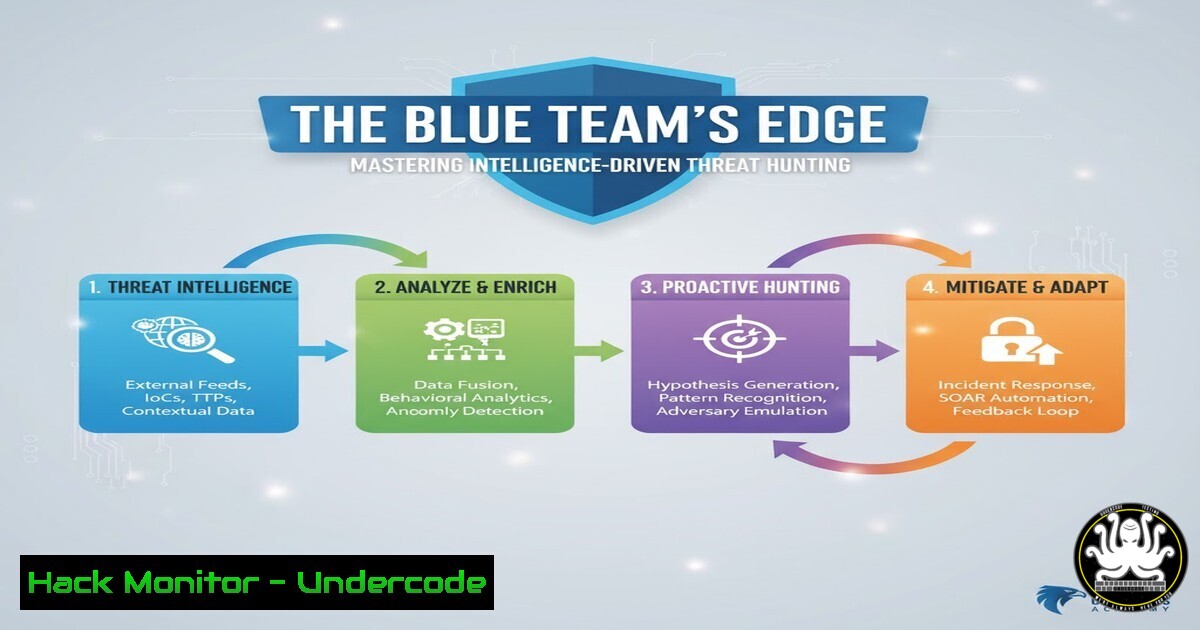
In an era of advanced persistent threats and sophisticated adversaries, reactive security measures are no longer sufficient. Intelligence-driven threat hunting represents a paradigm shift, empowering security teams to proactively search for indicators of compromise before they escalate into full-blown breaches. This proactive stance, as emphasized in certifications like the OffSec Threat Hunter (OSTH), is built on forming hypotheses based on threat intelligence and systematically validating them across the enterprise.
Learning Objectives:
- Understand the core principles of building and testing threat-hunting hypotheses.
- Master essential command-line and logging techniques for hunting on both Linux and Windows endpoints.
- Learn to analyze network traffic, memory, and cloud logs for evidence of malicious activity.
You Should Know:
1. Hypothesis-Driven Hunting: The Foundation
The entire process begins with a hypothesis, such as “An adversary may be using living-off-the-land techniques to execute PowerShell scripts for lateral movement.” This hypothesis guides your investigation and determines the data sources you need to examine.
2. Establishing a Windows Process Baseline with PowerShell
Verified Command:
Get-Process | Select-Object ProcessName, Id, CPU, WorkingSet, Path | Sort-Object CPU -Descending | Export-Csv -Path "C:\baseline\process_baseline.csv" -NoTypeInformation
Step‑by‑step guide:
This PowerShell command creates a critical baseline of running processes. It queries all running processes, selects key properties (name, PID, CPU, and memory usage), sorts them by CPU consumption, and exports the list to a CSV file. A hunter would run this in a known-clean state. During a hunt, you can compare a new process list against this baseline to identify unknown or suspicious processes that warrant further investigation.
3. Hunting for Anomalous Linux Processes
Verified Command:
ps aux --sort=-%cpu | head -20
Step‑by‑step guide:
This Linux command provides a real-time view of the most CPU-intensive processes. `ps aux` lists all running processes, `–sort=-%cpu` sorts them in descending order by CPU usage, and `head -20` displays only the top 20. A hunter would look for processes with unusual names, running from non-standard paths, or consuming an unexpected amount of resources, which could indicate malware or a crypto-miner.
4. Analyzing Windows Event Logs for PowerShell Attacks
Verified Command:
Get-WinEvent -LogName "Microsoft-Windows-PowerShell/Operational" | Where-Object {$<em>.Id -eq 4104 -or $</em>.Id -eq 4103} | Select-Object -First 50 | Format-List
Step‑by‑step guide:
This command is crucial for detecting malicious PowerShell scripts. It queries the PowerShell Operational log for events 4103 (module loading) and 4104 (script block logging). By examining these events, a hunter can see the actual code blocks that were executed, looking for obfuscated commands, IOCs like known-bad domains, or the use of sensitive .NET classes commonly leveraged by attackers.
5. Detecting Suspicious Network Connections
Verified Command (Linux):
ss -tunlp | grep -E '(:443|:80|:53)' | grep -v "systemd-resolve"
Verified Command (Windows):
Get-NetTCPConnection | Where-Object {$_.State -eq "Established"} | Select-Object LocalAddress, LocalPort, RemoteAddress, RemotePort, OwningProcess | Format-Table
Step‑by‑step guide:
These commands list all active network connections. The Linux `ss` command filters for common web and DNS ports while excluding a known system process. The Windows `Get-NetTCPConnection` cmdlet shows all established connections. Cross-reference the `OwningProcess` (PID) in Windows with your process list to identify which application is generating the traffic. Look for connections to suspicious IPs or unknown processes with network activity.
6. Memory Analysis for Advanced Threat Detection
Verified Command (Using Volatility 3):
vol -f memory_dump.raw windows.malfind
Step‑by‑step guide:
When a sophisticated attacker is suspected, analyzing a memory dump is essential. The `malfind` plugin in the Volatility framework scans process memory for indicators of code injection, a common technique used by malware to hide in legitimate processes. It looks for memory regions with executable permissions that contain hidden or injected code, providing evidence of an active compromise that may evade traditional disk-based detection.
7. Hunting in Cloud Environments: AWS CloudTrail Logging
Verified Command (AWS CLI):
aws cloudtrail lookup-events --start-time "2023-11-01T00:00:00Z" --end-time "2023-11-02T00:00:00Z" --lookup-attributes AttributeKey=Username,AttributeValue="suspect_user" --region us-east-1
Step‑by‑step guide:
In cloud environments, API activity is the new network traffic. This AWS CLI command queries CloudTrail, the central logging service, for all events performed by a specific user within a 24-hour window. Hunters use this to detect anomalous behavior, such as unusual geographic logins, excessive API calls (potential reconnaissance), or privileged actions like creating new IAM users or modifying security groups.
8. YARA: The Hunter’s Pattern-Matching Weapon
Verified Command (YARA Rule):
rule Suspicious_PS_Script {
meta:
description = "Detects potentially obfuscated PowerShell scripts"
strings:
$s1 = "FromBase64String" nocase
$s2 = "Invoke-Expression" nocase
$s3 = "IEX" nocase
$s4 = /-EncodedCommand\s+/
condition:
2 of them
}
Step‑by‑step guide:
YARA allows you to create custom signatures to hunt for malware or specific TTPs (Tactics, Techniques, and Procedures). This example rule looks for common indicators of obfuscated PowerShell scripts. You can run YARA rules against files on disk, memory dumps, or even network traffic. A positive match immediately flags a file for deep-dive analysis.
What Undercode Say:
- Proactivity is Non-Negotiable: The modern defender cannot wait for alerts. The most dangerous breaches are those you don’t have a signature for, making hypothesis-driven hunting a critical capability.
- Data is Your Weapon: Effective hunting is less about fancy tools and more about deeply understanding the data available to you—be it logs, processes, or network flows. Master your data sources.
The shift from a purely reactive SOC to one that incorporates proactive hunting is the defining evolution in cybersecurity defense. While automated tools provide a necessary baseline, the human hunter’s ability to reason, form hypotheses based on intelligence, and connect disparate data points is what uncovers the stealthy, advanced threats. The techniques outlined here provide a foundational toolkit, but sustained success requires cultivating a hunter’s mindset: one of perpetual curiosity, skepticism, and a deep understanding of the adversary.
Prediction:
The increasing adoption of AI by attackers will make traditional, signature-based detection even more obsolete. Threat hunting will evolve to incorporate AI-driven analytics to process the vast datasets required to identify subtle, anomalous patterns indicative of AI-powered attacks. The future hunter will be a data scientist as much as a security analyst, leveraging machine learning models to augment their intuition and hypothesis testing, creating a continuous cycle of human-machine teaming to stay ahead of the adaptive adversary.
🎯Let’s Practice For Free:
IT/Security Reporter URL:
Reported By: Alex Soloviev – Hackers Feeds
Extra Hub: Undercode MoN
Basic Verification: Pass ✅


