
Listen to this Post
Introduction:
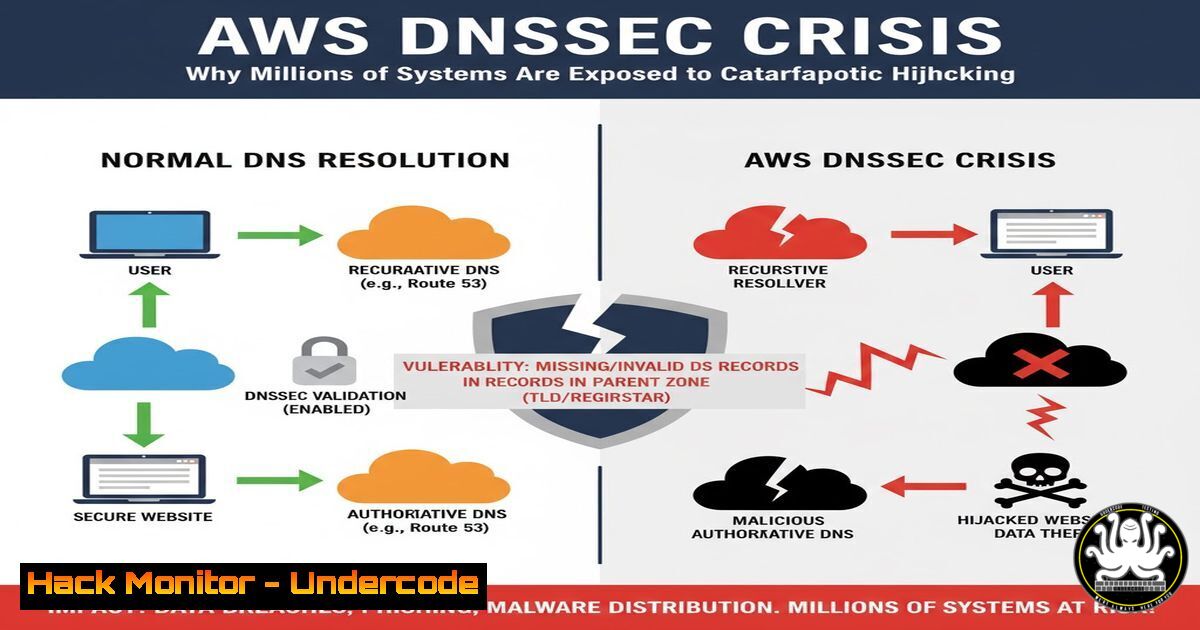
A systemic failure in Amazon Web Services’ (AWS) global DNS infrastructure has left millions of customers vulnerable to sophisticated cyberattacks. Despite possessing the proven capability to secure its U.S. GovCloud domain, AWS has neglected to implement DNSSEC validation across its global zones, creating a massive disparity in security posture and violating multiple core compliance frameworks.
Learning Objectives:
- Understand the critical role of DNSSEC in preventing DNS hijacking and cache poisoning attacks.
- Learn how to verify the DNSSEC status of your own domains and your service providers.
- Acquire practical skills to harden DNS configurations and monitor for delegation vulnerabilities.
You Should Know:
1. Verifying DNSSEC Validation with `dig`
The `dig` command is an essential tool for network administration and security, allowing you to query DNS servers and inspect the details of a domain’s records, including its security extensions.
Step-by-Step Guide:
To check if a domain has DNSSEC properly implemented and validated, you can use the following command sequence. First, check for the presence of DNSKEY records, which are used to sign the zone:
dig @8.8.8.8 example.com DNSKEY +dnssec
Next, query for the DS (Delegation Signer) record, which must be placed in the parent zone (like .com) to create a chain of trust:
dig @8.8.8.8 example.com DS +short
Finally, perform a lookup for a record while explicitly requesting DNSSEC validation. A status of `SERVFAIL` often indicates a broken DNSSEC chain, while `NOERROR` with the `ad` (authentic data) flag signifies successful validation.
dig @8.8.8.8 example.com A +dnssec +adflag
The `+adflag` in the response header confirms that the data has been validated as authentic by the recursive resolver.
2. Automating DNSSEC Checks with a Bash Script
Manually checking a long list of domains is inefficient. Automating the process with a script ensures consistent monitoring and rapid identification of failures.
Step-by-Step Guide:
Create a script named dnssec_audit.sh. This script will read a list of domains from a text file and test their DNSSEC validation status.
!/bin/bash
 Read a list of domains from a file and test DNSSEC validation
RESOLVER="8.8.8.8"  Using Google's public DNS

echo "DNSSEC Validation Audit Report"
echo "=============================="

while IFS= read -r domain; do
echo -n "Checking $domain... "
 Use dig to get the A record and check for the 'ad' flag
status=$(dig @$RESOLVER $domain A +dnssec +short +nocomments)
ad_flag=$(dig @$RESOLVER $domain A +dnssec +stats | grep -q "flags:.ad" && echo "SECURE" || echo "INSECURE")
echo "$ad_flag"
done < domains.txt
Save your list of critical domains in a file named domains.txt, one per line. Make the script executable with `chmod +x dnssec_audit.sh` and run it with ./dnssec_audit.sh. The output will clearly label each domain as “SECURE” or “INSECURE”.
3. Analyzing DNS Delegations for Misconfiguration
A common point of failure in DNSSEC is the delegation from the parent zone to the child zone. If the DS record in the parent zone is missing or incorrect, the entire chain of trust breaks.
Step-by-Step Guide:
Use `dig` to trace the delegation path. Start by finding the authoritative name servers for the Top-Level Domain (TLD), then query them directly for the DS record of your domain.
 Find the TLD servers for .com
dig NS com +short
 Query one of the TLD servers directly for the DS record
dig @a.gtld-servers.net your-aws-domain.com DS +short
If this command returns no output, the DS record is missing, and DNSSEC validation will fail for your domain, leaving it vulnerable. This is a critical check for any domain purported to be secured by DNSSEC.
4. Windows PowerShell DNSSEC Query
Windows administrators are not left out. The `Resolve-DnsName` cmdlet in PowerShell can be used to perform DNSSEC-aware queries.
Step-by-Step Guide:
Open Windows PowerShell as Administrator. The following command will query a specified domain and, if your configured DNS resolver supports DNSSEC, will return validated records. Look for the `IsAuthenticated` property in the output.
Resolve-DnsName -Name example.com -Type A -DnsSecOk -Server 8.8.8.8
If the `IsAuthenticated` property returns True, the record was validated using DNSSEC. A return value of `False` does not necessarily mean the domain is insecure; it may mean your local resolver is not performing validation, which is a security issue in itself.
5. Configuring BIND for DNSSEC Validation
If you run your own recursive DNS resolver using BIND, it is imperative to ensure it is configured to perform DNSSEC validation. This protects all clients using your resolver from receiving spoofed DNS data.
Step-by-Step Guide:
Edit your BIND configuration file, typically `named.conf` or named.conf.options. The `dnssec-validation` option must be set to `auto` or `yes` to enable validation using trusted root key anchors.
options {
directory "/var/cache/bind";
dnssec-validation auto;
auth-nxdomain no;  conform to RFC1035
listen-on { any; };
allow-query { any; };
};
After modifying the configuration, check its syntax with named-checkconf. Then, restart BIND to apply the changes using systemctl restart bind9. You can verify it’s working by checking the system logs for a successful key load and then testing against a known signed domain like dnssec-failed.org. A query for this domain should return no IP address (SERVFAIL) because its DNSSEC signature is intentionally invalid.
6. Monitoring for Zone Walking with `NSEC3`
Older DNSSEC implementations used NSEC records, which could be “walked” to enumerate all records in a zone. The NSEC3 standard mitigates this by cryptographically hashing the record names.
Step-by-Step Guide:
Check if a domain is using the more secure NSEC3 protocol by querying for its NSEC3PARAM record. The presence of this record indicates the zone is signed with NSEC3.
dig @8.8.8.8 example.com NSEC3PARAM +short
If this command returns a record, it includes parameters like the hash algorithm, flags, iterations, and salt. The absence of an NSEC3PARAM record suggests the zone may be using the older, less secure NSEC, which could expose its entire record set to enumeration by an attacker.
7. Leveraging `dnsrecon` for Comprehensive DNS Audits
For penetration testers and red teams, the `dnsrecon` tool is invaluable for enumerating DNS information and identifying misconfigurations, including DNSSEC issues.
Step-by-Step Guide:
Install `dnsrecon` (it is often pre-packaged in distributions like Kali Linux). To perform a standard enumeration and DNSSEC audit of a target domain, use the following command:
dnsrecon -d example.com -a -z
The `-d` flag specifies the domain, `-a` enables standard enumeration, and `-z` attempts a DNSSEC zone walk if the zone is using the insecure NSEC records. The tool will output a comprehensive list of records and provide an analysis of the domain’s DNSSEC posture, highlighting potential vulnerabilities like missing DS records or vulnerable NSEC configurations.
What Undercode Say:
- The deliberate segmentation of security, where GovCloud meets a higher standard than the global commercial cloud, creates a dangerous two-tiered system for critical infrastructure.
- This is not a technical limitation but a profound failure of governance and risk management, placing countless organizations in breach of compliance despite their own security controls.
The AWS DNSSEC negligence reveals a critical truth in cloud security: your security posture is only as strong as your provider’s weakest link. Organizations have blindly trusted cloud providers with foundational internet services without independent verification. This incident mandates a shift in cloud procurement and risk assessment strategies. Security teams must now actively audit their providers’ infrastructure, treating them as an extension of their own attack surface. Compliance certifications become meaningless if the underlying platform provider ignores a fundamental control like DNSSEC, rendering customer audits and controls insufficient against such a core failure.
Prediction:
The continued neglect of core protocol security like DNSSEC by major cloud providers will lead to a watershed, state-level DNS hijacking event within the next 18-24 months. This event will not be a simple outage but a sustained, malicious redirection of traffic from major financial, healthcare, or government platforms, leading to unprecedented data theft and systemic trust erosion in public cloud infrastructure. The resulting regulatory backlash will be severe, likely culminating in mandatory, legally-binding security protocols for all critical infrastructure providers, fundamentally reshaping cloud compliance and liability laws.
🎯Let’s Practice For Free:
IT/Security Reporter URL:
Reported By: Andy Jenkinson – Hackers Feeds
Extra Hub: Undercode MoN
Basic Verification: Pass ✅


