Listen to this Post
Introduction:
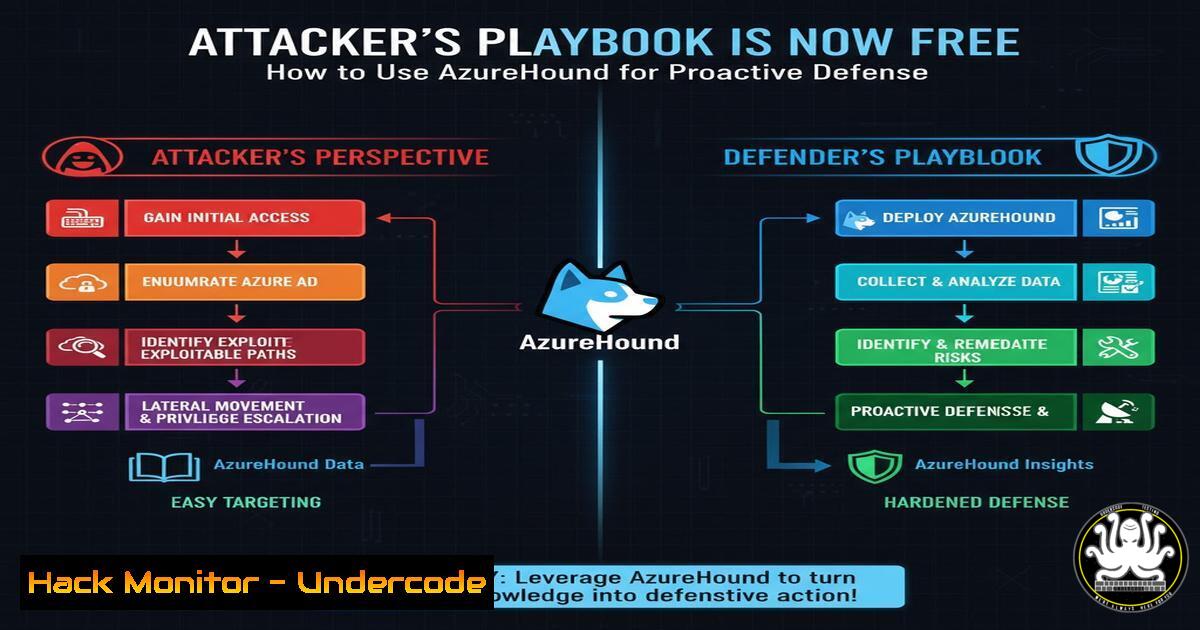
The recent weaponization of AzureHound by threat actors represents a fundamental shift in cloud security dynamics. This powerful enumeration tool, part of the BloodHound ecosystem, allows attackers to map attack paths through Azure AD and Entra ID environments with surgical precision. Organizations now face a critical choice: remain vulnerable to these mapping techniques or adopt the same tools for defensive advantage.
Learning Objectives:
- Understand how AzureHound enumerates Azure and Entra ID environments to reveal critical attack paths
- Implement defensive monitoring and detection strategies for AzureHound activity
- Develop proactive hardening measures to eliminate the most dangerous attack paths identified by the tool
You Should Know:
1. AzureHound Enumeration and Data Collection
 Connect to Azure AD and collect data
Connect-AzureAD
Connect-AzAccount
 Run AzureHound collection
.\AzureHound.exe -c all --output azure_data.json
This command sequence connects to both Azure AD and Azure Resource Manager, then executes AzureHound to collect comprehensive environment data. The tool maps relationships between users, groups, roles, subscriptions, and resources, outputting to a JSON file that can be imported into BloodHound for visualization. Defenders should run this regularly to maintain current visibility of their attack surface.
2. Detecting AzureHound Execution Through Process Monitoring
 PowerShell detection query for AzureHound artifacts
Get-WinEvent -FilterHashtable @{LogName='Security'; ID=4688} |
Where-Object {$<em>.Message -like "AzureHound" -or $</em>.Message -like "SharpHound"}
This PowerShell command queries Windows Security logs for process creation events (Event ID 4688) containing AzureHound or related tool references. Implementing this as a continuous monitoring rule helps detect when attackers (or legitimate penetration testers) are running enumeration tools in your environment.
3. Azure Diagnostic Settings for Identity Logging
 Configure diagnostic settings for Azure AD
az monitor diagnostic-settings create \
--resource /subscriptions/{sub-id}/resourceGroups/{rg-name}/providers/Microsoft.AzureActiveDirectory \
--name "AADMonitoring" \
--logs '[{"category": "SignInLogs", "enabled": true}, {"category": "AuditLogs", "enabled": true}, {"category": "NonInteractiveUserSignInLogs", "enabled": true}]' \
--workspace /subscriptions/{sub-id}/resourcegroups/{rg-name}/providers/microsoft.operationalinsights/workspaces/{workspace-name}
This Azure CLI command configures comprehensive logging for Azure AD activities, capturing sign-ins, audit events, and non-interactive authentication. These logs are essential for detecting anomalous enumeration patterns and understanding normal versus malicious AzureHound usage.
4. KQL Query for Suspicious Graph API Calls
SigninLogs
| where AppDisplayName has_any ("AzureHound", "BloodHound", "SharpHound")
| where ResultType == "0"
| project TimeGenerated, UserPrincipalName, AppDisplayName, IPAddress, Location
| sort by TimeGenerated desc
This Kusto Query Language (KQL) query monitors Azure AD sign-in logs for applications with display names matching known enumeration tools. When integrated into Azure Sentinel or Microsoft Defender, this detection can alert security teams to potential reconnaissance activities targeting their cloud identity infrastructure.
5. Hardening Critical Azure AD Roles
 Audit and report on privileged role assignments
Get-AzureADDirectoryRole | Where-Object {$_.DisplayName -eq "Global Administrator"} |
Get-AzureADDirectoryRoleMember | Select-Object DisplayName, UserPrincipalName, ObjectId
This PowerShell command enumerates members of the Global Administrator role, which represents the highest privilege in Azure AD. Regular auditing of these assignments helps ensure that only necessary accounts maintain this level of access, reducing the attack surface that tools like AzureHound would otherwise expose.
6. Implementing Conditional Access Policies
 Create Conditional Access policy via Graph API
az rest --method POST --uri "https://graph.microsoft.com/v1.0/policies/conditionalAccessPolicies" \
--body '{"displayName":"Block suspicious countries","state":"enabled","conditions":{"locations":{"includeLocations":["All"],"excludeLocations":["US","CA","GB"]}},"grantControls":{"operator":"OR","builtInControls":["block"]}}'
This command creates a Conditional Access policy that blocks authentication attempts from countries outside your approved list. Such policies directly counter attackers using AzureHound from unfamiliar geographic locations while allowing legitimate administrative access.
7. Network Restriction for Management Interfaces
 Restrict management plane access to specific IP ranges
az policy assignment create --name 'require-network-restriction' \
--display-name 'Require network restrictions for management interfaces' \
--policy <policy-definition-id> \
--params '{"effect": "Deny", "allowedIpRanges": ["192.0.2.0/24", "203.0.113.0/24"]}'
This Azure Policy implementation restricts management plane access to predefined IP ranges, significantly reducing the attack surface available to threat actors using AzureHound from unauthorized networks.
What Undercode Say:
- The democratization of advanced attack tools means defenders must adopt adversary emulation as a core security practice
- Elimination of attack paths provides more durable protection than continuous hardening of vulnerable systems
- Cloud identity has become the primary battlefield where security outcomes are determined
The weaponization of AzureHound represents an inevitable progression where sophisticated attack tools become widely accessible. Defenders can no longer rely on security through obscurity or assume attackers lack visibility into their environments. The commentary highlights a critical insight: at enterprise scale, the complexity of attack paths exceeds human comprehension, requiring automated tools for both attack and defense. Organizations that proactively use these same enumeration tools gain crucial visibility into their own vulnerabilities before attackers exploit them. The fundamental shift required is from reactive hardening to proactive attack path elimination—removing the very playbooks that threat actors follow rather than trying to block each individual technique.
Prediction:
Within two years, automated attack path enumeration and elimination will become standard practice in enterprise cloud security, fundamentally changing how organizations approach identity protection. The same machine learning and AI capabilities currently used for detection will be applied to preemptively identify and remove attack paths at scale, creating “empty voids” for attackers. This paradigm shift will render current reactive security models obsolete, forcing consolidation around platforms that provide continuous attack path analysis and automated remediation. Organizations that fail to adopt these proactive measures will face exponentially increasing breach costs as attackers leverage the same tools with increasing sophistication.
🎯Let’s Practice For Free:
IT/Security Reporter URL:
Reported By: Kdaskalakis Azurehound – Hackers Feeds
Extra Hub: Undercode MoN
Basic Verification: Pass ✅


