Listen to this Post
Introduction:
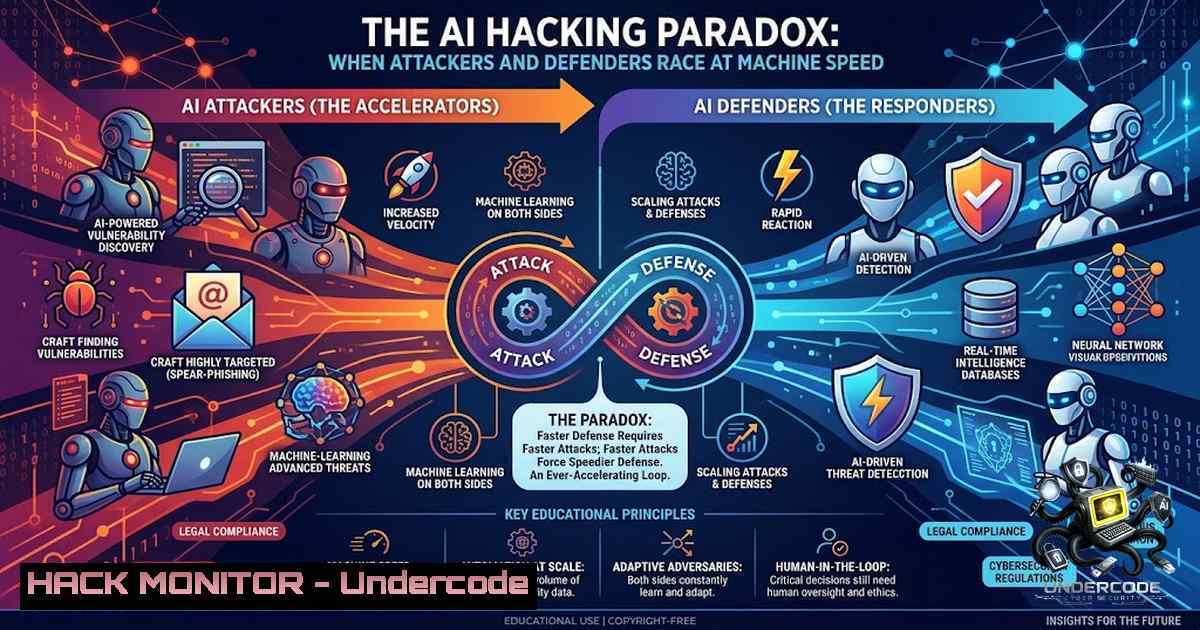
The cybersecurity landscape is undergoing a fundamental transformation as artificial intelligence shifts from a defensive tool to a dual-use weapon that equally empowers attackers and defenders. According to the Cloud Security Alliance’s 2026 Top Threats report, AI-Enhanced Attacks now rank as the second most critical cloud security concern — a new entry that has displaced traditional infrastructure risks. With Five Eyes cybersecurity agencies warning that “frontier AI models are anticipated to exceed current industry expectations, fundamentally transforming both offensive and defensive cyber capabilities,” and emphasizing that “the timeline is not years, it is months,” organizations face an urgent imperative to rethink their security architectures. This article examines the AI-driven threat landscape, from deepfake social engineering to polymorphic malware, and provides actionable defense strategies leveraging SIEM, IAM, PAM, and endpoint security solutions.
Learning Objectives:
- Understand how AI is weaponized for deepfake-based social engineering, automated phishing, and adaptive malware evasion
- Implement layered defense strategies combining MFA, endpoint security, vulnerability management, and identity governance
- Deploy practical Linux and Windows commands for log analysis, threat detection, and incident response against AI-augmented attacks
You Should Know:
- The Deepfake CEO Threat: When Trust Becomes a Vulnerability
The scenario described by ManageEngine Thailand — a CFO receiving a video call from a “CEO” whose face, voice, and speech patterns appear entirely authentic — is no longer hypothetical. In July 2024, a Ferrari executive received WhatsApp messages appearing to come from CEO Benedetto Vigna, complete with a profile picture and convincing Southern Italian accent. The scammer urged the executive to sign an NDA for an impending acquisition, claiming regulators had already been informed. The executive’s suspicion was triggered by slight tonal inconsistencies during a follow-up call; he asked a question only the real CEO would know — the title of a book Vigna had recommended days earlier — and the scammer abruptly ended the call.
The Securities and Exchange Board of India (SEBI) has since issued formal warnings about the “Boss Scam,” where fraudsters impersonate CEOs and managing directors using AI-based deepfake methodologies and voice cloning during video calls. In some cases, attackers compromise devices to alter contact lists, saving their own number under the CEO’s name to manipulate finance officers into transferring funds. DNB Bank also reportedly encountered a live deepfake meeting where cybercriminals impersonated both the CFO and CEO during a Microsoft Teams call.
Deloitte’s Center for Financial Services predicts that fraud enabled by generative AI could reach $40 billion in losses in the United States by 2027. The underlying technology — Generative Adversarial Networks (GANs) — uses two neural networks competing against each other to create increasingly realistic synthetic media.
Linux Command — Detecting Anomalous Network Connections:
To identify potential command-and-control or data exfiltration traffic associated with AI-driven attacks, monitor active network connections:
 Monitor all active TCP connections with process details
sudo netstat -tunap | grep ESTABLISHED

Real-time connection monitoring with continuous output
watch -1 2 'ss -tunap | grep ESTABLISHED'

Identify connections to suspicious external IPs (example: flag non-standard ports)
sudo lsof -i -P -1 | grep -E ":[0-9]{4,5}" | grep -v "localhost"
Windows PowerShell Command — Process and Network Investigation:
 Get active network connections with process information
Get-1etTCPConnection | Where-Object {$<em>.State -eq "Established"} |
Select-Object LocalAddress, LocalPort, RemoteAddress, RemotePort, OwningProcess |
ForEach-Object { $</em> | Add-Member -1otePropertyName "ProcessName" -1otePropertyValue
(Get-Process -Id $_.OwningProcess -ErrorAction SilentlyContinue).ProcessName -PassThru }

Check for suspicious scheduled tasks that may indicate persistence
Get-ScheduledTask | Where-Object {$<em>.State -1e "Disabled"} |
Select-Object TaskName, State, @{N="Actions";E={$</em>.Actions.Execute}}
- AI-Generated Phishing: The End of Traditional Red Flags
Generative AI has fundamentally changed the phishing landscape. Attackers can now create convincing phishing content by emulating writing styles and behavior patterns, automate parts of the attack lifecycle, and conduct rapid A/B testing of subject lines, pretexts, and calls-to-action. Traditional red flags — poor grammar, generic language, or unnatural phrasing — are rapidly becoming obsolete as AI-generated content achieves human-level linguistic quality.
Researchers have demonstrated how Generative AI can obfuscate malicious code and assemble phishing pages in real-time through “runtime assembly” methods that evade traditional network filters. The browser has emerged as a critical vantage point for detection, with security solutions deploying AI-ready defenses designed to detect social engineering content and overcome advanced cloaking.
Common GenAI-enabled attack patterns include:
- Email compromise: Plausible payment change requests, vendor impersonation, and thread hijacking
- Credential phishing: Realistic login pages adapted to the target’s role and project names
- MFA fatigue: Social pressure combined with repeated prompts to coerce approval
- QR phishing: QR codes that bypass URL scanning and shift interaction to mobile devices
- Vishing: Conversational scripts that are AI-assisted, directing victims to call fraudulent numbers
Linux Command — Email Header Analysis and SPF/DKIM/DMARC Validation:
 Extract and analyze email headers from a saved email file
cat suspicious_email.txt | grep -E "^From:|^Return-Path:|^Received:|^DKIM-Signature:|^Authentication-Results:"

Check SPF record for a domain
dig +short TXT example.com | grep "spf"

Check DMARC policy
dig +short TXT _dmarc.example.com

Verify DKIM selector (replace default._domainkey with actual selector)
dig +short TXT default._domainkey.example.com
Windows Command — Phishing URL Analysis:
 Resolve domain to IP and check reputation (requires manual verification)
Resolve-DnsName suspicious-domain.com -Type A

Check certificate information for a website
[System.Net.ServicePointManager]::ServerCertificateValidationCallback = {$true}
$request = [System.Net.WebRequest]::Create("https://suspicious-domain.com")
$request.GetResponse() | Out-1ull
$request.ServicePoint.Certificate | Format-List
3. AI-Generated Malware: Evasion at Scale
Large Language Models are now being leveraged to generate polymorphic malware that evades signature-based detection. Research shows that LLM-based variants demonstrate significantly higher structural diversity and improved evasion against signature-based detection compared to traditional metamorphic engines. Attackers can prompt LLMs to:
– Dynamically change variable names
– Insert dead code
– Restructure malicious files
– Encrypt portions of code
A study examining LLM-driven malware evasion against YARA rule detection found that LLMs (GPT, Claude, DeepSeek, Gemini) could produce variants that consistently bypassed traditional detection methods. In one documented case, AI-generated malware variants showed an 88% evasion rate against detection defenses. Furthermore, LLMs can be prompted to write code that detects when it’s running in a virtualized environment or security sandbox — common tools used by analysts to study malware safely — and alter behavior accordingly.
Linux Command — YARA Rule Creation and Malware Scanning:
 Install YARA on Ubuntu/Debian
sudo apt-get install yara

Create a simple YARA rule file (rule.yar)
cat > rule.yar << 'EOF'
rule Suspicious_Pattern {
strings:
$a = "base64_decode" nocase
$b = "eval(" nocase
$c = "system(" nocase
condition:
any of them
}
EOF

Scan a directory with YARA rules
yara -r rule.yar /path/to/directory/

Scan a specific file
yara rule.yar /path/to/suspicious/file
Windows PowerShell — Suspicious Process Detection:
 Detect processes running from temporary directories (common malware behavior)
Get-Process | Where-Object {
$<em>.Path -match "C:\Users\.\AppData\Local\Temp" -or
$</em>.Path -match "C:\Windows\Temp"
} | Select-Object Name, Id, Path, StartTime

Check for unsigned executables in critical locations
Get-ChildItem -Path C:\Windows\System32.exe |
Where-Object { -1ot (Get-AuthenticodeSignature $_.FullName).SignerCertificate } |
Select-Object Name, FullName
- Layered Defense: SIEM, IAM, PAM, and Endpoint Security
As ManageEngine’s portfolio demonstrates, effective defense against AI-augmented attacks requires multiple layers working in concert: SIEM for real-time detection and response, Identity and Access Management for authentication governance, Privileged Access Management for controlling critical accounts, and Unified Endpoint Management and Security for protecting all endpoints.
Security Information and Event Management (SIEM) : Log360 enables real-time threat detection and analysis from log data, with Zia AI enhancing SOC capabilities and intelligent analytics. SIEM solutions correlate events across the environment to identify patterns indicative of AI-driven attacks that might otherwise go unnoticed.
Identity and Access Management (IAM) : AD360 provides comprehensive identity and access management, including multi-factor authentication and phishing-resistant authentication methods. Phishing-resistant MFA (FIDO2-compliant passkeys) eliminates the risk of credential harvesting, which AI is particularly adept at scaling.
Privileged Access Management (PAM) : PAM360 controls and audits access to critical organizational accounts, applying the principle of least privilege to privileged users and service accounts.
Unified Endpoint Management and Security (UEMS) : EndpointCentral manages and protects endpoints from desktops and laptops to mobile devices and servers.
Linux Command — Log Analysis with SIEM-Ready Queries:
 Extract failed authentication attempts from auth.log
sudo grep "Failed password" /var/log/auth.log | awk '{print $1,$2,$3,$9,$11}' | sort | uniq -c | sort -1r

Monitor SSH login attempts in real-time
sudo tail -f /var/log/auth.log | grep "sshd"

Analyze system logs for suspicious patterns (example: excessive sudo attempts)
sudo grep "sudo" /var/log/auth.log | grep -v "COMMAND" | awk '{print $9}' | sort | uniq -c | sort -1r

Check for unexpected service changes
sudo systemctl list-units --type=service --state=running | grep -v "systemd|dbus|polkit"
Windows PowerShell — Security Event Log Analysis:
 Get failed login events (Event ID 4625) from the last 24 hours
$Time = (Get-Date).AddHours(-24)
Get-WinEvent -FilterHashtable @{LogName='Security'; ID=4625; StartTime=$Time} |
Select-Object TimeCreated, @{N='User';E={$<em>.Properties[bash].Value}},
@{N='SourceIP';E={$</em>.Properties[bash].Value}} |
Group-Object SourceIP | Sort-Object Count -Descending

Get privilege escalation events (Event ID 4672)
Get-WinEvent -FilterHashtable @{LogName='Security'; ID=4672; StartTime=$Time} |
Select-Object TimeCreated, @{N='User';E={$_.Properties[bash].Value}}

Check for suspicious service creation (Event ID 7045)
Get-WinEvent -FilterHashtable @{LogName='System'; ID=7045; StartTime=$Time} |
Select-Object TimeCreated, @{N='ServiceName';E={$<em>.Properties[bash].Value}},
@{N='ImagePath';E={$</em>.Properties[bash].Value}}
5. Proactive Defense: What Organizations Must Do Now
The Five Eyes cybersecurity agencies emphasize that “frontier AI models are anticipated to exceed current industry expectations” and that organizations must act immediately. The Cloud Security Alliance notes that “the organizations most exposed to the next generation of cloud threats are not necessarily those with weak perimeter controls — they are the ones whose governance, visibility, and change management have not kept pace with the complexity of their environments”.
Recommended Actions:
- Implement phishing-resistant MFA: Replace push/SMS/TOTP with FIDO2 hardware keys to eliminate session hijacking and AiTM attacks
- Deploy AI-powered detection: Use behavioral threat detection (EDR) that operates at the “speed of the attack”
- Require out-of-band verification: For finance and help desk workflows involving fund transfers or sensitive changes
- Conduct deepfake awareness training: Train employees to verify unusual requests through out-of-band channels, asking questions only the real person would know
- Inventory AI usage: Track both sanctioned and shadow AI usage across the organization
- Apply least privilege: Enforce minimum privilege to service accounts and AI applications
Linux Command — System Hardening Checklist:
 Check for unnecessary open ports
sudo ss -tulpn | grep LISTEN

Verify firewall rules (UFW)
sudo ufw status verbose

Check for world-writable files in critical directories
sudo find /etc /bin /sbin /usr/bin /usr/sbin -type f -perm -002 -ls 2>/dev/null

Review failed login attempts per IP (potential brute force)
sudo lastb | awk '{print $3}' | sort | uniq -c | sort -1r | head -10

Check for services with unnecessary privileges
sudo ps aux | grep -E "root.[0-9]+:[0-9]+" | grep -v "["
Windows PowerShell — Security Hardening Commands:
 List all local users and their group memberships
Get-LocalUser | ForEach-Object {
$user = $<em>.Name
$groups = Get-LocalGroup | Where-Object { (Get-LocalGroupMember -Group $</em>.Name).Name -match $user }
[bash]@{User=$user; Groups=($groups.Name -join ', ')}
}

Check Windows Defender real-time protection status
Get-MpPreference | Select-Object DisableRealtimeMonitoring, DisableBehaviorMonitoring,
DisableBlockAtFirstSeen, DisableIOAVProtection

List all startup programs (potential persistence mechanisms)
Get-CimInstance Win32_StartupCommand | Select-Object Name, Command, Location, User

Audit local group policy settings
secedit /export /cfg C:\security_audit.inf
Get-Content C:\security_audit.inf | Select-String -Pattern "PasswordComplexity|MinimumPasswordLength|LockoutBadCount"
What Undercode Say:
- Key Takeaway 1: AI has compressed the attack timeline from “hours to minutes” — organizations must match this speed with automated detection and response, not manual processes. The Five Eyes warning that “the timeline is not years, it’s months” underscores the urgency of immediate action. Taiwan’s recent experience with AI-driven attacks compromising 85 government user accounts and extracting over 2,500 personnel records demonstrates that these threats are already materializing at scale.
-
Key Takeaway 2: Deepfake-based social engineering represents a paradigm shift — traditional security awareness training that teaches employees to spot “obvious” phishing signs is no longer sufficient. Ferrari’s close call was prevented not by technical controls but by a human asking a contextual question. Organizations must implement layered defenses combining technical controls (MFA, SIEM, PAM) with human-centric verification protocols, particularly for financial transactions and executive communications. As CSA emphasizes, “complexity is outpacing governance” — organizations must ensure their governance frameworks keep pace with AI adoption.
Analysis: The AI hacking landscape is evolving at an unprecedented pace. The CSA’s 2026 Top Threats report reveals that AI-Enhanced Attacks and AI System Compromise have entered the top threat rankings for the first time, displacing traditional infrastructure concerns. This shift reflects a fundamental change: AI is no longer just a defensive tool but a weapon that attackers can wield at scale. The Five Eyes warning that frontier AI models could “fundamentally transform both offensive and defensive cyber capabilities” within months, combined with documented cases of AI-assisted attacks targeting Taiwan’s government agencies, signals that the threat is not theoretical — it’s active and escalating. Organizations that fail to implement layered defenses (SIEM, IAM, PAM, and endpoint security) and develop AI-aware security cultures risk becoming the next headline. The solution is not to abandon AI but to fight AI with AI — deploying automated detection, behavioral analytics, and AI-powered defensive tools that can operate at machine speed. ManageEngine’s comprehensive cybersecurity portfolio, covering SIEM, endpoint security, identity management, and privileged access management, provides a framework for building this layered defense.
Prediction:
- -1 The democratization of AI hacking tools will lead to a surge in small-to-medium enterprise breaches, as attackers leverage off-the-shelf AI agents that require minimal technical expertise. The gap between enterprise-grade security and SMB capabilities will widen, creating a “haves and have-1ots” cybersecurity divide.
-
+1 AI-powered defensive tools will become mandatory compliance requirements within 18-24 months, with regulators mandating AI-augmented SIEM, behavioral EDR, and phishing-resistant MFA as baseline security controls.
-
-1 The $40 billion GenAI fraud projection by 2027 may prove conservative as deepfake quality improves and attackers scale operations. Financial institutions will face unprecedented pressure to implement real-time voice and video biometric verification for high-value transactions.
-
+1 The development of AI-driven “security co-pilots” will dramatically reduce mean time to detection (MTTD) and mean time to response (MTTR), enabling smaller security teams to operate with enterprise-grade effectiveness. Organizations that invest in AI-1ative security platforms now will gain a significant competitive advantage.
-
-1 The rise of AI-generated polymorphic malware that evades signature-based detection will render traditional antivirus solutions obsolete, forcing a wholesale migration to behavioral and AI-based detection engines. Organizations still relying on legacy security tools will face elevated breach risks.
▶️ Related Video (84% Match):
https://www.youtube.com/watch?v=6ULnG0LM1_o
🎯Let’s Practice For Free:
🎓 Live Courses & Certifications:
Join Undercode Academy for Verified Certifications
🚀 Request a Custom Project:
Secure, high-velocity infrastructure and disruptive technological engineering. Contact our engineering team for high-tier development and proprietary systems:
[email protected]
💎 Smart Architecture | 🛡️ Secure by Design | ⭐ Trusted by Thousands
IT/Security Reporter URL:
Reported By: https://lnkd.in/p/eDUJAdKn – Hackers Feeds
Extra Hub: Undercode MoN
Basic Verification: Pass ✅


