Listen to this Post
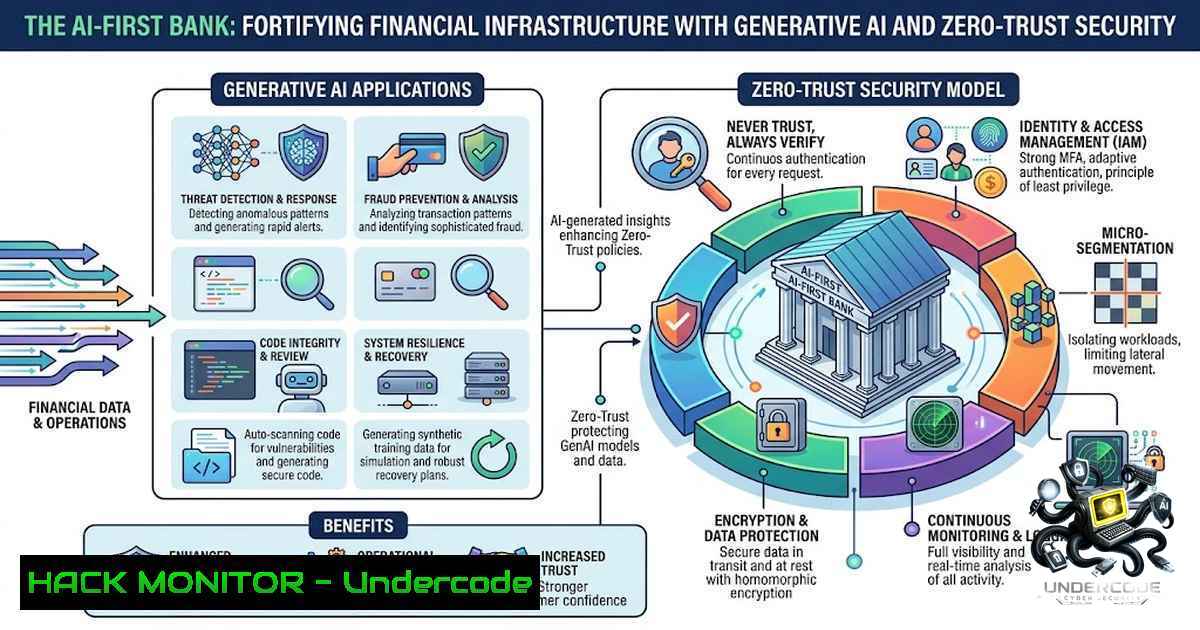
Introduction:
The integration of Generative AI (GenAI) into core financial operations is no longer experimental; it is a strategic imperative for operational efficiency and customer personalization. However, the banking sector’s strict compliance and security mandates require that these AI models be deployed within hardened, zero-trust frameworks to prevent data leakage and adversarial attacks. This article dissects the technical infrastructure required to deploy GenAI securely in banking, leveraging insights from the CIB Egypt Summer Internship Program 2026, and provides actionable command-line and configuration guides for IT and cybersecurity professionals.
Learning Objectives:
- Understand the intersection of Generative AI, data analytics, and cybersecurity within the context of retail and digital banking.
- Master the configuration of secure API gateways and encryption protocols for AI model endpoints.
- Implement Linux and Windows-based hardening techniques to protect AI data pipelines from injection and exfiltration threats.
- Learn to apply Zero-Trust Architecture (ZTA) principles to AI-driven decision-making systems.
You Should Know:
- Securing the GenAI Model Pipeline: API Gateways and Input Sanitization
The core of modern digital banking relies on APIs that interface with GenAI models for tasks like customer service chatbots and fraud detection. Without rigorous input sanitization, these endpoints are vulnerable to Prompt Injection attacks, where malicious inputs force the model to ignore system prompts and expose backend data.
To secure this pipeline, you must deploy an API gateway that acts as a reverse proxy, inspecting and sanitizing all requests before they reach the model. Here is a step-by-step guide to setting up a basic secure API gateway using NGINX on Linux with rate limiting and header validation.
Step-by-Step Guide:
1. Install NGINX: On Ubuntu/Debian, run:
`sudo apt update && sudo apt install nginx -y`
2. Configure Rate Limiting: Edit the `/etc/nginx/nginx.conf` file to define a zone for limiting requests:
limit_req_zone $binary_remote_addr zone=ai_zone:10m rate=5r/s;
3. Set Up the Virtual Host: In your site configuration (/etc/nginx/sites-available/ai-gateway), add a location block that proxies to your AI model server (e.g., localhost:8000) while enforcing the rate limit and stripping unwanted headers:
location /v1/chat/ {
limit_req zone=ai_zone burst=10 nodelay;
proxy_pass http://localhost:8000;
proxy_set_header Host $host;
proxy_set_header X-Real-IP $remote_addr;
 Block dangerous headers
proxy_hide_header X-Forwarded-For;
}
4. Enable the Site: `sudo ln -s /etc/nginx/sites-available/ai-gateway /etc/nginx/sites-enabled/` and restart: sudo systemctl restart nginx.
5. Windows Equivalent (IIS): For Windows environments using IIS, you can use the URL Rewrite module to create rules that block requests containing malicious patterns. Use `%{REQUEST_URI}` and `%{QUERY_STRING}` to match against regex patterns for SQL or command injection attempts before they hit the application layer.
- Data Encryption in Transit and at Rest for AI Training Sets
AI models are only as good as their data, but in banking, that data includes PII and transaction histories. Regulatory frameworks (e.g., GDPR, CBE regulations) mandate AES-256 encryption for data at rest and TLS 1.3 for data in transit. Beyond the standard, you must secure the data lakes used for fine-tuning GenAI models.
Step-by-Step Guide for Linux (LUKS and OpenSSL):
- Encrypt the Data Partition: Use LUKS to encrypt the volume housing the AI training data.
`sudo cryptsetup luksFormat /dev/sdb1` (Replace /dev/sdb1 with your data drive).
`sudo cryptsetup open /dev/sdb1 encrypted_data`
`sudo mkfs.ext4 /dev/mapper/encrypted_data`
`sudo mount /dev/mapper/encrypted_data /mnt/secure_data`
- Encrypt Individual Files: For granular control, use OpenSSL to encrypt CSV or Parquet files before transfer.
`openssl enc -aes-256-cbc -salt -in raw_training.csv -out encrypted_training.enc -pass file:./secure_key.bin`
3. Decrypt for Batch Processing: Run a decryption script that loads the key from a Hardware Security Module (HSM) rather than a local file.
`openssl enc -d -aes-256-cbc -in encrypted_training.enc -out decrypted_training.csv -pass file:/hsm/keyfile`
4. Windows (BitLocker and PowerShell): Enable BitLocker on the drive containing the AI datasets usingManage-bde -on C: -RecoveryPassword. For file-level encryption, use the `Protect-CmsMessage` cmdlet in PowerShell to encrypt files using certificate-based public key encryption.
3. Implementing Zero-Trust Architecture for AI Decision Engines
GenAI models often require access to core banking systems to make decisions (e.g., loan approvals, credit limits). Zero-Trust means never trusting the network perimeter. Every request from the AI engine must be authenticated and authorized in real-time. This involves implementing mutual TLS (mTLS) and short-lived JWT tokens.
Step-by-Step Guide for Linux and Kubernetes:
- Generate Certificates: Use OpenSSL to create a Certificate Authority (CA) and issue client/server certificates.
`openssl req -x509 -1ewkey rsa:4096 -keyout ca-key.pem -out ca-cert.pem -days 365`
`openssl req -1ewkey rsa:4096 -keyout client-key.pem -out client-req.pem` (Sign with CA). - Configure NGINX for mTLS: In the NGINX config, add:
ssl_client_certificate /etc/nginx/ca-cert.pem;
ssl_verify_client on;
- JWT Validation: Implement an authentication sidecar (e.g., using Istio in Kubernetes) that validates JWT tokens. A simple `curl` test to check token validity:
`curl -H “Authorization: Bearer” https://ai-service.internal.bank/v1/predict`
4. Windows Server (Active Directory): Integrate the AI service with Active Directory to use Kerberos authentication for Windows Integrated Security, ensuring that service accounts have the least privilege necessary via Group Policy Objects (GPOs).4. Hardening the Cloud Infrastructure for AI Workloads
Most modern banks utilize hybrid cloud models. Hardening the cloud environment involves configuring Security Groups (AWS) or Network Security Groups (Azure) to restrict access to AI model endpoints strictly. Additionally, implement CloudTrail or Azure Monitor to log all API calls for forensic analysis.
Step-by-Step Guide for AWS CLI:
1. Restrict Inbound Traffic: Update security groups to allow only specific VPC CIDR blocks.
`aws ec2 authorize-security-group-ingress –group-id sg-12345 –protocol tcp –port 443 –cidr 10.0.0.0/16` - Enable S3 Server-Side Encryption: Enforce encryption for the S3 buckets storing training data.
`aws s3 put-bucket-encryption –bucket ai-training-data –server-side-encryption-configuration ‘{“Rules”: [{“ApplyServerSideEncryptionByDefault”: {“SSEAlgorithm”: “AES256”}}]}’`
3. Windows Azure CLI: For Azure Blob Storage, use the Azure CLI to enforce TLS 1.2.
`az storage account update –1ame aistorageaccount –resource-group AI_RG –min-tls-version TLS1_2`
5. Vulnerability Mitigation: Adversarial AI Defenses
GenAI models are susceptible to adversarial attacks where slight perturbations in input data cause false outputs (e.g., misclassifying a fraudulent transaction as legitimate). Mitigation requires differential privacy and adversarial training. While the training is code-heavy, the operational security requires monitoring output confidence scores.
Step-by-Step Guide for Monitoring (Linux):
- Log Output Confidence: Use `jq` to parse JSON logs and flag low-confidence outputs.
`tail -f /var/log/ai_predictions.log | jq ‘select(.confidence < 0.75)' | mail -s "Low Confidence Alert" [email protected]` 2. Windows PowerShell: Use `Select-String` to filter event logs. `Get-Content -Path "C:\AI\Logs\.log" | Select-String "confidence": | Where-Object { $_ -match "0\.[0-6]" }`
What Undercode Say:
- Key Takeaway 1: The future of banking security lies in securing the “data supply chain” of AI; vulnerabilities will shift from network ports to model weights and training datasets.
- Key Takeaway 2: Automation is the ultimate security ally—infrastructure-as-code and automated vulnerability scanning for AI libraries (like PyTorch and TensorFlow) are non-1egotiable for compliance.
Analysis:
The internship insights from CIB Egypt highlight a critical transition: banks are moving from merely “using” AI to “living” AI. This requires a shift in security mindsets. The traditional perimeter is dead; now, the perimeter is the identity of the user and the integrity of the data fed to the AI. Undercode emphasizes that the technical controls listed above—mTLS, encryption, and sanitization—are just starting points. The real challenge is maintaining continuous monitoring and incident response plans tailored to AI drift. As GenAI becomes deeply embedded in retail banking, the attack surface expands exponentially. Security teams must now train in prompt engineering forensics and data poisoning detection. The “open to work” status of the intern suggests a hungry talent pool, but the industry needs professionals who understand both the math of attention mechanisms and the syntax of firewall rules. The synthesis of data analytics and cybersecurity is not just a buzzword; it is the bedrock of the future-of-finance.
Prediction:
- +1 A wave of “AI Security Engineers” will emerge, commanding premium salaries, driving a new niche in cybersecurity certifications.
- -1 In the next 2-3 years, we will witness the first major banking breach caused by a successful adversarial attack on a GenAI model, leading to regulatory overhauls.
- +1 The adoption of Homomorphic Encryption (allowing computation on encrypted data) will become a requirement for training AI in regulated cloud environments.
- -1 Legacy banks relying on outdated 2FA for internal AI services will suffer significant insider-threat incidents.
▶️ Related Video (84% Match):
🎯Let’s Practice For Free:
🎓 Live Courses & Certifications:
Join Undercode Academy for Verified Certifications
🚀 Request a Custom Project:
Secure, high-velocity infrastructure and disruptive technological engineering. Contact our engineering team for high-tier development and proprietary systems:
[email protected]
💎 Smart Architecture | 🛡️ Secure by Design | ⭐ Trusted by Thousands
IT/Security Reporter URL:
Reported By: Ahmed Osama – Hackers Feeds
Extra Hub: Undercode MoN
Basic Verification: Pass ✅


