Listen to this Post
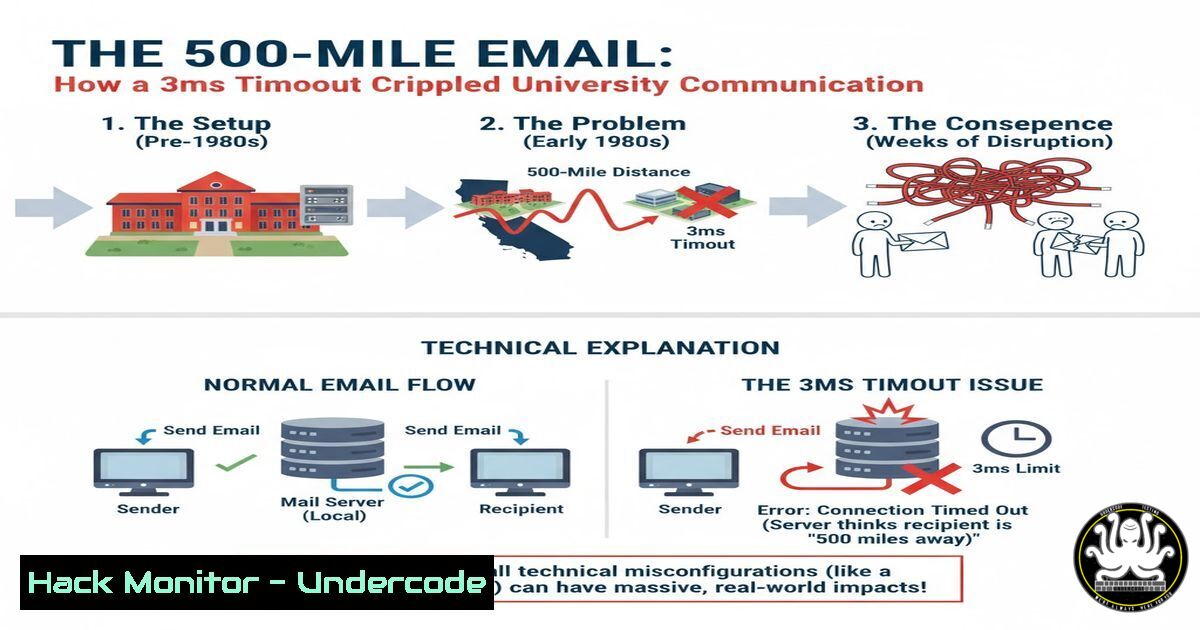
Introduction:
In the mid-1990s, a university’s statistics department found itself unable to send emails beyond a 500-mile radius. This true story, experienced by sysadmin Trey Harris, is a classic tale of how a seemingly insignificant technical misconfiguration can have bizarre and far-reaching consequences, highlighting the critical importance of version control and understanding underlying system dependencies in IT infrastructure.
Learning Objectives:
- Understand how default configuration values in legacy software can introduce critical failures.
- Learn the importance of comprehensive system audits after patches or upgrades.
- Grasp the relationship between network latency, physical distance, and application timeouts.
You Should Know:
1. The Perils of Sendmail Version Mismatch
The core of the 500-mile email issue was a version downgrade of the Sendmail mail transfer agent (MTA). A system patch reverted Sendmail 8 to Sendmail 5. The newer `sendmail.cf` configuration file contained directives unknown to the older binary. When Sendmail 5 encountered these unrecognized options, it ignored them, leaving critical parameters with an effective value of zero.
2. The Critical `Timeout` Configuration Directive
One of the zeroed-out settings was the connection timeout. In Sendmail 8, this is often controlled by the `Timeout` option in the `sendmail.cf` file. A zero value caused the connection attempt to abort after only 3 milliseconds. On a fast, switched network, this was enough time for a packet to travel roughly 500 miles and back at the speed of light, but no further.
3. Diagnosing SMTP Connection Issues with `telnet`
A fundamental step in diagnosing email delivery problems is to test the Simple Mail Transfer Protocol (SMTP) connection manually. Using `telnet` to connect to the SMTP port (25) allows an administrator to see the server’s banner and interact with the service directly, which is how the incorrect “SunOS Sendmail” banner was discovered.
`telnet mail.example.com 25`
Step 1: Open a terminal or command prompt.
Step 2: Type the command telnet [bash] 25, replacing `[bash]` with the target mail server.
Step 3: A successful connection will display the SMTP server banner, revealing the software and version. This can immediately identify version mismatches or unexpected services.
4. Comparing Configuration Files with `diff`
When a configuration file is suspected, comparing it against a known-good baseline is essential. The `diff` command is the primary tool for this on Unix-like systems, showing the precise differences between two files.
`diff /etc/mail/sendmail.cf /home/trey/sendmail.cf.backup`
Step 1: Use the `diff` command followed by the path to the two files you wish to compare.
Step 2: The output will highlight lines that are different. If no output is produced, the files are identical.
Step 3: In the 500-mile case, the files were the same, correctly pointing the investigation toward the binary interpreting the file, not the file itself.
5. Network Latency and the Speed of Light
The problem was only possible because of the network’s low latency. The time for a network packet to travel 500 miles and back at the speed of light is approximately 5.4 milliseconds. The 3ms timeout was less than this round-trip time, causing connections to fail. This can be approximated using tools like `ping` to measure latency.
`ping -c 10 boston.example.com`
Step 1: The `ping` command sends ICMP echo requests to a host.
Step 2: The `-c 10` flag sends 10 packets.
Step 3: The output shows the round-trip time (rtt) min/avg/max/mdev. An average rtt of over 3ms to a destination 500+ miles away would confirm the timeout was the bottleneck.
6. Auditing Software Versions Post-Upgrade
After any system upgrade, a formal audit of critical service versions must be performed. This prevents “dependency rot” and configuration drift.
`sendmail -d0.1 -bv root | grep Version`
`apache2 -v`
`nginx -v`
`ssh -V`
`python –version`
`java -version`
Step 1: Create a checklist of all critical services and their expected versions.
Step 2: Run the appropriate version query command for each service.
Step 3: Document the results and investigate any discrepancies from the baseline.
7. Modern Application Timeout Hardening
Modern applications and cloud services have more robust, but equally critical, timeout settings. Misconfigurations here can lead to application instability or vulnerability to Denial-of-Service (DoS) attacks.
Nginx Web Server:
`keepalive_timeout 75s; client_body_timeout 12s; client_header_timeout 12s; send_timeout 60s;`
Step 1: Edit your Nginx configuration file (e.g., /etc/nginx/nginx.conf).
Step 2: Set appropriate values in the `http` or `server` block to prevent resource exhaustion from slow clients.
Step 3: Test the configuration with `nginx -t` and reload with systemctl reload nginx.
AWS Application Load Balancer (CLI):
`aws elbv2 modify-load-balancer-attributes –load-balancer-arn [bash] –attributes Key=idle_timeout.timeout_seconds,Value=60`
Step 1: Ensure you have the AWS CLI installed and configured.
Step 2: Replace `[bash]` with your load balancer’s ARN.
Step 3: This command sets the idle connection timeout to 60 seconds, balancing resource usage and client compatibility.
Database Connection Pool (Python/Psycopg2):
`import psycopg2
from psycopg2 import pool
connection_pool = psycopg2.pool.SimpleConnectionPool(1, 20, user=’…’, password=’…’, host=’…’, database=’…’, connect_timeout=10)`
Step 1: When creating a connection pool, explicitly set the `connect_timeout` parameter.
Step 2: This ensures the application does not hang indefinitely if the database becomes unreachable.
Step 3: Combine this with statement timeouts for full query lifecycle control.
What Undercode Say:
- Cascading Failures Are Inevitable: A minor change in one system layer (OS upgrade) can trigger a catastrophic failure in another (email delivery) due to hidden dependencies. Modern microservices and cloud architectures amplify this risk exponentially.
- The Map is Not the Territory: The statistics department had a accurate map of the problem, but it described a symptom, not the root cause. In cybersecurity, we often see attackers’ “maps” (IOCs) without understanding their “territory” (TTPs), leading to ineffective defenses.
This case is a masterclass in systemic thinking. The admin didn’t just fix the config; he understood the physics of the network, the software’s version history, and the consultant’s actions to form a complete picture. In today’s complex environments, this holistic approach is not just beneficial—it’s mandatory for resilience. The failure wasn’t just a bug; it was a failure of the change management process to account for service interdependencies.
Prediction:
The fundamental lesson of the 500-mile email will replay itself with increasing severity in the age of AI and hyper-distributed systems. We will see AI-driven operations (AIOps) automatically applying patches or reconfiguring services, and without robust, human-understandable dependency graphs and simulation environments, these systems will create “AI-scale” anomalies. Imagine an AI optimizing a global CDN’s caching rules, inadvertently introducing a cascading failure that makes a service geographically unavailable based on a misinterpreted latency threshold, creating a digital “Bermuda Triangle” dictated by machine logic. The future of system administration and cybersecurity lies in building guardrails and observability tools that can anticipate and diagnose these non-intuitive, multi-variable failures before they escalate.
🎯Let’s Practice For Free:
IT/Security Reporter URL:
Reported By: Hakluke My – Hackers Feeds
Extra Hub: Undercode MoN
Basic Verification: Pass ✅


