
Listen to this Post
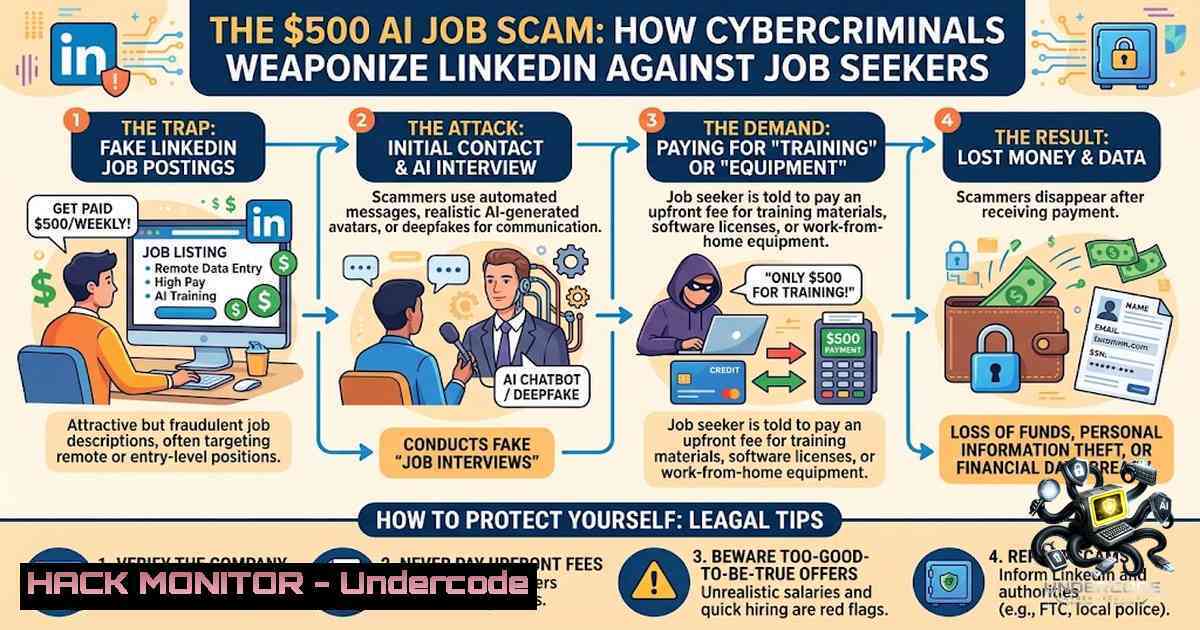
Introduction:
The convergence of AI-powered social engineering and professional networking platforms has created a perfect storm for cybercriminals. Job seekers, already vulnerable in a competitive market, are now being systematically targeted by scammers who clone executive profiles, craft error-free AI-generated pitches, and deploy 21-point instruction sets to extort money and harvest sensitive data. A recent incident where a job seeker received a $500 invoice for a job listing he never posted—accompanied by an AI-generated checklist of demands—exposes how threat actors are weaponizing professional desperation at an industrial scale.
Learning Objectives & Secrets:
- Objective 1: Identify AI-Generated Job Scams – Learn to distinguish between legitimate opportunities and AI-fabricated listings by analyzing linguistic patterns, urgency cues, and profile inconsistencies.
- Objective 2 Secret Tip: Leverage OSINT for Recruiter Verification – Before engaging, run passive reconnaissance on recruiter profiles using Google dorks and LinkedIn’s own data to uncover impersonation attempts.
- Objective 3 Secret Tip: Implement Zero-Trust Job Application Workflows – Treat every inbound recruiting message as potentially malicious until verified through out-of-band communication channels.
You Should Know:
- Anatomy of the AI-Powered Job Scam Kill Chain
Modern job scams follow a structured attack lifecycle that mirrors sophisticated phishing campaigns. Threat actors first perform reconnaissance on targets, scraping data from past breaches, public social media profiles, and dark web purchases. They then create cloned LinkedIn profiles—copying photos, job titles, and even connections—to establish credibility. Using AI tools, they generate personalized, error-free pitches that once betrayed themselves with typos and awkward phrasing.
The scam escalates when the victim is asked to move conversations off-platform to WhatsApp, Telegram, or Signal—a red flag legitimate recruiters rarely request. The attacker then deploys a multi-step instruction set (sometimes 21 points or more) designed to confuse, overwhelm, and pressure the victim into compliance. This psychological tactic exploits cognitive overload, making victims more likely to pay fake invoices or share sensitive information without proper verification.
Step‑by‑step guide to recognizing the kill chain:
 Linux - Extract and analyze email headers from suspicious recruiter messages
grep -E "Received: from|Return-Path|Reply-To" suspicious_email.eml

Windows PowerShell - Check domain reputation
Resolve-DnsName linkedin-security[.]com -Type A  Look for suspicious TLDs
Test-1etConnection -ComputerName fraudulent-domain[.]xyz -Port 443
2. Digital Forensics: Investigating Suspicious Recruiter Profiles
When a recruiter reaches out with an opportunity that seems too good to be true, conduct a digital investigation before responding. Over one-third (36%) of recruiters report being impersonated, and 67% say job scams are eroding trust with candidates. Fake profiles often have limited activity, generic or AI-generated photos, and no verifiable contact information.
Step‑by‑step OSINT verification guide:
- Reverse image search the recruiter’s profile photo using Google Images or TinEye—AI-generated faces will return zero matches.
- Check profile creation date and activity history—legitimate recruiters have years of engagement.
- Cross-reference connections—look for mutual connections you can privately verify.
- Search the company domain on WHOIS to confirm legitimate registration.
 Linux - WHOIS domain investigation
whois company-1ame.com | grep -E "Creation Date|Registrar|Registrant Email"

Check for domain age discrepancies (scam domains are often recently registered)
curl -s https://api.securitytrails.com/v1/domain/company-1ame.com | jq '.registrant_name'

Windows - Nslookup to verify mail server alignment with legitimate company
nslookup -type=MX company-1ame.com
3. Email Authentication and Invoice Fraud Detection
Fake invoices are a primary monetization vector in job scams. Attackers send convincing invoices for “equipment,” “background checks,” or “CV services,” demanding payment via Zelle, PayPal, or cryptocurrency. These invoices often originate from spoofed or lookalike domains (e.g., `linkedin-security[.]com` vs. linkedin.com).
Step‑by‑step email authentication verification:
- Check SPF (Sender Policy Framework) records to confirm the email originated from authorized servers.
- Verify DKIM (DomainKeys Identified Mail) signatures to ensure message integrity.
- Examine DMARC (Domain-based Message Authentication) policies to see how the domain handles unauthenticated emails.
 Linux - Check SPF record
dig TXT company-domain.com | grep "spf"

Verify DKIM selector (replace selector with domain's published selector)
dig TXT selector._domainkey.company-domain.com

Windows PowerShell - Comprehensive email header analysis
$headers = Get-Content suspicious_email.txt
$headers | Select-String "Authentication-Results|DKIM|SPF|DMARC"

Python script to validate invoice PDF metadata for forgery indicators
from PyPDF2 import PdfReader
reader = PdfReader("invoice.pdf")
metadata = reader.metadata
print(metadata.get("/Creator"), metadata.get("/Producer"))
- API Security: Protecting Against Credential Harvesting Through Fake Job Portals
Sophisticated scammers now deploy fake job application portals that mimic legitimate company career pages. These sites harvest credentials, resumes, and PII through API endpoints that silently exfiltrate data. Some campaigns even use clipboard hijacking to push malicious payloads during “technical interviews”.
Step‑by‑step API and portal security assessment:
- Inspect network traffic using browser developer tools when interacting with job application portals.
- Check for suspicious JavaScript that exfiltrates form data to third-party domains.
- Verify SSL certificates—scam sites often use expired or self-signed certificates.
 Linux - Monitor network connections during job portal interaction
sudo tcpdump -i any -1 port 443 -v | grep -E "application|submit"

Use curl to inspect response headers for suspicious redirects
curl -I https://suspicious-job-portal[.]com/apply

Windows - Check certificate chain
certutil -verify -urlfetch https://suspicious-job-portal[.]com

Browser console JavaScript to detect data exfiltration
// Run in DevTools Console to monitor fetch/XHR to unknown domains
const originalFetch = window.fetch;
window.fetch = function(...args) {
console.warn("Fetch to:", args[bash]);
return originalFetch.apply(this, args);
};
5. Cloud Hardening for Job Seeker Data Protection
Job seekers store sensitive documents (resumes, ID scans, tax forms) across cloud platforms. Scammers who compromise one account can pivot to others through credential reuse. Implementing proper cloud hygiene is essential.
Step‑by‑step cloud security configuration:
- Enable MFA on all job-related accounts (LinkedIn, email, cloud storage).
- Review and revoke OAuth tokens and third-party app access.
- Implement geofencing to block access from high-risk regions.
 AWS CLI - Review IAM access keys for unusual activity
aws iam list-access-keys --user-1ame your-username
aws iam get-access-key-last-used --access-key-id AKIA...

Check S3 bucket permissions for accidental public exposure
aws s3api get-bucket-acl --bucket your-resume-bucket
aws s3api get-bucket-policy --bucket your-resume-bucket

Google Cloud - Audit IAM permissions
gcloud projects get-iam-policy your-project-id --format=json | jq '.bindings[] | select(.role | contains("editor"))'

Azure - Check for suspicious sign-in logs
az ad user show --id your-email --query "signInActivity"
6. Vulnerability Exploitation and Mitigation: The Human Firewall
The most critical vulnerability in job scams isn’t technical—it’s human psychology. Scammers exploit desperation, hope, and cognitive biases. Reports of employment scams doubled in 2025, with losses reaching $501 million by 2024, and AI-enabled scams delivering 4.5 times the profit of traditional methods. Nearly 80% of these scams target low-skill roles with inflated pay and vague requirements.
Step‑by‑step psychological defense implementation:
- Implement a “cooling-off” period—never respond to urgent payment requests within 24 hours.
- Use out-of-band verification—contact the company through official channels found on their website, not through links provided in the message.
- Maintain a personal threat intelligence feed—follow cybersecurity blogs and LinkedIn safety updates to stay aware of emerging tactics.
 Linux - Set up automated alerting for suspicious LinkedIn messages using Python
 Monitor for keywords indicating scams
grep -E "payment|Zelle|PayPal|crypto|urgent|immediately|background check" messages.log

Windows - Create a PowerShell script to flag high-risk email patterns
Get-Content emails.txt | Select-String "upfront|fee|processing|equipment" -Context 2,2
What Undercode Say:
- Key Takeaway 1: The “Open to Work” frame, while valuable for visibility, has become an attack surface that scammers actively target. Job seekers must balance professional visibility with operational security.
-
Key Takeaway 2: Never pay upfront fees for a job—period. Legitimate employers never request money from candidates for equipment, training, visas, or background checks. Every such request is a definitive scam indicator.
The $500 invoice scam represents a broader trend where cybercriminals are industrializing job fraud. The 21-point AI instruction set is particularly insidious—it’s designed to overwhelm victims with complexity, making them more likely to comply rather than question. This mirrors advanced persistent threat (APT) tactics but deployed against individual job seekers rather than corporations. The psychological impact is severe: victims lose not just money but trust in the job market itself. LinkedIn and other platforms must adopt AI-driven detection systems to counter AI-generated scams, but individual vigilance remains the first and most critical line of defense.
Prediction:
- -1 Job scams will continue to rise as AI tools become more accessible and sophisticated, with losses potentially exceeding $1 billion annually within the next 18 months.
-
-1 Deepfake video interviews will emerge as the next frontier, making it nearly impossible to distinguish real recruiters from AI-generated impostors without biometric verification.
-
+1 Increased awareness and cybersecurity education will lead to widespread adoption of verification protocols, making job scams harder to execute successfully.
-
+1 Platform providers like LinkedIn will be forced to implement mandatory identity verification and AI-content labeling, creating a safer ecosystem for legitimate job seekers.
▶️ Related Video (82% Match):
https://www.youtube.com/watch?v=5U1we-rwuGM
🎯Let’s Practice For Free:
🎓 Live Courses & Certifications:
Join Undercode Academy for Verified Certifications
🚀 Request a Custom Project:
Secure, high-velocity infrastructure and disruptive technological engineering. Contact our engineering team for high-tier development and proprietary systems:
[email protected]
💎 Smart Architecture | 🛡️ Secure by Design | ⭐ Trusted by Thousands
IT/Security Reporter URL:
Reported By: https://lnkd.in/p/dkBSJY42 – Hackers Feeds
Extra Hub: Undercode MoN
Basic Verification: Pass ✅


