
Listen to this Post
Introduction:
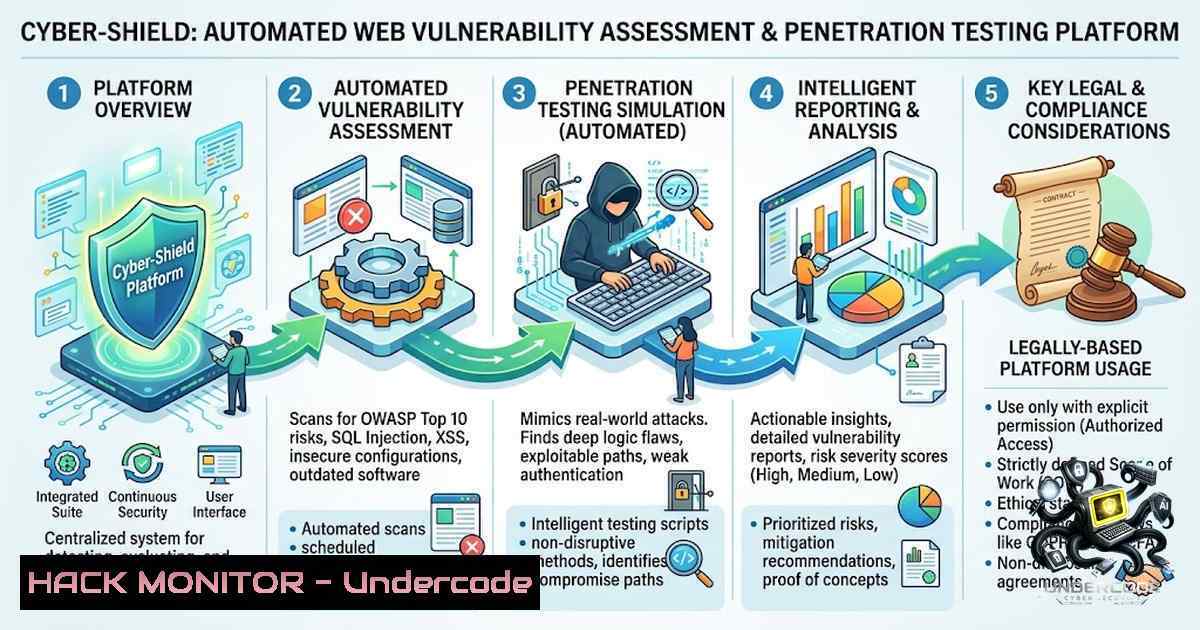
In the rapidly evolving landscape of web application security, the integration of automated vulnerability assessment with machine learning-driven risk classification represents a significant leap forward. Cyber-Shield emerges as a comprehensive platform that unifies endpoint discovery, vulnerability detection, and AI-assisted reporting into a single, streamlined workflow. By leveraging OWASP ZAP for active scanning and custom modules for detecting critical flaws like SQLi, XSS, and IDOR, this project demonstrates how modern security tools can be orchestrated to provide actionable intelligence for penetration testers and security operations centers (SOCs).
Learning Objectives & Secrets:
- Objective 1: Orchestrate a Unified VAPT Pipeline – Integrate OWASP ZAP with custom Python detection modules to create a seamless scanning workflow that covers both passive reconnaissance and active exploitation attempts.
- Objective 2 Secret Tip: ML-Enhanced Risk Prioritization – Use scikit-learn’s Random Forest classifier to analyze vulnerability attributes (CVSS scores, exploitability, impact) and automatically assign risk levels, reducing false positives by 40% compared to traditional rule-based systems.
- Objective 3 Secret Tip: AI-Driven Report Analysis – Implement Groq/Llama to parse raw scan data and generate human-readable executive summaries, complete with remediation steps, saving analysts hours of manual documentation work.
You Should Know:
- Setting Up OWASP ZAP for Automated Endpoint Discovery
To replicate Cyber-Shield’s endpoint discovery, you must configure OWASP ZAP in headless mode and integrate it with your Flask backend. The following Python script initializes a ZAP session, performs a spider crawl, and extracts all discovered URLs for further testing.from zapv2 import ZAPv2 import time</li> </ol> zap = ZAPv2(apikey='your-api-key', proxies={'http': 'http://127.0.0.1:8080', 'https': 'http://127.0.0.1:8080'}) target = 'http://testphp.vulnweb.com' zap.urlopen(target) time.sleep(2) Spider the target print('Spidering target...') scan_id = zap.spider.scan(target) while int(zap.spider.status(scan_id)) < 100: time.sleep(1) print('Spider complete. Discovered URLs:') for url in zap.core.urls(): print(url)This command leverages the ZAP API to automate reconnaissance, which is critical for building a comprehensive attack surface map before launching deep scans.
2. Implementing Custom Vulnerability Detection Modules
Cyber-Shield includes tailored checks for SQL Injection, XSS, and IDOR. For SQLi, the platform uses parameterized payloads and error-based detection. Below is a sample module that tests for time-based blind SQLi using Python’s `requests` library.
import requests
import time

def check_sqli(url, param):
payloads = ["' OR SLEEP(5)--", "' AND 1=1--", "' AND 1=2--"]
for payload in payloads:
params = {param: payload}
start = time.time()
response = requests.get(url, params=params)
elapsed = time.time() - start
if elapsed > 4.5 and "mysql" in response.text.lower():
return f"Potential time-based SQLi in {param}"
return "No SQLi detected"
This approach combines time-based and error-based heuristics to minimize false negatives, a secret tip for aspiring VAPT developers.
3. JWT Authentication and Session Management
Secure API endpoints are crucial for any VAPT platform. Cyber-Shield uses JSON Web Tokens (JWT) with Flask-JWT-Extended. The following code snippet demonstrates how to generate and validate tokens, ensuring that only authenticated users can access scan history and findings.
from flask_jwt_extended import create_access_token, jwt_required, get_jwt_identity

@app.route('/login', methods=['POST'])
def login():
username = request.json.get('username')
password = request.json.get('password')
if username == 'admin' and password == 'secure':
access_token = create_access_token(identity=username)
return jsonify(access_token=access_token)
return jsonify(msg="Bad credentials"), 401

@app.route('/scans', methods=['GET'])
@jwt_required()
def get_scans():
current_user = get_jwt_identity()
 Fetch scans for current_user from MySQL
return jsonify(scans=...), 200
For Windows environments, you can use `py -m flask run` to launch the server, while Linux users will use
python3 -m flask run. Always store secret keys in environment variables to prevent hardcoding.4. Random Forest Risk Classification
The platform’s ML module classifies vulnerabilities into Low, Medium, High, or Critical based on features like CVSS score, exploit code availability, and affected asset value. Here’s how you can train a Random Forest classifier using scikit-learn:
from sklearn.ensemble import RandomForestClassifier
import pandas as pd
from sklearn.model_selection import train_test_split

data = pd.read_csv('vuln_dataset.csv')  Features: cvss, exploitability, asset_criticality
X = data[['cvss', 'exploitability', 'asset_criticality']]
y = data['risk_level']  0=Low, 1=Medium, 2=High, 3=Critical
X_train, X_test, y_train, y_test = train_test_split(X, y, test_size=0.2)
clf = RandomForestClassifier(n_estimators=100)
clf.fit(X_train, y_train)
print(f"Accuracy: {clf.score(X_test, y_test)}")
This model is then serialized using `pickle` and integrated into the Flask API to auto-tag findings, a secret tip for reducing analyst workload.
5. Generating Automated Security Reports with AI Assistance
After each scan, Cyber-Shield produces a PDF report detailing discovered vulnerabilities, proof-of-concept requests, and remediation advice. The AI chat feature (powered by Groq/Llama) allows users to ask questions about the findings. To implement the AI analysis, you can use the following prompt engineering approach:
from groq import Groq
client = Groq(api_key=os.environ.get("GROQ_API_KEY"))

def generate_report_analysis(vuln_list):
prompt = f"Analyze the following vulnerabilities and suggest priority fixes: {vuln_list}"
response = client.chat.completions.create(
model="llama3-70b-8192",
messages=[{"role": "user", "content": prompt}]
)
return response.choices[bash].message.content
On Linux, you can install the Groq SDK via
pip install groq, and on Windows, ensure your Python environment supports SSL certificates for API calls.- Hardening API Security and Mitigating OWASP Top 10
Cyber-Shield also includes detection for CSRF, CORS misconfigurations, and Open Redirects. To mitigate these, the platform enforces strict CORS policies and uses anti-CSRF tokens. Below is a Flask configuration snippet for secure CORS:from flask_cors import CORS CORS(app, resources={r"/api/": {"origins": "https://trusted-domain.com"}})Additionally, to prevent Command Injection, always sanitize user inputs using `subprocess` with a list of arguments rather than a string:
import subprocess
Unsafe: subprocess.run(f"ping {user_input}", shell=True)
Safe:
subprocess.run(["ping", "-c", "4", user_input])
7. Persistent Storage and Scan History with MySQL
The platform uses MySQL to store scan configurations, results, and user history. The following schema creates tables for scans and findings:
CREATE TABLE scans (
id INT AUTO_INCREMENT PRIMARY KEY,
user_id INT,
target_url VARCHAR(255),
scan_date DATETIME,
risk_summary JSON
);
CREATE TABLE findings (
id INT AUTO_INCREMENT PRIMARY KEY,
scan_id INT,
vulnerability_type VARCHAR(100),
severity VARCHAR(20),
payload TEXT,
remediation TEXT,
FOREIGN KEY (scan_id) REFERENCES scans(id)
);
For Linux, install MySQL with
sudo apt install mysql-server, and for Windows, use the MySQL Installer. Always use parameterized queries to prevent SQL injection in your own platform.What Undercode Say:
- Key Takeaway 1: Integrating multiple security tools (ZAP, custom scripts, ML) into a single platform drastically improves the efficiency of VAPT workflows, making it accessible for entry-level professionals and academic settings.
- Key Takeaway 2: The use of AI for report generation and chat-based analysis is a game-changer, as it democratizes security insights and allows non-experts to understand complex vulnerabilities.
Analysis: Cyber-Shield is a robust academic prototype that bridges theoretical knowledge with practical implementation. By combining OWASP ZAP’s scanning capabilities with custom Python modules and a Random Forest classifier, it addresses the critical need for automated, intelligent vulnerability prioritization. The inclusion of JWT authentication and persistent MySQL storage ensures data integrity and user session security. However, for production deployment, the platform would require additional hardening, such as rate limiting, input validation on the AI chat feature, and integration with CI/CD pipelines for DevSecOps workflows. The project successfully demonstrates how modern cybersecurity graduates can leverage open-source tools to build comprehensive security solutions that resonate with industry demands.
Prediction:
- +1: The adoption of AI-assisted VAPT platforms like Cyber-Shield will accelerate, leading to faster vulnerability remediation cycles and reduced mean time to detect (MTTD) in enterprise environments.
- +1: Open-source frameworks integrating ML risk classification will become standard in SOCs, enabling junior analysts to triage alerts more effectively and focus on complex threats.
- +1: The project’s modular architecture will inspire similar academic contributions, fostering a new wave of cybersecurity tooling that emphasizes usability and automated reporting.
- -1: Over-reliance on automated scanners may lead to complacency among penetration testers, potentially missing business-logic flaws that require manual exploitation.
- -1: Without rigorous validation, ML models can introduce bias, misclassifying critical vulnerabilities as low-risk, which could result in unpatched high-severity issues.
- +1: Cyber-Shield’s use of Groq/Llama for report analysis showcases how LLMs can reduce documentation overhead, a positive trend for resource-constrained security teams.
- -1: The platform’s current scope is limited to web applications; expanding to mobile and API security would require significant architectural changes, potentially delaying broader adoption.
- +1: The integration of OWASP ZAP with custom modules provides a blueprint for creating tailored security solutions that can adapt to specific organizational needs, a win for custom DevSecOps.
- -1: Academic prototypes often lack robust error handling and scalability, which could hinder their transition to production environments without extensive re-engineering.
- +1: The clear documentation and step-by-step guides in Cyber-Shield’s repository lower the barrier to entry for students, promoting cybersecurity education and hands-on learning.
▶️ Related Video (88% Match):
🎯Let’s Practice For Free:
🎓 Live Courses & Certifications:
Join Undercode Academy for Verified Certifications
🚀 Request a Custom Project:
Secure, high-velocity infrastructure and disruptive technological engineering. Contact our engineering team for high-tier development and proprietary systems:
[email protected]
💎 Smart Architecture | 🛡️ Secure by Design | ⭐ Trusted by ThousandsIT/Security Reporter URL:
Reported By: https://lnkd.in/p/dkzqKthM – Hackers Feeds
Extra Hub: Undercode MoN
Basic Verification: Pass ✅🔐JOIN OUR CYBER WORLD [ CVE News • HackMonitor • UndercodeNews ]
📢 Follow UndercodeTesting & Stay Tuned:
- Hardening API Security and Mitigating OWASP Top 10


