Listen to this Post
Introduction:
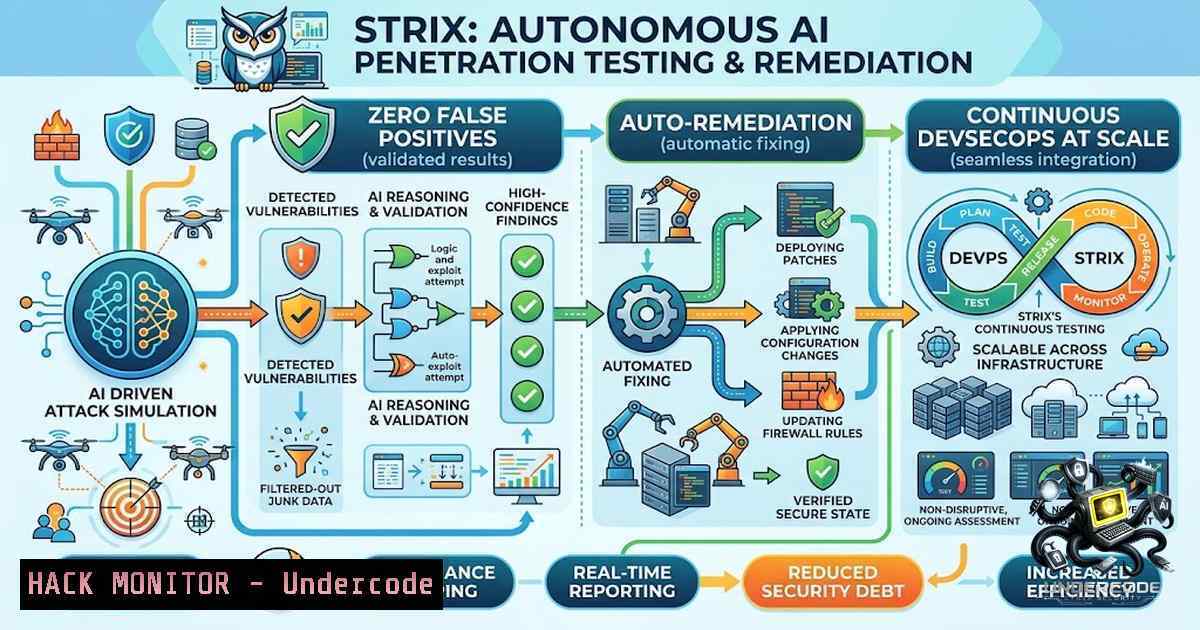
The modern software delivery lifecycle demands speed, but velocity without security is a liability. Traditional penetration testing is costly, slow, and often yields a flood of false positives that overwhelm development teams. Static Application Security Testing (SAST) and Dynamic Application Security Testing (DAST) tools, while useful, frequently flag issues that are not exploitable in context, wasting valuable engineering hours. Strix emerges as a paradigm shift: an open-source, AI-powered autonomous pentesting framework that deploys multi-agent teams to dynamically attack your applications, validate every finding with a working proof-of-concept (PoC), and even generate merge-ready patches. By combining a full hacker toolkit—including HTTP proxy, browser automation, terminal, and Python runtime—with sophisticated LLM orchestration, Strix delivers continuous, context-aware security testing that integrates directly into CI/CD pipelines, ensuring that vulnerable code never reaches production.
Learning Objectives:
- Understand the architecture and capabilities of Strix, including its multi-agent orchestration and full-spectrum vulnerability coverage across OWASP Top 10, IDOR, SSRF, and business logic flaws.
- Master the installation, configuration, and execution of Strix in both local development and CI/CD environments using CLI commands and GitHub Actions.
- Learn to leverage Strix’s auto-remediation features, interpret validated findings with reproduction steps, and integrate continuous pentesting into enterprise DevSecOps workflows.
You Should Know:
1. Installation and First Scan: Deploying Strix Locally
Strix is designed for developer-first experiences, requiring minimal setup to begin securing your applications. The installation process is a single command that fetches the latest binary and sets up the necessary sandbox environment. Strix runs inside a Docker container to ensure isolation and consistency, so Docker must be installed and running on your system.
Before initiating a scan, you must configure an LLM provider. Strix supports a wide range of models including OpenAI GPT-5.4, Anthropic Claude Sonnet 4.6, Google Gemini 3 Pro, and local models via Ollama or LMStudio. The LLM serves as the “brain” of the autonomous agents, driving their decision-making, exploit development, and reasoning capabilities.
Step-by-Step Guide:
- Install Strix: Open your terminal and execute the installation script. This command downloads and installs the Strix CLI.
curl -sSL https://strix.ai/install | bash
What this does: The script retrieves the latest Strix release from the official repository, installs it to a directory in your
PATH, and verifies the installation. -
Configure Your LLM Provider: Set the required environment variables to authenticate with your chosen AI model provider. For example, using OpenAI:
export STRIX_LLM="openai/gpt-5.4"
export LLM_API_KEY="your-api-key-here"
What this does: These variables tell Strix which model to use and provide the API key for authentication. Strix saves this configuration to `~/.strix/cli-config.json` so you don’t need to re-enter it on every run. For local models, you can set `LLM_API_BASE` to point to your local endpoint, e.g., `http://localhost:11434` for Ollama.
-
Run Your First Security Assessment: Point Strix at a target. This can be a local codebase, a GitHub repository URL, or a live web application.
strix --target ./your-app-directory
What this does: Strix initiates a comprehensive pentest. The first run automatically pulls the required Docker sandbox image, which provides a controlled environment for the agents to execute exploits safely. Results are saved to the `strix_runs/` directory. For a black-box assessment of a live application:
strix --target https://your-app.com
2. API and Multi-Target Testing: Beyond the Codebase
Modern applications are API-driven, and Strix excels at testing these interfaces. By providing an OpenAPI/Swagger specification or a Postman collection, Strix can map out every declared endpoint and test them systematically without relying on crawling, which may miss hidden or undocumented routes.
Step-by-Step Guide:
- API Testing with OpenAPI: Provide the spec file and the live base URL.
strix --target ./openapi.yaml --target https://api.your-app.com
What this does: Strix parses the OpenAPI definition to understand the API structure, including endpoints, parameters, and authentication requirements. It then targets the live base URL to execute tests against each endpoint, validating for issues like mass assignment, broken authentication, and injection flaws.
-
Postman Collection Integration: You can either export a collection file or pull it live from Postman using an API key.
export POSTMAN_API_KEY="PMAK-..."
strix --target postman://
What this does: The `postman://` URI instructs Strix to fetch the collection using the provided API key. You can also append a Postman environment ID to resolve variables like `{{baseUrl}}` automatically.
-
Multi-Target Scanning: Strix can test multiple targets simultaneously, such as a source code repository and its deployed production instance, to correlate findings.
strix -t https://github.com/org/repo -t https://your-app.com
What this does: This command launches a coordinated assessment across both the source code (for SAST-style analysis) and the live application (for DAST), providing a comprehensive view of the attack surface. Targets can also be loaded from a file using
--target-list ./targets.txt. -
CI/CD Integration: Blocking Vulnerable Code at the Source
Strix’s true power lies in its ability to integrate seamlessly into developer workflows, acting as a gatekeeper in the CI/CD pipeline. By scanning every pull request, Strix ensures that security is not an afterthought but a continuous, automated process. The tool automatically scopes quick reviews to changed files in PR runs, minimizing scan time while maximizing relevance.
Step-by-Step Guide:
- GitHub Actions Workflow: Create a `.github/workflows/strix-scan.yml` file in your repository.
name: strix-penetration-test
on:
pull_request:
jobs:
security-scan:
runs-on: ubuntu-latest
steps:</li>
</ol>

- uses: actions/checkout@v6
with:
fetch-depth: 0
- name: Install Strix
run: curl -sSL https://strix.ai/install | bash
- name: Run Strix
env:
STRIX_LLM: ${{ secrets.STRIX_LLM }}
LLM_API_KEY: ${{ secrets.LLM_API_KEY }}
run: strix -1 -t ./ --scan-mode quick
What this does: This workflow triggers on every pull request. The `actions/checkout@v6` with `fetch-depth: 0` ensures the full git history is available, which is necessary for Strix to determine the diff scope accurately. The `-1` flag runs Strix in headless, non-interactive mode—perfect for CI environments—and the `–scan-mode quick` focuses the scan on the changes introduced in the PR. If vulnerabilities are found, the CLI exits with a non-zero code, failing the build and preventing the merge.
- Blocking Vulnerable Deploys: The integration is designed to plug directly into your CI/CD pipeline, ensuring that vulnerable code never reaches production. Strix provides a merge-ready PR with auto-fix suggestions, allowing developers to review and merge the fix with a single click.
-
Validating Findings and Auto-Remediation: From Discovery to Fix
One of Strix’s most compelling features is its commitment to eliminating false positives. Every reported finding is accompanied by a step-by-step reproduction guide and a working PoC, demonstrating exactly how an attacker could exploit the vulnerability in your specific environment. Furthermore, Strix doesn’t just identify problems; it solves them.
Step-by-Step Guide:
- Reviewing Findings: After a scan, you can view the results in the local web dashboard.
strix view
What this does: This command starts a lightweight local server bound to `127.0.0.1` on a random port and opens your browser to a private, tokened link. The dashboard reads the run’s files directly from disk, with no cloud upload required. The UI provides an overview of the run status, a severity breakdown, detailed vulnerability information with reproduction steps, a live map of the multi-agent team’s activity, and the ability to steer the agents mid-run.
-
Auto-Fix and Validation: For identified vulnerabilities, Strix generates a security patch.
What this does: Strix’s auto-remediation engine proposes a code change, applies it, and then re-tests the application to confirm that the vulnerability is no longer exploitable. Once validated, it delivers a merge-ready pull request directly to your repository, streamlining the remediation process.
5. Multi-Agent Architecture and Enterprise Deployment
Strix is not a single AI but a coordinated team of specialized agents. This multi-agent system mimics a real red team, with agents dedicated to reconnaissance, exploitation, and post-exploitation, all collaborating and sharing discoveries. For enterprise environments, Strix offers self-hosted deployment options, allowing organizations to run the platform within their own VPC, on-premise, or even in air-gapped environments with complete control over data privacy and infrastructure. It is SOC 2 Type II and ISO 27001 compliant, with zero data retention policies ensuring source code is never stored or used for model training.
Step-by-Step Guide:
- Self-Hosted Deployment: Enterprise customers can deploy Strix in their own infrastructure.
What this does: This provides full control over the environment, ensuring compliance with internal security policies and data residency requirements. The platform can test internal networks and services that are not exposed to the public internet. -
Context-Aware Pentesting: Strix learns from your stack, architecture, and business logic.
What this does: The AI agents tailor their tests to your specific environment, moving beyond generic scanning to identify complex business logic flaws, race conditions, and workflow manipulations that traditional scanners miss. Over time, Strix learns from past findings and how you fixed them, continuously improving the accuracy and relevance of its tests.
What Undercode Say:
-
Key Takeaway 1: Strix represents a fundamental shift from reactive vulnerability scanning to proactive, continuous penetration testing. By integrating directly into the developer workflow and providing validated, actionable findings, it bridges the gap between security and development teams, fostering a true DevSecOps culture. The ability to auto-fix and re-test vulnerabilities reduces Mean Time To Remediation (MTTR) from weeks to minutes.
-
Key Takeaway 2: The open-source nature of Strix, combined with its support for local LLMs and self-hosted deployment, makes it accessible to organizations of all sizes while addressing enterprise concerns about data privacy and vendor lock-in. However, the power of autonomous AI agents also introduces new risks: the same tooling can be weaponized by adversaries if not properly secured. Organizations must ensure strict access controls and scope enforcement to prevent misuse.
Prediction:
-
+1 Strix and similar AI-driven pentesting tools will become the de facto standard for application security within the next 24 months. The automation of complex, multi-step exploits that previously required senior security consultants will democratize security testing, enabling startups and SMBs to achieve enterprise-grade security postures without prohibitive costs.
-
+1 The integration of autonomous pentesting into CI/CD pipelines will significantly reduce the prevalence of critical vulnerabilities in production. As the tools learn and adapt to specific codebases, the signal-to-1oise ratio will improve dramatically, eliminating the alert fatigue that plagues current SAST/DAST solutions.
-
-1 The adversarial use of these same AI agents poses a growing threat. As observed by Zenity Labs, threat actors are already weaponizing exposed LLM endpoints to deploy Strix against third-party targets. Organizations must prioritize securing their AI infrastructure and implementing robust monitoring to detect unauthorized agentic activity.
-
+1 The auto-remediation capabilities will evolve to handle increasingly complex vulnerabilities, potentially leading to the automation of entire security patch cycles. This will free security engineers to focus on strategic threat modeling and architecture reviews, rather than manual vulnerability triage and remediation.
▶️ Related Video (78% Match):
https://www.youtube.com/watch?v=4ZafFotzDkY
🎯Let’s Practice For Free:
🎓 Live Courses & Certifications:
Join Undercode Academy for Verified Certifications
🚀 Request a Custom Project:
Secure, high-velocity infrastructure and disruptive technological engineering. Contact our engineering team for high-tier development and proprietary systems:
[email protected]
💎 Smart Architecture | 🛡️ Secure by Design | ⭐ Trusted by ThousandsIT/Security Reporter URL:
Reported By: Your Typical – Hackers Feeds
Extra Hub: Undercode MoN
Basic Verification: Pass ✅🔐JOIN OUR CYBER WORLD [ CVE News • HackMonitor • UndercodeNews ]
📢 Follow UndercodeTesting & Stay Tuned:


