Listen to this Post
Introduction:
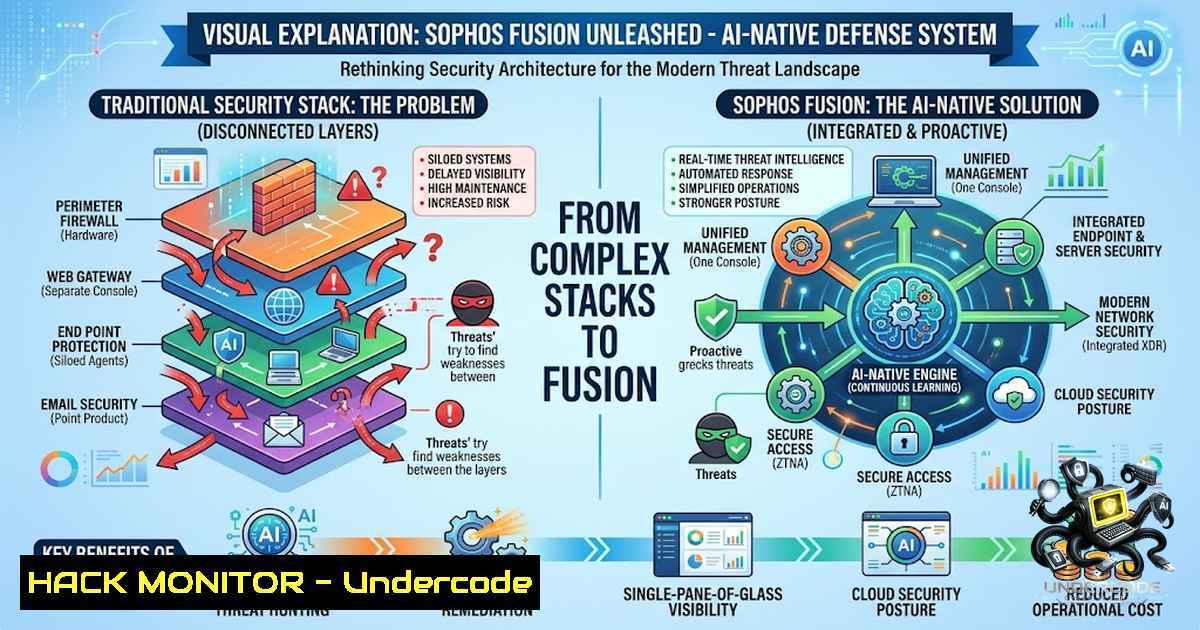
The cybersecurity industry has reached an inflection point. With AI-enabled attacks compressing the intrusion lifecycle from days to mere minutes, the traditional model of stacking 45+ disconnected security tools has become not just inefficient, but dangerously inadequate. Sophos Fusion emerges as the industry’s first complete AI-1ative cybersecurity defense system—a unified, open architecture where endpoint protection, XDR, next-gen SIEM, identity threat detection, and managed detection and response (MDR) operate as a single, coordinated organism rather than a collection of disjointed products. Built on a shared data layer that ingests signals from every control point in real time, Fusion leverages agentic AI to investigate and respond inside boundaries that human analysts set and continuously calibrate. The system already proves its efficacy at scale: 52 percent of cases are resolved entirely by AI, with an average time from alert to automated response of just 89 seconds.
Learning Objectives:
- Understand the architectural pillars of Sophos Fusion and how its shared data layer enables synchronized defense across endpoints, networks, email, cloud, and identity.
- Master the operational workflow to deploy, configure, and manage Fusion’s AI-1ative capabilities—including next-gen SIEM, MDR, and adaptive attack protection.
- Acquire practical Linux and Windows commands, API security configurations, and cloud hardening techniques to harden environments against AI-speed threats.
You Should Know:
- The Fusion Architecture: From Siloed Stacks to Unified Cyber Defense
Sophos Fusion is not a standalone product but the evolution of the Sophos Central platform—trusted by over 625,000 organizations worldwide—into a cohesive cyber defense system, now rebuilt on one open architecture incorporating Secureworks Taegis analytics following the 2025 acquisition. It is defined by four core capabilities:
- One Shared Context Lake: Every signal from every control point—endpoint, firewall, email, cloud, identity, and third-party tools—flows into a single data layer in real time.
- Synchronized Security™: A detection on one control point triggers coordinated action across all others at the same moment.
- Agentic Autonomy with Human Governance: The system investigates and responds inside boundaries analysts set and continuously calibrate.
- Compounding Intelligence: Every threat seen across the defended base makes every customer’s defense stronger.
Unlike traditional SIEM solutions that aggregate logs after the fact or early XDR platforms that correlate alerts only across a single vendor’s tools, Fusion’s control points share one data layer from the moment a signal is born—not after it lands in a warehouse. This is the fundamental difference between collecting intelligence and operating as a true defense system.
Step‑by‑Step Guide: Validating Fusion’s Data Integration
To confirm that telemetry from your endpoints is feeding into the Fusion data lake, use the following verification steps:
Linux (Endpoint with Sophos Agent installed):
 Check Sophos Anti-Virus service status and telemetry connectivity
systemctl status sophos-av

Verify the scan engine version
savscan --version

Validate that the agent can reach Sophos Central/Fusion endpoints
curl -I https://api.sophos.com/health

Check telemetry logs for successful data transmission
grep -i "telemetry" /opt/sophos-av/log/savlog

For more detailed agent connectivity status
sudo /opt/sophos-av/bin/savdctl status
Windows (PowerShell as Administrator):
 Verify Sophos Endpoint service is running
Get-Service -1ame "Sophos Endpoint Defense"

Check the last telemetry sync timestamp
Get-Content "C:\ProgramData\Sophos\Endpoint Defense\Logs\agent.log" | Select-String "telemetry"

Test network connectivity to Sophos Fusion endpoints
Test-1etConnection api.sophos.com -Port 443

Verify the Sophos Endpoint Defense service details
Get-Service -1ame "Sophos Endpoint Defense" | Select-Object Status, StartType, DisplayName
2. Configuring API Security and Third-Party Integrations
Sophos Fusion supports more than 500 third-party integrations, allowing organizations to incorporate existing endpoint, firewall, and identity management tools alongside Sophos’ own security products. The API uses a dual-authentication model combining x-api-key headers with Bearer tokens—both must be enforced for secure access.
Step‑by‑Step Guide: Creating API Credentials in Sophos Central/Fusion
- Sign in to Sophos Central with Super Administrator privileges.
2. Click the Global Settings icon (gear icon).
3. Navigate to Access Control > API Credentials.
4. Click Add Credential.
- Enter a Credential name to identify this API key.
- Select the appropriate permission level (read-only or read-write) based on your integration needs.
- Copy the generated Client ID and Client Secret—store these securely.
- Use the following cURL example to authenticate and obtain a Bearer token:
 Obtain Bearer token using Client ID and Client Secret
curl -X POST https://api.sophos.com/oauth/token \
-H "Content-Type: application/x-www-form-urlencoded" \
-d "grant_type=client_credentials" \
-d "client_id=YOUR_CLIENT_ID" \
-d "client_secret=YOUR_CLIENT_SECRET" \
-d "scope=token"

Example API call to fetch endpoint alerts with dual authentication
curl -X GET "https://api.sophos.com/endpoint/v1/alerts" \
-H "Authorization: Bearer YOUR_ACCESS_TOKEN" \
-H "x-api-key: YOUR_API_KEY"
Security Best Practices for API Configuration:
- Define security at the global or operation level.
- Rotate API credentials regularly and revoke unused keys.
- Use read-only credentials for monitoring integrations and read-write only for automated response workflows.
- Enforce TLS 1.2 or higher for all API communications.
- Implementing Zero Trust Network Access (ZTNA) with Sophos Fusion
Sophos Fusion natively integrates Zero Trust Network Access (ZTNA) capabilities, enabling organizations to control which applications and services users can access. ZTNA gateways can be configured on-premises or in the Sophos Cloud on ESXi or Microsoft Hyper-V servers.
Step‑by‑Step Guide: Setting Up a ZTNA Gateway
- Navigate to My Products > ZTNA > Gateways in the Sophos Fusion interface.
- Click Add Gateway and select the deployment type (on-premises or cloud).
3. For on-premises deployment:
- Download the gateway installer package.
- Deploy on an ESXi or Hyper-V server.
- Configure network settings including IP address, subnet mask, and DNS.
4. For cloud gateway:
- Select the region for Points of Presence (PoP).
- The system automatically provisions the gateway infrastructure.
5. Define access policies:
- Specify which applications and services are accessible.
- Assign user groups and enforce multi-factor authentication (MFA).
- Configure conditional access rules based on device posture and user location.
- Test connectivity by accessing a protected application through the ZTNA gateway.
4. Automated Threat Response and Process Isolation
Sophos Fusion’s Active Threat Response capability uses API-triggered responses to automatically isolate compromised or unauthorized devices. Using context from Live Discover queries, administrators can block a device at the wired or wireless access layer, preventing lateral movement across the network.
Step‑by‑Step Guide: Configuring Automated Response Actions
Linux Sensor Response Configuration:
The Sophos Linux Sensor (SLS) can be configured to kill a process as a response action to a detection. SLS sends the SIGKILL signal, causing the process to exit immediately.
 Add kill to the responseActions configuration of your detection
 Edit the detection configuration file
sudo nano /opt/sophos-av/etc/savd.conf

Add the following line under the detection section:
responseActions=kill

Restart the Sophos service to apply changes
sudo systemctl restart sophos-av

Verify the configuration
sudo /opt/sophos-av/bin/savdctl config
Windows Automated Response via PowerShell:
 Query Sophos Fusion API for high-severity alerts
$headers = @{
"Authorization" = "Bearer $accessToken"
"x-api-key" = $apiKey
}
$alerts = Invoke-RestMethod -Uri "https://api.sophos.com/endpoint/v1/alerts?severity=high" -Headers $headers

For each critical alert, trigger isolation
foreach ($alert in $alerts.items) {
if ($alert.severity -eq "critical") {
$body = @{ "endpointId" = $alert.endpointId; "action" = "isolate" } | ConvertTo-Json
Invoke-RestMethod -Method POST -Uri "https://api.sophos.com/endpoint/v1/endpoints/$($alert.endpointId)/isolate" -Headers $headers -Body $body
}
}
- Network Visibility with Network Map and Live Discover Queries
Sophos Fusion provides Network Map—a live visual view of managed network infrastructure—and Live Discover queries that provide on-demand access to connection-event data in the unified context lake.
Step‑by‑Step Guide: Using Live Discover Queries
1. Navigate to Sophos Fusion > Live Discover.
- Select a pre-built query template or create a custom query:
– For AP6 Series access points: Review all Wi-Fi clients, find a client by MAC address, explore connection history including first-seen dates, associated users, SSID, band, and signal strength.
– For Sophos Switch: List reachable clients, return latest session details, map a device to a specific switch and port with timestamps and connection status.
3. Run the query against the unified context lake.
4. Review results and identify:
- New or unauthorized devices.
- Clients using an unexpected SSID.
- Devices connected to the wrong switch port.
- Use Active Threat Response to block suspicious devices at the access layer.
Sample Live Discover SQL Query Template:
-- Find all Wi-Fi clients connected to a specific SSID
SELECT
client_mac,
associated_user,
ap_name,
ssid,
band,
signal_strength,
first_seen,
last_seen
FROM wireless_connections
WHERE ssid = 'Corporate_WiFi'
AND last_seen > NOW() - INTERVAL 1 HOUR
ORDER BY signal_strength DESC;
What Undercode Say:
- Key Takeaway 1: The era of stacking security products is over. Organizations running 45+ separate tools are fighting a losing battle against AI-speed attacks. Sophos Fusion’s shared data layer and synchronized response capabilities represent a paradigm shift from reactive, siloed defense to proactive, unified cyber resilience.
-
Key Takeaway 2: Agentic AI with human governance is the winning formula. Fusion doesn’t replace security analysts—it augments them. By automating triage and investigation (52% of cases resolved entirely by AI) while keeping human experts in the loop for final decisions and boundary calibration, the system achieves both speed and accountability.
Analysis: The cybersecurity industry has spent four decades building a stack-based defense model—new threat, new product, new vendor. That model worked when attacks unfolded over days. But with frontier AI models now capable of generating working exploit code and chaining attacks across product boundaries autonomously, the threat landscape has structurally changed. Sophos Fusion addresses this by treating security as a system rather than a collection of tools. The integration of Secureworks Taegis analytics following the 2025 acquisition brings enterprise-grade threat detection capabilities to a platform already trusted by 625,000 organizations. The upcoming additions of next-gen SIEM, enhanced MDR, expanded XDR, and CISO-level advisory services (scheduled between August and October 2026) will further solidify Fusion’s position as the industry’s most complete cyber defense system. For CIOs, CISOs, and IT leaders, the message is clear: the stack had a good run. Sophos Fusion is the future of AI-1ative cybersecurity defense.
Prediction:
- +1 The Security Operations market, where AI-1ative orchestration and adaptive defense systems compete, is projected to double from $18 billion to $37 billion by 2029, growing faster than any other cybersecurity category. Sophos Fusion is positioned to capture significant market share as organizations abandon fragmented tool stacks.
-
+1 The 89-second average response time from alert to automated action sets a new industry benchmark. Competitors will be forced to accelerate their AI-1ative roadmaps or risk obsolescence, benefiting the entire cybersecurity ecosystem through accelerated innovation.
-
-1 Organizations that delay transitioning to AI-1ative defense systems will face widening exposure windows as attackers leverage AI to compress attack timelines from days to minutes. The gap between defender response capability and attacker speed will continue to widen until the stack model is abandoned.
-
+1 The open architecture supporting 500+ third-party integrations lowers the barrier to adoption. Organizations can incrementally adopt Fusion while preserving existing security investments, creating a natural land-and-expand motion that strengthens the entire defense posture over time.
-
-1 The complexity of managing the transition from legacy SIEM and XDR deployments to a unified defense system may create short-term operational friction for security teams, particularly in organizations with deeply entrenched legacy architectures.
▶️ Related Video (84% Match):
https://www.youtube.com/watch?v=23xBPGmmLeg
🎯Let’s Practice For Free:
🎓 Live Courses & Certifications:
Join Undercode Academy for Verified Certifications
🚀 Request a Custom Project:
Secure, high-velocity infrastructure and disruptive technological engineering. Contact our engineering team for high-tier development and proprietary systems:
[email protected]
💎 Smart Architecture | 🛡️ Secure by Design | ⭐ Trusted by Thousands
IT/Security Reporter URL:
Reported By: Future Cybersecurity – Hackers Feeds
Extra Hub: Undercode MoN
Basic Verification: Pass ✅


