Listen to this Post
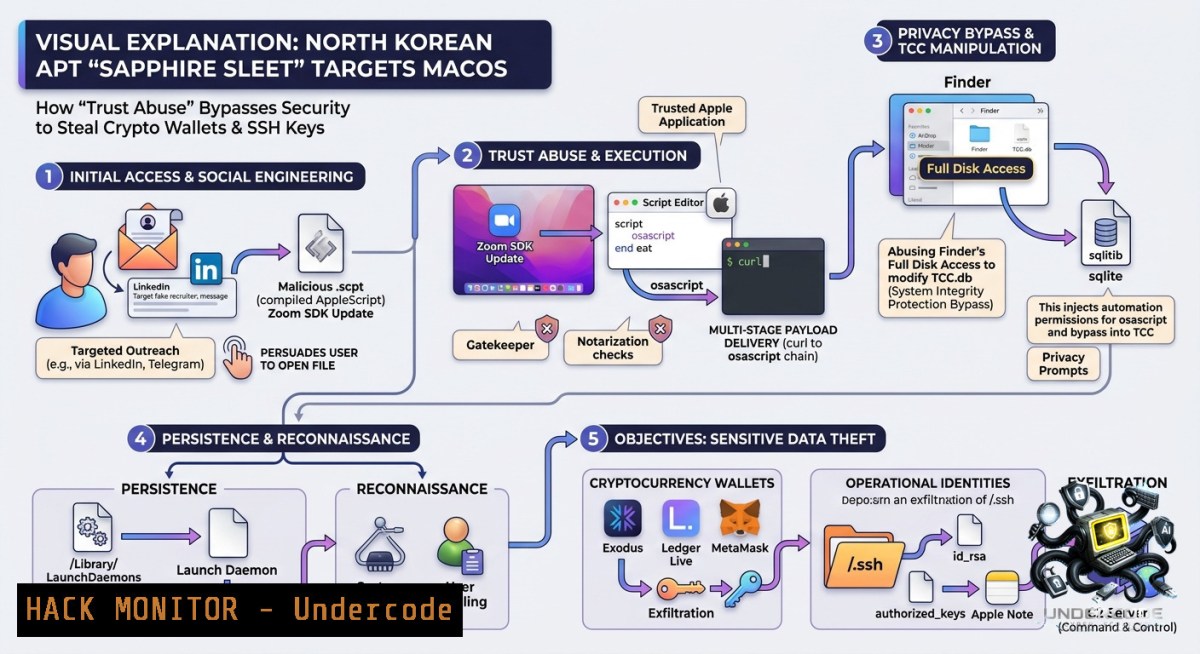
Introduction:
State-sponsored threat actors are shifting from brute-force exploitation to psychological manipulation, with North Korea’s Sapphire Sleet (BlueNoroff/UNC1069) now disguising macOS malware as routine software updates. This trust‑abuse tactic allows attackers to bypass endpoint detection, drain cryptocurrency wallets, and exfiltrate SSH keys—turning legitimate user behavior into the primary attack vector.
Learning Objectives:
– Identify the indicators of compromise (IoCs) for macOS malware masquerading as software updates.
– Implement detection and mitigation strategies to protect crypto wallets and SSH credentials on macOS, Linux, and Windows.
– Apply step‑by‑step forensic commands and hardening scripts to disrupt trust‑abuse attack chains.
You Should Know:
1. Detecting Fake Software Update Processes on macOS
Attackers often name their malicious payloads as “Update”, “Installer”, or “SecurityPatch”. These processes may run from unusual directories like `/tmp` or `~/Downloads` instead of `/Applications`.
Step‑by‑step guide to identify rogue update processes:
– List all running processes with full paths:
ps aux | grep -E "(Update|Installer|SecurityPatch|updater)" | grep -v grep
– Check launch daemons and agents for persistence:
launchctl list | grep -v com.apple
ls -la ~/Library/LaunchAgents/ /Library/LaunchDaemons/
– Inspect code signatures of suspicious binaries:
codesign -dv --verbose=4 /path/to/suspicious
spctl --assess --verbose /path/to/suspicious
– Monitor network connections from update‑named processes:
lsof -i | grep -E "(Update|Installer)"
sudo tcpdump -i en0 -1 -s 0 -c 50 port not 443 and port not 80
If an unsigned or ad‑hoc signed process claims to be a system update, quarantine and upload to a sandbox.
2. Hardening SSH Key Storage Against Exfiltration
Sapphire Sleet actively steals `~/.ssh/id_rsa`, `id_ed25519`, and `known_hosts`. Protect these files with file‑level access controls and integrity monitoring.
Step‑by‑step hardening on macOS/Linux:
– Restrict permissions:
chmod 700 ~/.ssh
chmod 600 ~/.ssh/id_
– Enable SSH key passphrase (if not already):
ssh-keygen -p -f ~/.ssh/id_rsa
– Monitor SSH directory changes with a cron + hash check:
 Create baseline
find ~/.ssh -type f -exec sha256sum {} \; > ~/.ssh_baseline
 Daily check
find ~/.ssh -type f -exec sha256sum {} \; | diff ~/.ssh_baseline -
– For Windows (OpenSSH):
`C:\Users\%USERNAME%\.ssh` → right‑click Properties > Security > Advanced > Disable inheritance, remove all except your user account.
– Prevent SSH agent forwarding misuse:
echo "ForwardAgent no" >> ~/.ssh/config
3. Securing Cryptocurrency Wallets from Credential Theft
The malware hunts for wallet files (e.g., `wallet.dat`, Ethereum keystore, Ledger Live configs, browser extension data). Use application allow‑listing and behavioral monitoring.
Step‑by‑step wallet protection on macOS:
– Find all wallet files on the system (hunter’s perspective):
sudo find / -1ame ".dat" -o -1ame "UTC--" -o -1ame "wallet" 2>/dev/null
– Create a sensitive file integrity monitor using `fswatch` (install via `brew install fswatch`):
fswatch -0 ~/Library/Application\ Support/ ~/.config/ | while read -d "" event; do
echo "[bash] Wallet access at $event" | logger -t crypto_watch
done
– Block outgoing connections from wallet apps except known RPC endpoints using Little Snitch or built‑in `pf`:
echo "block out proto tcp from any to any port 8333, 8545, 30303" | sudo pfctl -f -
– Windows equivalent: Use PowerShell to monitor file access:
$watcher = New-Object System.IO.FileSystemWatcher
$watcher.Path = "$env:APPDATA\Bitcoin"
$watcher.IncludeSubdirectories = $true
Register-ObjectEvent $watcher "Changed" -Action { Write-Host "Wallet file changed!" }
4. Analyzing the Malicious Software Update Package (Static & Dynamic)
If you obtain a sample (e.g., `Update.pkg` or `Installer.app`), perform safe analysis in a VM.
Step‑by‑step triage:
– Extract package contents without installing:
pkgutil --expand Update.pkg ./extracted
– Check for hidden scripts in `Scripts` directory and `postinstall` file:
cat ./extracted/Scripts/postinstall
– Scan binary for known SSH key exfiltration patterns (strings + regex):
strings ./extracted/Payload/Contents/MacOS/Installer | grep -E "id_rsa|\.ssh|PRIVATE KEY|bc1|0x"
– Simulate execution using `dtruss` (macOS tracing) to hook file reads:
sudo dtruss -t open -1 Installer 2>&1 | grep ".ssh"
– Linux alternative (using `strace`):
strace -e openat -f ./suspicious_binary 2>&1 | grep "\.ssh"
5. Blocking C2 Communication for North Korean APTs
Sapphire Sleet’s C2 domains often use typosquatting (e.g., `apple-update[.]com`). Use DNS filtering and firewall rules.
Step‑by‑step network hardening:
– Extract domains from a PCAP or process memory:
tshark -r capture.pcap -T fields -e dns.qry.name | sort -u | grep -E "update|apple|icloud"
– Add malicious domains to local hosts file (macOS/Linux):
echo "127.0.0.1 apple-update.com fake-icloud.net" | sudo tee -a /etc/hosts
– Windows hosts file: `C:\Windows\System32\drivers\etc\hosts`
– Create a proactive blocklist using `pf` (macOS):
echo "block drop out quick proto tcp from any to { apple-update.com, 185.130.5.253 }" | sudo pfctl -a "apt_block" -f -
– Deploy `dnsmasq` to sinkhole known APT domains:
sudo brew install dnsmasq
echo "address=/northkoreanapt.local/0.0.0.0" >> /usr/local/etc/dnsmasq.conf
– Monitor for beaconing using `ngrep`:
sudo ngrep -d en0 -W byline "POST|GET" port 443
6. Remediation After Trust‑Abuse Compromise
If you suspect Sapphire Sleet has executed a fake update, follow this incident response workflow.
Step‑by‑step eradication:
– Kill malicious processes:
pgrep -f "Update|Installer|com.apple.softwareupdateservice" | xargs sudo kill -9
– Remove persistence:
sudo launchctl unload /Library/LaunchAgents/com.apple.softwareupdate.plist
rm -f ~/Library/LaunchAgents/com.apple.softwareupdate.plist
– Reset all SSH keys and rotate API tokens:
mv ~/.ssh ~/.ssh_compromised && ssh-keygen -t ed25519 -C "compromised_replacement"
– Revoke and regenerate crypto wallet private keys (never re‑use seed phrases).
– Check for SSH backdoor in `~/.ssh/authorized_keys`:
cat ~/.ssh/authorized_keys | grep -v "$(whoami)@$(hostname)"
– Update macOS and disable automatic installation from untrusted sources:
sudo softwareupdate --schedule off
sudo spctl --master-disable  Then re‑enable after audit
What Undercode Say:
– Key Takeaway 1: Trust abuse via fake software updates is now a first‑class TTP for APT groups targeting macOS. Defenders must treat every “update” prompt as a potential breach vector, regardless of source.
– Key Takeaway 2: Crypto wallets and SSH keys remain the highest‑value data on developer and trader endpoints. File integrity monitoring (FIM) and outbound firewall rules are more effective than signature‑based AV.
Analysis: This campaign reveals a maturation of North Korean cyber‑financial operations. By moving away from zero‑day exploits toward social engineering of platform trust, Sapphire Sleet drastically lowers its operational cost while maintaining high success rates. The use of macOS is strategic: many crypto founders, VCs, and DeFi engineers prefer MacBooks, and native security tools (Gatekeeper, XProtect) are often overridden by users eager to install “critical updates.” Without user‑behavior analytics or application allow‑listing, even fully patched systems fall. Organizations should enforce that all software updates come only from Apple’s official servers or a managed MDM, and deploy endpoint detection rules that flag any process named “Update” reading `~/.ssh` or wallet directories.
Prediction:
– -1 More APT groups will replicate this trust‑abuse model, leading to a wave of “update” malware on macOS and Linux desktops in 2026–2027.
– -1 Crypto‑focused users will face increased spear‑phishing disguised as Ledger Live or MetaMask updates, causing multimillion‑dollar losses.
– +1 Security vendors will accelerate development of behavioral AI models that detect abnormal file access by installer processes, shifting defenses from static signatures to intent analysis.
– -1 Small to medium crypto funds without 24/7 SOC will remain extremely vulnerable, as they lack the resources to implement continuous SSH and wallet integrity monitoring.
– +1 Open‑source tools like `fswatch` + `auditd` rules will become standard inclusion in macOS hardening guides, democratizing APT‑level detection.
▶️ Related Video (70% Match):
🎯Let’s Practice For Free:
🎓 Live Courses & Certifications:
[Join Undercode Academy for Verified Certifications](https://undercode.co.uk/certifications/)
🚀 Request a Custom Project:
Secure, high-velocity infrastructure and disruptive technological engineering. Contact our engineering team for high-tier development and proprietary systems:
[[email protected]](mailto:[email protected])
💎 Smart Architecture | 🛡️ Secure by Design | ⭐ Trusted by Thousands
IT/Security Reporter URL:
Reported By: [Cybersecuritynews Cybersecuritytimes](https://www.linkedin.com/posts/cybersecuritynews-cybersecuritytimes-share-7467838343947640832-dMEl/) – Hackers Feeds
Extra Hub: Undercode MoN
Basic Verification: Pass ✅
🔐JOIN OUR CYBER WORLD [ CVE News • HackMonitor • UndercodeNews ]
[💬 Whatsapp](https://undercode.help/whatsapp) | [💬 Telegram](https://t.me/UndercodeCommunity)
📢 Follow UndercodeTesting & Stay Tuned:
[𝕏 formerly Twitter 🐦](https://x.com/undercodeupdate) | [@ Threads](https://www.threads.net/@undercodetesting) | [🔗 Linkedin](https://www.linkedin.com/company/undercodetesting/) | [🦋BlueSky](https://bsky.app/profile/undercode.bsky.social)


