Listen to this Post
Introduction
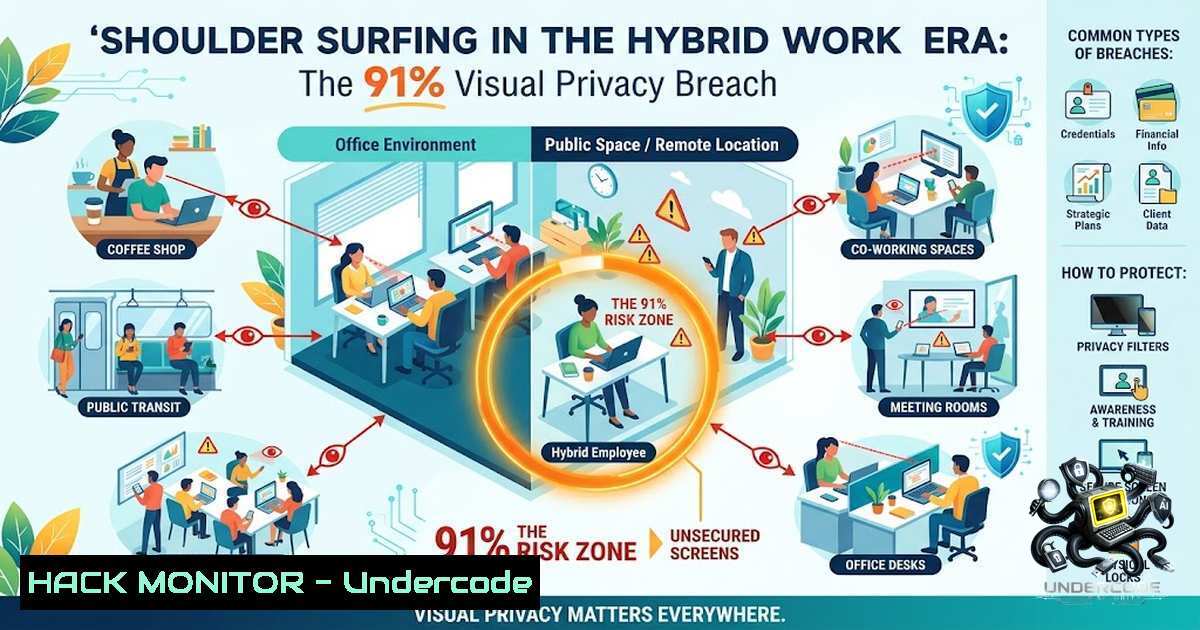
As organizations rapidly embrace hybrid work models, employees are increasingly logging sensitive corporate data from coffee shops, airport lounges, and co-working spaces. While cybersecurity teams fortify firewalls and patch vulnerabilities, a silent, low-tech threat is bypassing every digital defense: shoulder surfing. The 2016 Global Visual Hacking Experiment, conducted by Ponemon Institute across eight countries including China, France, Germany, India, Japan, South Korea, the UK, and the US, revealed that 91% of visual hacking attempts successfully captured sensitive information. With 52% of compromised data originating from employee computer screens and nearly half of successful hacks occurring in under 15 minutes, visual privacy has become an urgent security imperative that demands immediate attention.
Learning Objectives
- Understand the mechanics of shoulder surfing and visual hacking attacks in hybrid work environments
- Identify behavioral indicators of active shoulder surfing attempts
- Implement physical and technical countermeasures including privacy filters, screen lock shortcuts, and AI-based detection tools
- Apply network security best practices such as personal hotspot usage over public Wi-Fi
- Develop organizational policies for visual privacy awareness and incident reporting
You Should Know
1. Understanding the Shoulder Surfing Attack Surface
Shoulder surfing is a form of visual hacking where an attacker observes a device screen—either directly over the shoulder or via a camera—to capture sensitive information such as passwords, PINs, client data, or confidential emails. Unlike digital breaches that leave forensic trails, visual hacking leaves no digital footprint, making it exceptionally difficult to detect or prosecute.
The 2016 Global Visual Hacking Experiment involved 157 trials across 46 participating companies. A white-hat hacker, wearing a valid security badge, performed three overt tasks: walking through offices to scout visible information on desks and monitors, removing confidential documents from desks, and photographing sensitive on-screen data. The results were alarming: 91% success rate globally, with 27% of captured data classified as highly sensitive—including login credentials, attorney-client privileged documents, and financial information. Perhaps most concerning, 68% of office workers did not question or report the hacker even after witnessing suspicious behavior.
Step‑by‑step guide to assessing your visual privacy risk:
- Conduct a physical walkthrough of your workspace—identify all screens visible from common pathways
- Map sightlines from entry points, seating areas, and windows to employee displays
- Audit paper documents left on desks, printers, and shared workspaces
- Document findings and prioritize high-risk areas (open floor plans showed significantly higher vulnerability)
- Implement a clean desk policy requiring all sensitive materials to be secured when not in use
-
Behavioral Indicators: How to Spot a Shoulder Surfer
Visual hacking is silent and subtle, but attackers often exhibit detectable behaviors. Understanding these indicators enables proactive defense:
- The Quick Turnaway: A person abruptly shifts their gaze or looks away the moment you turn your head
- The Screen Mirror: You catch your display’s reflection on their glasses, phone screen, or nearby window
- The Strategic Phone Angle: Someone holds their smartphone at an elevated angle that aligns perfectly with your keyboard or screen
Attackers may also observe hand movements on keyboards to deduce passwords without seeing the screen, or listen nearby while you read out card numbers or confirm addresses.
Situational awareness checklist for public workspaces:
| Environment | Risk Level | Key Indicators |
|-||-|
| Coffee shops | High | Seating behind/beside you, reflective surfaces |
| Public transit | High | Standing passengers, adjacent seats |
| Co-working spaces | Medium | Open floor plans, shared tables |
| Airport lounges | High | Dense seating, business travelers |
| Hotel lobbies | Medium | Transient foot traffic |
3. Physical Countermeasures: Privacy Filters and Smart Seating
Privacy screen filters are the first line of defense against visual hacking. 3M™ Privacy Filters attach to displays, providing a clear view for the intended user while blocking side views—effectively “blacking out” visibility outside a 60-degree viewing angle. Advanced models like 3M™ Bright Screen Privacy Filters offer 85% light transmission for the primary user while preventing side-angle viewing.
Smart seating is equally critical. Position your back against a wall or sit in a corner to eliminate blind spots behind you【3M recommendation】. In open floor plans—which exacerbate visual hacking risks—consider requesting a workstation with reduced foot traffic.
Step‑by‑step guide to deploying privacy filters:
- Measure your display diagonally (inches) to select the correct filter size
2. Clean the screen thoroughly before application
- Align the filter using the 3M™ Comply™ Attachment System for easy installation and removal
- Test the viewing angle—confirm that side views are fully blacked out while your direct view remains clear
- Train employees on proper filter usage and the importance of maintaining them
4. Digital Defenses: Screen Lock Shortcuts and Automation
Building muscle memory around instant screen locking is essential. Memorize these keyboard shortcuts:
| Operating System | Lock Screen Shortcut |
|||
| Windows | `Win + L` |
| macOS | `Ctrl + Cmd + Q` |
| Linux | `Ctrl + Alt + L` |
| Chromebook | `Search + L` |
Automated lock configuration:
Windows:
Settings → Personalization → Lock screen → Screen timeout settings
Set "Screen" to turn off after 1-3 minutes of inactivity
Enable "On resume, show logon screen"
macOS:
System Settings → Lock Screen
Set "Turn display off on battery when inactive" to 1-3 minutes
Enable "Require password" immediately after sleep or screen saver begins
Linux (GNOME):
Settings → Privacy → Screen Lock
Enable "Automatic Screen Lock"
Set delay to 1-3 minutes
Step‑by‑step guide to building the lock habit:
- Practice the shortcut 10 times immediately—muscle memory is key
- Lock your screen every time you step away—even for a quick coffee refill
- Enable automatic lock after 1-3 minutes of inactivity as a backup
- Consider a daily device shutdown—power cycling at least once daily helps clear temporary caches and reinforces security discipline【as recommended in the original post】
-
AI-Powered Detection: The New Frontier in Visual Privacy
Emerging AI solutions are transforming visual privacy protection. Applications like EyesOff utilize on-device neural networks running locally on your computer to detect when someone unauthorized is looking at your screen—alerting you in real time. Similarly, Screen Guardian uses AI to detect nearby strangers and notify you instantly when you step away, with all processing occurring locally to ensure zero data leaves your device.
Academic research from the University of Melbourne has introduced a context-aware framework that leverages mobile device camera sensors and bystander positions to detect and prevent visual privacy attacks, including a reactive system that alerts users in real-time and a proactive text reader that dynamically adjusts content visibility.
Step‑by‑step guide to implementing AI visual privacy tools:
- Research available options—EyesOff, Screen Guardian, and other on-device AI solutions
- Verify local-only processing—confirm no data is uploaded to the cloud
- Install and configure the application, granting necessary camera permissions
- Test the system in various lighting conditions and seating arrangements
- Integrate with existing security protocols—use AI alerts as triggers for immediate screen locking
6. Network Security: Personal Hotspots vs. Public Wi-Fi
Public Wi-Fi networks are a known vector for digital attacks, but they also contribute to visual privacy risks. When connected to public networks, users often display sensitive information for extended periods while performing work tasks. Using your own mobile phone data or personal hotspot adds an invisible layer of network safety and reduces the temptation to work on sensitive materials in unsecured environments【original post recommendation】.
Step‑by‑step guide to secure hotspot usage:
- Enable personal hotspot on your mobile device (iOS: Settings → Personal Hotspot; Android: Settings → Network & Internet → Hotspot & tethering)
- Set a strong Wi-Fi password—minimum 12 characters with mixed case, numbers, and symbols
- Rename your hotspot to a non-identifiable name (avoid “John’s iPhone”)
4. Disable hotspot when not actively in use
- Use a VPN in conjunction with your hotspot for defense-in-depth
7. Organizational Policies: Building a Visual Privacy Culture
Companies with sound privacy-control practices experienced 26% fewer visual privacy breaches. Building a comprehensive visual privacy program requires:
- Employee training on shoulder surfing identification and reporting procedures
- Clean desk policies requiring all sensitive documents to be secured when unattended
- Regular visual privacy audits to identify and address vulnerabilities
- Incident reporting procedures that encourage employees to report suspicious behavior without fear
- Privacy filter provisioning for all remote and hybrid workers
As Dr. Larry Ponemon noted, “While visual hacking is often considered a low-tech threat, the repercussions can be just as detrimental as a high-tech cyberattack”. Organizations must treat visual privacy with the same seriousness as digital security.
What Undercode Say
- Visual hacking is not a hypothetical threat—91% success rates across eight countries prove this is a systemic vulnerability that demands immediate action.
-
The human element is both the weakest link and the strongest defense—68% of visual hacking attempts go unchallenged, yet companies with trained employees and sound policies experience 26% fewer breaches.
-
Hybrid work has dramatically expanded the attack surface—sensitive data is now displayed in cafes, airports, and co-working spaces where visual privacy controls are minimal.
-
Defense-in-depth is essential—no single countermeasure is sufficient; combine privacy filters, screen locks, AI detection, situational awareness, and organizational policies for comprehensive protection.
-
Low-tech attacks demand high-tech responses—AI-powered detection tools represent a promising frontier, but they must complement rather than replace fundamental security habits.
Prediction
-
+1 The proliferation of AI-powered on-device detection tools will significantly reduce successful shoulder surfing attempts by 2027, as real-time alerts become standard features in enterprise devices.
-
+1 Privacy filter technology will evolve beyond passive blocking to active, adaptive solutions that dynamically adjust screen visibility based on detected bystander proximity.
-
-1 The continued expansion of hybrid and remote work will increase visual hacking incidents by an estimated 30-40% over the next three years unless organizations implement comprehensive visual privacy programs.
-
-1 Regulatory bodies will likely introduce visual privacy compliance requirements, potentially including mandatory privacy filter deployment and regular visual security audits—creating short-term compliance burdens for unprepared organizations.
-
+1 Integration of visual privacy awareness into standard cybersecurity training will become universal, transforming shoulder surfing from an overlooked vulnerability to a routinely defended attack vector.
▶️ Related Video (80% Match):
https://www.youtube.com/watch?v=1k9Z2yNxFQY
🎯Let’s Practice For Free:
🎓 Live Courses & Certifications:
Join Undercode Academy for Verified Certifications
🚀 Request a Custom Project:
Secure, high-velocity infrastructure and disruptive technological engineering. Contact our engineering team for high-tier development and proprietary systems:
[email protected]
💎 Smart Architecture | 🛡️ Secure by Design | ⭐ Trusted by Thousands
IT/Security Reporter URL:
Reported By: https://lnkd.in/p/eM-qHikn – Hackers Feeds
Extra Hub: Undercode MoN
Basic Verification: Pass ✅


