Listen to this Post
Introduction:
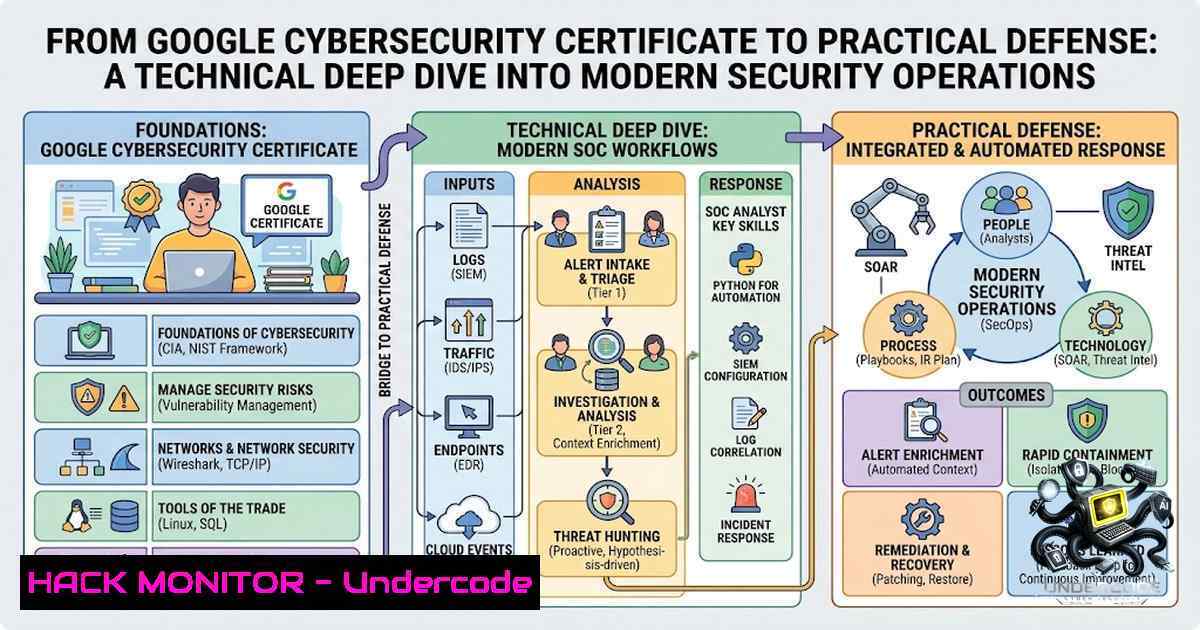
The Google Cybersecurity Professional Certificate, completed through nine structured courses, provides a comprehensive foundation spanning network security, Linux system administration, SQL data analysis, Python automation, threat detection, and incident response【1†L17-L44】. This article translates that curriculum into actionable technical knowledge—delivering verified commands, configuration examples, and step‑by‑step procedures that bridge the gap between certification and real‑world security operations.
Learning Objectives:
- Master Linux system hardening, user authentication, and file permission management using Bash commands.
- Implement SQL queries for security log analysis and threat hunting in relational databases.
- Automate repetitive security tasks—such as log parsing and alert triage—with Python scripts.
- Configure and verify firewall rules, VPN tunnels, and intrusion prevention systems in cloud and on‑premise environments.
- Apply the NIST Cybersecurity Framework to conduct vulnerability assessments and prioritize remediation.
You Should Know:
1. Linux System Hardening and Access Control
Linux serves as the backbone of most security appliances and cloud infrastructure. Mastering user and file permissions is non‑negotiable for any security professional【1†L30-L32】.
Step‑by‑step guide to hardening user authentication and file permissions:
- Audit user accounts and groups:
List all users and their UIDs cat /etc/passwd Identify users with UID 0 (root privileges) awk -F: '($3 == 0) {print}' /etc/passwd Review sudoers for excessive privileges cat /etc/sudoers -
Enforce strong password policies:
Edit `/etc/login.defs` to set password aging:
PASS_MAX_DAYS 90
PASS_MIN_DAYS 7
PASS_MIN_LEN 12
PASS_WARN_AGE 14
- Lock inactive accounts:
Lock account
sudo passwd -l username
Unlock account
sudo passwd -u username
-
Set strict file permissions on critical directories:
Restrict /etc/shadow to root only sudo chmod 600 /etc/shadow Set world-readable but only writable by root for /etc/passwd sudo chmod 644 /etc/passwd Remove SUID/SGID bits from unnecessary binaries find / -perm /6000 -type f -exec ls -ld {} \; -
Configure and verify firewall rules with iptables/nftables:
Default deny policy
sudo iptables -P INPUT DROP
sudo iptables -P FORWARD DROP
sudo iptables -P OUTPUT ACCEPT
Allow established connections
sudo iptables -A INPUT -m state --state ESTABLISHED,RELATED -j ACCEPT
Allow SSH from trusted subnet only
sudo iptables -A INPUT -p tcp --dport 22 -s 192.168.1.0/24 -j ACCEPT
- SQL for Security Log Analysis and Threat Hunting
Security analysts often query logs stored in databases to identify anomalous patterns. SQL proficiency enables rapid investigation of authentication failures, privilege escalations, and data exfiltration indicators【1†L30-L32】.
Step‑by‑step guide to using SQL for security monitoring:
Assume a table `security_events` with columns: event_id, timestamp, user, source_ip, event_type, details, and severity.
- Identify brute‑force attempts (multiple failed logins from same IP):
SELECT source_ip, COUNT() AS failed_attempts
FROM security_events
WHERE event_type = 'LOGIN_FAILURE'
AND timestamp > NOW() - INTERVAL '15 minutes'
GROUP BY source_ip
HAVING COUNT() > 5
ORDER BY failed_attempts DESC;
-
Detect privilege escalation events:
SELECT user, source_ip, details, timestamp FROM security_events WHERE event_type IN ('SUDO_COMMAND', 'ROLE_GRANT', 'PERMISSION_CHANGE') AND severity IN ('HIGH', 'CRITICAL') ORDER BY timestamp DESC LIMIT 50; -
Correlate events to find data exfiltration patterns:
SELECT a.user, a.source_ip, b.destination_ip, b.bytes_transferred
FROM security_events a
JOIN data_transfer_logs b ON a.user = b.user
WHERE a.event_type = 'AUTH_SUCCESS'
AND b.bytes_transferred > 1000000
AND b.timestamp BETWEEN a.timestamp AND a.timestamp + INTERVAL '5 minutes';
-
Windows alternative (PowerShell + SQL Server):
Query Windows Event Logs via SQL-like cmdlets
Get-WinEvent -LogName Security | Where-Object { $<em>.Id -eq 4625 } |
Group-Object -Property @{Expression={$</em>.Properties[bash].Value}} |
Where-Object { $_.Count -gt 5 } |
Select-Object Name, Count
3. Python Automation for Security Operations
Automation reduces response times and eliminates human error in repetitive tasks. Python is the lingua franca for security orchestration【1†L39-L41】.
Step‑by‑step guide to automating log parsing and alert generation:
- Parse Apache/Nginx access logs and flag suspicious IPs:
import re from collections import Counter from datetime import datetime, timedelta</li> </ul> log_pattern = r'(?P<ip>\d+.\d+.\d+.\d+) - - [(?P<time>.?)] "(?P<method>.?)" (?P<status>\d+)' suspicious_ips = [] threshold = 100 requests per minute with open('access.log', 'r') as f: for line in f: match = re.search(log_pattern, line) if match: ip = match.group('ip') status = match.group('status') if status.startswith('4') or status.startswith('5'): suspicious_ips.append(ip) ip_counts = Counter(suspicious_ips) for ip, count in ip_counts.items(): if count > threshold: print(f"ALERT: IP {ip} generated {count} error responses.") Optionally, add to firewall blocklist os.system(f"sudo iptables -A INPUT -s {ip} -j DROP")- Automated vulnerability scanner wrapper (pseudo‑code):
import subprocess import json</li> </ul> def scan_network(subnet): result = subprocess.run(['nmap', '-sV', '-oX', '-', subnet], capture_output=True, text=True) Parse XML output, extract open ports and service versions Compare against CVE database (e.g., via NVD API) return vulnerabilities if <strong>name</strong> == "<strong>main</strong>": alerts = scan_network('192.168.1.0/24') for alert in alerts: print(f"VULNERABILITY: {alert['cve']} on {alert['host']}:{alert['port']}")- Windows alternative (Python + PowerShell):
import subprocess
Query Windows Event Log for specific Event IDs
result = subprocess.run(
['powershell', '-Command',
'Get-WinEvent -LogName Security -MaxEvents 100 | Where-Object {$_.Id -in 4624,4625}'],
capture_output=True, text=True
)
print(result.stdout)
4. Network Security: Firewalls, VPNs, and Intrusion Prevention
Network segmentation and encryption are foundational to defense‑in‑depth【1†L27-L29】. Modern security relies on properly configured firewalls, VPNs, and IPS/IDS systems.
Step‑by‑step guide to hardening network perimeters:
- Configure iptables for a web server (allow HTTP/HTTPS, block all else):
Flush existing rules
sudo iptables -F
Set default policies
sudo iptables -P INPUT DROP
sudo iptables -P FORWARD DROP
sudo iptables -P OUTPUT ACCEPT
Allow loopback
sudo iptables -A INPUT -i lo -j ACCEPT
Allow established connections
sudo iptables -A INPUT -m state --state ESTABLISHED,RELATED -j ACCEPT
Allow HTTP and HTTPS
sudo iptables -A INPUT -p tcp --dport 80 -j ACCEPT
sudo iptables -A INPUT -p tcp --dport 443 -j ACCEPT
Allow SSH from management subnet only
sudo iptables -A INPUT -p tcp --dport 22 -s 10.0.0.0/8 -j ACCEPT
Log dropped packets
sudo iptables -A INPUT -j LOG --log-prefix "IPTables-Dropped: "
-
Set up a WireGuard VPN tunnel (cloud hardening):
Install WireGuard
sudo apt install wireguard
Generate server private/public keys
wg genkey | tee server_private.key | wg pubkey > server_public.key
Create /etc/wireguard/wg0.conf with:
[bash]
Address = 10.0.0.1/24
PrivateKey = <server_private>
ListenPort = 51820
[bash]
PublicKey = <client_public>
AllowedIPs = 10.0.0.2/32
Start the tunnel
sudo wg-quick up wg0
-
Enable and configure Fail2ban for intrusion prevention:
sudo apt install fail2ban
sudo cp /etc/fail2ban/jail.conf /etc/fail2ban/jail.local
Edit /etc/fail2ban/jail.local:
[bash]
enabled = true
maxretry = 3
bantime = 3600
sudo systemctl enable fail2ban
sudo systemctl start fail2ban
5. Threat Modeling and Vulnerability Management (NIST CSF)
The NIST Cybersecurity Framework provides a structured approach to identifying, protecting, detecting, responding, and recovering from threats【1†L34-L36】. Practical application involves continuous vulnerability assessment and remediation.
Step‑by‑step guide to conducting a vulnerability assessment:
- Identify assets and map attack surfaces:
Network scan with nmap
nmap -sV -sC -O 192.168.1.0/24
Web application scan with Nikto
nikto -h https://target-domain.com
-
Prioritize vulnerabilities using CVSS scores:
Use cve-search or similar tools to query CVE database
cve-search -c CVE-2024-XXXXX
-
Remediate common findings:
-
Disable unnecessary services: `sudo systemctl disable
`
– Apply security patches: `sudo apt update && sudo apt upgrade -y`
– Enforce multi‑factor authentication (MFA) and single sign‑on (SSO)【1†L34-L36】. -
Windows alternative (PowerShell + Windows Defender):
Run offline vulnerability scan
Start-MpScan -ScanType QuickScan
Check for missing patches
Get-HotFix | Sort-Object InstalledOn -Descending
What Undercode Say:
-
Key Takeaway 1: Cybersecurity is not monolithic—it spans network architecture, system administration, threat analysis, incident response, and automation. The Google certificate provides a solid springboard, but hands‑on practice with tools like iptables, SQL, and Python is what builds true competence.
-
Key Takeaway 2: Automation is the force multiplier. Python scripts that parse logs, query APIs, and trigger firewall rules turn a reactive security posture into a proactive one. Every security professional should invest time in scripting proficiency.
Analysis: The certificate curriculum emphasizes breadth over depth, which is appropriate for entry‑level professionals. However, the real value lies in translating each module into repeatable technical procedures. For example, the Linux and SQL module becomes powerful only when you regularly query system logs for anomalies. The Python module is transformative when you build custom alerting pipelines. Organizations should encourage certification holders to immediately apply these skills in lab environments—simulating breaches, tuning detection rules, and automating patch management. The inclusion of AI for job searching is a pragmatic addition, but the technical core remains the differentiator.
Prediction:
- +1 The demand for professionals who combine foundational security knowledge with practical scripting and querying skills will surge as organizations adopt DevSecOps and cloud‑native architectures.
-
+1 Automation‑first security operations centers (SOCs) will increasingly value Python and SQL proficiency over traditional manual analysis, making this certificate a strong entry point.
-
-1 Without continuous hands‑on practice and lab work, certification knowledge can degrade quickly—graduates must commit to ongoing projects to maintain relevance.
-
+1 The integration of AI into job searching and career development, as highlighted in the final course, signals a broader trend where AI tools augment, rather than replace, security analysts’ decision‑making.
-
-1 The rapid evolution of threats means that foundational courses require frequent updates; professionals must supplement with threat intelligence feeds and CVE monitoring to stay current.
▶️ Related Video (78% Match):
https://www.youtube.com/watch?v=0QAz2g65DXI
🎯Let’s Practice For Free:
🎓 Live Courses & Certifications:
Join Undercode Academy for Verified Certifications
🚀 Request a Custom Project:
Secure, high-velocity infrastructure and disruptive technological engineering. Contact our engineering team for high-tier development and proprietary systems:
[email protected]
💎 Smart Architecture | 🛡️ Secure by Design | ⭐ Trusted by ThousandsIT/Security Reporter URL:
Reported By: https://lnkd.in/p/enu6XvXX – Hackers Feeds
Extra Hub: Undercode MoN
Basic Verification: Pass ✅🔐JOIN OUR CYBER WORLD [ CVE News • HackMonitor • UndercodeNews ]
📢 Follow UndercodeTesting & Stay Tuned:
- Windows alternative (Python + PowerShell):
- Automated vulnerability scanner wrapper (pseudo‑code):


