
Listen to this Post
Introduction
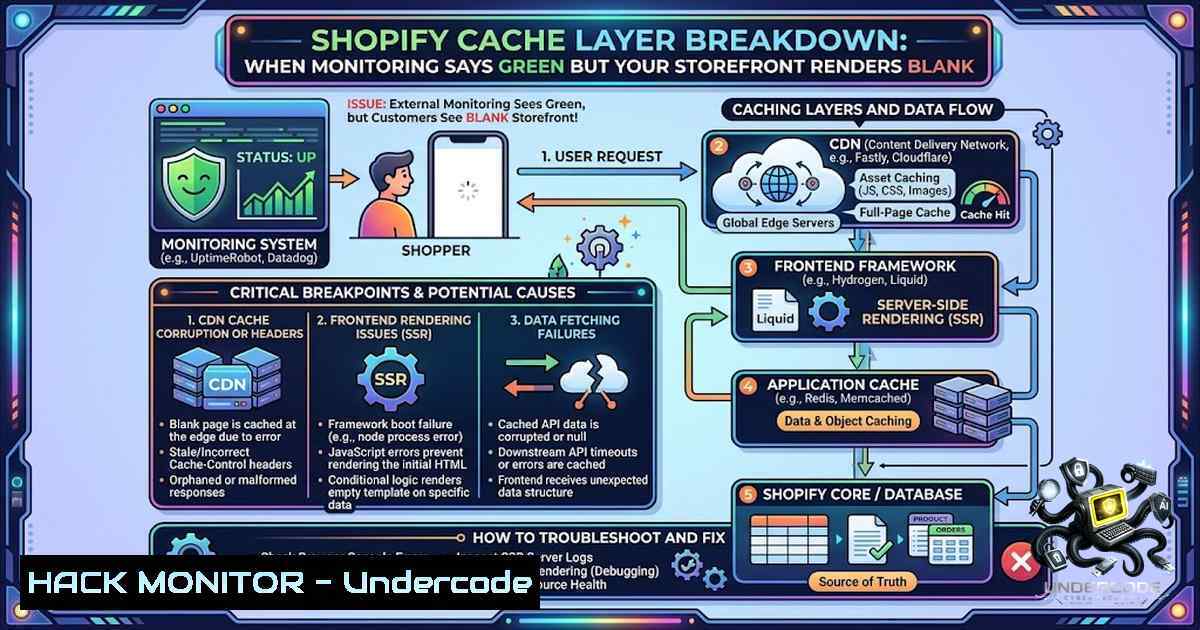
Shopify’s multi-layered caching infrastructure—spanning CDN edge caches (Fastly/Cloudflare), Redis full-page caching, and Liquid Object Memoization—is designed to deliver sub-second response times for millions of storefront requests. However, when cache invalidation logic fails or cache keys are misconstructed, the very system that accelerates performance can serve stale or empty HTML responses while platform monitoring tools report everything as operational. This article dissects the technical anatomy of Shopify’s server-side cache, explores how rendering failures manifest without triggering errors, and provides actionable diagnostics for enterprise e-commerce teams.
Learning Objectives & Secrets
- Objective 1: Understand Shopify’s Multi-Layer Cache Architecture – Master the five layers from CDN edge to Redis full-page caching and learn how each layer contributes to storefront performance.
-
Objective 2 Secret Tip: Cache Key Composition Is Everything – Shopify builds a composite MD5 cache key from the URL (including all query parameters), device/user-agent, session cookies (currency, localization, country), and customer segment. A seemingly innocuous query parameter like `?ref=email` generates a distinct cache key, meaning the same page can have dozens of cached variants—and a misconfigured parameter can cause cache misses that spike origin load by orders of magnitude.
-
Objective 3 Secret Tip: Monitor Cache Hits, Not Just Response Codes – Standard uptime monitoring checks HTTP 200 status codes, but a cached empty HTML response still returns 200 OK. The real metric is `X-Cache: HIT` vs `MISS` headers and HTML payload size. A sudden drop in average HTML bytes per response often precedes blank-page incidents.
You Should Know
1. Understanding Shopify’s Cache Key and Invalidation Mechanism
Shopify’s Storefront Renderer (SFR) handles server-side rendering and caching. When a request arrives, SFR constructs a composite cache key—typically an MD5 hash of:
- Exact URL – Including all query parameters (
/products/examplediffers from/products/example?ref=email) - Device Type – Mobile vs. desktop user-agent (if the theme supports responsive rendering)
- Session Context – Currency (
cart_currency), language/localization, country, and customer login status
Why This Matters for Blank Page Issues: If any cache key component changes unexpectedly—for example, a third-party app appends a unique tracking parameter to every request—the cache is missed (MISS) and the page must be regenerated. Under high concurrency, this cascades into origin overload, and the renderer may time out and return an empty or partial HTML response that gets cached. Subsequent visitors receive the cached empty page.
Cache Invalidation Strategies:
- Time-Based (TTL): Shopify’s full-page cache TTL is approximately 5 minutes (300 seconds).
- Event-Based: Changes to products, collections, or theme assets trigger invalidation via the `asset_url` filter which appends version numbers.
- Stale-While-Revalidate: Shopify caches support serving stale content while revalidating in the background.
Verification Command (Linux/macOS):
 Check cache headers and HTML payload size
curl -I -X GET "https://your-store.myshopify.com/products/example" \
-H "User-Agent: Mozilla/5.0 (Windows NT 10.0; Win64; x64)" \
-w "\nHTTP Status: %{http_code}\nTime: %{time_total}s\n" \
-o /dev/null -s

View full response including cache headers
curl -v "https://your-store.myshopify.com/products/example" 2>&1 | grep -i "x-cache|cache-control|content-length"
2. Diagnosing Silent Cache Failures with Response Analysis
When monitoring shows green but users see white, the issue lies in the response content, not the status code. A cached empty HTML page returns HTTP 200 with `Content-Length: 0` or minimal HTML shell.
Step-by-Step Diagnostic Guide:
1. Capture the Raw Response:
curl -s "https://your-store.myshopify.com/" > response.html
ls -lh response.html  Check file size—sudden drops indicate issues
2. Inspect Cache Headers:
curl -I "https://your-store.myshopify.com/" | grep -E "X-Cache|Cache-Control|Age|CF-Cache-Status"
– `X-Cache: HIT` → served from cache
– `X-Cache: MISS` → origin generated the response
– `CF-Cache-Status: HIT` → Cloudflare edge cache (for Hydrogen stores)
3. Force Cache Bypass for Comparison:
 Append a cache-busting parameter
curl -s "https://your-store.myshopify.com/?_=$(date +%s)" > bypass.html
diff response.html bypass.html  Compare cached vs. fresh
4. Test with Different User-Agents:
 Mobile user-agent may trigger different cache key
curl -s "https://your-store.myshopify.com/" \
-H "User-Agent: Mozilla/5.0 (iPhone; CPU iPhone OS 14_0 like Mac OS X)" > mobile.html
Windows PowerShell Equivalent:
Invoke-WebRequest -Uri "https://your-store.myshopify.com/" -OutFile response.html
(Get-Item response.html).Length
(Invoke-WebRequest -Uri "https://your-store.myshopify.com/" -Headers @{"Cache-Control"="no-cache"}).Headers
3. Liquid Object Memoizer and Request-Scoped Caching
Even when full-page cache is missed, Shopify employs a Liquid Object Memoizer that caches database query results within a single request. If your Liquid template calls `product.variants` at ten different locations, Shopify queries the database only once and reuses the result.
Secret Tip: This request-scoped cache can mask performance issues. If a Liquid section contains a syntax error or times out during generation, the memoizer doesn’t help—the renderer fails silently and may return an incomplete page that gets cached.
Debugging Liquid Rendering:
<!-- Add debug output to identify rendering failures -->
{% assign debug_output = "" %}
{% capture debug_output %}
Page generated at: {{ "now" | date: "%Y-%m-%d %H:%M:%S" }}
Cache status: {{ cache_status }}
{% endcapture %}
<!-- Place debug_output in an HTML comment for inspection -->
4. CDN Edge Cache and Asset Versioning Pitfalls
Shopify’s CDN (backed by Cloudflare) caches assets with aggressive `Cache-Control` headers. The `asset_url` Liquid filter automatically appends version numbers (?v=1384022871) to bust the cache when assets change.
Critical Warning: Only the `v=` parameter format is recognized for cache busting. Appending arbitrary timestamps or using unsupported parameter names will not bust the CDN cache.
Correct Cache Busting:
{{ 'theme.css' | asset_url }}
<!-- Outputs: https://cdn.shopify.com/.../theme.css?v=1612345678 -->
Incorrect (Won’t Bust Cache):
<link rel="stylesheet" href="{{ 'theme.css' | asset_url }}?t={{ 'now' | date: '%s' }}">
<!-- The ?t= parameter is ignored by the CDN -->
Force CDN Cache Purge (Shopify Admin API):
 Using Shopify CLI to touch theme assets and trigger recompilation
shopify theme pull --store=your-store.myshopify.com
shopify theme push --store=your-store.myshopify.com --themeid=YOUR_THEME_ID
- GraphQL and Storefront API Caching for Headless Stores
For headless implementations using Hydrogen or custom Storefront API integrations, caching operates at additional layers:
- Hydrogen’s Cache Primitives: `CacheShort()` (1 second, stale-while-revalidate 9 seconds) and `CacheLong()` (1 hour, stale-while-revalidate 23 hours)
- GraphQL Response Caching: Cache keys must include the query, variables, and user context
Hydrogen Cache Configuration Example:
// routes/products.[bash].jsx
export async function loader({ params, context }) {
const { product } = await context.storefront.query(PRODUCT_QUERY, {
variables: {
handle: params.productHandle,
country: context.storefront.i18n.country
},
cache: context.storefront.CacheShort(), // Edge cache control
});
return json({ product });
}
GraphQL Query Optimization for Better Cache Hits:
 Fetch only what you need—smaller payloads = better cache hit rates
query ProductDetails($handle: String!) {
product(handle: $handle) {
id
title
priceRange {
minVariantPrice { amount currencyCode }
}
variants(first: 5) {
nodes { id availableForSale selectedOptions { name value } }
}
}
}
API Rate Limit Monitoring:
 Check remaining Storefront API rate limits
curl -X POST "https://your-store.myshopify.com/api/2025-01/graphql.json" \
-H "Content-Type: application/json" \
-H "X-Shopify-Storefront-Access-Token: YOUR_TOKEN" \
-d '{"query":"{ shop { name } }"}' \
-v 2>&1 | grep -i "x-shopify-shop-api-call-limit"
6. Web Cache Deception and Security Implications
Cache misconfigurations can have security implications beyond performance. Shopify has paid bounties for Web Cache Deception vulnerabilities where path confusion allowed attackers to retrieve cached HTML containing private user information. Attackers craft URLs with misleading file extensions (e.g., .css) that trick the CDN into caching sensitive responses.
Mitigation Checklist:
- Ensure 404 pages do not disclose sensitive information
- Validate that cache keys properly differentiate authenticated vs. unauthenticated content
- Implement `Cache-Control: private` for user-specific responses
- Regularly audit CDN cache behavior with security testing tools
What Undercode Say
- Key Takeaway 1: Monitoring Tools Lie. Standard uptime monitors check HTTP status codes and response times, not HTML content validity. A cached empty page returns 200 OK in milliseconds—green across every dashboard, white across every browser. The team’s diagnosis succeeded because they reproduced the issue manually rather than trusting automated alerts.
-
Key Takeaway 2: Bug Bounties Don’t Cover Reliability. Shopify’s bug bounty program explicitly covers security vulnerabilities, not rendering failures or cache bugs. The team received no financial reward despite identifying and helping fix a platform-level cache issue affecting thousands of stores. This underscores a gap in platform accountability: reliability bugs that impact revenue are not incentivized the same way security bugs are.
Extended Analysis: The incident reveals a fundamental tension in SaaS platforms: merchants are locked into proprietary infrastructure but lack visibility into its internal state. When Shopify’s cache layer fails, merchants cannot directly inspect or flush caches—they must rely on support tickets and hope engineering prioritizes the fix. The 22-day timeline from report to production fix is actually fast by enterprise standards, but for a store generating significant revenue, every hour of blank pages represents lost sales. The solution is layered defense: implement client-side monitoring that validates HTML content (not just HTTP status), use cache-busting parameters strategically, and maintain a fallback mechanism (e.g., static cached pages served from an external CDN) for when Shopify’s cache misbehaves. Third-party apps that inject JavaScript or modify request parameters are frequent culprits in cache key fragmentation—audit every app’s network activity.
Prediction
- +1 E-commerce platforms will increasingly adopt observability-driven development, exposing cache hit/miss metrics and cache key composition to merchants via dashboards, enabling proactive detection of cache fragmentation before it impacts users.
-
+1 The distinction between “security bugs” and “reliability bugs” will blur as cache poisoning and web cache deception demonstrate that caching flaws are security vulnerabilities. Expect bug bounty programs to expand scope to include high-impact reliability issues.
-
-1 Without financial incentives for reporting platform reliability issues, merchants will continue to discover and silently patch around cache bugs rather than reporting them, leaving underlying platform flaws unaddressed for other stores.
-
-1 As Shopify pushes more rendering to the edge (Hydrogen 3.0 with Cloudflare Workers), cache invalidation complexity increases exponentially. More layers mean more failure modes, and the “green monitors, white pages” scenario will become more common, not less.
-
+1 The rise of AI-powered monitoring tools that analyze HTML structure and detect anomalous empty responses will fill the gap left by traditional uptime monitors, giving merchants early warning of silent cache failures.
-
-1 Headless architectures amplify cache risks: with separate frontend and backend caches, a stale product cache on the CDN can serve outdated pricing while the backend shows correct inventory—a discrepancy that erodes customer trust and increases support costs.
▶️ Related Video (82% Match):
https://www.youtube.com/watch?v=6PwcC6cAH2s
🎯Let’s Practice For Free:
🎓 Live Courses & Certifications:
Join Undercode Academy for Verified Certifications
🚀 Request a Custom Project:
Secure, high-velocity infrastructure and disruptive technological engineering. Contact our engineering team for high-tier development and proprietary systems:
[email protected]
💎 Smart Architecture | 🛡️ Secure by Design | ⭐ Trusted by Thousands
IT/Security Reporter URL:
Reported By: https://lnkd.in/p/e7Zw6_nB – Hackers Feeds
Extra Hub: Undercode MoN
Basic Verification: Pass ✅


