
Listen to this Post
Introduction:
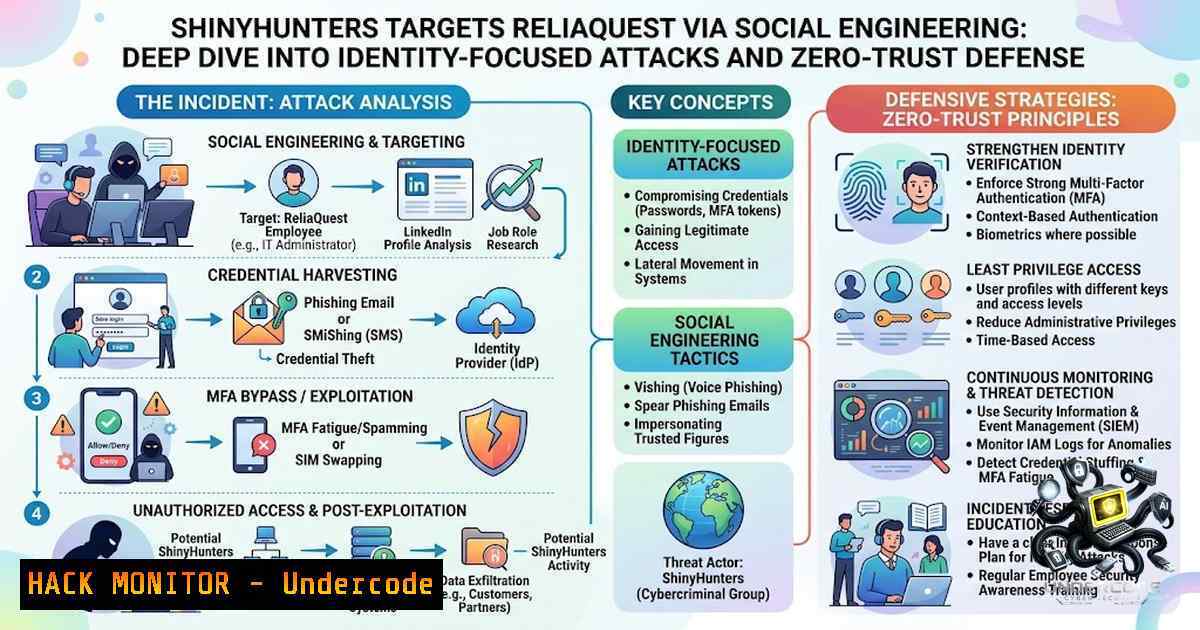
On August 22, 2026, the notorious extortion group ShinyHunters executed a targeted social engineering campaign against cybersecurity firm ReliaQuest. The attackers used voice phishing (vishing) combined with a lookalike single sign-on (SSO) phishing page to compromise a single employee’s credentials and MFA push approval. While the breach was limited to view-only access to an identity dashboard and quickly contained, the incident underscores the growing sophistication of identity-focused attacks and the critical importance of zero-trust architecture in modern security operations.
Learning Objectives & Secrets:
- Objective 1: Understand the anatomy of a social engineering attack targeting identity providers (Okta, Azure AD) and how adversaries use vishing and lookalike domains to bypass traditional security controls.
- Objective 2 Secret Tip: Implement device-trust controls that treat every sign-in as untrusted until the endpoint is validated—this was the key control that stopped ShinyHunters from pivoting from the dashboard to internal applications.
- Objective 3 Secret Tip: Establish automated incident response playbooks that immediately terminate attacker sessions, revoke compromised passwords, and reset all authentication tokens upon detection of suspicious activity.
You Should Know:
1. Anatomy of the ShinyHunters Social Engineering Attack
The attack followed a clear, repeatable playbook that organizations must understand to defend against. The threat actor first registered a lookalike domain—reliaquest[.]claims—and hosted a fake ReliaQuest SSO page behind a content delivery network (CDN). The attacker then called multiple employees, impersonating a named security team member, and directed them to the malicious page. One employee entered their credentials and approved an MFA push notification on their phone, granting the attacker a brief, view-only session on ReliaQuest’s Okta identity dashboard.
What made this attack particularly dangerous was the use of `.claims` TLDs, which ShinyHunters had been actively registering to impersonate company help desks and IT teams. According to ReliaQuest’s Threat Research team, the group was using domains following the `company[.]claims` pattern, incorporating the target organization’s name or abbreviation. This technique allows attackers to bypass traditional domain-based monitoring that typically focuses on newly registered domains.
Step‑by‑step guide to detecting and responding to similar attacks:
Linux Command – Monitor for suspicious domain registrations:
 Use PassiveTotal or SecurityTrails API to monitor for newly registered domains
curl -s "https://api.securitytrails.com/v1/domains/list?apikey=YOUR_API_KEY&search_pattern=.claims" | jq '.[] | select(.registrar == "NameCheap" or .registrar == "GoDaddy")'
Windows PowerShell – Check for unauthorized SSO login attempts in Azure AD:
 Review Azure AD sign-in logs for suspicious activity
Get-AzureADAuditSignInLogs -All $true | Where-Object {$<em>.Status.ErrorCode -eq 50057 -or $</em>.AppDisplayName -eq "Okta"} | Select-Object UserPrincipalName, CreatedDateTime, IPAddress, DeviceDetail
Okta Configuration – Enforce device trust policies:
- Navigate to Security > Device Trust in Okta Admin Console.
- Create a policy that requires managed devices (e.g., enrolled in MDM) for access to sensitive applications.
- Configure conditional access rules that block sign-ins from unmanaged or non-compliant devices.
- Enable session lifetime controls to automatically expire sessions after a defined period of inactivity.
-
The Critical Role of Device Trust and Zero-Trust Controls
ReliaQuest’s defense-in-depth strategy proved effective because the company operates from the assumption that a threat actor will eventually phish someone’s account. The key control that prevented the attack from escalating was device trust—the system blocked the attacker’s unmanaged, external device from accessing any application or system beyond the identity dashboard.
When the attacker attempted to pivot from the dashboard into internal applications, every request was systematically denied because it originated from a non-compliant, unmanaged endpoint. This zero-trust approach—treating a sign-in to the identity provider as permission to do nothing at all—stopped the attacker from establishing persistence or accessing customer data.
Step‑by‑step guide to implementing device trust and zero-trust controls:
Linux Command – Verify endpoint compliance before allowing access:
 Use osquery to check device compliance status
osqueryi -A "SELECT hostname, os_version, platform, hardware_model, cpu_brand, physical_memory FROM system_info;"
 Check if security software is running
osqueryi "SELECT name, state FROM processes WHERE name LIKE '%crowdstrike%' OR name LIKE '%sentinel%' OR name LIKE '%defender%';"
Windows Command – Enforce device compliance with Conditional Access:
 PowerShell script to check if device is domain-joined and compliant
$deviceInfo = Get-WmiObject -Class Win32_ComputerSystem
$domainJoined = $deviceInfo.PartOfDomain
$complianceStatus = (Get-MpComputerStatus).AntivirusEnabled
if ($domainJoined -and $complianceStatus) {
Write-Output "Device is compliant"
} else {
Write-Output "Device is non-compliant - blocking access"
}
Azure AD Conditional Access Policy Configuration:
- In Azure AD, navigate to Security > Conditional Access.
- Create a new policy named “Require compliant devices for all cloud apps.”
- Under Assignments, select All users and All cloud apps.
- Under Grant, select Require device to be marked as compliant and Require Hybrid Azure AD joined device.
- Enable the policy and enforce it for all authentication attempts.
3. MFA Push Fatigue and Phishing-Resistant Authentication
The attack succeeded because the employee approved an MFA push notification after entering their credentials on the fake SSO page. This highlights the growing threat of MFA push fatigue—attackers bombard users with push notifications until they eventually approve one out of annoyance or confusion. ShinyHunters has been actively using this technique, often combined with phone-based social engineering to create urgency and pressure victims.
To defend against this, organizations must move beyond traditional MFA and implement phishing-resistant authentication methods such as FIDO2 security keys or certificate-based authentication. These methods eliminate the risk of push notification abuse because they require physical presence and cryptographic verification.
Step‑by‑step guide to implementing phishing-resistant MFA:
Okta Configuration – Enforce WebAuthn/FIDO2:
- In Okta Admin Console, go to Security > Authenticators.
- Add WebAuthn as an authenticator and set it as required for all users.
- Under Sign-on Policy, create a rule that requires WebAuthn for access to critical applications.
- Disable less secure methods like SMS and voice call OTPs where possible.
Azure AD Configuration – Require FIDO2 security keys:
 PowerShell to enable FIDO2 security keys as a required authentication method
Connect-MgGraph -Scopes "Policy.ReadWrite.AuthenticationMethod"
$fido2Policy = @{
"@odata.type" = "microsoft.graph.fido2AuthenticationMethodConfiguration"
id = "Fido2"
state = "enabled"
isAttestationEnforced = $true
isSelfServiceRegistrationAllowed = $true
keyRestrictions = @{
isEnforced = $true
enforcementType = "block"
keyRestrictions = @()
}
}
Update-MgPolicyAuthenticationMethodPolicy -BodyParameter $fido2Policy
Windows – Enforce Windows Hello for Business:
 Enable Windows Hello for Business via Group Policy
Set-ItemProperty -Path "HKLM:\SOFTWARE\Policies\Microsoft\PassportForWork" -1ame "Enabled" -Value 1
Set-ItemProperty -Path "HKLM:\SOFTWARE\Policies\Microsoft\PassportForWork" -1ame "UsePassportForWork" -Value 1
- Threat Actor Tactics: Subdomain Impersonation and Recycled Data
ShinyHunters is evolving its tactics to bypass traditional security controls. The group is shifting from registering lookalike domains to subdomain impersonation—placing the brand signal in the subdomain rather than the domain itself. This allows attackers to slip past traditional “new domain” controls that only monitor registered domain names.
Additionally, the group is likely reusing previously exposed SaaS records (from CRM and ERP datasets) to build believable pretexts and identify the “next best” person to socially engineer. This creates a repeatable access loop: a single valid SSO session can enable broad access to emails, files, HR, and customer data—without deploying any malware.
Step‑by‑step guide to detecting subdomain impersonation and credential harvesting:
Linux Command – Monitor for suspicious subdomain activity:
 Use dnsrecon to enumerate subdomains for your domain
dnsrecon -d yourcompany.com -t brt -D /usr/share/wordlists/subdomains.txt

Monitor Certificate Transparency logs for unauthorized subdomains
curl -s "https://crt.sh/?q=%25.yourcompany.com&output=json" | jq '.[] | select(.name_value | contains("claims") or contains("support") or contains("helpdesk"))'
Windows PowerShell – Detect credential harvesting pages:
 Search Microsoft 365 threat intelligence for known phishing domains
$phishingDomains = Get-MgThreatAssessmentRequest | Where-Object {$<em>.Category -eq "Phishing"}
$phishingDomains | ForEach-Object {
if ($</em>.RequestedBy -eq "yourcompany.com") {
Write-Output "Potential phishing domain detected: $($_.ContentData)"
}
}
SIEM Rule – Alert on suspicious subdomain logins:
Rule Name: Suspicious Subdomain SSO Login
Condition: EventID 4624 (Successful Logon) AND LogonType 10 (RemoteInteractive) AND WorkstationName CONTAINS ".claims" OR ".support"
Action: Trigger Alert and Initiate Session Termination
5. Incident Response and Containment Playbook
ReliaQuest’s rapid response was critical in containing the attack. Upon detection, the security team immediately terminated the attacker’s sessions, revoked the compromised password, and reset all authentication tokens. The investigation included a complete audit of control fidelity, device trust, and on-1etwork access, with no evidence of persistence or further compromise.
This incident response playbook should be standard for all organizations. The key steps are:
1. Detect: Monitor for unusual SSO logins from unmanaged devices.
2. Contain: Terminate active sessions and revoke tokens.
3. Eradicate: Reset passwords and authentication factors.
- Recover: Audit all access logs and verify no persistence.
5. Lessons Learned: Review and strengthen controls.
Step‑by‑step guide to incident response for identity compromise:
Okta API – Terminate all user sessions:
 Use Okta API to revoke all sessions for a compromised user
curl -X POST "https://your-okta-domain.okta.com/api/v1/users/{userId}/lifecycle/reset_factors" \
-H "Authorization: SSWS YOUR_API_TOKEN" \
-H "Content-Type: application/json"
Azure AD PowerShell – Revoke all refresh tokens:
 Revoke all refresh tokens for a compromised user
Revoke-AzureADUserAllRefreshToken -ObjectId "[email protected]"

Force password reset on next login
Set-AzureADUser -ObjectId "[email protected]" -PasswordPolicies "DisablePasswordExpiration,DisableStrongPassword"
Linux – Audit authentication logs:
 Check for suspicious login attempts in /var/log/auth.log
grep "Failed password" /var/log/auth.log | awk '{print $9}' | sort | uniq -c | sort -1r
 Check for successful logins from unusual IPs
grep "Accepted password" /var/log/auth.log | awk '{print $11}' | sort | uniq -c | sort -1r
What Undercode Say:
- Key Takeaway 1: Social engineering remains the most effective initial access vector—even well-trained employees can be deceived by a convincing caller who knows a teammate’s name. Organizations must assume that accounts will eventually be phished and build defenses accordingly.
-
Key Takeaway 2: Zero-trust architecture, particularly device-trust controls, is the most effective defense against identity-based attacks. Treating every sign-in as untrusted until the endpoint is validated stopped ShinyHunters from turning a successful phish into a devastating breach.
Analysis:
The ReliaQuest incident is a textbook example of how modern extortion groups operate. ShinyHunters combined voice phishing, lookalike domains, and MFA push abuse to compromise an identity session—all without deploying any malware. The attack was fast, targeted, and leveraged human psychology rather than technical vulnerabilities. ReliaQuest’s defense succeeded because of layered controls: device trust prevented lateral movement, and rapid incident response contained the damage. However, the fact that the attacker gained any access at all is a sobering reminder that no organization is immune. The shift to subdomain impersonation and recycled SaaS data makes these attacks even harder to detect. Organizations must move beyond traditional security monitoring and adopt identity-centric, zero-trust frameworks that assume compromise from the start.
Prediction:
- -1 The use of `.claims` TLDs and subdomain impersonation will become a standard tactic for social engineering campaigns, making it significantly harder for organizations to detect phishing infrastructure through traditional domain monitoring.
-
-1 MFA push fatigue attacks will increase in frequency and sophistication, with attackers using AI-generated voice impersonation to make vishing calls more convincing and harder to detect.
-
+1 The ReliaQuest incident will accelerate adoption of phishing-resistant MFA (FIDO2/WebAuthn) and device-trust controls across the cybersecurity industry, as organizations recognize that traditional MFA is no longer sufficient.
-
-1 Extortion groups like ShinyHunters will continue to recycle stolen SaaS data to build targeted social engineering campaigns, creating a repeatable access loop that bypasses traditional perimeter defenses.
-
+1 The transparency of ReliaQuest’s post-incident disclosure—sharing the full attack playbook—will set a new standard for incident reporting and help the broader security community defend against similar threats.
▶️ Related Video (78% Match):
https://www.youtube.com/watch?v=2h6JnDMDVnY
🎯Let’s Practice For Free:
🎓 Live Courses & Certifications:
Join Undercode Academy for Verified Certifications
🚀 Request a Custom Project:
Secure, high-velocity infrastructure and disruptive technological engineering. Contact our engineering team for high-tier development and proprietary systems:
[email protected]
💎 Smart Architecture | 🛡️ Secure by Design | ⭐ Trusted by Thousands
IT/Security Reporter URL:
Reported By: https://lnkd.in/p/e2h-_NiP – Hackers Feeds
Extra Hub: Undercode MoN
Basic Verification: Pass ✅


