Listen to this Post
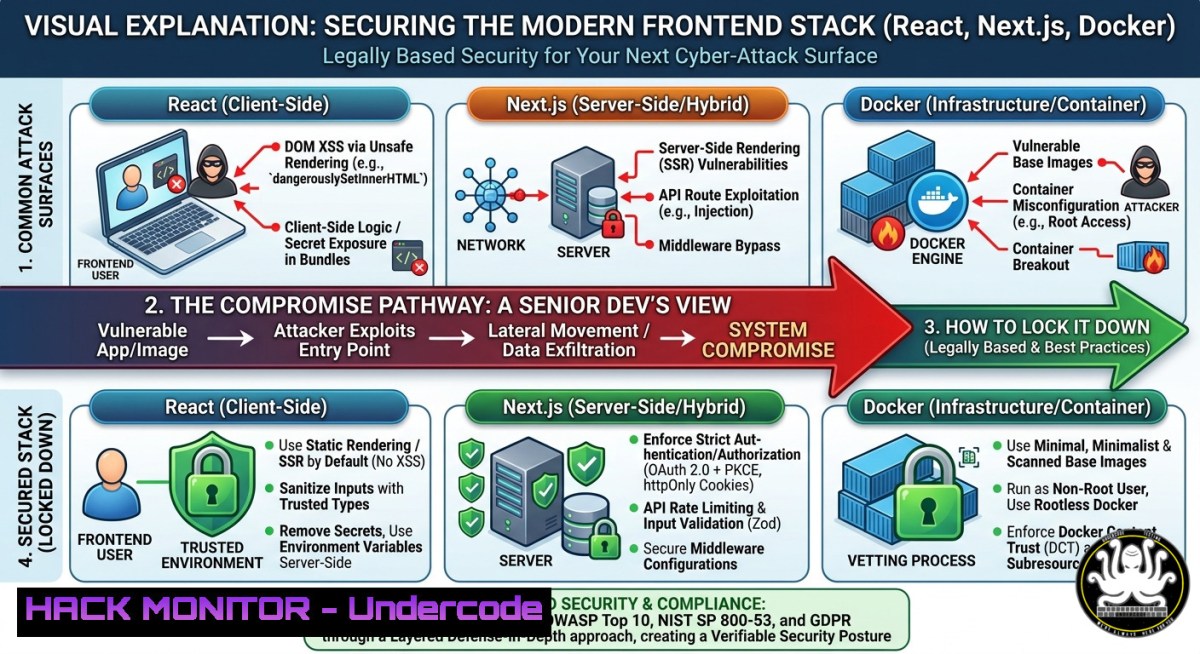
Introduction:
The job post for a Senior Frontend Developer building “AI-enabled digital products” with React, Next.js, and Docker sounds like a dream role – but modern frontend stacks are increasingly targeted by supply chain attacks, API abuse, and container escapes. As organizations rush to integrate AI-driven UIs, they often neglect secure coding practices in client-side state management, CI/CD pipelines, and image hardening. This article transforms that job description into a cybersecurity hardening guide for frontend engineers and DevSecOps teams.
Learning Objectives:
- Identify and mitigate risks in Next.js SSR/CSR, REST APIs, and Dockerized frontend environments.
- Implement secure CI/CD with GitHub Actions including SAST, dependency scanning, and secret detection.
- Apply Linux/Windows commands to harden containerized frontend apps and audit AI-enabled data flows.
You Should Know:
1. Hardening React/Next.js Against XSS and Client-Side Injection
Modern frontend apps using dangerouslySetInnerHTML, dynamic imports, or unsanitized API responses are prime targets for cross-site scripting (XSS). With AI-generated content being displayed, attackers can inject malicious payloads via LLM prompt injection.
Step-by-step guide:
- Audit all uses of `dangerouslySetInnerHTML` – replace with DOMPurify.
- Implement Content Security Policy (CSP) headers in Next.js
next.config.js:// next.config.js async headers() { return [{ source: '/(.)', headers: [{ key: 'Content-Security-Policy', value: "default-src 'self'; script-src 'self' 'unsafe-inline' https://trusted-cdn.com;" }] }] } - Validate and escape any AI-generated text before rendering. Use `sanitize-html` on the backend.
- Linux command to scan for hardcoded secrets in React components:
grep -r "API_KEY|SECRET|PASSWORD" --include=".jsx" --include=".tsx" ./src
- Windows PowerShell alternative:
Get-ChildItem -Recurse -Include .jsx,.tsx | Select-String "API_KEY|SECRET|PASSWORD"
- Securing REST APIs and Asynchronous Data Flows from Frontend
The job mentions working with REST APIs and async data. Unvalidated API responses can lead to JSON hijacking, mass assignment, or broken object level authorization (BOLA). With AI-driven applications, APIs often expose more endpoints for model inference.
Step-by-step guide:
- Implement API response validation using Zod or TypeScript guards to reject malformed data before rendering.
- Use fetch interceptors to add CSRF tokens and validate status codes:
// custom fetch wrapper const apiFetch = (url, options) => { const csrfToken = getCookie('XSRF-TOKEN'); return fetch(url, { ...options, headers: { 'X-CSRF-Token': csrfToken } }) .then(res => res.ok ? res.json() : Promise.reject(<code>API error ${res.status}</code>)); }; - For Linux, monitor outbound API calls from the frontend container:
docker exec -it frontend_container tcpdump -i eth0 -n 'port 443 and host api.example.com'
- Use OWASP ZAP or Burp Suite to proxy and fuzz API endpoints. Command to run ZAP in headless mode:
zap-cli quick-scan --self-contained --spider -t https://frontend-app.com/api
3. Docker Container Security for Frontend Builds
The tech stack includes Docker – but many frontend images include Node.js dev dependencies, build tools, and even secrets. Attackers who compromise a container can pivot to internal networks.
Step-by-step guide:
- Use multi-stage builds to exclude `devDependencies` and source maps:
Stage 1: build
FROM node:18-alpine AS builder
WORKDIR /app
COPY package.json ./
RUN npm ci --only=production
COPY . .
RUN npm run build

Stage 2: run
FROM nginx:alpine
COPY --from=builder /app/out /usr/share/nginx/html
- Scan the image for vulnerabilities using Trivy:
trivy image your-frontend:latest --severity HIGH,CRITICAL
- Run container as non-root user inside Dockerfile:
RUN addgroup -g 1001 -S nodejs && adduser -S nextjs -u 1001
USER nextjs
- Windows Docker Desktop command to check running processes inside container:
docker exec -it frontend_container ps aux
4. CI/CD Pipeline Hardening with GitHub Actions
The job ad lists GitHub Actions for CI/CD. Misconfigured workflows expose secrets, allow dependency confusion, or execute untrusted code.
Step-by-step guide:
- Never log secrets; use GitHub Secrets and mask them. Example secure workflow:
name: Build & Scan
on: push
jobs:
security:
runs-on: ubuntu-latest
steps:</li>
<li>uses: actions/checkout@v4</li>
<li>name: Run Trivy vulnerability scanner
uses: aquasecurity/trivy-action@master
with:
scan-type: 'fs'
scan-ref: '.'
format: 'sarif'</li>
<li>name: Check for npm audit
run: npm audit --audit-level=high</li>
<li>name: Run Gitleaks (secret scanning)
uses: gitleaks/gitleaks-action@v2
- Use `actions/dependency-review-action` to block PRs with known vulnerabilities.
- Linux command to verify no secrets in local Git history:
git log -p | grep -E "(API_KEY|SECRET|PASSWORD|TOKEN)"
- Protecting AI-Enabled User Experiences from Model Inversion and Prompt Leakage
“AI-enabled digital products” imply frontends that send user data to LLM APIs. Attackers can reverse-engineer model behavior or steal training data via the UI.
Step-by-step guide:
- Implement rate limiting and input length validation on API routes that proxy LLM requests (e.g., Next.js API routes).
- Sanitize user prompts before sending to AI models to prevent prompt injection:
function sanitizePrompt(input) { return input.replace(/[;&|`$()]/g, '').slice(0, 2000); } - Use a proxy to log and block suspicious patterns (e.g., “ignore previous instructions”).
- Linux command to monitor outgoing AI API calls for anomalies:
sudo ngrep -d eth0 -W byline 'api.openai.com' port 443
6. Hardening Ionic/Capacitor Mobile Wrappers for Hybrid Apps
If the frontend is wrapped with Ionic/Capacitor, additional mobile attack surfaces appear: insecure WebView storage, deep link hijacking, and code injection via custom URL schemes.
Step-by-step guide:
- Disable JavaScript injection in WebView by setting `setAllowJavaScriptAccess` to required-only.
- Use Capacitor’s `CapacitorHttp` instead of fetch to enforce native cookie handling.
- Audit all custom URL schemes (e.g.,
myapp://) for open redirects:grep -r "App.addListener('appUrlOpen'" ./src - For Android, check if `android:allowBackup` is false to prevent data extraction.
7. Monitoring and Detecting Frontend Attacks in Production
Once deployed, frontend attacks like formjacking, clickjacking, or CDN cache poisoning must be detected.
Step-by-step guide:
- Implement a CSP report-uri endpoint to collect violations.
- Set up client-side observability using Sentry or OpenTelemetry to catch JavaScript errors that may indicate exploitation.
- Linux command to check for unexpected changes to static assets on the CDN:
curl -s https://cdn.example.com/main.js | sha256sum
Compare with expected hash
- Windows: use `Get-FileHash` to compare local and remote file hashes.
What Undercode Say:
- Key Takeaway 1: The seemingly standard frontend job post for React/Next.js and Docker is a blueprint for your next security audit – every listed technology has known attack vectors (XSS, container escape, CI/CD poisoning) that require proactive hardening.
- Key Takeaway 2: AI-enabled frontends introduce new threat surfaces (prompt injection, model inversion) that traditional SAST tools miss; combine runtime API monitoring with input sanitization specific to LLM interactions.
Analysis (approx. 10 lines): The job ad emphasizes “modern, AI-enabled digital products” but completely omits security responsibilities – a red flag for enterprises. Frontend developers are now de facto security gatekeepers because client-side code exposes APIs, tokens, and user data. The shift to Docker and GitHub Actions means build-time security is mandatory: image scanning, secret detection, and dependency auditing should be non-negotiable. Most React apps fail CSP implementation, leaving them vulnerable to even basic XSS. With AI features, you must also guard against indirect prompt injection where an attacker’s data poisons the model’s output, leading to malicious UI rendering. The commands and code snippets above give developers a practical starting point to harden exactly the stack described – from `grep` for secrets to Trivy scans. Organizations hiring for this role should ask candidates about secure coding in Next.js, not just component architecture. The future of frontend security is real-time, context-aware protection that bridges the gap between UX and cybersecurity.
Prediction:
Within 18 months, job descriptions for Senior Frontend Developers will explicitly require “secure AI integration” and “container security” as core competencies. As AI-generated UIs become dynamic and personalized, traditional static CSPs will evolve into adaptive policies enforced by browser-native APIs like Trusted Types. We will see a rise in “frontend detection and response” (FDR) tools that monitor DOM manipulation for injection attacks, similar to EDR on endpoints. The gap between DevOps and frontend engineering will close further, with GitHub Actions workflows including mandatory security gates for every PR. Companies that ignore these practices will face breaches originating from their own customer-facing AI portals, leading to regulatory fines and loss of user trust.
▶️ Related Video (68% Match):
🎯Let’s Practice For Free:
IT/Security Reporter URL:
Reported By: Shannon Scullion – Hackers Feeds
Extra Hub: Undercode MoN
Basic Verification: Pass ✅
🎓 Live Courses & Certifications:
Join Undercode Academy for Verified Certifications
🚀 Request a Custom Project:
Secure, high-velocity infrastructure and disruptive technological engineering. Contact our engineering team for high-tier development and proprietary systems:
[email protected]


