
Listen to this Post
Introduction:
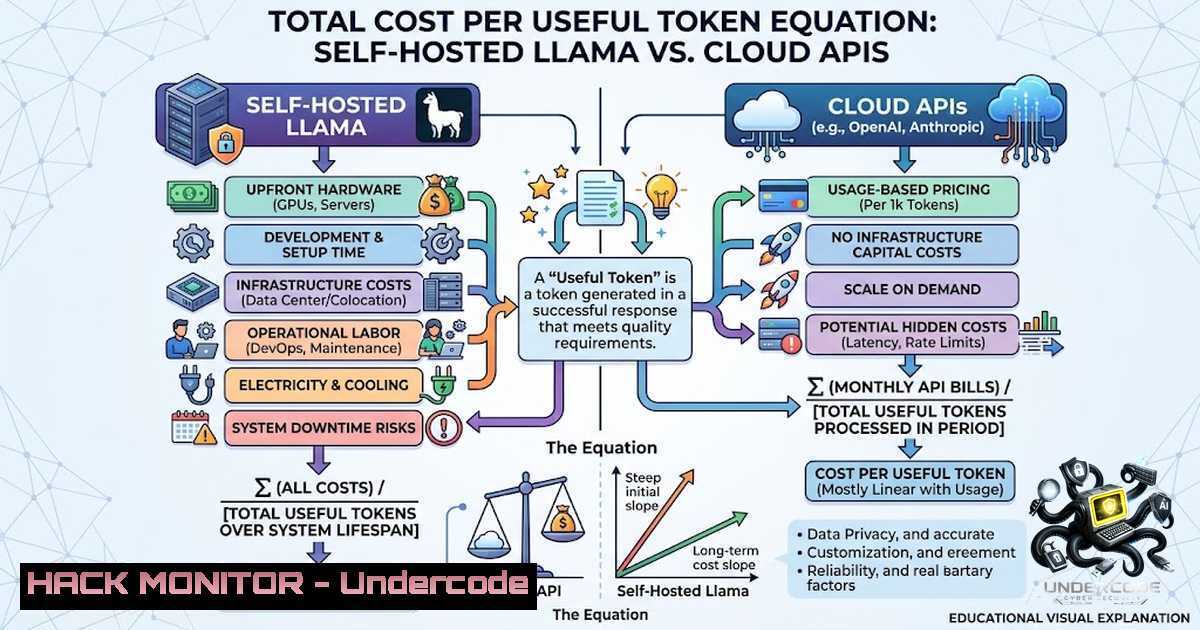
The debate between self-hosting large language models (LLMs) like Llama and relying on cloud-based APIs is often oversimplified as a binary choice between “free” infrastructure and “pay-as-you-go” convenience. In reality, the decision hinges on a granular analysis of the Total Cost per Useful Token (TCUT), which accounts for hardware depreciation, engineering overhead, and latency requirements. This article dissects the hidden costs of both approaches, providing a framework for calculating your break-even point and implementing a cost-optimized, secure AI strategy.
Learning Objectives & Secrets:
- Objective 1: Calculate True TCO – Learn to model all direct and indirect costs associated with self-hosting (GPUs, power, cooling, idle capacity, and engineering time) versus API consumption (token pricing, retries, and vendor lock-in).
- Objective 2: Identify Break-Even Thresholds – Discover the secret to pinpointing the exact workload volume (tokens per month) where self-hosting becomes cheaper, factoring in latency and privacy premiums.
- Objective 3: Secure Hybrid Deployment – Understand how to combine self-hosted inference for sensitive data with cloud APIs for burst capacity, using confidential computing and API gateways to minimize risk.
You Should Know:
- Modeling the Hardware and Operational Costs of Self-Hosting
Self-hosting Llama is not merely a capital expense (CapEx) for GPUs; it is an operational expense (OpEx) that includes power consumption, data center cooling, and network egress fees. For a typical 70B parameter model, you need multiple A100 or H100 GPUs, which can draw over 400W each. Additionally, idle capacity during off-peak hours represents wasted investment.
To accurately model this, use the following formula:
Monthly Self-Hosting Cost = (GPU Depreciation / 36 months) + (Power Cost kWh Runtime) + (Engineering Hours Hourly Rate) + (Monitoring & Security Tools)
Example Command for Power Monitoring on Linux:
 Monitor real-time GPU power draw for NVIDIA cards
nvidia-smi --query-gpu=power.draw,power.limit --format=csv
Windows (WSL) equivalent:
wsl nvidia-smi --query-gpu=power.draw --format=csv
To calculate idle capacity waste, log utilization over a week:
 Log GPU utilization every 5 minutes for 7 days
watch -1 300 nvidia-smi --query-gpu=utilization.gpu --format=csv >> gpu_usage.log
Step‑by‑Step Guide to Cost Modeling:
- Step 1: Inventory hardware (type and number of GPUs).
- Step 2: Calculate monthly depreciation (purchase price / 36 months).
- Step 3: Measure power consumption under load and idle.
- Step 4: Multiply by your local electricity rate (e.g., $0.12/kWh).
- Step 5: Add engineering salaries for deployment, maintenance, and fine-tuning.
- Step 6: Factor in inference serving tools like vLLM or TensorRT-LLM, including their licensing or support costs.
- Cloud API Pricing: The Hidden Cost of Tokens and Retries
Cloud APIs (e.g., OpenAI, Anthropic, or hosted Llama variants) charge per input/output token. While this appears simple, costs escalate with retries due to rate limiting, error handling, and traffic spikes. Additionally, premium models or fine-tuned versions incur higher per-token fees.
To estimate monthly API costs, use the formula:
Monthly API Cost = (Input Tokens Input Price) + (Output Tokens Output Price) + (Retry Overhead 0.10)
Bash script to estimate token consumption from logs:
 Rough token counter for plain text (1 token ≈ 4 chars for English)
cat api_logs.txt | wc -c | awk '{print $1 / 4}'
Python snippet for precise tiktoken count:
import tiktoken
enc = tiktoken.encoding_for_model("gpt-4")
tokens = enc.encode("Your text here")
print(len(tokens))
Step‑by‑Step Guide to API Cost Management:
- Step 1: Enable response caching for identical prompts (e.g., using Redis).
- Step 2: Implement exponential backoff with jitter to reduce retry costs.
- Step 3: Use a router to send simple queries to cheaper models and complex ones to premium models.
- Step 4: Monitor token usage via cloud provider dashboards and set budget alerts.
3. Break-Even Analysis: Finding the Inflection Point
The break-even point occurs when the total cost of self-hosting equals the total API cost over a specific period. This threshold is highly dependent on workload predictability and latency sensitivity.
Example Calculation:
- Self-Hosting Monthly Cost = $8,000 (GPUs + power + engineering)
- API Cost per 1M tokens = $15 (Input) + $60 (Output) = $75/M tokens
- Break-Even Volume = $8,000 / $75 = ~106,666 tokens per day or ~3.2M tokens per month.
If your workload exceeds this volume, self-hosting is cheaper. However, if latency <100ms is required, self-hosting with a dedicated cluster often outperforms APIs due to network hops.
Command to benchmark latency (Linux):
 Test latency to a cloud API endpoint
curl -w "Connect: %{time_connect}s, TTFB: %{time_starttransfer}s\n" -o /dev/null -s https://api.openai.com/v1/completions
4. Security and Privacy Considerations in Hybrid Architectures
For regulated industries (e.g., BioPharma, Finance), privacy requirements often override cost savings. Self-hosting within a secure enclave (Confidential Computing) ensures data never leaves your control, but this adds overhead.
To secure self-hosted Llama:
- Use Intel SGX or AMD SEV for encrypted memory.
- Implement network policies to restrict egress.
- Regularly patch inference engines (e.g., vLLM, Hugging Face TGI).
Linux Firewall Rule to restrict API access:
 Allow only local traffic to the inference port (e.g., 8000)
sudo ufw allow from 192.168.1.0/24 to any port 8000
sudo ufw deny 8000
Windows Defender Firewall Command (PowerShell):
New-1etFirewallRule -DisplayName "Block Inference" -Direction Inbound -LocalPort 8000 -Action Block
5. Engineering Time: The Silent Cost Driver
Maintaining a self-hosted LLM cluster requires continuous attention—model updates, driver upgrades, and performance tuning. This often consumes 20–40 hours of engineering time per month. To mitigate this, adopt MLOps practices:
– Automate model deployment with Kubernetes and Helm.
– Use Prometheus + Grafana for monitoring.
– Set up automated scaling (KEDA) to reduce idle capacity.
Sample Kubernetes deployment command for vLLM:
kubectl apply -f https://raw.githubusercontent.com/vllm-project/vllm/main/examples/deployment.yaml
What Undercode Say:
- Key Takeaway 1: Self-hosting is not about saving money on a per-token basis; it is about gaining control over latency, privacy, and long-term scalability. The break-even point is often around 3–5 million tokens per month, but this varies widely based on GPU type and electricity costs.
- Key Takeaway 2: Cloud APIs are ideal for experimentation, variable workloads, and teams without dedicated infrastructure engineers. However, vendor lock-in and data egress fees can silently inflate costs. A hybrid strategy—using self-hosting for predictable core workloads and cloud for burst traffic—often yields the best balance.
Prediction:
- +1 By 2027, we will see “inference-as-a-service” platforms offering dynamic pricing based on GPU availability, blurring the line between self-hosting and cloud.
- -1 As open-source models grow to 1 trillion parameters, self-hosting will become economically unfeasible for most enterprises unless quantum or photonic computing reduces power consumption.
- -1 API providers will introduce “compute credits” similar to cloud providers, making cost optimization a complex, data-driven discipline rather than a simple choice.
- +1 Confidential Computing solutions will enable secure multi-party inference, allowing organizations to share workloads without exposing raw data, reducing the need for full self-hosting.
▶️ Related Video (84% Match):
🎯Let’s Practice For Free:
🎓 Live Courses & Certifications:
Join Undercode Academy for Verified Certifications
🚀 Request a Custom Project:
Secure, high-velocity infrastructure and disruptive technological engineering. Contact our engineering team for high-tier development and proprietary systems:
[email protected]
💎 Smart Architecture | 🛡️ Secure by Design | ⭐ Trusted by Thousands
IT/Security Reporter URL:
Reported By: https://lnkd.in/p/eAxrvrDv – Hackers Feeds
Extra Hub: Undercode MoN
Basic Verification: Pass ✅


