Listen to this Post
Introduction:
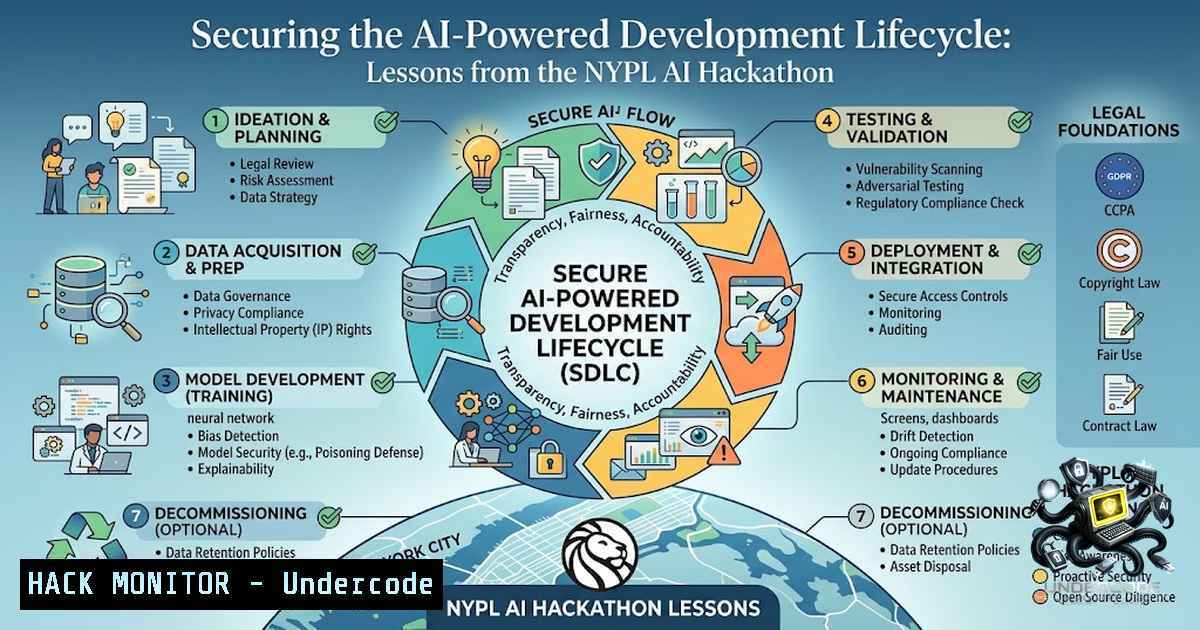
The integration of artificial intelligence into the software development lifecycle (SDLC) has evolved from a novelty to a critical operational necessity. Events like the Major League Hacking hackathon at the New York Public Library’s Stavros Niarchos Foundation Library (SNFL), which focused on tools like Google AI Studio, GitHub Copilot, and Gemini Notebook LM, underscore this shift. However, as development teams race to leverage these powerful AI assistants, a new attack surface emerges, demanding a security-first approach to configuration, deployment, and monitoring to prevent data leakage, prompt injection, and privilege escalation.
Learning Objectives:
- Understand the security architecture and potential vulnerabilities of key AI development tools including Google AI Studio, Gemini API, and GitHub Copilot.
- Learn to implement hardening measures and best practices for API key management, workspace trust, and sandboxing.
- Gain practical knowledge of commands and configurations to secure AI-assisted coding environments across Linux and Windows platforms.
You Should Know:
- Hardening Google AI Studio and Gemini API Key Management
Google AI Studio is a powerful web-based tool for prototyping and experimenting with prompt engineering using Gemini models. However, its API key management has been a significant security concern. To mitigate unauthorized usage and billing risks, Google is transitioning from standard API keys to authentication (auth) keys. As of June 19, 2026, all new API keys created in Google AI Studio are automatically created as auth keys, which are restricted to the Gemini API by default. Furthermore, unrestricted keys will be entirely rejected by September 2026.
Step-by-step guide:
- Audit Existing Keys: Log into Google AI Studio and navigate to the API Keys page. Identify any keys marked as “Unrestricted”.
2. Restrict or Migrate Keys:
Option 1 (Restrict): Hover over the “Unrestricted” label, click “Add restrictions”, and select “Restrict to Gemini API only” (generativelanguage.googleapis.com).
Option 2 (Migrate – Recommended): Generate a new auth key directly in Google AI Studio. These are restricted by default and offer improved security.
3. Update Integrations: Replace any old standard API keys in your applications, scripts, and CI/CD pipelines with the new restricted auth keys.
4. Configure Safety Settings: In Google AI Studio, adjust safety settings under “Advanced settings” in the Run settings panel. Use the sliders to set content filtering levels across four harm dimensions: harassment, hate speech, sexually explicit, and dangerous content. For development and testing, you may need to set a threshold like BLOCK_NONE. For production, implement least-privilege safety configurations.
2. Securing GitHub Copilot in the Enterprise
GitHub Copilot, an AI pair programmer, can significantly accelerate development but introduces risks if not properly configured. Attackers can exploit vulnerabilities to leak local GitHub tokens, access sensitive files, or even execute arbitrary code. Furthermore, prompt injection remains a primary threat, where malicious prompts can manipulate the AI agent’s behavior.
Step-by-step guide:
- Enable Workspace Trust: In VS Code, ensure Workspace Trust is enabled. This restricts Copilot’s capabilities within untrusted folders.
- Configure Code Referencing: In your GitHub Copilot settings, enable “Suggestions matching public code” to either block or flag matches. This prevents the accidental introduction of code with restrictive licenses or known vulnerabilities. While matches occur in less than 1% of suggestions, they are more frequent in empty files.
- Implement “Do Not Suggest” Lists: Create a `copilot-instructions.md` file in your repository to guide Copilot toward secure coding defaults. Include “Do Not Suggest” lists to block risky completions like
eval, inline SQL, and insecure deserialization patterns.
4. Harden Copilot CLI:
Set Trusted Directories: Control where Copilot CLI can read, modify, and execute files. Be cautious when trusting directories, as this has security implications.
Manage Tool Permissions: Use the `–allow-tool` and `–deny-tool` command-line options to control which tools Copilot can use. For persistent permissions, configure the `~/.copilot/permissions-config.json` file.
Enable Sandboxing: Use the `/sandbox` slash command within a Copilot CLI session to restrict filesystem access, network connectivity, and system capabilities. Sandboxing is turned on by default.
Use Hooks for Policy Enforcement: Implement repository hooks to log user prompts and control which tools Copilot CLI can run, ensuring compliance with organizational security policies.
3. Securing Gemini NotebookLM and Enterprise Data
NotebookLM is now a core Google Workspace service, providing enterprise-grade security protections. It offers features like Customer-Managed Encryption Keys (CMEK), Data Residency (DRZ) for US and EU regions, and ensures that your data is not reviewed by humans or shared outside your organization.
Step-by-step guide:
- Verify Enterprise Status: Ensure your organization is using NotebookLM Enterprise or a Gemini Enterprise plan to benefit from full security controls like CMEK and compliance certifications.
- Manage Data Residency: Confirm that your data residency settings (e.g., US or EU multi-region) meet your compliance requirements.
- Leverage Admin Controls: IT administrators can control access permissions and security policies directly through the Google Workspace Admin Console.
- Understand the “Clean Slate” Policy: Each new Gemini chat starts with a “clean slate” and does not carry over information from previous conversations. This prevents cross-session data leakage.
4. Protecting Against Prompt Injection and AI-Specific Threats
Prompt injection is the leading attack vector against AI agents, accounting for the majority of security failures in production. Attackers can use direct prompts to steal credentials or indirect prompts embedded in external sources like open-source repos, Jira tickets, or files. Researchers have even demonstrated workflow-level prompt injection techniques that bypass safeguards and cause Copilot to generate malicious code.
Step-by-step guide:
- Input Validation: Never trust user-supplied input. Sanitize and validate all prompts before they are processed by the AI model.
- Content Filtering: Utilize the built-in safety settings in tools like Google AI Studio to filter out harmful or malicious prompts.
- Principle of Least Privilege: Grant AI agents the minimum permissions necessary. Avoid using `/allow-all` or `/yolo` commands in Copilot CLI. Instead, use granular tool permissions and sandboxing.
- Monitoring and Logging: Implement robust logging to monitor AI agent activity. This includes logging user prompts, tool usage, file access, and generated code. Regularly review logs for suspicious patterns.
5. Hardening AI Toolchains on Linux and Windows
Securing the underlying infrastructure is as important as securing the AI tools themselves.
Linux Hardening Commands:
Restrict File Permissions: `chmod 600 ~/.copilot/permissions-config.json` (Restrict read/write to the owner only).
Monitor System Calls: Use `auditd` to monitor file access to sensitive directories like `/etc/` or ~/.ssh/.
Network Controls: Use `iptables` or `ufw` to restrict outbound connections from development environments to only necessary endpoints.
Windows Hardening Commands:
Restrict File Permissions: `icacls %USERPROFILE%\.copilot\permissions-config.json /inheritance:r /grant %USERNAME%:F` (Remove inheritance and grant full control only to the user).
Audit Policy: Use `auditpol` to enable auditing for object access, specifically for sensitive directories.
What Undercode Say:
- Key Takeaway 1: The democratization of AI through tools like Google AI Studio and GitHub Copilot is a double-edged sword. While they accelerate development, they introduce a new class of vulnerabilities that require a fundamental shift in security mindset and practices.
- Key Takeaway 2: Proactive security is non-1egotiable. Hardening measures such as proper API key management, workspace trust, sandboxing, and strict tool permissions are not optional extras but essential steps to prevent data breaches and unauthorized access.
Analysis:
The NYPL hackathon highlights the rapid adoption of AI in development. However, the security community is catching up, revealing significant risks. The transition of Gemini API keys to auth keys and the discovery of prompt injection vulnerabilities in Copilot are clear indicators that the industry is in a learning phase. Organizations must move beyond treating AI tools as simple productivity boosters and instead view them as privileged system components that require rigorous security oversight. The future of secure AI development lies in automated security scanning, continuous monitoring of AI agents, and embedding security into the AI development lifecycle from the start. Ignoring these risks is not an option; the attack surface is too large and the potential impact too severe.
Prediction:
- +1 The forced migration to auth keys for the Gemini API will significantly reduce the risk of API key abuse and unauthorized billing, setting a new industry standard for AI API security.
- +1 The rise of AI-specific security frameworks and tools (e.g., for detecting prompt injections) will create a new cybersecurity sub-market, leading to more robust and resilient AI-powered applications.
- -1 Until comprehensive security frameworks are widely adopted, we will continue to see a rise in incidents involving data leakage and compromised AI agents, particularly in organizations with immature security postures.
- -1 The sophistication of prompt injection attacks will outpace the development of effective defenses in the short term, leading to a “cat and mouse” game between attackers and defenders in the AI security space.
▶️ Related Video (86% Match):
🎯Let’s Practice For Free:
🎓 Live Courses & Certifications:
Join Undercode Academy for Verified Certifications
🚀 Request a Custom Project:
Secure, high-velocity infrastructure and disruptive technological engineering. Contact our engineering team for high-tier development and proprietary systems:
[email protected]
💎 Smart Architecture | 🛡️ Secure by Design | ⭐ Trusted by Thousands
IT/Security Reporter URL:
Reported By: https://lnkd.in/p/epieyus5 – Hackers Feeds
Extra Hub: Undercode MoN
Basic Verification: Pass ✅


