Listen to this Post
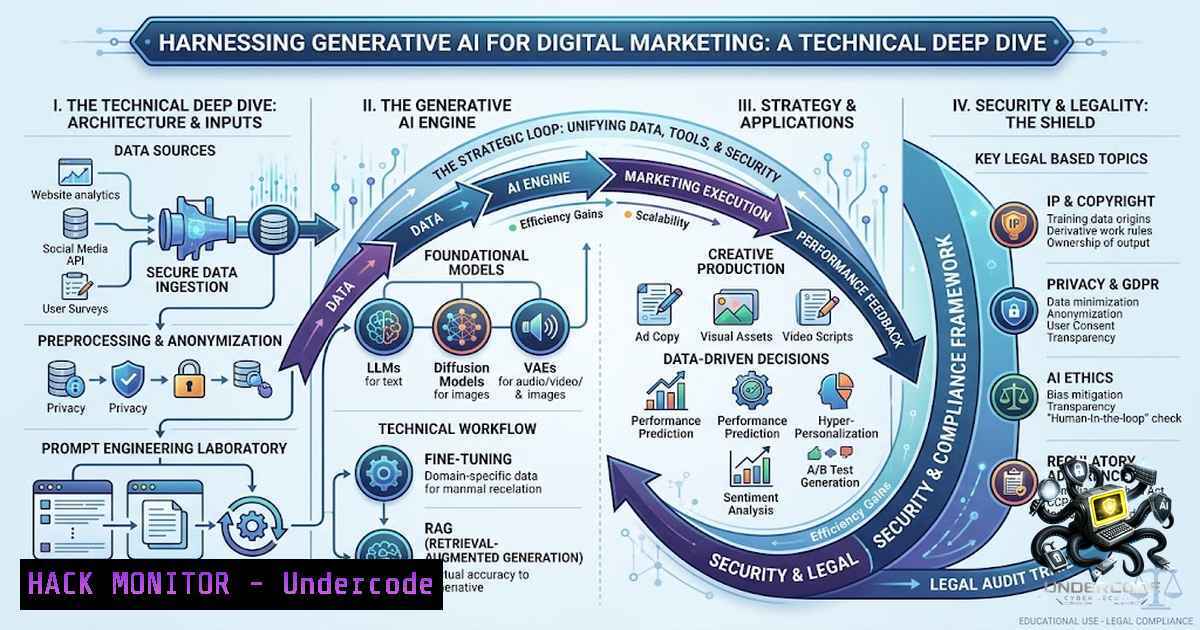
Introduction:
The rapid integration of Generative AI into digital marketing represents a paradigm shift, transforming creative workflows and data analysis. As professionals explore tools like Claude.ai and Google Analytics GA4, the underlying technical infrastructure—from API integrations to cloud data storage—introduces new considerations for security, automation, and system hardening. This article examines the technical stack powering modern AI-driven marketing campaigns, providing a comprehensive guide to leveraging these technologies effectively while mitigating associated risks.
Learning Objectives:
- Understand the core technical components and API security practices for integrating AI tools like Claude.ai and GA4 into marketing workflows.
- Learn how to automate prompt engineering and content generation using Python scripts and command-line interfaces.
- Implement basic hardening measures for cloud environments used to store and process marketing data and AI-generated assets.
You Should Know:
1. Securing AI Tool API Integrations
The power of tools like Claude.ai and GA4 lies in their APIs, which allow for programmatic content generation, data retrieval, and report automation. However, these integrations can become a vector for data leakage if not properly secured. A critical first step is to ensure API keys are never hardcoded in scripts or exposed in version control.
Step‑by‑step guide explaining what this does and how to use it:
Managing API keys securely is paramount. Instead of embedding them directly, use environment variables. This practice separates configuration from code, reducing the risk of accidental exposure.
- On Linux/macOS:
- Open your terminal and navigate to your project directory.
2. Create a `.env` file: `touch .env`.
- Add your API keys: `echo “CLAUDE_API_KEY=’your_actual_api_key'” >> .env` and
echo "GA4_API_SECRET='your_secret'" >> .env.
4. Protect the file: `chmod 600 .env`.
- To load these variables in a Python script, use the `python-dotenv` library: `from dotenv import load_dotenv` and
import os; then load with `load_dotenv()` and access withos.getenv('CLAUDE_API_KEY').
- On Windows (PowerShell):
1. Set a user-level environment variable: `[System.Environment]::SetEnvironmentVariable(‘CLAUDE_API_KEY’,’your_actual_api_key’,’User’)`.
- In your Python script, retrieve it with
os.getenv('CLAUDE_API_KEY'). This method ensures your keys are not stored in plain text within your codebase.
2. Automating Prompt Engineering with Command-Line Tools
The efficiency gains from Generative AI are amplified when prompt generation and submission are automated. For instance, marketers can use `curl` commands to test and refine prompts for ad copy generation via an API, allowing for rapid prototyping and testing of different prompt structures.
Step‑by‑step guide explaining what this does and how to use it:
Automating prompt testing allows for rapid iteration. The `curl` utility is a powerful tool to interact with AI APIs directly from the command line.
- Basic `curl` request to a large language model API (conceptual):
curl -X POST https://api.anthropic.com/v1/messages \ -H "x-api-key: $CLAUDE_API_KEY" \ -H "anthropic-version: 2023-06-01" \ -H "content-type: application/json" \ -d '{ "model": "claude-3-opus-20240229", "max_tokens": 150, "messages": [{"role": "user", "content": "Generate a catchy headline for a new AI-based digital marketing course."}] }' - This command can be integrated into a shell script to generate multiple headlines or ad variations, significantly speeding up the creative ideation process. The output can be piped to a text file for further review.
3. Hardening Your Analytics Data Pipeline (GA4)
Google Analytics GA4 provides rich user interaction data. When combining this with AI tools for analysis, the data pipeline must be hardened to protect user privacy and maintain data integrity. This involves configuring data retention settings and ensuring data is transferred over secure, encrypted channels.
Step‑by‑step guide explaining what this does and how to use it:
Configuring GA4 data retention and export ensures compliance and security.
- Setting Data Retention in GA4:
1. Log in to your GA4 property.
- Navigate to Admin > Data Settings > Data Retention.
- Set the retention period for event and user data. For event-level data, options range from 2 to 14 months. Choose a period that aligns with your business and compliance requirements.
- For reports and advertising, the retention period can be set to a different duration. Ensure the “Reset user data on new activity” toggle is set to your preference, which controls whether the retention clock resets with each new user session.
- Exporting Data to Cloud Storage for AI Analysis:
- In GA4, go to Admin > Data Export > BigQuery Linking.
- Link your GA4 property to a Google Cloud project.
- Configure the export settings, choosing whether to export daily and streaming data. Once linked, you can query your raw event data in BigQuery, which is a best practice for advanced analysis and machine learning projects, as it offloads processing from GA4 and allows for more complex data joins and transformations.
-
Enhancing Visual Content Creation with AI: A Technical Workflow
Generative AI image and video creation tools often rely on complex models like Stable Diffusion or GANs. For a marketing professional, understanding the basics of interacting with these models via local or cloud-based interfaces can be beneficial.
Step‑by‑step guide explaining what this does and how to use it:
For local testing of image generation, you can set up a stable diffusion model using a Python library like diffusers.
- Installation and Setup:
1. Ensure Python 3.8+ and `pip` are installed.
- Create a virtual environment: `python3 -m venv venv` and activate it.
- Install the `diffusers` and `transformers` libraries:
pip install diffusers transformers accelerate.
4. Create a simple script:
from diffusers import StableDiffusionPipeline
import torch

model_id = "runwayml/stable-diffusion-v1-5"
pipe = StableDiffusionPipeline.from_pretrained(model_id, torch_dtype=torch.float16)
pipe = pipe.to("cuda")

prompt = "a professional digital marketing banner depicting AI and analytics"
image = pipe(prompt).images[bash]
image.save("marketing_banner.png")
– This script will download the model and generate an image based on your prompt. This is a powerful demonstration of how Generative AI works under the hood.
5. Vulnerability Mitigation in AI-Powered Marketing Tools
Marketers using AI are often unaware that their prompts can be a source of vulnerability through “prompt injection” or “data poisoning.” This occurs when malicious input is crafted to override the AI’s instructions or to extract sensitive training data.
Step‑by‑step guide explaining what this does and how to use it:
Mitigating these risks involves sanitizing input and implementing a “zero-trust” architecture for user-generated content that feeds into an AI model.
- Input Sanitization (Conceptual):
- Before sending user-generated content to an AI API, filter and sanitize the input.
2. A simple Python function might look like:
def sanitize_prompt(user_input):
 Remove any characters that could be interpreted as delimiter or escape sequences
sanitized = ''.join([c for c in user_input if c.isalnum() or c in (' ', '.', '?', '!')])
 Add a system prefix to prevent overriding instructions
return f"System: Generate marketing content based on the following user theme: {sanitized}"
– For more advanced security, consider using the AI model’s safety settings to filter inappropriate or suspicious content.
What Undercode Say:
- Key Takeaway 1: The core of AI-driven marketing success lies in mastering the “art of the prompt,” which is essentially a new form of programming language for non-technical professionals.
- Key Takeaway 2: Generative AI tools are not just for creative tasks; they are critical for data analysis and reporting, bridging the gap between creative ideation and data-driven performance.
Analysis:
Devapriya’s journey underscores a crucial evolution in digital marketing from a purely creative to a technically augmented discipline. The tools mentioned—Generative AI for content and GA4 for data—represent a modern technical stack. The core skill highlighted is not just using these tools, but orchestrating them. The “prompt” becomes the new line of code, and mastering it demands an understanding of the model’s capabilities and limitations. This is analogous to learning a new query language. The article expands on this by emphasizing the security and automation aspects of this stack, which are often overlooked. Practical advice on API key management, data pipeline hardening, and input sanitization provides a solid foundation for professionals to build upon. It transforms the narrative from one of fear of replacement to one of empowerment through technical and procedural knowledge, ensuring that the integration of AI is both powerful and secure.
Prediction:
+1 The integration of AI into marketing will lead to the creation of new, specialized roles such as “Prompt Engineers for Marketing” and “AI Security Analysts,” driving demand for hybrid skills.
+1 The democratization of AI tools will lower the barrier to entry for high-quality content creation, allowing smaller teams to compete with larger enterprises.
-1 An over-reliance on automated AI tools without understanding the underlying security implications could lead to significant data breaches and reputational damage for marketing firms.
-1 The rapid evolution of AI may outpace the development of industry-wide security standards, leading to a fragmented and potentially risky ecosystem for non-technical marketers.
▶️ Related Video (76% Match):
🎯Let’s Practice For Free:
🎓 Live Courses & Certifications:
Join Undercode Academy for Verified Certifications
🚀 Request a Custom Project:
Secure, high-velocity infrastructure and disruptive technological engineering. Contact our engineering team for high-tier development and proprietary systems:
[email protected]
💎 Smart Architecture | 🛡️ Secure by Design | ⭐ Trusted by Thousands
IT/Security Reporter URL:
Reported By: https://lnkd.in/p/e-kUiJx9 – Hackers Feeds
Extra Hub: Undercode MoN
Basic Verification: Pass ✅


