
Listen to this Post
Introduction:
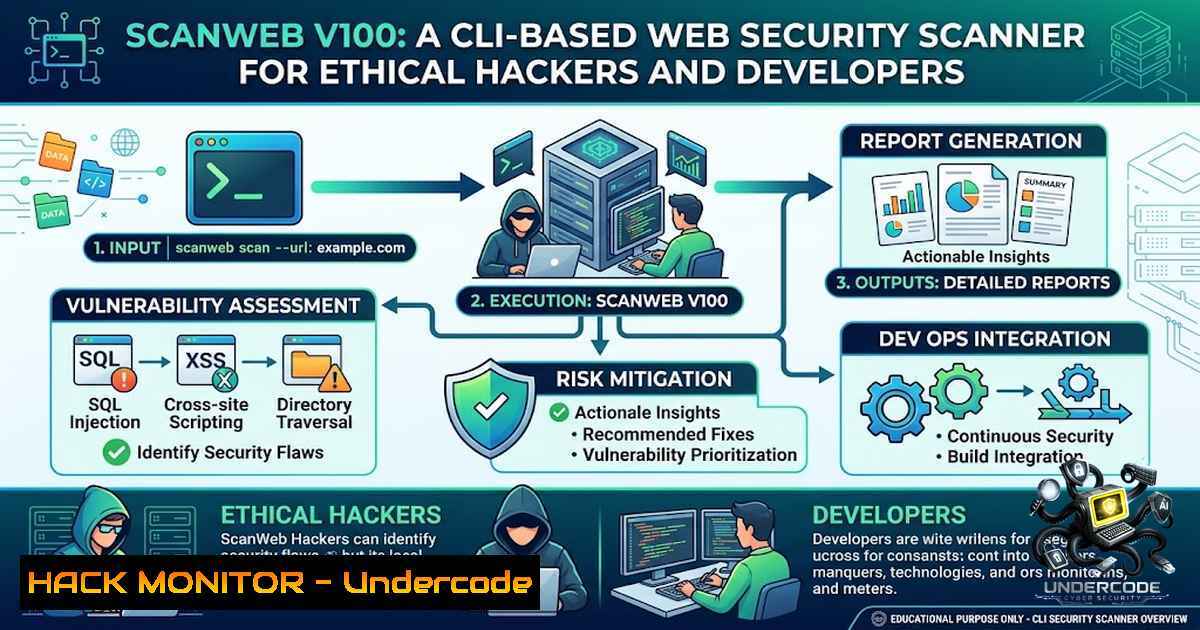
Web security testing has traditionally been a domain dominated by heavy GUI tools and complex enterprise solutions. The release of ScanWeb v1.0.0 on NPM marks a significant shift toward accessibility—bringing basic reconnaissance and vulnerability detection capabilities directly to the terminal. Developed as a learning project by a computer science student passionate about ethical hacking, ScanWeb demonstrates how modern CLI tools can democratize security testing by lowering the barrier to entry. The tool combines traditional security checks—SQL injection detection, XSS testing, CORS misconfiguration analysis, and SSL/TLS inspection—with optional Groq AI integration for enhanced security analysis, all packaged in a simple npm install command.
Learning Objectives & Secrets:
- Objective 1: Master CLI-Based Reconnaissance – Learn to perform comprehensive web security assessments directly from the terminal without relying on bulky graphical interfaces. ScanWeb automates IP address identification, cloud infrastructure detection, and port scanning, enabling rapid initial assessment of any web target.
-
Objective 2: Automated Vulnerability Assessment – Secret tip: Combine ScanWeb’s built-in checks with the `–report` flag to generate JSON and HTML reports. This creates a documented audit trail that can be integrated into CI/CD pipelines or shared with team members for collaborative security reviews.
-
Objective 3: AI-Enhanced Security Analysis – Secret tip: Configure Groq AI integration by setting your API key as an environment variable (
GROQ_API_KEY=your_key). This enables the LLM to provide contextual analysis of detected vulnerabilities, offering remediation suggestions beyond the raw scan results—essentially giving you an AI security analyst in your terminal.
You Should Know:
1. Installation and Basic Usage
ScanWeb follows the standard npm package distribution model, making it instantly accessible to any developer with Node.js installed. The installation process is straightforward:
 Global installation for repeated use
npm install -g scanweb

Run a scan against your target
scanweb https://your-website.com
For one-off scans without permanent installation, npx provides a cleaner approach:
 Run without installing globally
npx scanweb https://your-website.com
This zero-friction installation model aligns with modern development workflows, allowing security testing to become part of the regular development cycle rather than a separate, specialized activity.
2. Reconnaissance Capabilities
The first phase of any security assessment involves understanding the target infrastructure. ScanWeb automates several critical reconnaissance tasks:
- IP Address Resolution: Identifies the target server’s IP address, providing the foundation for further network analysis.
- Cloud Infrastructure Detection: Determines whether the target is hosted on cloud platforms (AWS, Azure, GCP, etc.), which influences the threat model and potential attack vectors.
- Web Port Scanning: Checks common web ports (80, 443, 8080, 8443) to identify exposed services beyond the primary web server.
To perform manual reconnaissance on Linux systems, you can supplement ScanWeb with traditional tools:
 Manual IP resolution
dig +short example.com
nslookup example.com

Port scanning with netcat
nc -zv example.com 80 443 8080 8443

Cloud infrastructure detection using whois
whois example.com | grep -i "cloud|aws|azure|google"
On Windows, equivalent commands include:
 IP resolution
nslookup example.com
ping example.com

Port scanning with Test-1etConnection
Test-1etConnection example.com -Port 80
Test-1etConnection example.com -Port 443
3. SSL/TLS Configuration Inspection
SSL/TLS misconfigurations remain one of the most common security oversights. ScanWeb inspects certificate validity, protocol versions, and cipher suite strength. Understanding SSL/TLS security is crucial for preventing man-in-the-middle attacks and ensuring data-in-transit protection.
For manual SSL/TLS inspection, OpenSSL provides comprehensive capabilities:
 Check certificate details
openssl s_client -connect example.com:443 -servername example.com

View certificate expiry
echo | openssl s_client -servername example.com -connect example.com:443 2>/dev/null | openssl x509 -1oout -dates

Test for weak ciphers
openssl s_client -connect example.com:443 -cipher 'EXP:@SECLEVEL=0' 2>/dev/null
On Windows, you can use PowerShell for SSL/TLS inspection:
 Check SSL certificate
$request = [System.Net.WebRequest]::Create("https://example.com")
$request.GetResponse()
$request.ServicePoint.Certificate
4. Common Web Vulnerability Testing
ScanWeb automates detection of several OWASP Top 10 vulnerabilities:
- SQL Injection: Tests input vectors for classic SQL injection patterns by injecting payloads and analyzing server responses.
- Cross-Site Scripting (XSS): Checks for reflected and stored XSS vulnerabilities by injecting JavaScript payloads.
- CORS Misconfiguration: Identifies overly permissive Cross-Origin Resource Sharing policies that could allow unauthorized domain access.
- Security Headers: Verifies the presence and correctness of security headers like Content-Security-Policy, X-Frame-Options, and HSTS.
- Sensitive File Exposure: Scans for exposed configuration files, backup files, and directory listings.
To complement ScanWeb’s automated testing, manual validation using curl can provide deeper insight:
 Test for SQL injection manually
curl "https://example.com/page?id=1' OR '1'='1"

Check security headers
curl -I https://example.com

Test CORS configuration
curl -H "Origin: https://malicious.com" -I https://example.com

Check for sensitive file exposure
curl https://example.com/.env
curl https://example.com/robots.txt
curl https://example.com/.git/config
5. Vulnerability Assessment and Risk Scoring
After completing the security checks, ScanWeb generates a vulnerability assessment with a risk score. This scoring system prioritizes findings based on severity, helping security teams focus on the most critical issues first. The tool can export results in JSON format for integration with other security tools, or HTML format for human-readable reporting.
 Generate JSON report
scanweb https://example.com --report json

Generate HTML report
scanweb https://example.com --report html
For automated security workflows, you can pipe ScanWeb output to other tools:
 Combine with jq for JSON processing
scanweb https://example.com --report json | jq '.vulnerabilities[] | select(.severity=="high")'

Parse HTML report with pup (Linux)
scanweb https://example.com --report html | pup 'table tr json{}'
6. Groq AI Integration for Enhanced Analysis
The optional Groq AI integration represents a forward-thinking approach to security testing. By leveraging Groq’s high-performance LLM inference, ScanWeb can provide contextual analysis of detected vulnerabilities. To enable this feature:
 Set your Groq API key
export GROQ_API_KEY="your_groq_api_key"

Run scan with AI analysis
scanweb https://example.com --ai
The AI component can suggest remediation strategies, explain attack vectors in plain language, and prioritize findings based on business context. This transforms ScanWeb from a simple vulnerability scanner into an intelligent security assistant.
7. Integration with Security Workflows
ScanWeb’s CLI nature makes it ideal for integration into existing security workflows:
- CI/CD Pipelines: Add ScanWeb as a pre-deployment check to catch security issues before production release.
- Bug Bounty Programs: Use ScanWeb for initial reconnaissance before deeper manual testing.
- Security Training: Incorporate ScanWeb into ethical hacking courses to demonstrate automated vulnerability detection.
- Incident Response: Quickly assess new or suspicious web applications during security investigations.
Example CI/CD integration with GitHub Actions:
name: Security Scan
on: [bash]
jobs:
scan:
runs-on: ubuntu-latest
steps:
- uses: actions/checkout@v3
- uses: actions/setup-1ode@v3
with:
node-version: '18'
- run: npx scanweb https://staging.example.com --report json > scan-results.json
- uses: actions/upload-artifact@v3
with:
name: scan-results
path: scan-results.json
What Undercode Say:
- Key Takeaway 1: ScanWeb represents the democratization of security testing—transforming complex web security assessments into a simple npm command. This lowers the barrier to entry for developers and aspiring ethical hackers alike.
-
Key Takeaway 2: The integration of Groq AI with traditional vulnerability scanning creates a hybrid approach that combines automated detection with intelligent analysis. This is the direction the security industry is heading—merging deterministic checks with AI-powered reasoning.
The release of ScanWeb v1.0.0 signals a broader trend in cybersecurity: the move toward lightweight, accessible, and AI-enhanced security tools that empower developers to take ownership of security testing. While enterprise-grade solutions will always have their place, tools like ScanWeb fill a critical gap for individuals and small teams who need security testing capabilities without enterprise budgets. The fact that a student built this as a learning project is particularly encouraging—it demonstrates that the next generation of security professionals is building practical tools that solve real problems. However, users must remember the ethical responsibility: ScanWeb should only be used against websites you own or have explicit permission to test.
Prediction:
- +1 The rise of CLI-based security scanners like ScanWeb will accelerate the adoption of security testing among junior developers and students, creating a more security-conscious developer community over the next 2–3 years.
-
+1 Integration of AI (Groq, OpenAI, etc.) into security tools will become standard practice, with AI providing contextual analysis, remediation suggestions, and even autonomous vulnerability exploitation, significantly reducing the skill barrier for effective security testing.
-
-1 The accessibility of tools like ScanWeb also lowers the barrier for malicious actors, who may use similar automated scanners for reconnaissance and vulnerability discovery against unauthorized targets.
-
+1 The modular, open-source nature of ScanWeb will likely encourage community contributions, expanding its capabilities and creating a vibrant ecosystem of security-focused npm packages.
-
+1 As organizations increasingly adopt DevSecOps practices, tools that integrate seamlessly into development workflows (like ScanWeb) will see growing adoption, potentially disrupting traditional security tool vendors.
-
-1 Over-reliance on automated scanners without understanding the underlying security concepts may lead to false confidence and overlooked vulnerabilities that require manual testing and human judgment to identify.
-
+1 The educational value of building security tools as learning projects will continue to produce innovative solutions that challenge established commercial offerings, benefiting the broader security community.
▶️ Related Video (84% Match):
https://www.youtube.com/watch?v=2D05VSWegd4
🎯Let’s Practice For Free:
🎓 Live Courses & Certifications:
Join Undercode Academy for Verified Certifications
🚀 Request a Custom Project:
Secure, high-velocity infrastructure and disruptive technological engineering. Contact our engineering team for high-tier development and proprietary systems:
[email protected]
💎 Smart Architecture | 🛡️ Secure by Design | ⭐ Trusted by Thousands
IT/Security Reporter URL:
Reported By: https://lnkd.in/p/eA_CXSFK – Hackers Feeds
Extra Hub: Undercode MoN
Basic Verification: Pass ✅


