Listen to this Post
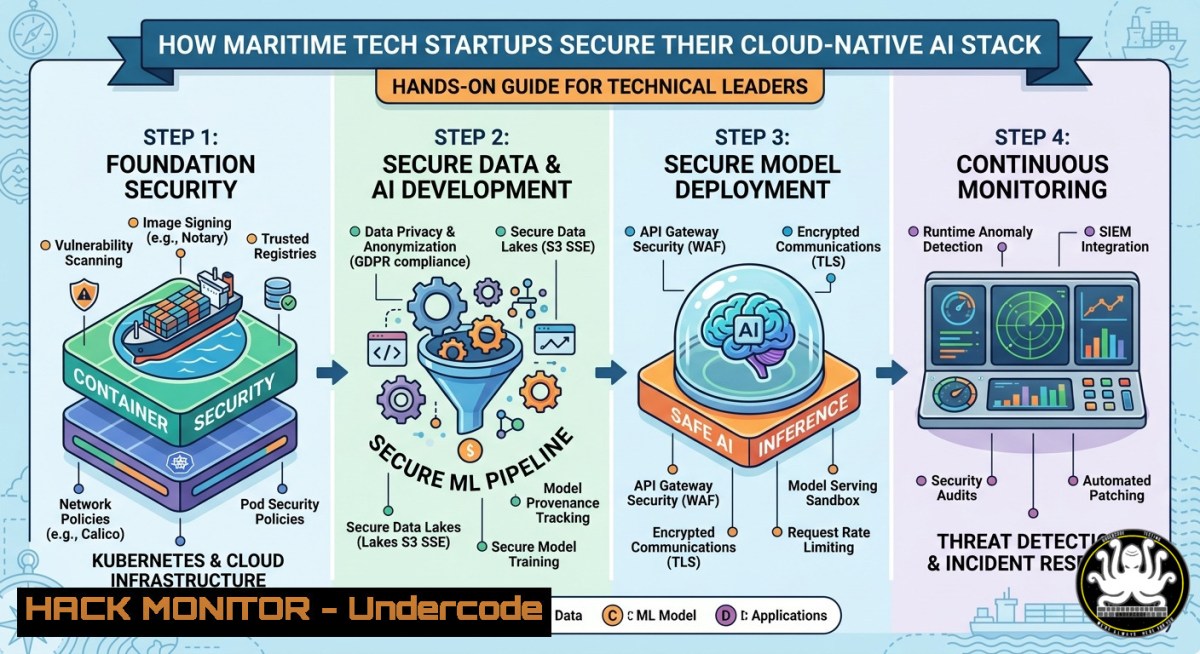
Introduction:
Maritime technology startups like Integrated Maritime Exchange (IME) are racing to build AI-driven platforms on Microsoft Azure, but rapid development often leaves cloud-native architectures exposed to API breaches, container escapes, and LLM injection attacks. For a hands-on technical lead, balancing feature velocity with security requires embedding zero-trust principles across PHP/Python backends, Kubernetes clusters, and predictive analytics pipelines.
Learning Objectives:
- Implement infrastructure-as-code security scanning for Azure and GCP deployments
- Harden Docker containers and Kubernetes RBAC against privilege escalation
- Apply OWASP API security controls in FastAPI/Node.js microservices
- Secure AI/ML pipelines and LLM integrations from prompt injection and model inversion
You Should Know:
1. Securing Azure Cloud Infrastructure with Terraform (IaC)
Start by treating your cloud configuration as code with security built-in. Use Terraform to define resources, then run static analysis to catch misconfigurations before apply.
Step‑by‑step guide:
1. Install Terraform and Azure CLI (Linux/macOS):
curl -fsSL https://apt.releases.hashicorp.com/gpg | sudo apt-key add -
sudo apt-add-repository "deb [arch=amd64] https://apt.releases.hashicorp.com $(lsb_release -cs) main"
sudo apt-get update && sudo apt-get install terraform
curl -sL https://aka.ms/InstallAzureCLIDeb | sudo bash
az login
2. Write a secured Azure App Service + PostgreSQL definition with main.tf:
resource "azurerm_app_service" "secure_api" {
name = "ime-secure-api"
location = azurerm_resource_group.rg.location
resource_group_name = azurerm_resource_group.rg.name
app_service_plan_id = azurerm_app_service_plan.asp.id
https_only = true
site_config {
always_on = true
http2_enabled = true
min_tls_version = "1.2"
}
}
3. Run `terraform plan` and `tfsec` vulnerability scan:
brew install tfsec  or download from GitHub
tfsec .  scans for open ingress, missing encryption
terraform apply -auto-approve
4. Enable Azure Defender for Cloud (command line):
az security pricing create -n VirtualMachines --tier standard
az security auto-provisioning-setting update --auto-provision On
2. Hardening Docker Containers and Kubernetes Workloads
IME’s migration to Kubernetes demands container security from build to runtime. Avoid running as root, drop all capabilities, and enforce read‑only root filesystems.
Step‑by‑step guide:
- Create a hardened Dockerfile for a Python FastAPI service:
FROM python:3.11-slim AS builder
RUN useradd --no-create-home -s /bin/fastapi-user
WORKDIR /app
COPY requirements.txt .
RUN pip install --no-cache-dir -r requirements.txt
COPY . .
USER fastapi-user
CMD ["uvicorn", "main:app", "--host", "0.0.0.0", "--port", "8000"]
2. Run with security options (Linux):
docker run --read-only --cap-drop=ALL --cap-add=NET_BIND_SERVICE -p 8000:8000 ime-api:latest
3. Apply a restrictive Kubernetes Pod Security Standard in your deployment YAML:
securityContext:
runAsNonRoot: true
runAsUser: 1000
allowPrivilegeEscalation: false
capabilities:
drop: ["ALL"]
4. Use kube-bench to validate cluster compliance:
docker run --pid=host -v /etc/kubernetes:/etc/kubernetes aquasec/kube-bench:latest
- API Security: JWT, Rate Limiting, and Input Validation in FastAPI
Maritime APIs handle sensitive operational data – unprotected endpoints risk injection and DoS. Implement multi‑layer defense.
Step‑by‑step guide:
1. Install dependencies:
pip install fastapi python-jose[bash] passlib[bash] slowapi
2. Add rate limiting middleware (Python):
from slowapi import Limiter, _rate_limit_exceeded_handler
from slowapi.util import get_remote_address

limiter = Limiter(key_func=get_remote_address, default_limits=["100/minute"])
app.state.limiter = limiter
app.add_exception_handler(RateLimitExceeded, _rate_limit_exceeded_handler)

@app.get("/v1/freight")
@limiter.limit("50/minute")
async def get_freight(request: Request):
return {"data": "secure"}
3. Validate all inputs using Pydantic models (prevents SQL/NoSQL injection):
from pydantic import BaseModel, Field, constr

class VesselInput(BaseModel):
imo: constr(regex=r'^[0-9]{7}$')
speed_kt: Field(ge=0, le=50)
4. Rotate JWT secrets via Azure Key Vault (PowerShell):
az keyvault secret set --vault-name ime-kv --name "JWT-SECRET" --value $(openssl rand -hex 32)
4. Securing AI/ML Pipelines and LLM Integrations
IME plans AI‑driven features – this introduces model poisoning, prompt injection, and data leakage. Isolate training pipelines and validate LLM inputs.
Step‑by‑step guide:
- Use Azure Machine Learning with private endpoints (CLI):
az ml workspace create -n ime-ml-ws -g ime-rg --vnet-name ime-vnet --subnet ml-subnet
- Sanitize training data (Python example to remove PII):
import re def scrub_pii(text: str) -> str: text = re.sub(r'\b\d{3}[-.]?\d{4}\b', '[REDACTED-PHONE]', text) text = re.sub(r'\b[A-Za-z0-9._%+-]+@[A-Za-z0-9.-]+.[A-Z|a-z]{2,}\b', '[REDACTED-EMAIL]', text) return text - Add a guardrail for LLM prompt injection (pre‑filter):
DANGEROUS_PATTERNS = ["ignore previous instructions", "leak system prompt", "DROP TABLE"] if any(pattern in user_input.lower() for pattern in DANGEROUS_PATTERNS): return {"error": "Request blocked by security policy"} - Run model scanning with Gitleaks or ModelScan before deployment:
pip install modelscan
modelscan --path ./saved_model --report-format json
5. CI/CD Security: Embedding DevSecOps in GitHub Actions
A compromised pipeline can inject backdoors into production. Sign commits, scan dependencies, and limit secrets exposure.
Step‑by‑step guide:
1. Create a hardened GitHub Actions workflow (`.github/workflows/sec-build.yml`):
name: Secure Build
on: push
jobs:
security:
runs-on: ubuntu-latest
steps:
- uses: actions/checkout@v4
- name: Run Trivy vulnerability scanner
uses: aquasecurity/[email protected]
with:
scan-type: 'fs'
scan-ref: '.'
format: 'sarif'
- name: Check for secrets
uses: gitleaks/gitleaks-action@v2
- name: OWASP Dependency Check
uses: dependency-check/Dependency-Check_Action@main
2. Enforce signed commits locally (Linux):
git config --global commit.gpgsign true
git commit -S -m "feat: secure API endpoint"
3. Never hardcode credentials – use GitHub Secrets and Azure OIDC:
az ad app create --display-name ime-gh-oidc --enable-id-token-issuance
- Monitoring and Logging for Threat Detection (Azure Monitor + ELK)
Detect real‑time attacks (failed logins, privilege escalations) using centralized logging and anomaly detection.
Step‑by‑step guide:
- Enable diagnostic logs for all Azure resources (CLI):
az monitor diagnostic-settings create --resource /subscriptions/.../appService/ime-api \
--name "stream-to-log-analytics" --workspace ime-law
- Install Filebeat to forward Kubernetes logs to Elasticsearch (Helm):
helm repo add elastic https://helm.elastic.co
helm upgrade --install filebeat elastic/filebeat -f custom-values.yaml
- Create an anomaly detection alert (KQL query in Azure Log Analytics):
AppServiceHTTPLogs
| where TimeGenerated > ago(10m)
| summarize FailedCount = countif(ScStatus >= 400) by ClientIP, _ResourceId
| where FailedCount > 50
- Set up real‑time Slack alert using Logic App – trigger on “Login failures > 10/min”.
7. Authentication and Access Control (OAuth2 + RBAC)
Move beyond basic auth – implement OAuth2 with Azure AD and fine‑grained RBAC for your microservices.
Step‑by‑step guide:
1. Register an app in Azure AD (PowerShell):
$app = New-AzADApplication -DisplayName "IME-Backend" -SignInAudience AzureADMyOrg
New-AzADServicePrincipal -ApplicationId $app.AppId
2. Protect a FastAPI endpoint with OAuth2:
from fastapi.security import OAuth2AuthorizationCodeBearer
oauth2_scheme = OAuth2AuthorizationCodeBearer(
authorizationUrl="https://login.microsoftonline.com/{tenant}/oauth2/v2.0/authorize",
tokenUrl="https://login.microsoftonline.com/{tenant}/oauth2/v2.0/token"
)
@app.get("/secure-data")
async def read_data(token: str = Depends(oauth2_scheme)):
 Validate token scopes
return {"message": "Authorized"}
3. Implement role‑based access (RBAC) with JWT claims:
required_role = "maritime_analyst"
if required_role not in token_payload.get("roles", []):
raise HTTPException(403, "Insufficient role")
4. Audit access periodically:
az role assignment list --assignee [email protected] --include-inherited
What Undercode Say:
- Key Takeaway 1: Technical leads at maritime startups must treat security as a non‑functional requirement from day one – not a post‑launch bolt‑on. The IME job description correctly emphasizes “security best practices” but implementing them requires concrete IaC scanning, container hardening, and API rate limiting.
- Key Takeaway 2: AI/ML features (LLM integrations, predictive analytics) introduce novel attack surfaces – prompt injection and model inversion. Guardrails and input sanitization are mandatory, even in rapid prototyping. The shortage of candidates who can bridge cloud-native DevOps, AI security, and team leadership is the real “gap” mentioned in the comments.
Analysis: The hiring post targets a leader who can “drive migration toward modern frameworks” while ensuring security and reliability. Most candidates over‑index on architecture diagrams but fail to operationalize security in CI/CD. The commands and steps above (tfsec, kube‑bench, FastAPI middleware, OAuth2) are exactly what a hands‑on technical lead would implement within the first 60 days. Without these, a maritime platform becomes a prime target for ransomware – especially given the industry’s critical supply chain role.
Prediction:
By 2026, maritime tech startups without automated security gates in their Azure/Kubernetes pipelines will face insurance premium hikes of 300–500% after the first breach. Technical leadership roles will evolve to require specific DevSecOps certifications (e.g., Certified Kubernetes Security Specialist, Azure Security Engineer). IME’s next hire won’t just write PHP and Python – they’ll be expected to enforce zero‑trust across every API call and AI inference, turning security into a competitive moat for freight and operational analytics platforms.
▶️ Related Video (76% Match):
🎯Let’s Practice For Free:
IT/Security Reporter URL:
Reported By: %F0%9D%97%9B%F0%9D%97%9C%F0%9D%97%A5%F0%9D%97%9C%F0%9D%97%A1%F0%9D%97%9A %F0%9D%97%A6%F0%9D%97%B2%F0%9D%97%BB%F0%9D%97%B6%F0%9D%97%BC%F0%9D%97%BF – Hackers Feeds
Extra Hub: Undercode MoN
Basic Verification: Pass ✅


