Listen to this Post
Introduction:
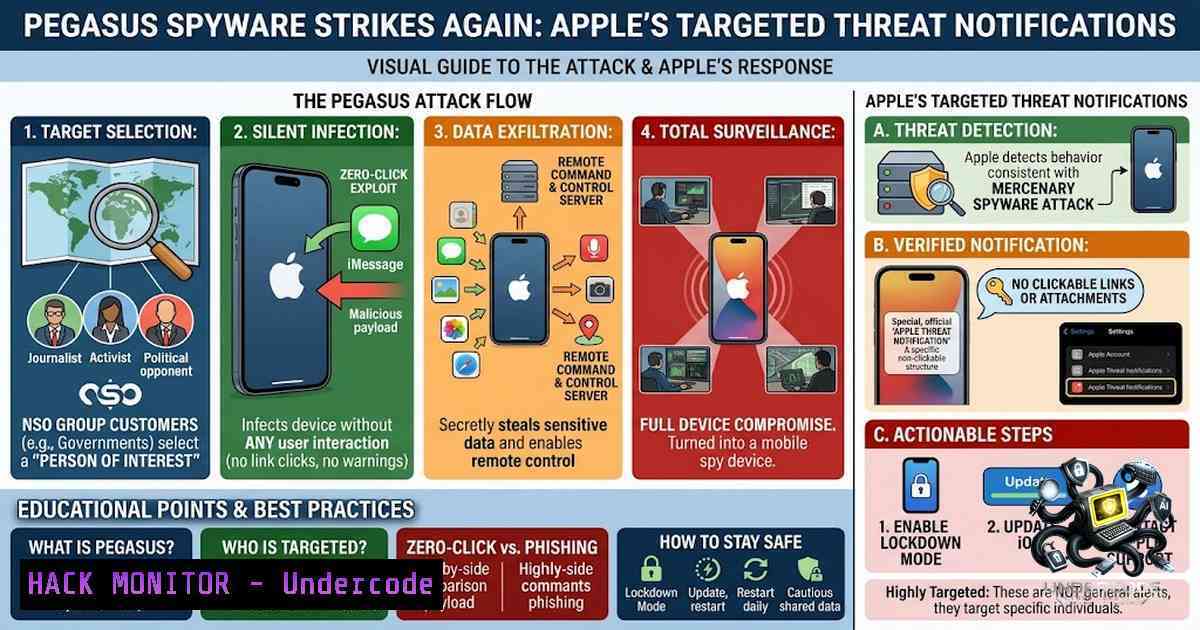
Apple has initiated a new wave of threat notifications to iPhone users identified as potential targets of sophisticated mercenary spyware, including the notorious Pegasus tool developed by NSO Group. These state-grade surveillance tools are designed for highly targeted attacks against journalists, activists, politicians, and public figures—not mass-market infections. Security researchers emphasize that recipients must take these alerts seriously, as Apple only issues such warnings when it detects credible indicators of spyware activity.
Learning Objectives:
- Understand the operational mechanics of Pegasus and similar mercenary spyware targeting iOS devices
- Learn to verify the authenticity of Apple threat notifications and distinguish them from phishing attempts
- Master the configuration and deployment of Apple’s Lockdown Mode for high-risk individuals
- Acquire technical skills to detect, mitigate, and respond to sophisticated spyware infections
You Should Know:
1. Understanding Mercenary Spyware and Attack Vectors
Mercenary spyware like Pegasus represents the pinnacle of commercial surveillance technology. Unlike common malware distributed through mass phishing campaigns, these tools are developed by companies like NSO Group and sold exclusively to government agencies and law enforcement entities. The operational model involves attackers selecting a specific individual and allocating significant resources to compromise their device.
The infection chain typically employs zero-click exploits that require no user interaction—a single missed call, an iMessage containing a maliciously crafted attachment, or even a WhatsApp voice call can silently deploy the spyware. Once installed, Pegasus achieves deep system-level persistence, enabling real-time exfiltration of messages, photos, emails, location data, and even activation of the device’s microphone and camera without any visible indicators.
Apple’s threat notifications are triggered by a combination of telemetry analysis and threat intelligence. According to Citizen Lab researcher John Scott-Railton, recipients should treat these warnings with utmost seriousness, as Apple has refined its detection capabilities to identify sophisticated surveillance activity. The company describes these attacks as “extremely rare and significantly more sophisticated than typical cybercrime or mass malware”.
2. Verifying Apple Threat Notification Authenticity
The first critical step upon receiving any Apple security alert is verification. Cybercriminals frequently exploit fear by sending fake notifications designed to steal credentials or deploy malware.
Step‑by‑Step Verification Process:
- Do not click any links or attachments in the notification email or message. Apple never requests that recipients click links, download files, install configuration profiles, or provide passwords or verification codes.
-
Log in to your Apple ID account page at `account.apple.com` using a trusted browser on a known-secure device. Authentic threat notifications from Apple will always appear on this official portal after authentication.
-
Check for the notification banner within the account dashboard. If the warning is not present on
account.apple.com, treat the message as a potential phishing attempt and report it to a cybersecurity professional. -
Verify sender details—legitimate Apple communications never originate from personal email addresses or contain urgent demands for immediate action.
-
Enable two-factor authentication (2FA) if not already active, and review all trusted devices associated with your account.
For Windows Users (Verification via Browser):
 Clear browser cache and cookies before logging in
 Windows: Open Command Prompt as Administrator
ipconfig /flushdns

Use an incognito/private browsing window
 Navigate to https://account.apple.com
 Verify presence of security notifications
For Linux Users (Verification via Browser):
 Use Firefox or Chromium in private mode
firefox --private-window https://account.apple.com

Or use curl to check for potential redirects (not for authentication)
curl -I https://account.apple.com
If the notification is confirmed as authentic, proceed immediately to security hardening measures.
3. Deploying Apple Lockdown Mode for High‑Risk Individuals
Apple introduced Lockdown Mode as an extreme protective measure specifically designed for the small subset of users at risk of highly targeted cyberattacks. When activated, this feature severely restricts device functionality to minimize attack surfaces.
Step‑by‑Step Activation Guide:
- On iPhone or iPad: Navigate to Settings → Privacy & Security → Lockdown Mode → Turn On Lockdown Mode.
-
On Mac: Go to System Settings → Privacy & Security → Lockdown Mode → Turn On.
3. Review the restrictions: Lockdown Mode disables:
- Most message attachment types except images and videos
- Certain complex web technologies in Safari (just-in-time JavaScript compilation is blocked)
- Incoming invitations and service requests from Apple services if the user has not previously contacted the sender
- Wired connections to accessories when the device is locked
- Configuration profile installations
- Device enrollment in mobile device management (MDM)
-
Confirm activation by entering your device passcode or Apple ID password. The device may require a restart.
-
Test critical applications after activation—some apps may exhibit limited functionality due to the security restrictions.
Mitigation Considerations:
Lockdown Mode is not intended for everyday users. It should be activated only when there is credible evidence of targeted surveillance. High-risk individuals—including NGO staff, journalists, human rights activists, and political figures—should consider enabling this feature proactively if they operate in hostile environments. Organizations supporting such individuals can contact Access Now’s digital security service for assistance.
4. Forensic Detection and Spyware Scanning
Detecting Pegasus-style spyware is notoriously difficult due to its stealth capabilities. However, several tools and methodologies can assist in identifying potential compromise.
Mobile Verification Toolkit (MVT) – iOS Analysis:
Developed by Amnesty International, MVT is a forensic tool designed to identify indicators of compromise (IoCs) associated with Pegasus and similar spyware.
Installation on Linux/macOS:
 Install MVT via pip
pip3 install mvt

Download iOS forensic module
mvt-ios download-iocs

Extract iOS backup (requires iTunes backup)
 First, create an encrypted backup of the iOS device via Finder or iTunes

Analyze the backup for spyware indicators
mvt-ios check-backup --output /path/to/output /path/to/backup
Installation on Windows (via WSL or Python):
 Install Windows Subsystem for Linux (if not available)
wsl --install -d Ubuntu

Within WSL Ubuntu:
sudo apt update && sudo apt install python3-pip -y
pip3 install mvt

Follow same analysis procedure as Linux
Sysdiagnose Log Collection (iOS):
Apple provides a built-in diagnostic logging tool that can reveal anomalous system behavior:
1. Press and hold both the Side and Volume Up buttons for approximately 1–2 seconds
2. Release and immediately press Volume Up then Volume Down
3. Press and hold the Side button until the device restarts
4. The sysdiagnose archive will be saved in Settings → Privacy & Security → Analytics & Improvements → Analytics Data
5. Incident Response Protocol for Confirmed Compromise
When a threat notification is confirmed and spyware presence is suspected, follow this structured response protocol:
Step 1: Isolate the Device
- Enable Airplane Mode immediately to sever network connectivity
- Disable Wi-Fi and Bluetooth
- Do not restart the device, as this may destroy volatile forensic evidence
Step 2: Preserve Evidence
- Create a full forensic backup using iTunes/Finder (encrypted)
- Document all system logs, notification details, and observed anomalous behavior
- Capture screenshots of the threat notification and device settings
Step 3: Engage Professional Support
- High-risk individuals should contact Access Now’s digital security helpline for expert assistance
- Consider engaging a forensic investigator with experience in mobile spyware analysis
- Report the incident to relevant authorities or human rights organizations
Step 4: Secure Credentials
- Change all passwords using a known-clean device
- Revoke all session tokens and application-specific passwords
- Enable hardware security keys (e.g., YubiKey) for critical accounts
Step 5: Device Remediation
- Perform a factory reset and restore from a known-good backup (pre‑compromise)
- If the compromise is confirmed at the firmware level, device replacement may be necessary
- Configure the replacement device with Lockdown Mode enabled from the outset
Linux Command for Network Traffic Analysis (Post‑Compromise Investigation):
 Capture and analyze network traffic for suspicious outbound connections
sudo tcpdump -i any -w capture.pcap

Analyze with Wireshark or tshark for connections to known C2 infrastructure
tshark -r capture.pcap -Y "dns.qry.name contains 'nsogroup' or dns.qry.name contains 'pegasus'"
Windows PowerShell for Network Monitoring:
 Monitor active network connections for suspicious processes
Get-1etTCPConnection | Where-Object {$_.State -eq "Established"}

Log outbound connections for analysis
New-1etFirewallRule -DisplayName "Log Outbound Connections" -Direction Outbound -Action Allow -Enabled True
What Undercode Say:
- Key Takeaway 1: Apple’s threat notification system represents a significant advancement in commercial spyware detection, but it is not foolproof—the absence of a notification does not guarantee device safety, and the presence of one demands immediate, structured response.
-
Key Takeaway 2: The distinction between zero-click and click‑based exploits is critical for understanding attack surfaces; zero-click vulnerabilities represent the most dangerous class of threats because they require no user action to succeed, making traditional security awareness training insufficient.
-
Analysis: The Pegasus ecosystem exemplifies the growing commoditization of state‑grade surveillance capabilities. While initially restricted to nation‑state actors, the proliferation of commercial spyware vendors has lowered the barrier to entry, enabling a broader range of threat actors to access these tools. Apple’s Lockdown Mode, while effective, imposes significant usability trade‑offs—users must choose between security and functionality. The long‑term solution requires legislative action to regulate the spyware industry, combined with continuous advancement in endpoint detection capabilities. Organizations supporting high‑risk individuals must develop comprehensive digital security programs that include technical controls, incident response planning, and psychological support for targets who may experience prolonged surveillance. The cybersecurity community must also prioritize research into detection methodologies that can operate without requiring device backups or user‑initiated scans, as many targets may not have the technical expertise to perform these procedures independently.
Prediction:
- +1 The increasing frequency of Apple threat notifications will drive broader adoption of Lockdown Mode among journalists and activists, creating a more resilient high‑risk user base and potentially reducing the effectiveness of commercial spyware campaigns.
- -1 As detection mechanisms improve, spyware vendors will accelerate investment in zero‑day exploit development and novel infection vectors, leading to an escalating arms race between Apple’s security team and the surveillance industry.
- -1 The commoditization of spyware technology will extend beyond nation‑state actors to include corporate espionage and private investigation firms, expanding the target pool beyond traditional high‑risk demographics.
- +1 Increased public awareness of mercenary spyware will pressure governments to implement stricter export controls and licensing requirements for surveillance technology vendors, potentially limiting the global reach of tools like Pegasus.
- -1 The sophistication gap between enterprise security teams and advanced threat actors will widen, as most organizations lack the forensic capabilities to detect or respond to zero‑click spyware infections, leaving critical infrastructure and corporate intellectual property vulnerable to surveillance‑based attacks.
▶️ Related Video (82% Match):
https://www.youtube.com/watch?v=34hLskysajA
🎯Let’s Practice For Free:
🎓 Live Courses & Certifications:
Join Undercode Academy for Verified Certifications
🚀 Request a Custom Project:
Secure, high-velocity infrastructure and disruptive technological engineering. Contact our engineering team for high-tier development and proprietary systems:
[email protected]
💎 Smart Architecture | 🛡️ Secure by Design | ⭐ Trusted by Thousands
IT/Security Reporter URL:
Reported By: https://lnkd.in/p/edqGwetv – Hackers Feeds
Extra Hub: Undercode MoN
Basic Verification: Pass ✅


