
Listen to this Post
Introduction:
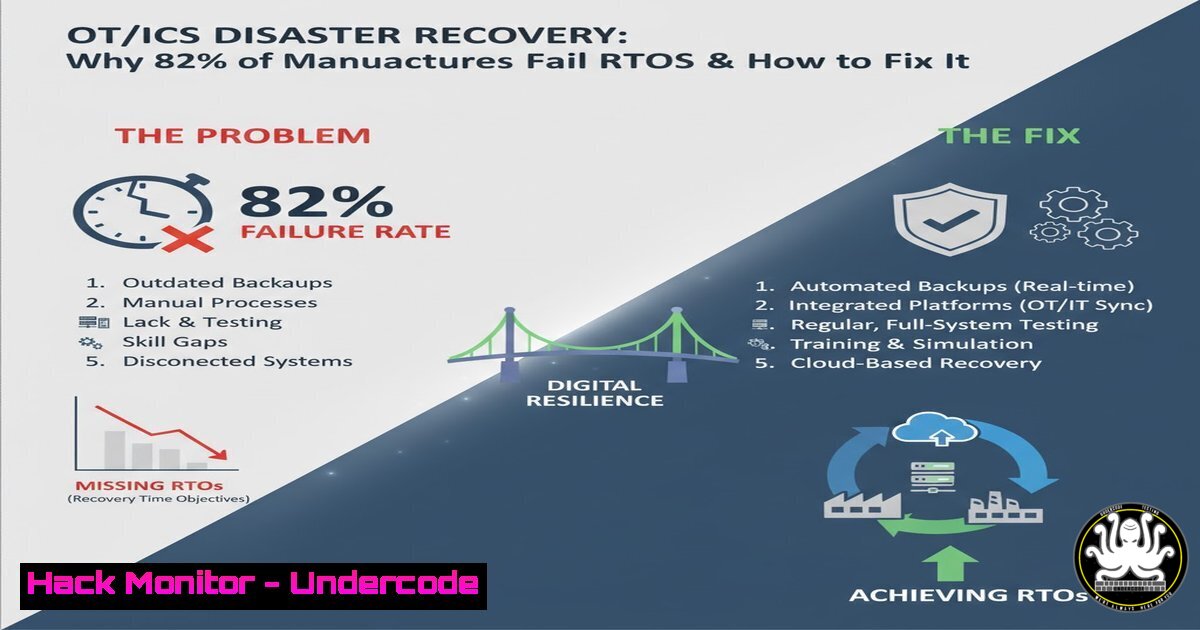
In the high-stakes world of Operational Technology (OT) and Industrial Control Systems (ICS), data integrity is synonymous with operational safety. Recent industry research highlighted by Macrium Software reveals a startling reality: only 18% of manufacturing organizations consistently meet their Recovery Time Objectives (RTOs), and a mere one in three test their backups annually. This gap between assumed readiness and actual resilience exposes critical infrastructure to extended downtime, massive financial loss, and potential safety hazards. This article dissects the failure points in OT/ICS recovery strategies and provides a technical blueprint for validating your backups before disaster strikes.
Learning Objectives:
- Understand the critical disconnect between IT backup policies and OT recovery realities in industrial environments.
- Learn how to validate backup integrity and system restorability using native OS tools and specialized software.
- Master the process of documenting and testing RTOs against actual hardware and virtualized OT environments.
You Should Know:
1. The “Assumed Safety” Fallacy in OT/ICS Environments
Most manufacturing and critical infrastructure organizations operate under the assumption that their data is safe simply because backups are configured. The statistics provided—only 34% say IT and OT work as one coordinated team—highlight a dangerous silo effect. In OT, a backup that cannot be restored onto specific industrial hardware (like a Human-Machine Interface (HMI) server or a Programmable Logic Controller (PLC) engineering workstation) within the RTO is worthless.
To move from assumption to proof, you must move beyond “backup completion” reports and focus on “Restore Validation.” This involves testing the actual recovery process in a sandboxed environment that mirrors your production ICS network.
2. Validating Backups with Native Command-Line Tools
Before relying on enterprise software, you should verify that your data blocks are readable. While Macrium Software provides a robust GUI for this, understanding the underlying mechanics via the command line is crucial for automation and scripting validation tasks.
On Linux (Common in OT data historians):
Use `md5sum` or `sha256sum` to generate checksums of critical files immediately after backup and compare them during a test restore.
 Generate checksum of a critical SCADA configuration file
sha256sum /opt/ignition/data/db/config.idb > /backup/config_backup.sha256

During a test restore, verify the file integrity
sha256sum -c /backup/config_backup.sha256
On Windows (Common for Engineering Workstations):
Use `robocopy` with logging to verify file-level integrity during a copy/restore operation.
:: Restore files with verification (compares data after copy)
robocopy D:\Backup\EngineeringVM E:\Restore\EngineeringVM /E /V /LOG:C:\logs\restore_verify.log

:: Use Windows Management Instrumentation (WMI) to check Volume Shadow Copy Service (VSS) writers
:: to ensure application-consistent backups (critical for databases like SQL Server on MES).
vssadmin list writers
3. Step-by-Step: Testing Recovery Readiness in a Sandbox
Mike Holcomb and Jack Mansfield’s session emphasizes validating recovery in realistic OT environments. Here is a structured approach to test your RTOs without disrupting production.
Step 1: Isolate the Test Environment
Create a network segment isolated from the production OT network. Use VLANs or physical air-gaps.
 Linux iptables example to block traffic from test net to production (192.168.1.0/24)
iptables -A FORWARD -s 192.168.100.0/24 -d 192.168.1.0/24 -j DROP
Step 2: Perform a Bare-Metal Restore (Simulated)
If using imaging software, restore the latest backup of an HMI or engineering workstation to dissimilar hardware or a virtual machine.
– Note: In OT, “dissimilar hardware” is common due to hardware obsolescence. You must test the restore process with the specific storage drivers for your target hardware.
Step 3: Validate Application Functionality
A file restore is not a recovery. The application must run.
– For a Windows-based HMI: After restore, open Command Prompt as Admin and run a system file check to ensure core OS integrity wasn’t compromised during the restore process.
sfc /scannow
– Then, check specific Windows Services critical to the HMI/SCADA application.
sc query "HMICommsService"
- Bridging the IT/OT Gap: Configuration Drift and Backups
The statistic that only 34% see IT and OT as a coordinated team is likely due to “configuration drift.” OT environments are often static by design (“if it isn’t broke, don’t fix it”), while IT pushes patches. Your backup strategy must account for this.
Use version control for network device configurations (switches, firewalls) that sit between IT and OT. This is not just a backup; it’s a recovery prerequisite.
 Example: Backing up a Cisco switch config via SSH (run from a secure jumpbox)
ssh admin@switch01 "show running-config" > /backup/network/switch01_config_$(date +%F).cfg

Compare current config to last known good backup
diff /backup/network/switch01_config_latest.cfg /backup/network/switch01_config_2026-03-01.cfg
5. Automating RTO Validation with Scripts
To ensure you meet that 18% success rate, automate the validation. Create a script that timestamps the start and end of a restore process.
Linux/Mac Recovery Test Script:
!/bin/bash
 Simulate a recovery time test for a critical data directory
START_TIME=$(date +%s)
echo "Recovery started at: $(date)"

Restore from compressed archive
tar -xzvf /mnt/backup/Historian_Data.tar.gz -C /mnt/test_recovery/

END_TIME=$(date +%s)
echo "Recovery finished at: $(date)"
RUNTIME=$((END_TIME - START_TIME))
echo "Total Recovery Time: $RUNTIME seconds"

Check against RTO threshold (e.g., RTO is 3600 seconds)
if [ $RUNTIME -le 3600 ]; then
echo "RTO MET: Recovery completed within 1 hour."
else
echo "RTO MISSED: Recovery exceeded 1 hour."
fi
6. The Immutable Backup Strategy for Ransomware Resilience
Given the rise of ransomware targeting ICS networks (e.g., via phishing or IT/OT pivot points), your backups must be immutable. This means even if an attacker gains admin credentials, they cannot delete or encrypt the backup files.
- Linux Implementation: Use `chattr` to make files immutable on a backup server (though this requires root access to change, so combine with strict access controls).
sudo chattr +i /backup_share/critical_plc_programs/
- Windows Implementation: Utilize Windows Server features like File Server Resource Manager (FSRM) to create file screens or use Volume Shadow Copy with careful ACLs to prevent deletion from the application layer. More reliably, use backup software that supports “Object Lock” on the target storage (like S3-compatible storage).
What Undercode Say:
- Recovery is the Only Metric That Matters: The finding that only 18% meet RTOs is a systemic failure, not a technical glitch. Most organizations treat backup as a compliance checkbox rather than an engineering process. The data proves that without rigorous, scheduled testing that mirrors real disaster conditions (hardware failure, ransomware, facility loss), “backup” is merely a comforting illusion.
- The Cultural Chasm is a Technical Vulnerability: The 34% coordination statistic between IT and OT is the root cause of RTO failures. IT typically prioritizes data consistency, while OT prioritizes uptime and safety. This disconnect results in backup schedules that interrupt processes or recovery plans that don’t account for proprietary industrial protocols. Bridging this requires joint drills where IT engineers learn the physical impact of halting a production line, and OT engineers learn the necessity of patch management and backup hygiene. The future of industrial resilience depends on merging these two worlds into a unified, validated recovery command structure.
Prediction:
Within the next 24 months, regulatory bodies (such as TSA in transportation or NERC CIP for power) will mandate “Recovery Validation” as a distinct compliance requirement, separate from “Backup Existence.” This will move the industry from asking “Do you have a backup?” to demanding “Prove you can restore within 4 hours.” Consequently, we will see the rise of automated “Recovery Orchestration” platforms specifically designed for OT/ICS environments that can spin up virtualized replicas of industrial control systems on-demand to test RTOs without impacting production, forcing a fundamental shift from passive data storage to active resilience engineering.
▶️ Related Video (76% Match):
🎯Let’s Practice For Free:
IT/Security Reporter URL:
Reported By: If Your – Hackers Feeds
Extra Hub: Undercode MoN
Basic Verification: Pass ✅


