Listen to this Post
Introduction
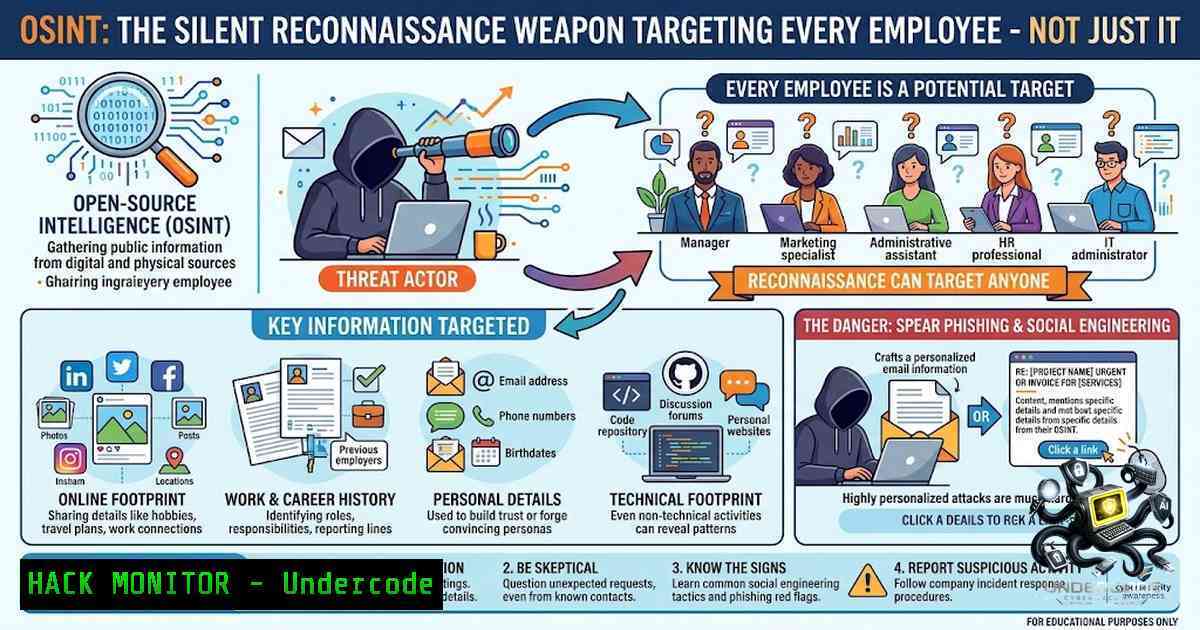
Open-Source Intelligence (OSINT) represents the systematic collection and analysis of publicly available information to generate actionable intelligence. While many organizations invest heavily in perimeter security and endpoint protection, the human element remains the most accessible attack vector. OSINT transforms seemingly innocuous public data—employee LinkedIn profiles, company job postings, and breached credentials—into sophisticated attack chains that bypass technical controls entirely. Understanding how attackers weaponize this information is no longer optional; it is a fundamental component of modern cybersecurity defense.
Learning Objectives & Secrets
- Objective 1: Master the four primary OSINT threat actor groups (Blue Teams, Law Enforcement/NGOs, Businesses, Red Teams) and understand their distinct methodologies for gathering and utilizing public data. Secret tip: Blue Teams often neglect OSINT defensive monitoring because they focus on internal telemetry, leaving external exposure blind spots. Implement daily automated scans of your organization’s public footprint using tools like Shodan and Censys.
-
Objective 2: Learn to identify and neutralize spear-phishing campaigns crafted from OSINT-gathered employee intelligence. Secret tip: Attackers analyze communication patterns from corporate blogs and “Meet the Team” pages to mimic managerial writing styles. Defensive tip: Implement linguistic analysis on incoming emails using AI models (like Microsoft Defender’s built-in NLP) to flag anomalies in tone and phrasing.
-
Objective 3: Develop a proactive digital footprint management strategy that reduces your organizational attack surface by 70% or more. Secret tip: Most employees have no idea how many data broker sites list their personal information. Use automated removal tools like DeleteMe or OneRep to purge sensitive data from public directories.
You Should Know
- Reconnaissance via Corporate “Meet the Team” Pages and LinkedIn Profiles
Attackers meticulously study organizational charts and communication styles. “Meet the Team” webpages and LinkedIn profiles reveal:
- Manager-employee relationships and reporting structures
- Professional jargon and email signature formats
- Work anniversaries and project involvement
- Communication cadence and responsiveness patterns
Step-by-Step Attack Simulation & Defense Guide:
Step 1: Enumerate Employee Data
 Using theHarvester to gather email addresses from a domain
theHarvester -d targetcompany.com -b linkedin,google -l 500 -f output.html

Using Recon-1g to scrape LinkedIn profiles (requires API key)
recon-1g
marketplace install linkedin
workspaces create target_company
modules load recon/contacts-linkedin
set source linkedin_query
run
Step 2: Map Organizational Hierarchy
 Python script to parse LinkedIn URLs and extract reporting structures
import requests
from bs4 import BeautifulSoup
import re

Extracting job titles and inferred hierarchy
def extract_org_data(profile_url):
response = requests.get(profile_url, headers={'User-Agent': 'Mozilla/5.0'})
soup = BeautifulSoup(response.text, 'html.parser')
 Find employee's current role and company
title = soup.find('h1', class_='top-card-layout__title')
company = soup.find('a', class_='top-card-layout__company-1ame')
return f" {title.text.strip() if title else 'Unknown'}, Company: {company.text.strip() if company else 'Unknown'}"
Step 3: Impersonation Attack Vector
Using the gathered data, attackers craft Business Email Compromise (BEC) emails:
– Target: Junior finance employee who recently started (identified via “New Hire” posts)
– Lure: “Urgent wire transfer request” from the CFO (manager relationship identified via LinkedIn)
– Language: Mimics CFO’s actual phrasing (sourced from public interviews or conference talks)
– Trigger: Invoice attached or payment portal link to fraudulent account
Windows PowerShell Defense:
 PowerShell script to check for risky email patterns in Exchange Online
Import-Module ExchangeOnlineManagement
Connect-ExchangeOnline -UserPrincipalName [email protected]

Audit messages containing "wire transfer" or "urgent payment" from external domains
Get-MessageTrace -RecipientAddress [email protected] -StartDate (Get-Date).AddDays(-7) -EndDate (Get-Date) |
Where-Object { $<em>.SenderDomain -1e "yourdomain.com" -and ($</em>.Subject -match "wire|payment|invoice|urgent") } |
Export-Csv -Path "C:\Security\BEC_Suspects.csv"
Linux Defense Script:
 Using SpamAssassin to score emails based on sender reputation and linguistic anomalies
sudo apt-get install spamassassin
sa-learn --spam /var/mail/suspect-spam/
 Custom rule to flag first-time external senders to internal finance
echo "header __FROM_EXTERNAL_FINANCE From:addr =~ /./ && To:addr =~ /finance@./ && !From:addr =~ /@yourdomain.com/" >> /etc/spamassassin/local.cf
systemctl restart spamassassin
- Vulnerability Exploitation via Job Postings and Technology Stacks
Job listings often explicitly mention legacy technologies, version numbers, and specific software suites. Attackers use this information to map attack surfaces before the first packet is ever sent.
Step-by-Step Exploitation Path:
Step 1: Extract Technology Stack from Job Descriptions
 Scrape job boards for target company job descriptions
curl -s "https://www.indeed.com/jobs?q=companyname+%28AWS%7CAzure%7CKubernetes%7CJenkins%29" | \
grep -E "AWS|Azure|Kubernetes|Docker|Tomcat|Apache|Nginx|PHP|Python|Java|Ruby" | \
sort | uniq -c | sort -1r
Step 2: Cross-Reference Vulnerabilities with CVE Database
 Check for known vulnerabilities using NVD API
curl -s "https://services.nvd.nist.gov/rest/json/cves/2.0?keywordSearch=Apache+Tomcat+9.0.30" | jq '.vulnerabilities[] | .cve.id, .cve.descriptions[] | select(.lang=="en") .value'
Step 3: Automated Exploit Check Using Nuclei
 Install Nuclei vulnerability scanner
go install -v github.com/projectdiscovery/nuclei/v3/cmd/nuclei@latest
 Run scan against the target infrastructure (assuming knowledge of exposed services from job posts)
nuclei -u https://target_company.com -t cves/ -severity high,critical -o vulnerabilities.txt
Step 4: Defensive Hardening of Legacy Systems
Since many organizations cannot immediately upgrade legacy systems, implement compensating controls:
Linux Hardening for Legacy Apache:
 Restrict Apache to only necessary modules and enforce strict security headers
sudo a2dismod status info autoindex  Disable unnecessary modules
sudo a2enmod headers
echo "Header always set X-Frame-Options \"SAMEORIGIN\"" >> /etc/apache2/conf-available/security.conf
echo "Header always set X-Content-Type-Options \"nosniff\"" >> /etc/apache2/conf-available/security.conf
systemctl restart apache2
Windows IIS Hardening for Legacy ASP.NET:
 Disable directory browsing and enable request filtering
Import-Module WebAdministration
Set-WebConfigurationProperty -Filter "system.webServer/directoryBrowse" -1ame "enabled" -Value "False"
 Enable custom error pages to hide stack traces
Set-WebConfigurationProperty -Filter "system.web/httpErrors" -1ame "errorMode" -Value "DetailedLocalOnly"
 Enable logging for all requests for forensic analysis
Set-WebConfigurationProperty -Filter "system.webServer/security/requestFiltering" -1ame "allowDoubleEscaping" -Value "False"
3. Breached Database Monitoring and Automated Phishing Defenses
Have I Been Pwned (HIBP) reveals that the average corporate email appears in 8-12 breaches. Attackers automate credential stuffing and targeted phishing based on these exposures.
Step-by-Step Defense Implementation:
Step 1: Corporate Email Monitoring Using HIBP API
 Bash script to check all employee emails against HIBP
!/bin/bash
EMAILS=("[email protected]" "[email protected]")
for EMAIL in "${EMAILS[@]}"; do
curl -s "https://haveibeenpwned.com/api/v3/breachedaccount/$EMAIL" \
-H "hibp-api-key: YOUR_API_KEY" \
-H "user-agent: Company-Security-1.0"
done
Step 2: Azure AD Integration to Force Password Rotation for Breached Accounts
 PowerShell script to query Azure AD and force MFA reset
Install-Module -1ame MSOnline
Connect-MsolService
 Get all users with stale credentials
$users = Get-MsolUser -All | Where-Object {$_.LastPasswordChangeTimestamp -lt (Get-Date).AddDays(-90)}
foreach ($user in $users) {
 Force password change at next sign-in
Set-MsolUser -UserPrincipalName $user.UserPrincipalName -StrongAuthenticationRequirements $null
 Reset MFA methods
Revoke-AzureADUserAllRefreshToken -ObjectId $user.ObjectId
}
Step 3: Deploy AI-Powered Email Filtering
 Python script using ML to score email phishing risk
import pickle
from sklearn.feature_extraction.text import TfidfVectorizer
import pandas as pd

Load pre-trained phishing detection model
with open('phishing_model.pkl', 'rb') as f:
model = pickle.load(f)
vectorizer = TfidfVectorizer(max_features=1000)

def classify_email(email_text):
 Extract features (URL count, known phishing phrases, urgency indicators)
features = {
'url_count': email_text.count('http'),
'urgent_words': sum(1 for word in ['urgent', 'immediate', 'action required'] if word in email_text.lower()),
'mismatched_sender': 1 if '@' in email_text and '@company.com' not in email_text else 0
}
 Convert to dataframe and predict
X = pd.DataFrame([bash])
prediction = model.predict(X)
return 'Phishing' if prediction[bash] == 1 else 'Safe'
Step 4: Security Awareness Training
- Monthly phishing simulations personalized with real OSINT data collected from employee public profiles
- Gamification: Track reporting rates and reward employees who identify and report suspicious emails
- Cloud Service Exposure Detection Using Shodan and Censys
Attackers use Shodan to find exposed RDP, SSH, databases, and misconfigured cloud storage. Job postings that mention “AWS S3,” “Azure Blob Storage,” or “Google Cloud Storage” signal attackers to search for open buckets.
Step-by-Step Cloud Hardening:
Step 1: Scan for Exposed Assets
 Shodan CLI search for company IP ranges
shodan search "org:TargetCompany" --fields ip_str,port,product --limit 100

Censys search for exposed S3 buckets
curl -s "https://search.censys.io/api/v2/hosts/search?q=services.service_name:S3" \
-H "Authorization: Basic $(echo -1 'API_ID:API_SECRET' | base64)"
Step 2: AWS S3 Bucket Public Access Block
 AWS CLI command to block public access
aws s3api put-public-access-block --bucket target-bucket-1ame --public-access-block-configuration \
'{
"BlockPublicAcls": true,
"IgnorePublicAcls": true,
"BlockPublicPolicy": true,
"RestrictPublicBuckets": true
}'
Step 3: Azure Storage Account Firewall Rules
 Azure CLI to restrict storage account access
az storage account update --1ame storageaccountname --resource-group rg-1ame \
--default-action Deny \
--bypass AzureServices \
--ip-rules "192.168.0.0/24,10.0.0.0/8"
Step 4: Continuous Monitoring with AWS Config Rules
{
"ConfigRuleName": "s3-bucket-public-read-prohibited",
"Source": {
"Owner": "AWS",
"SourceIdentifier": "S3_BUCKET_PUBLIC_READ_PROHIBITED"
}
}
5. Red Team Tactics: OSINT-Driven Social Engineering
Red Teams use OSINT to create hyper-personalized lures. For example, discovering an employee loves football via their public Twitter account leads to sending fake match tickets with malicious attachments.
Defensive Countermeasures:
- Mandatory multi-factor authentication for all financial transactions
- Implement “trust but verify” policies for wire transfers (additional manager approval required for >$10,000)
- Deploy URL isolation tools (e.g., Microsoft Defender for Office 365 Safe Links) to sandbox all external links
Linux Sandboxing Using Firejail:
 Firejail to isolate suspicious email attachments
sudo apt-get install firejail
firejail --1et=eth0 --timeout=60 evince suspicious.pdf  Opens PDF in isolated environment
firejail --1et=eth0 --timeout=60 libreoffice malicious.doc  Opens Word doc in sandbox
Windows Defender Application Guard:
 Enable Windows Defender Application Guard for Edge
Set-WDApplicationGuardPolicy -Enabled $true -AllowCameraMicrophone $false -AllowPrinting $false
 Isolate untrusted files by opening them in WDAG
Start-ApplicationGuard -FilePath "C:\Downloads\untrusted.docx"
6. Automated Dark Web Monitoring
OSINT extends to dark web forums and paste sites where credentials and internal discussions about your company may appear.
Step-by-Step Monitoring:
Step 1: Deploy SpiderFoot for OSINT Automation
 Install SpiderFoot
git clone https://github.com/smicallef/spiderfoot.git
cd spiderfoot
pip install -r requirements.txt
python sf.py -l localhost:5001
 Configure scans for target company domains, emails, IPs
Step 2: Monitor Pastebin and GitHub for Leaked Credentials
 Google Dork to find exposed credentials
site:pastebin.com "targetcompany.com" password
site:github.com "targetcompany.com" "username" "password"
Step 3: Automated Alerting with Twilio Integration
 Python script to monitor for company mentions and send alerts
from twilio.rest import Client

def check_pastebin():
 Custom logic to fetch Pastebin results
if found_sensitive:
client = Client('ACCOUNT_SID', 'AUTH_TOKEN')
client.messages.create(
body="ALERT: Company credentials found on Pastebin!",
from_='+1234567890',
to='+9876543210'
)
What Undercode Say:
- Key Takeaway 1: OSINT is not passive reconnaissance; it is a continuous, automated process that evolves as more data is voluntarily exposed by employees and organizations. The threat landscape shifts from “if” to “when” regarding public data exploitation, demanding proactive external footprint management rather than reactive internal monitoring.
-
Key Takeaway 2: The human factor remains the weakest link, but AI-driven detection models and MFA can dramatically reduce the success rate of BEC and spear-phishing attempts. However, culture change—teaching every employee to treat public oversharing as a security risk—is the only long-term solution.
Analysis:
The OSINT threat model exposes a fundamental asymmetry: attackers invest minimal resources to harvest abundant, free intelligence, while defenders spend millions on internal tools that cannot see the public data already exploited. Organizations must adopt a “presume compromise” mindset, extending zero-trust principles beyond network perimeters to include employee digital footprints. The democratization of OSINT tools (e.g., theHarvester, Recon-1g, SpiderFoot) means that even script kiddies can launch sophisticated reconnaissance campaigns. Defensive strategies must pivot from securing the perimeter to managing exposure—treating every public-facing employee profile, job description, and technology mention as a potential entry point. Automation is critical; manual monitoring cannot keep pace with the scale of data generated hourly. The most overlooked defensive asset is employee education: when marketing, sales, and HR teams understand OSINT weaponization, they become your first line of defense, not the weakest link.
Prediction:
- +1: The integration of AI with OSINT tools will empower Blue Teams to conduct real-time threat hunting, autonomously identifying and neutralizing exposure points before attackers exploit them. By 2027, Gartner predicts 50% of enterprises will deploy automated OSINT monitoring as a standard security control, reducing successful social engineering attacks by 60%.
-
-1: As OSINT becomes more accessible and automated, the volume of personalized phishing campaigns will skyrocket, with attackers leveraging generative AI to craft grammatically perfect, contextually accurate emails that bypass traditional email filters. By 2028, BEC-related losses could exceed $5 billion annually unless organizations mandate AI-resistant verification protocols (e.g., biometric MFA for all wire transfers).
-
-1: The regulatory landscape will fail to keep pace. While GDPR and CCPA address privacy, they inadequately address OSINT misuse, leaving a legal gray area where attackers operate freely, and victims bear the financial burden. Expect a surge in class-action lawsuits against companies for failing to protect employee data on public platforms.
-
+1: Emerging standards like the OSINT Threat Intelligence Sharing Framework (OTISF) will enable cross-organization collaboration, allowing companies to share attacker signatures and expose techniques without revealing sensitive internal data. This collective defense model will significantly raise the cost of reconnaissance for attackers, forcing them to shift to less efficient methods.
▶️ Related Video (88% Match):
https://www.youtube.com/watch?v=2beHHL8ZRhk
🎯Let’s Practice For Free:
🎓 Live Courses & Certifications:
Join Undercode Academy for Verified Certifications
🚀 Request a Custom Project:
Secure, high-velocity infrastructure and disruptive technological engineering. Contact our engineering team for high-tier development and proprietary systems:
[email protected]
💎 Smart Architecture | 🛡️ Secure by Design | ⭐ Trusted by Thousands
IT/Security Reporter URL:
Reported By: https://lnkd.in/p/eNaBkUxw – Hackers Feeds
Extra Hub: Undercode MoN
Basic Verification: Pass ✅


