
Listen to this Post
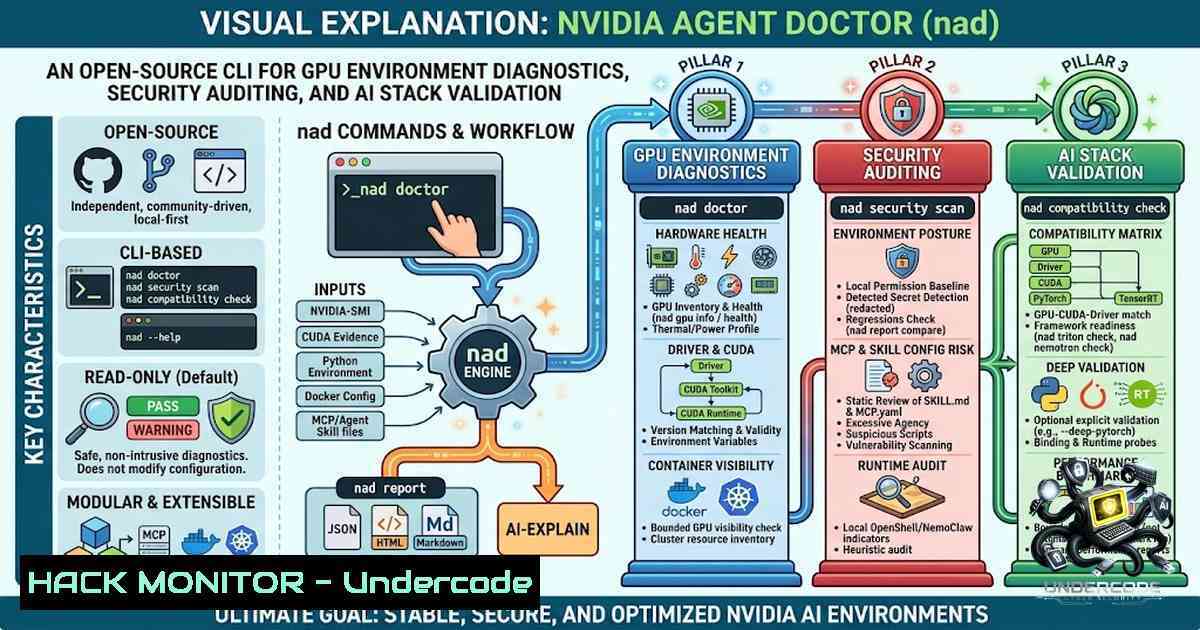
Introduction:
As AI workloads increasingly depend on complex NVIDIA GPU ecosystems—spanning CUDA, PyTorch, TensorRT, Triton Inference Server, NIM, and Kubernetes—the lack of a unified, local-first diagnostic tool leaves engineers guessing about environment health and security posture. NVIDIA Agent Doctor (nad) emerges as an independent, open-source CLI that answers a practical question: what can this machine actually run, what is misconfigured, and what configuration needs human security review? With over 150 automated tests and real hardware validation on an RTX 3050, nad combines read-only hardware checks with static security analysis for MCP configurations and agent skills—all without telemetry or automatic remediation.
Learning Objectives & Secrets:
- Objective 1 – Comprehensive GPU and CUDA Environment Validation: Learn to inventory NVIDIA GPUs, verify driver-CUDA-PyTorch compatibility, and detect misconfigurations using read-only `nvidia-smi` queries, CUDA environment variable analysis, and optional deep PyTorch imports.
-
Objective 2 Secret Tip – Security-First Static Analysis for AI Agents: Discover how nad statically reviews MCP configuration files and `SKILL.md` skill definitions—detecting suspicious commands, environment variables, and endpoint risks without executing any code or making network requests.
-
Objective 3 Secret Tip – Bounded Benchmarking with Safety Guardrails: Run minimal GPU performance measurements (matrix multiplication, CUDA copy) under explicit memory (16–1024 MB) and timeout (1–300 seconds) limits, with automatic GPU memory cleanup on success and failure.
You Should Know:
1. Installing nad and Running Your First Diagnostic
NVIDIA Agent Doctor is installed directly from source—no PyPI package is assumed at this alpha stage. The installation process never installs or upgrades NVIDIA drivers, CUDA, Docker, or any system service.
Step‑by‑step guide:
 Clone the repository
git clone https://github.com/karthikrshet/NVIDIA-Agent-Doctor.git
cd NVIDIA-Agent-Doctor

Install in editable mode (recommended for development)
python -m pip install -e .

Verify installation
nad --version

Run a full, read-only diagnostic (human-readable)
nad doctor

Generate a machine-readable JSON report for CI integration
nad doctor --json

Enable deep PyTorch validation (imports PyTorch, checks CUDA devices, runs a tiny GPU dot product)
nad doctor --deep-pytorch --json
Requirements: Python 3.11+ and `nvidia-smi` on `PATH` for GPU detection. On a CPU-only machine, `nad doctor` completes normally and reports GPU components as unavailable—it never fabricates a GPU result.
2. GPU, CUDA, and Compatibility Health Checks
The default `nad doctor` command is entirely read-only. It checks the operating system, NVIDIA GPU state, CUDA evidence, optional Python integrations (PyTorch, TensorRT), Docker, baseline security posture, and cross-component compatibility.
Step‑by‑step guide:
 Targeted GPU inventory and health
nad gpu info --json
nad gpu health --json

GPU-to-GPU interconnect topology (from nvidia-smi topo -m)
nad gpu topology --json

CUDA toolkit/runtime/environment evidence
nad cuda check --json

Cross-component compatibility report
nad compatibility check --json

Docker GPU access validation (requires explicit consent; uses only an already-local image)
nad docker gpu-check --allow-container-run --json
Understanding results: The tool returns PASS, WARNING, ERROR, NOT_INSTALLED, NOT_APPLICABLE, or UNKNOWN. Exit codes: `0` (no warnings/errors), `1` (warnings), `2` (diagnostic errors or benchmark failure), `3` (HIGH/CRITICAL security finding), `4` (invalid configuration).
Security Note: The Docker GPU check never pulls images—it uses only images already present on the local daemon. With explicit consent, it starts one automatically removed, network-isolated, read-only container with dropped capabilities and strict CPU, memory, PID, and timeout limits.
- Validating TensorRT, Triton Inference Server, and NVIDIA NIM
nad provides heuristic detection and optional opt-in runtime validation for NVIDIA’s AI inference stack. These checks do not install, start, or simulate any service—they validate what you have already deployed.
Step‑by‑step guide:
 TensorRT: imports Python binding, performs bounded runtime and builder-object probes
nad tensorrt check --json

Triton: local binary/client/process indicators only (no HTTP request by default)
nad triton check --json

Triton readiness probe (one GET request to /v2/health/ready on loopback, with explicit consent)
nad triton check --allow-local-request --endpoint http://127.0.0.1:8000 --json

NVIDIA NIM: loopback readiness request (no inference, model-list query optional)
nad nemotron nim --allow-local-request --json
nad nemotron nim --allow-local-request --models --json
Critical Safety: NIM and Triton requests are restricted to validated loopback endpoints. Remote URLs, credential-bearing URLs, query strings, and fragments are rejected. The readiness probe confirms service availability only—it never loads a model, sends inference input, or establishes throughput.
- Security Auditing: MCP Configuration and Agent Skill Analysis
One of nad’s most distinctive features is its static security analysis for MCP (Model Context Protocol) configurations and agent skill files. It discovers supported JSON configuration files and statically reviews commands, environment variables, transport settings, and endpoint risk. It parses `SKILL.md` files, builds a risk graph, and detects suspicious static patterns.
Step‑by‑step guide:
 Scan MCP configuration (discovery + static review; does NOT execute servers or commands)
nad mcp scan --config examples/mcp/example-mcp-config.json --json

Scan agent skills for risk patterns
nad skills scan examples/skills --risk-graph --json

Verify skill integrity with SHA-256 digest
nad skills verify path/to/SKILL.md --signature path/to/skill.sha256 --json

Verify with Ed25519 detached signature (offline verification)
nad skills verify path/to/SKILL.md --signature path/to/skill.sig --public-key path/to/signer.pem --json

Static preflight check combining skills and MCP wiring
nad test-agent examples/skills --mcp-config examples/mcp/example-mcp-config.json --json
Security Model: These are static preflight checks—they do not run a skill, invoke an MCP server, call a model, or make a network request. Findings describe potential risk requiring human review and can produce false positives or false negatives.
5. Bounded Benchmarks and Performance Measurement
Benchmarks are never part of nad doctor—they require explicit confirmation (--yes) and enforce safety limits. This design prevents accidental resource exhaustion in production environments.
Step‑by‑step guide:
 Conservative GPU-only benchmark (16 MB, 15-second timeout)
nad benchmark run --gpu-only --yes --max-memory-mb 16 --timeout-seconds 15 --json

Include optional system-memory and CUDA-copy measurements
nad benchmark run --yes --max-memory-mb 128 --timeout-seconds 15 --json

Profile host-device transfer path (maximum 64 MiB)
nad benchmark run --gpu-only --profile-transfers --yes --max-memory-mb 64 --json
What it measures: Small PyTorch GPU matrix multiplication, CUDA copy, and optional system-memory copy. Results are measured on the current machine and workload only—they are not fabricated, are not hardware specifications, and should not be compared across unrelated configurations. A timeout produces exit code 2; GPU memory references are cleaned up on success and failure.
6. Kubernetes Cluster Inspection and Reporting
nad can perform fixed, read-only `kubectl` queries against the current context—but only after explicit consent. This is useful for validating GPU node readiness in Kubernetes environments.
Step‑by‑step guide:
 Detect whether kubectl is available (does NOT contact cluster)
nad cluster scan --json

Fixed, read-only queries against the current kubectl context
nad cluster scan --allow-cluster-access --json
Safety: The cluster command does not edit workloads, policies, or contexts. Confirm that the current `kubectl` context is appropriate before granting access.
Generating shareable reports:
 JSON, Markdown, HTML, or compliance-audit formats
nad report generate --format json --output nad-report.json
nad report generate --format markdown --output nad-report.md
nad report generate --format html --output nad-report.html
nad report generate --format compliance-audit --output readiness.md

Compare two reports and detect regressions (exit code 1 if regression found)
nad report compare baseline.json current.json --json
All report renderers apply the project’s credential redaction boundary—known API-key, token, password, private-key, credential URL, MCP argument, and handled-exception patterns are redacted before rendering. However, reports still contain environment facts such as operating-system and hardware information—review them before sharing externally.
7. Security Leak-Check and Configuration Hardening
nad includes deterministic redaction regression probes and a security baseline scanner to help validate that sensitive information is not accidentally exposed.
Step‑by‑step guide:
 Security baseline and deterministic redaction regression probes
nad security scan --json
nad security leak-check --json
Redaction is defense in depth—not a guarantee that every proprietary string is classified as a secret. Use `nad security leak-check` after upgrading and inspect generated reports before uploading or sharing them.
Configuration (TOML):
 .nvidia-agent-doctor.toml example
[bash]
max_memory_mb = 128  16–1024
timeout_seconds = 15  1–300

[bash]
config_paths = ["./mcp.json"]

[bash]
scan_depth = 3
Configuration files are validated strictly: malformed TOML, unknown keys, invalid values, or a missing explicit `–config` file return exit code 4. NAD does not silently fall back to defaults after an invalid user configuration.
What Undercode Say:
- Key Takeaway 1 – Local-First, Zero-Telemetry Design Is a Security Win: In an era of cloud-centric monitoring tools, nad’s commitment to no telemetry, read-only defaults, and explicit consent for network operations sets a strong precedent for diagnostic tooling in sensitive AI environments. The tool’s explicit redaction of credentials and its refusal to install or modify system components make it suitable for production GPU clusters where unintended changes could cascade into outages.
-
Key Takeaway 2 – Static Security Analysis for AI Agents Fills a Critical Gap: As AI agents and MCP-based tool calling become mainstream, the attack surface expands dramatically. nad’s ability to statically review `SKILL.md` files and MCP configurations—without executing them—provides a much-1eeded pre-deployment security gate. This is particularly valuable for organizations adopting agentic workflows where untrusted skill inputs are a growing concern.
Analysis: The project’s alpha status (v0.1.0) and its explicit disclaimers—”not affiliated with, endorsed by, or an official product of NVIDIA Corporation”—underscore its community-driven nature. The validation ledger transparently documents what has been verified (Windows RTX 3050, Docker CUDA container) versus what remains unverified (multi-GPU, native Linux GPU CI, CUDA/driver mismatch scenarios). This honesty builds trust but also highlights the urgent need for community testing across diverse NVIDIA ecosystems—exactly what the author is calling for. The tool’s 150+ automated tests provide a solid foundation, but real-world hardware validation from the community will be the difference between a useful alpha and a production-grade diagnostic tool.
Prediction:
- +1 Community-driven validation of nad across diverse NVIDIA GPU environments (multi-GPU, different driver/CUDA combinations, TensorRT/Triton/NIM deployments) will accelerate its maturation from alpha to beta within 6–12 months, establishing it as a de facto standard for pre-flight GPU environment checks in AI engineering workflows.
-
+1 The static security analysis capabilities for MCP and agent skills will gain traction as organizations adopt agentic AI frameworks, potentially inspiring similar security-first diagnostic tools for other AI ecosystems (e.g., AMD ROCm, Intel OpenVINO).
-
-1 Without sustained community contributions and real-world validation across Linux GPU runners, Kubernetes clusters, and edge-case compatibility scenarios, nad risks remaining a niche tool validated primarily on the author’s personal hardware—limiting its adoption in enterprise production environments.
-
+1 The bounded benchmarking feature, with its explicit safety guardrails, could evolve into a lightweight performance regression detection tool for CI/CD pipelines, enabling teams to catch GPU performance degradation before deployment.
-
-1 The absence of PyPI packaging and the reliance on source installation may deter casual users and slow adoption; a formal packaging strategy will be critical for wider community engagement.
▶️ Related Video (74% Match):
https://www.youtube.com/watch?v=-2nCxItGNvE
🎯Let’s Practice For Free:
🎓 Live Courses & Certifications:
Join Undercode Academy for Verified Certifications
🚀 Request a Custom Project:
Secure, high-velocity infrastructure and disruptive technological engineering. Contact our engineering team for high-tier development and proprietary systems:
[email protected]
💎 Smart Architecture | 🛡️ Secure by Design | ⭐ Trusted by Thousands
IT/Security Reporter URL:
Reported By: https://lnkd.in/p/eRXhjHmc – Hackers Feeds
Extra Hub: Undercode MoN
Basic Verification: Pass ✅


