Listen to this Post
Introduction
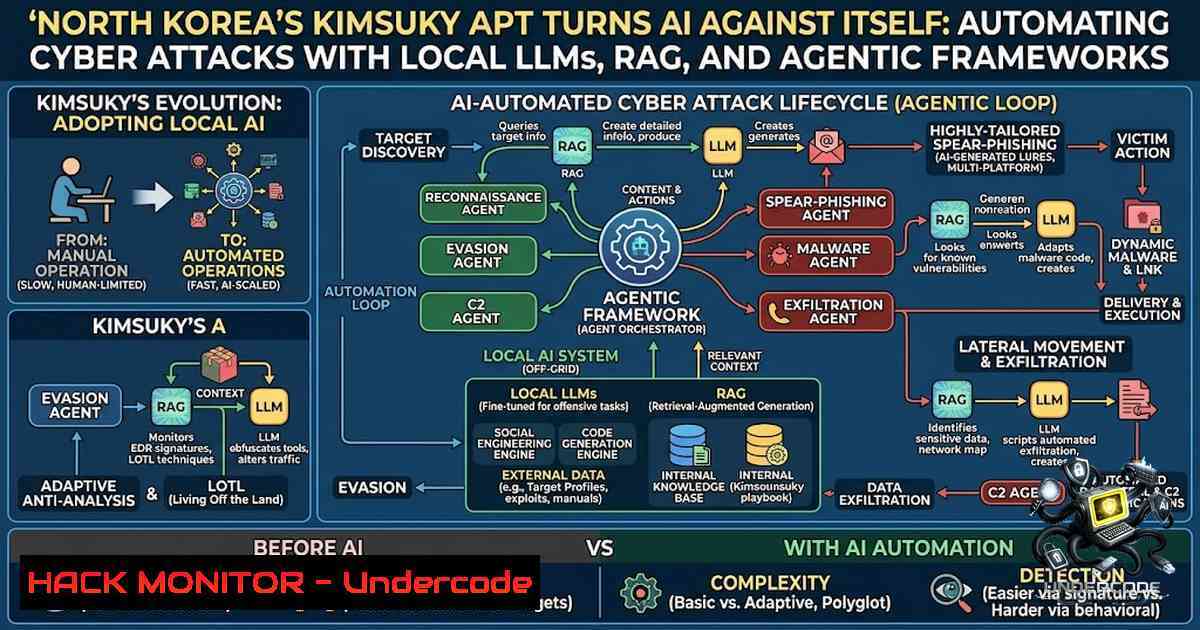
The democratization of artificial intelligence has lowered the barrier to entry for sophisticated cyber operations—and state-sponsored threat actors are taking full advantage. On August 10, 2026, South Korean cybersecurity firm Genians revealed that the North Korean-linked hacking group Kimsuky has built and operated local large language model (LLM) environments using Ollama, GPT4All, and Msty, alongside retrieval-augmented generation (RAG) technology and AI-assisted coding tools like Cursor. This marks a significant escalation: Kimsuky is no longer merely using generative AI to craft convincing phishing lures but is actively integrating AI across the entire attack chain—from malware development and stolen data analysis to attack automation. The following article dissects the technical implications of this development, provides actionable detection and defense strategies, and explores what this means for the future of cybersecurity.
Learning Objectives
- Understand how threat actors like Kimsuky operationalize local LLMs, RAG, and AI agent frameworks to automate cyber attacks
- Master detection techniques for identifying Kimsuky’s signature TTPs, including LNK-based initial access, PowerShell loaders, and GitHub C2 infrastructure
- Learn practical defensive measures, including EDR-based threat hunting, registry hardening, and AI supply chain security
- Gain hands-on familiarity with Linux and Windows commands for investigating and mitigating AI-powered threats
You Should Know
- Local LLM Environments as Attack Multipliers: Ollama, GPT4All, and Msty in Adversarial Hands
Kimsuky’s deployment of local LLM tools represents a strategic shift. By running models locally—rather than relying on external AI services like ChatGPT—the group can process stolen confidential documents without exfiltrating sensitive data to third-party servers, reducing operational exposure. Genians identified Ollama, GPT4All, and Msty running on Kimsuky’s attack servers, alongside RAG infrastructure for searching and organizing stolen documents.
Why This Matters for Defenders: Local LLM frameworks are not inherently malicious, but they introduce significant security risks. Ollama, for instance, binds its HTTP API to `0.0.0.0:11434` with zero authentication by default, enabling unauthenticated remote attackers to read and exfiltrate heap memory—a critical vulnerability tracked as CVE-2026-7482 (CVSS 9.1), dubbed “Bleeding Llama”. Over 300,000 internet-exposed Ollama servers are potentially vulnerable. Similarly, GPT4All’s local API server is susceptible to Denial of Service attacks via improper `max_tokens` validation.
Detection and Hardening Commands:
Linux – Detect Ollama Running on Your Network:
 Check for Ollama processes
ps aux | grep -i ollama

Check for open port 11434 (Ollama default)
ss -tlnp | grep 11434
netstat -tulpn | grep 11434

Query Ollama API endpoint (if accessible)
curl -s http://localhost:11434/api/tags

Check for unauthorized model downloads in /usr/share/ollama or ~/.ollama
find / -1ame ".gguf" -type f 2>/dev/null | head -20
Windows – Detect Local LLM Frameworks:
 Check for running processes
Get-Process -1ame "ollama", "gpt4all", "msty" -ErrorAction SilentlyContinue

Check for installed applications
Get-WmiObject -Class Win32_Product | Where-Object {$_.Name -match "ollama|gpt4all|msty"}

Check for DNS queries to LLM model registries (Hugging Face, etc.)
 Using Sysmon Event 22 if configured
Get-WinEvent -LogName "Microsoft-Windows-Sysmon/Operational" | Where-Object {$_.Message -match "huggingface|ollama|gpt4all"}
Hardening Ollama (Linux):
 Restrict Ollama to localhost only
 Edit /etc/systemd/system/ollama.service or the ollama start script
 Add: OLLAMA_HOST=127.0.0.1:11434

Or using environment variable
export OLLAMA_HOST=127.0.0.1:11434
ollama serve

Apply firewall rules to block external access
sudo ufw deny from any to any port 11434
sudo iptables -A INPUT -p tcp --dport 11434 -j DROP

Monitor Ollama logs for suspicious activity
tail -f ~/.ollama/logs/server.log
- Retrieval-Augmented Generation (RAG) as a Threat Multiplier for Data Exfiltration
RAG enables AI models to query external document repositories for contextually relevant information—a capability Kimsuky is exploiting to rapidly extract intelligence from stolen materials. By feeding exfiltrated documents into a RAG pipeline, attackers can quickly surface account credentials, wallet information, and strategic intelligence without manual review.
The Defensive Challenge: RAG systems introduce a new attack surface. Adversaries can poison vector databases with trigger-embedded malicious documents, causing the LLM to produce attacker-controlled outputs or serve phishing links. Treating retrieved context as untrusted input is paramount.
Detection and Mitigation Strategies:
Monitor for Unauthorized RAG Tooling:
 Linux - Look for vector database files (Chroma, FAISS, Weaviate)
find / -1ame ".chroma" -o -1ame ".faiss" -o -1ame ".weaviate" 2>/dev/null

Check for Python RAG libraries installed
pip list | grep -E "chromadb|faiss|langchain|llama-index"

Monitor for large document ingestion patterns
 (Look for bulk file reads from unusual processes)
lsof | grep -E ".pdf|.docx|.xlsx" | grep -v "USER"
Windows – RAG Detection:
 Check for Python environments with RAG libraries
Get-ChildItem -Path C:\ -Recurse -ErrorAction SilentlyContinue | Where-Object {$_.Name -match "chromadb|faiss|langchain"}

Monitor for unusual file access patterns (EDR/SIEM integration recommended)
 Look for processes reading large numbers of documents in short timeframes
RAG Pipeline Security Best Practices:
- Implement embedding anomaly detection to identify poisoned retrievals
- Deploy multi-layer prompt injection defense with input validation, intent classification, and document validation
- Treat all retrieved context as read-only evidence; never treat it as instruction text
- Maintain blocklists for known injection patterns and use lightweight classifiers to detect injection attempts
- The LNK-PowerShell-GitHub Kill Chain: Kimsuky’s Signature Initial Access Vector
Genians’ report confirms that Kimsuky continues to leverage weaponized LNK (Windows shortcut) files delivered via ZIP archives as their primary initial access mechanism. When executed, these LNK files trigger obfuscated PowerShell commands that fetch additional payloads from GitHub repositories used as command-and-control (C2) infrastructure. The group has also been observed abusing Git-based repositories to distribute encrypted AsyncRAT payloads.
Dissecting the Attack Chain:
Stage 1 – LNK File Execution:
The LNK file contains obfuscated command-line arguments that launch PowerShell with encoded commands. These LNK files are often disguised as “Hangul Documents” or financial reports.
Stage 2 – PowerShell Loader:
The embedded PowerShell script performs anti-analysis checks, establishes persistence via scheduled tasks, and fetches next-stage payloads from GitHub.
Stage 3 – Payload Delivery:
Encrypted AsyncRAT or other remote access tools are deployed, enabling full system compromise.
Detection Commands:
Windows – Detect Suspicious LNK Files:
 Find LNK files with suspiciously long command-line arguments
Get-ChildItem -Path C:\ -Recurse -Filter .lnk -ErrorAction SilentlyContinue | ForEach-Object {
$shell = New-Object -ComObject Shell.Application
$folder = Split-Path $<em>.FullName
$file = $shell.NameSpace($folder).ParseName((Split-Path $</em>.FullName -Leaf))
$link = $file.GetLink
if ($link.Arguments.Length -gt 100) {
Write-Host "Suspicious LNK: $($_.FullName)"
Write-Host "Arguments: $($link.Arguments)"
}
}

Check for PowerShell executed from Explorer (suspicious)
Get-WinEvent -LogName "Security" | Where-Object {$<em>.Id -eq 4688 -and $</em>.Message -match "powershell.explorer"} | Select-Object -First 20

Check for scheduled tasks with suspicious names
schtasks /query /fo LIST /v | findstr /i "powershell github"

Look for GitHub C2 connections
 Monitor outbound connections to raw.githubusercontent.com or github.com
 Using netstat or PowerShell
netstat -ano | findstr "github"
Linux – Detect Similar TTPs (Cross-Platform Awareness):
 Check for suspicious .desktop files (Linux equivalent of LNK)
find ~/.local/share/applications -1ame ".desktop" -exec grep -l "Exec=" {} \; | xargs grep -E "curl|wget|python|bash" | grep -v "safe"

Monitor for unusual outbound connections to code repositories
sudo tcpdump -i any -1 "host raw.githubusercontent.com or host github.com" -c 50
Mitigation Strategies:
- Block known Kimsuky-associated GitHub repositories and C2 IPs at perimeter controls
- Implement application whitelisting to prevent unauthorized PowerShell execution
- Configure EDR solutions to detect `explorer.exe` spawning `powershell.exe` or
cmd.exe—a key indicator of LNK-based attacks - Disable LNK file execution from ZIP attachments via Group Policy or email security controls
- AI-Assisted Coding Tools as Attack Accelerators: The Cursor Risk
Genians also identified traces of Cursor, an AI-powered code editor, on Kimsuky’s infrastructure. Threat actors are using Cursor to automate malicious code development, modify attack scripts, and validate generated outputs. This represents a concerning trend: AI coding assistants are being repurposed to accelerate malware development at scale.
The Vulnerability Landscape: Cursor versions prior to 3.0 contain critical sandbox escape vulnerabilities (CVE-2026-50548, CVE-2026-61613, CVE-2026-48124) that enable zero-click prompt injection attacks and remote code execution. Attackers can plant hidden instructions in `.cursorrules` or `.github/copilot-instructions.md` files, causing the AI to silently generate backdoored code.
Detection Commands:
Windows – Detect Cursor Usage:
 Check for Cursor installation
Get-ChildItem -Path "C:\Program Files\Cursor" -ErrorAction SilentlyContinue
Get-ChildItem -Path "$env:APPDATA\Cursor" -ErrorAction SilentlyContinue

Check for Cursor processes
Get-Process -1ame "cursor" -ErrorAction SilentlyContinue

Look for .cursorrules files (potential injection vectors)
Get-ChildItem -Path C:\ -Recurse -Filter ".cursorrules" -ErrorAction SilentlyContinue
Linux – Detect Cursor Usage:
 Check for Cursor installation
find / -1ame "cursor" -type f 2>/dev/null | grep -E "bin|cursor"

Look for .cursorrules files
find /home -1ame ".cursorrules" 2>/dev/null

Check for recent AI-assisted coding activity (look for model cache)
find ~ -1ame ".gguf" -o -1ame "model" 2>/dev/null | head -20
5. EDR-Based Threat Hunting: The Recommended Defense Paradigm
Moon Jong-hyun, Director of Genians Security Center, emphasized that “as AI advances, social engineering attacks will become more refined, making EDR-based threat hunting systems—focused on detecting execution behaviors rather than document content—critical”. This is the most actionable takeaway for defenders.
Key Threat Hunting Queries:
Windows EDR Queries (Splunk/QRadar/Elastic Syntax):
 Detect suspicious LNK file creation
index=windows sourcetype=WinEventLog:Security EventCode=4663 Object_Type="File" Object_Name=".lnk" | stats count by User, Computer, Object_Name

Detect PowerShell with encoded commands
index=windows sourcetype=WinEventLog:Security EventCode=4688 CommandLine="powershell" CommandLine="-e" OR CommandLine="-enc" OR CommandLine="Base64"

Detect GitHub C2 connections
index=network sourcetype=firewall dest_domain=".github.com" OR dest_domain="raw.githubusercontent.com" | stats count by src_ip, dest_ip, dest_domain

Detect scheduled task creation with suspicious names
index=windows sourcetype=WinEventLog:Security EventCode=4698 Task_Name="update" OR Task_Name="backup" OR Task_Name="sync"
Linux EDR Queries:
 Monitor for unusual cron jobs
grep -r "curl|wget|python -c|bash -c" /etc/cron /var/spool/cron/ 2>/dev/null

Check for unusual systemd timers
systemctl list-timers --all | grep -v "systemd|user"

Monitor for outbound connections to known GitHub C2 patterns
 Using auditd (install if not present)
auditctl -a exit,always -F arch=b64 -S connect -k outbound_connections
ausearch -k outbound_connections | grep github
What Undercode Say
- The AI arms race has reached a critical inflection point. Threat actors are no longer just using AI for content generation—they are building entire AI-1ative attack pipelines. Local LLMs eliminate the dependency on external services, making these operations more resilient to takedowns and intelligence collection.
-
Defenders must shift left in the AI supply chain. The vulnerabilities in Ollama (CVE-2026-7482), Cursor (multiple CVEs), and other AI frameworks demonstrate that the tools themselves become attack surfaces. Organizations must inventory all AI tooling in their environments, apply security patches, and restrict network exposure.
-
Behavior-based detection is non-1egotiable. Kimsuky’s use of LNK files, PowerShell, and GitHub C2 is not new—but the scale and automation enabled by AI make traditional signature-based detection obsolete. EDR solutions that monitor process execution chains, anomalous parent-child relationships, and unusual outbound connections are the new frontline.
-
The financial and virtual asset sectors are the primary targets. Genians explicitly identified cryptocurrency and finance-themed decoy documents, suggesting that Kimsuky is prioritizing economic intelligence and potential financial theft. Organizations in these sectors should elevate their threat posture immediately.
-
International collaboration is essential. Genians has shared findings with KISA and international partners. This underscores the need for cross-border threat intelligence sharing to counter state-sponsored AI-enabled cyber threats.
Prediction
-
+1 The adoption of AI by threat actors will accelerate defensive innovation. Expect a surge in AI-powered EDR solutions, automated threat hunting, and adversarial machine learning countermeasures over the next 12–18 months. This will create new market opportunities for cybersecurity vendors specializing in AI security.
-
-1 Smaller organizations and developing nations without access to advanced EDR and threat intelligence will become increasingly vulnerable. The asymmetry between state-sponsored AI capabilities and conventional defenses will widen, potentially leading to more frequent and devastating cyber incidents in underserved sectors.
-
-1 The vulnerabilities discovered in Ollama, Cursor, and other AI frameworks are likely just the tip of the iceberg. As more organizations deploy local LLMs and RAG pipelines, attackers will increasingly target the AI infrastructure itself—poisoning models, exfiltrating training data, and exploiting implementation flaws. The “Bleeding Llama” vulnerability affecting 300,000+ servers is a harbinger of things to come.
-
+1 Regulatory bodies will likely respond with AI cybersecurity frameworks, mandating minimum security standards for AI deployments. This could drive adoption of secure-by-design principles in AI development and create compliance-driven demand for AI security auditing services.
-
-1 The barrier to entry for sophisticated cyber attacks will continue to fall. With open-source AI tools and frameworks readily available, even less-resourced threat actors can automate previously manual attack steps. The democratization of AI is, unfortunately, also a democratization of cyber attack capabilities.
This article is based on threat intelligence published by Genians Security Center on August 10, 2026, and corroborated by Reuters, Chosun, Yonhap News, and other sources. All commands and recommendations are provided for defensive and educational purposes only.
▶️ Related Video (72% Match):
🎯Let’s Practice For Free:
🎓 Live Courses & Certifications:
Join Undercode Academy for Verified Certifications
🚀 Request a Custom Project:
Secure, high-velocity infrastructure and disruptive technological engineering. Contact our engineering team for high-tier development and proprietary systems:
[email protected]
💎 Smart Architecture | 🛡️ Secure by Design | ⭐ Trusted by Thousands
IT/Security Reporter URL:
Reported By: Gregorydevans North – Hackers Feeds
Extra Hub: Undercode MoN
Basic Verification: Pass ✅


