
Listen to this Post
Introduction:
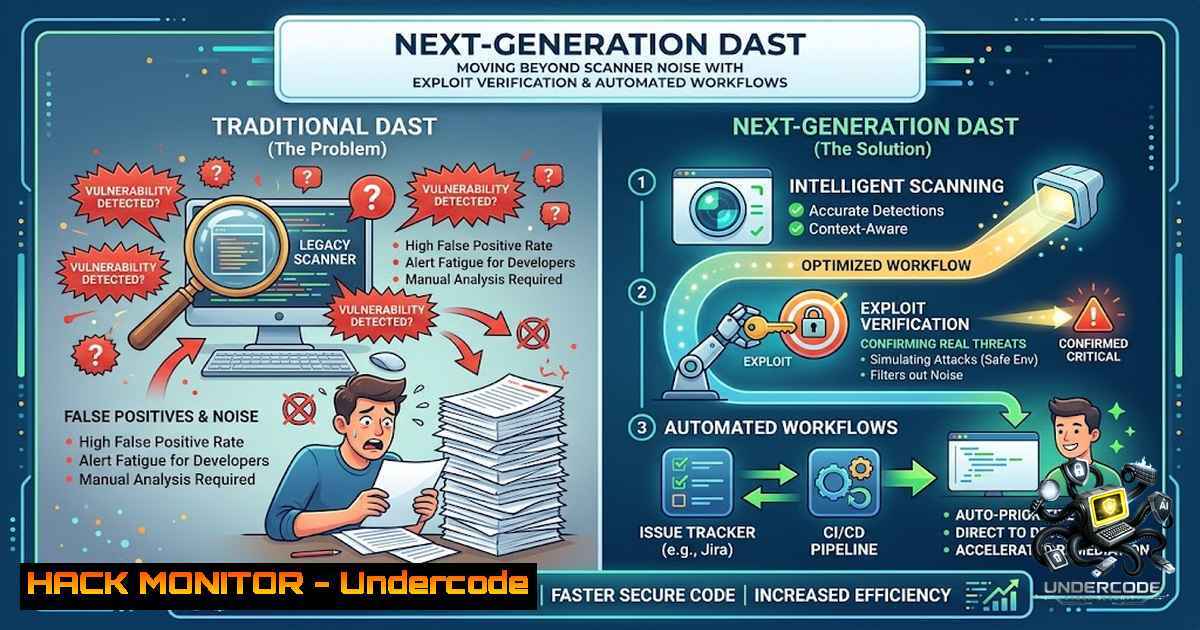
Automated vulnerability scanners have long been a staple in application security, yet they frequently overwhelm development teams with a deluge of false positives, obscuring genuine risks and draining resources. Modern black-box Dynamic Application Security Testing (DAST) is evolving to address this critical issue by shifting from pattern-matching to active exploit verification. This approach, as demonstrated by platforms like Pentest App, leverages out-of-band callbacks, HTTP header tracking, and WAF-aware response parsing to deliver enterprise-grade accuracy, bridging the gap between manual penetration testing and continuous automated security.
Learning Objectives & Secrets:
- Objective 1: Master the configuration and interpretation of DAST scans that utilize out-of-band network callbacks to definitively confirm Server-Side Request Forgery (SSRF) vulnerabilities, moving beyond simple error message detection.
- Objective 2 Secret Tips: Learn to analyze 3xx location headers to automatically validate open redirects, a common but often misclassified flaw, by following the redirect chain and checking for external domains.
- Objective 3 Secret Tips: Implement techniques to securely parse application responses behind WAFs (Web Application Firewalls) to identify true vulnerabilities without triggering excessive blocks or rate limits, ensuring consistent testing.
You Should Know:
1. Out-of-Band (OOB) Callback Verification for SSRF
Server-Side Request Forgery (SSRF) remains a high-severity flaw often overlooked by traditional scanners due to the difficulty of confirming blind vulnerabilities. Modern scanners like Pentest App address this by generating unique payloads that cause the target server to make a network request to an external, attacker-controlled domain. If the server successfully connects to this callback URL, the vulnerability is confirmed without relying on error messages or page content.
Step‑by‑step guide explaining what this does and how to use it:
1. Understand the Payload: The scanner injects a parameter value containing a URL to a specific OOB server (e.g., http://oob-12345.pentestapp.tech/SSRF`).curl -X POST “https://vulnerable-app.com/api/fetch” -d “url=http://oob-12345.pentestapp.tech/test”`.
2. Simulate the Attack: In a testing environment, use `curl` to simulate a vulnerable endpoint. For example,
3. Monitor the Callback: Set up a listener using `nc -lvnp 80` on a test machine or use a public OOB service to listen for incoming connections.
4. Configure the Scanner: In Pentest App or similar tools, enable the SSRF check with OOB verification, specifying the location of the callback listener.
5. Analyze the Results: A confirmed SSRF will show a successful callback in the dashboard, indicating the external request was made by the server. This validates the vulnerability and allows you to trace the exact request and its parameters.
6. Mitigation: To fix, validate and sanitize all user-supplied URLs, implement an allowlist of permitted hostnames, and restrict outbound network access from your application servers.
- Tracking 30X Location Headers for Open Redirect Verification
Open redirect vulnerabilities are often downgraded in severity, but they are a key component in sophisticated phishing attacks. Advanced scanners validate these by not just detecting a `3xx` status code but by actively following the redirect chain. If the final destination is a domain outside the application’s scope or a different internal domain, the vulnerability is flagged as confirmed.
Step‑by‑step guide explaining what this does and how to use it:
1. Test Manually: Use curl -L -I "https://your-app.com/redirect?url=https://evil.com". The `-L` flag follows redirects, and `-I` shows headers. Observe the `Location` header in the response.
2. Automate with a Script: Use a simple Python script with the `requests` library to automate this: import requests; r = requests.get('https://your-app.com/redirect?url=https://evil.com', allow_redirects=True); print(r.url). If the final URL is https://evil.com`, the scanner confirms the open redirect./dashboard`). If necessary, validate the redirect URL against an allowlist of trusted domains.
3. Scanner Configuration: Configure your DAST tool to check for this by providing a list of blacklisted domains or top-level domains. The scanner will then automatically follow redirects and flag any that lead to an external, non-approved domain.
4. Remediation: Avoid using user-supplied input for redirection destinations. Instead, use a mapping of predefined safe paths (e.g., `/redirect?dest=home` mapping to
3. Parsing Response Bodies Securely Behind WAF Blocks
Web Application Firewalls (WAFs) can inadvertently prevent scanners from assessing vulnerabilities by blocking malicious-looking requests based on signature-based rules. To overcome this, modern DAST tools employ evasion techniques, such as encoding payloads, splitting malicious content across multiple parameters, or using request fragmentation. However, the key to accuracy is safely parsing the response body even after the WAF has intervened, ensuring the scanner only reports findings that have been verified.
Step‑by‑step guide explaining what this does and how to use it:
1. Identify WAF Types: Use tools like `wafw00f` to identify the WAF type (e.g., Cloudflare, AWS WAF, ModSecurity). wafw00f https://your-app.com`.%27%20OR%201%3D1–`.
2. Test for Evasion: Craft an SQL injection payload that is URL-encoded or uses a variation to bypass the WAF signature. For example, `' OR 1=1--` can be encoded to
3. Evaluate the Response: Use `curl -v -H “User-Agent: Mozilla/5.0” “https://your-app.com/page?id=1′ OR 1=1–“` to see the raw response. A 403 or 406 response often indicates WAF blocking. A successful request will return a 200 with a body that might contain an error or the injected content.
4. Analyze with a Tool: In a DAST tool like Pentest App, the engine will perform a series of tests, each with a different evasion technique. If a request with a modified payload receives a 200 response, the tool will then parse the body for error messages or injected data. For example, it might look for the string “You have an error in your SQL syntax” or the numeric value “1” in a specific location to confirm the vulnerability.
5. Remediation: Focus on the root cause: use parameterized queries for SQL injection prevention, robust escaping for XSS, and context-aware validation for all user inputs.
4. Advanced Checks: From SQLi to Prototype Pollution
The technology stack of modern applications is diverse, requiring a broad range of security checks. A comprehensive DAST platform goes beyond basic OWASP Top 10 checks to include more nuanced vulnerabilities like prototype pollution in JavaScript, CORS misconfigurations, and subdomain takeovers.
Step‑by‑step guide explaining what this does and how to use it:
1. Prototype Pollution (Client-Side): Use the browser’s developer console to test. For example, in an application that merges objects, use a query parameter like ?__proto__[bash]=true. If the application merges this into the global object, it’s a vulnerability. Check for `Object.prototype.polluted` in the console.
2. CORS Misconfiguration: Use curl -H "Origin: https://evil.com" -I "https://your-app.com/api/data". If the `Access-Control-Allow-Origin` header reflects the `evil.com` origin and `Access-Control-Allow-Credentials` is set to true, your API is vulnerable to cross-origin data theft.
3. Subdomain Takeover: Use a tool like `nslookup` or `dig` on a subdomain (e.g., dig test.your-app.com). If the CNAME points to an unclaimed or deleted service (e.g., `test.azurewebsites.net` and the Azure site no longer exists), an attacker can claim it and host malicious content. Many tools, including the one mentioned, automate this check by querying DNS and checking service statuses.
4. Integration: Modern DAST tools automate these checks. For CORS, they will test multiple origins and report on any insecure configurations. For subdomain takeover, they will perform a DNS lookup and verify if the target service is no longer in use.
5. Enterprise-Grade Features and Compliance Workflows
To integrate effectively into an enterprise environment, a vulnerability assessment tool must provide frictionless team workflows, detailed reporting, and clear remediation steps. Features like role-based access control (Admin, Operator, Viewer), secure sharing through project join codes, and automated report generation are essential for scaling security operations.
Step‑by‑step guide explaining what this does and how to use it:
1. Set Up Role-Based Access: In your Pentest App dashboard, create a new project and invite team members. Assign the Admin role to a security lead, Operator roles to engineers who will run scans, and Viewer roles for managers or SOC analysts who need to review results.
2. Secure Project Sharing: Generate a secure, expiring join code to invite team members without needing to manage passwords or send sensitive credentials via email. This streamlines onboarding and reduces the risk of credential leakage.
3. Generate Compliance Reports: After a scan, generate a detailed PDF report. This report will include the exact URLs, the payloads used to find the vulnerability, and step-by-step remediation advice. Use this to create a compliance checklist for your SOC2 or ISO 27001 audit.
4. Integrate into DevSecOps: Use the platform’s API to trigger scans on code commits in your CI/CD pipeline. This ensures new code is automatically assessed before it reaches production, shifting security left.
What Undercode Say:
- Key Takeaway 1: Moving from simple signature-based scanning to active exploit verification is the only way to achieve the accuracy required for modern DevSecOps pipelines. Tools that rely on passive fingerprinting or generic error strings are insufficient and introduce more noise than value, harming the relationship between security and engineering teams.
- Key Takeaway 2: The emphasis on enterprise-grade features like HMAC-signed certificates and role-based access highlights a critical industry shift: vulnerability scanning is no longer a one-off activity but a continuous, collaborative process that demands accountability and traceability. The future of security lies in platforms that not only find vulnerabilities but also integrate seamlessly into existing development workflows and governance structures.
Analysis: The core of the problem addressed by this technology is the “signal-to-1oise ratio” in application security. By implementing OOB callbacks and handling WAF bypass, the engine reduces the cognitive load on developers, allowing them to focus on genuine issues. The platform’s ability to track 30X headers and parse responses securely demonstrates a deep understanding of HTTP, which is essential for accurately identifying open redirects and information leaks. Furthermore, the inclusion of modern attack vectors like prototype pollution and subdomain takeover confirms a keen awareness of the cloud-1ative, JavaScript-heavy landscape of today’s applications. The move towards actionable reports and integrated CI/CD pipelines signifies a maturation of the AppSec market, where tools are becoming less of a “black box” and more of a transparent, collaborative partner in the software development lifecycle.
Prediction:
- +1: The adoption of verified DAST with OOB callbacks will significantly reduce the manual triage time for security teams, allowing them to reallocate resources toward threat hunting and security architecture reviews.
- +1: The integration of such tools into CI/CD pipelines will become a standard requirement for enterprise software development, leading to fewer critical vulnerabilities reaching production environments.
- -1: As automated verification becomes more sophisticated, attackers will increasingly develop evasion techniques specifically targeting OOB detection methods, such as delayed callbacks or filtering outbound traffic based on source IP.
- -1: The reliance on cloud-based scanners introduces a new supply chain risk; if the scanner’s infrastructure is compromised, it could serve as a vector for targeted attacks against its customers.
▶️ Related Video (84% Match):
🎯Let’s Practice For Free:
🎓 Live Courses & Certifications:
Join Undercode Academy for Verified Certifications
🚀 Request a Custom Project:
Secure, high-velocity infrastructure and disruptive technological engineering. Contact our engineering team for high-tier development and proprietary systems:
[email protected]
💎 Smart Architecture | 🛡️ Secure by Design | ⭐ Trusted by Thousands
IT/Security Reporter URL:
Reported By: https://lnkd.in/p/eZNSqduH – Hackers Feeds
Extra Hub: Undercode MoN
Basic Verification: Pass ✅


