
Listen to this Post
Introduction
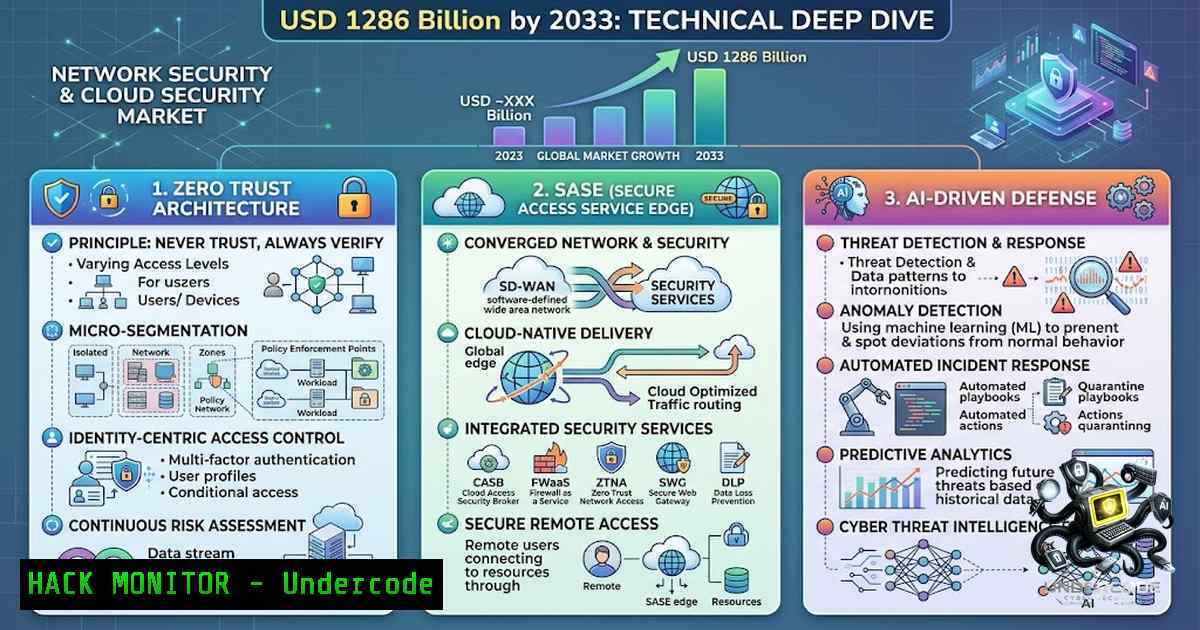
The global Network Security and Cloud Security Market is on a trajectory to reach USD 128.6 billion by 2033, growing at a CAGR of 13.9% from 2026 through 2033. This explosive growth is driven by escalating geopolitical tensions, cyber warfare, sanctions, and attacks on critical infrastructure that are forcing enterprises to fundamentally rethink their security postures. Organizations are rapidly moving away from perimeter-based security models toward zero-trust architectures, Secure Access Service Edge (SASE) frameworks, cloud-1ative application protection platforms (CNAPP) , and AI-powered threat intelligence—all while grappling with increasingly stringent regulatory compliance requirements and data sovereignty concerns. This article provides a comprehensive, command-level technical guide for implementing these next-generation security controls across Linux and Windows environments, cloud infrastructures, and API ecosystems.
Learning Objectives
- Objective 1: Implement zero-trust network access controls, including identity hardening, micro-segmentation, and continuous monitoring across Linux and Windows servers.
- Objective 2: Deploy and configure SASE components, including secure web gateways, cloud access security brokers, and zero-trust network access (ZTNA) policies.
- Objective 3: Operationalize AI-powered threat detection, SIEM integration, and CNAPP security controls to protect cloud-1ative applications across their entire lifecycle.
You Should Know
1. Zero-Trust Architecture: Hardening Identities, Networks, and Workloads
Zero trust is no longer a buzzword—it is an operational imperative. The core principle is simple: never trust, always verify. Every access request, regardless of its origin, must be authenticated, authorized, and continuously validated. Below is a step-by-step guide to implementing zero-trust controls on Linux infrastructure.
Step 1: Harden Identity and Access Management (IAM)
Start by enforcing multi-factor authentication (MFA) for all user accounts, including privileged ones. On Linux, integrate Google Authenticator with PAM:
 Install Google Authenticator PAM module
sudo apt install libpam-google-authenticator

Run the configuration tool for each user
google-authenticator -t -d -f -r 3 -R 30 -w 3
Next, harden SSH access by disabling root login, enforcing key-based authentication, and limiting user access:
 Edit SSH configuration
sudo nano /etc/ssh/sshd_config

Apply these settings
PermitRootLogin no
PasswordAuthentication no
PubkeyAuthentication yes
AllowUsers adminuser1 adminuser2

Restart SSH service
sudo systemctl restart sshd
Restrict sudo privileges to specific commands only using visudo:
sudo visudo
 Add: username ALL=(ALL) /usr/bin/systemctl, /usr/bin/apt
On Windows (PowerShell as Administrator), enforce least privilege by auditing and removing unnecessary admin rights:
 List all local administrators
Get-LocalGroupMember -Group "Administrators"

Remove a user from the Administrators group
Remove-LocalGroupMember -Group "Administrators" -Member "jdoe"

Set granular NTFS permissions using icacls
icacls C:\SensitiveData /grant "adminuser:(OI)(CI)F" /inheritance:r
Step 2: Implement Micro-Segmentation with eBPF-Based Policy Engines
Micro-segmentation isolates workloads so that even if an attacker compromises one system, they cannot move laterally. Open-source tools like ZTAP (Zero-Trust Access Platform) provide cross-platform policy enforcement at the kernel level using eBPF (Linux), WFP (Windows), and pf (macOS).
Build and install ZTAP:
go build -o ztap
sudo mv ztap /usr/local/bin/
Validate and enforce a policy:
 Validate policy before deployment (CI/CD friendly)
ztap policy validate -f examples/web-to-db.yaml

Apply the policy
ztap policy apply -f examples/web-to-db.yaml
For Linux-1ative firewalling, use `nftables` to enforce strict segmentation:
 Create a table for zero-trust rules
sudo nft add table inet zero_trust

Drop all traffic by default
sudo nft add chain inet zero_trust forward { type filter hook forward priority 0 \; policy drop \; }

Allow only specific application traffic between trusted zones
sudo nft add rule inet zero_trust forward ip saddr 10.0.1.0/24 ip daddr 10.0.2.0/24 tcp dport 443 accept
Step 3: Continuous Monitoring and Auditing
Deploy comprehensive audit logging using `auditd`:
 Install auditd
sudo apt install auditd audispd-plugins

Monitor critical system files
sudo auditctl -w /etc/passwd -p wa -k identity_changes
sudo auditctl -w /etc/sudoers -p wa -k sudo_changes
sudo auditctl -w /var/log/auth.log -p r -k authentication

View audit logs
sudo ausearch -k identity_changes
Apply kernel-level security hardening by editing ` /etc/sysctl.d/99-zero-trust.conf`:
 Enable IP spoofing protection
net.ipv4.conf.all.rp_filter=1
net.ipv4.conf.default.rp_filter=1

Disable IP forwarding (unless required)
net.ipv4.ip_forward=0

Enable TCP SYN cookie protection
net.ipv4.tcp_syncookies=1
2. SASE Deployment: Converging Networking and Security
Secure Access Service Edge (SASE) is a cloud-delivered framework that converges networking and security functions—SD-WAN, secure web gateway, CASB, FWaaS, and ZTNA—into a single, unified service. Below is a structured approach to SASE adoption.
Step 1: Assess Current Environment and Define Use Cases
Before deployment, inventory all users, devices, applications, and locations. Determine which traffic patterns (web, SaaS, private apps) will be routed through the SASE fabric.
Step 2: Choose a Deployment Model
SASE can be deployed as:
- Full cloud-1ative (all functions delivered via cloud PoPs)
- Hybrid (on-premises connectors for legacy systems)
- Managed service (third-party operated)
Step 3: Deploy SASE Connectors
For on-premises resources, deploy a SASE connector on a server or VM in your data center:
 Example: Download and install a SASE connector (vendor-specific)
wget https://sase-vendor.com/connector/installer.sh
chmod +x installer.sh
sudo ./installer.sh --tenant-id YOUR_TENANT --region us-east
Step 4: Configure Private Business Applications
Define which internal applications are exposed via ZTNA:
 Example: Register a private application
sase-cli app add --1ame "internal-erp" --host 10.0.10.5 --port 443 --protocol https
Step 5: Enforce Security Policies
Define policies for web filtering, data loss prevention, and threat prevention:
 Block high-risk categories
sase-cli policy web-filtering --block-categories "malware,phishing,proxy-anonymizer"

Enable SSL/TLS inspection
sase-cli policy tls-inspection --enable --exclude-domains "banking.gov,healthcare.gov"
Step 6: Deploy Endpoint Agents
For managed endpoints, deploy the SASE agent via MDM (e.g., Jamf Pro for macOS). On Windows, deploy via Group Policy or SCCM:
 Silent install of SASE agent (vendor-specific)
msiexec /i "SASEAgent.msi" /quiet /norestart TENANT_ID="your-tenant" REGION="us-east"
Step 7: Monitor and Optimize
Continuously monitor SASE performance metrics—latency, throughput, policy hits—and adjust routing and security rules accordingly.
- CNAPP: Securing Cloud-1ative Applications from Build to Runtime
A Cloud-1ative Application Protection Platform (CNAPP) unifies security across the entire cloud application lifecycle, correlating risks from development through runtime. CNAPP consolidates CSPM, CWPP, CIEM, and KSPM into a single platform.
Step 1: Integrate with CI/CD Pipelines
Scan container images for vulnerabilities and misconfigurations before deployment. Example using `trivy` (open-source vulnerability scanner):
 Scan a container image for vulnerabilities
trivy image --severity HIGH,CRITICAL myapp:latest

Scan Infrastructure-as-Code (Terraform)
trivy config --severity HIGH,CRITICAL ./terraform/
Step 2: Implement Cloud Security Posture Management (CSPM)
Continuously assess cloud configurations against benchmarks (CIS, NIST). On AWS, use the AWS CLI to audit S3 bucket policies:
 List all S3 buckets with public access
aws s3api list-buckets --query 'Buckets[].Name' --output text | xargs -I {} aws s3api get-bucket-acl --bucket {} --query 'Grants[?Grantee.URI==`http://acs.amazonaws.com/groups/global/AllUsers`]'

Enable default encryption on S3 buckets
aws s3api put-bucket-encryption --bucket my-secure-bucket --server-side-encryption-configuration '{"Rules":[{"ApplyServerSideEncryptionByDefault":{"SSEAlgorithm":"AES256"}}]}'
Step 3: Runtime Protection
Deploy workload protection agents (CWPP) on running containers and VMs to detect and block threats in real time.
Step 4: Correlate Risks
Unify findings from build-time scans and runtime telemetry to prioritize remediation based on actual exploitability.
4. SIEM Deployment: Centralized Logging and Threat Detection
Security Information and Event Management (SIEM) systems aggregate and analyze security logs from across the enterprise. Below is a practical guide to deploying an open-source SIEM using Wazuh.
Step 1: Install Dependencies and Wazuh Manager
 Update system
sudo apt update && sudo apt upgrade -y

Install dependencies
sudo apt install curl apt-transport-https gnupg -y

Add Wazuh repository
curl -s https://packages.wazuh.com/key/GPG-KEY-WAZUH | sudo apt-key add -
echo "deb https://packages.wazuh.com/4.x/apt/ stable main" | sudo tee /etc/apt/sources.list.d/wazuh.list
sudo apt update

Install Wazuh manager
sudo apt install wazuh-manager -y
Step 2: Install Wazuh Dashboard
sudo apt install wazuh-dashboard -y
 Access dashboard at https://your-server-ip:443
Step 3: Deploy Agents on Endpoints
On Linux endpoints:
 Install Wazuh agent
sudo apt install wazuh-agent -y

Configure agent to connect to manager
sudo nano /var/ossec/etc/ossec.conf
 Set

<address>MANAGER_IP</address>

Start agent
sudo systemctl start wazuh-agent
On Windows (PowerShell as Administrator):
 Download and install Wazuh agent (adjust version)
Invoke-WebRequest -Uri "https://packages.wazuh.com/4.x/windows/wazuh-agent-4.7.0-1.msi" -OutFile "$env:TEMP\wazuh-agent.msi"
msiexec.exe /i "$env:TEMP\wazuh-agent.msi" /q WAZUH_MANAGER="MANAGER_IP" WAZUH_REGISTRATION_SERVER="MANAGER_IP"
Step 4: Configure Log Sources
Forward Windows Event Logs, syslog, firewall logs, and application logs to the SIEM for centralized analysis.
Step 5: Create Alerts and Dashboards
Define alert rules for suspicious activities—failed logins, privilege escalations, malware detections—and visualize events in the dashboard.
- Cloud Security Hardening: Linux and Windows Commands for Enterprise Defense
Hardening cloud instances is non-1egotiable. Below are verified commands for securing both Linux and Windows environments in the cloud.
Linux Hardening (Ubuntu/Debian)
- Secure password hashing: Ensure `SHA-512` is used for password hashing in
/etc/login.defs.
2. Harden SSH (as covered in Section 1).
3. Configure UFW Firewall:
 Enable UFW and set default policies
sudo ufw default deny incoming
sudo ufw default allow outgoing

Allow SSH, HTTPS, and HTTP only
sudo ufw allow 22/tcp
sudo ufw allow 443/tcp
sudo ufw allow 80/tcp

Enable UFW
sudo ufw enable
4. Deploy `auditd` for monitoring.
5. Enable AppArmor or SELinux:
 Check AppArmor status
sudo aa-status

Enforce a profile
sudo aa-enforce /etc/apparmor.d/usr.sbin.nginx
Windows Server Hardening (PowerShell with Admin Rights)
1. Enable Windows Firewall and configure logging:
 Enable firewall for all profiles
Set-1etFirewallProfile -All -Enabled True

Enable firewall logging
Set-1etFirewallProfile -All -LogFileName "C:\Windows\System32\LogFiles\Firewall\pfirewall.log"
Set-1etFirewallProfile -All -LogAllowed True -LogBlocked True
2. Enforce password policies:
 Set minimum password length
Set-ADDefaultDomainPasswordPolicy -Identity "domain.com" -MinPasswordLength 12

Enforce password complexity
Set-ADDefaultDomainPasswordPolicy -Identity "domain.com" -ComplexityEnabled $true
3. Audit effective permissions:
 Download Sysinternals AccessChk
Invoke-WebRequest -Uri "https://live.sysinternals.com/AccessChk.exe" -OutFile "C:\Tools\AccessChk.exe"

Audit permissions on sensitive directories
C:\Tools\AccessChk.exe -u "jdoe" C:\SensitiveData
- AI-Powered Threat Detection: Operationalizing Machine Learning in Security Operations
AI is transforming threat detection from reactive to predictive. Organizations are adopting AI-powered threat intelligence platforms, behavioral analytics, and autonomous threat hunting agents to detect and neutralize threats in real time.
Implementation Approach:
- Collect high-fidelity telemetry: Aggregate network flows, endpoint logs, cloud audit trails, and identity events.
-
Deploy ML-based anomaly detection: Train models on baseline behavior to flag deviations.
-
Automate response: Integrate AI detections with SOAR platforms for automated containment (e.g., isolating compromised endpoints, revoking access tokens).
-
Continuous feedback loop: Feed incident outcomes back into the model to improve detection accuracy.
Example: Using AI for log analysis
Many SIEM platforms now include ML-based anomaly detection. A simple Python script using `scikit-learn` for outlier detection on login data:
from sklearn.ensemble import IsolationForest
import pandas as pd

Load login attempt data (timestamps, IPs, user agents)
df = pd.read_csv('login_attempts.csv')

Train Isolation Forest model
model = IsolationForest(contamination=0.01)
model.fit(df[['hour_of_day', 'login_frequency']])

Predict anomalies
df['anomaly'] = model.predict(df[['hour_of_day', 'login_frequency']])
anomalous_logins = df[df['anomaly'] == -1]
print(f"Detected {len(anomalous_logins)} anomalous login patterns")
- API Security: Protecting the Connective Tissue of Modern Applications
With the proliferation of microservices and cloud-1ative architectures, APIs have become prime attack targets. Securing APIs requires a multi-layered approach.
Step 1: Implement Strong Authentication and Authorization
Use OAuth 2.0 and OpenID Connect (OIDC) with short-lived access tokens. Enforce least-privilege scopes.
Step 2: Validate and Sanitize Input
Prevent injection attacks by validating all inputs against strict schemas.
Step 3: Rate Limiting and Throttling
Protect against DDoS and brute-force attacks:
 Using NGINX rate limiting
limit_req_zone $binary_remote_addr zone=api_limit:10m rate=10r/s;

location /api/ {
limit_req zone=api_limit burst=20 nodelay;
proxy_pass http://backend;
}
Step 4: Encrypt Data in Transit and at Rest
Enforce TLS 1.3 for all API endpoints. Use strong cipher suites and HSTS headers.
Step 5: Monitor and Log API Activity
Forward API logs to SIEM for anomaly detection. Monitor for unusual patterns—unexpected geolocations, excessive error rates, atypical payload sizes.
What Undercode Say
- Key Takeaway 1: The projected USD 128.6 billion market size by 2033 reflects a fundamental shift in how enterprises approach security—from reactive, perimeter-based models to proactive, identity-centric, and AI-driven frameworks. Organizations that delay zero-trust and SASE adoption will face disproportionately higher breach risks and compliance penalties.
-
Key Takeaway 2: The convergence of networking and security through SASE is not just a cost-saving measure; it is a strategic imperative for securing hybrid and remote workforces. However, successful SASE deployment requires careful assessment of existing infrastructure, clear use-case definition, and phased rollouts to avoid operational disruption.
Analysis: The cybersecurity landscape in 2026 is defined by asymmetric warfare—attackers leverage AI and automation to scale their operations, while defenders must do the same. The market growth numbers are not just about selling more firewalls; they reflect a wholesale replacement of legacy architectures with cloud-1ative, AI-enhanced platforms. Geopolitical tensions have accelerated this transition, with governments mandating zero-trust compliance for critical infrastructure operators. However, the talent gap remains a critical bottleneck—there simply aren’t enough security professionals trained in SASE, CNAPP, and AI threat detection. This is where training courses and certifications (like those offered by SANS Institute, ISC2, and Cloud Security Alliance) become mission-critical. Organizations must invest not only in technology but also in continuous workforce upskilling to realize the full potential of these security investments.
Prediction
- +1: The zero-trust security market will exceed USD 112.8 billion by 2033, with identity-centric controls (CIEM, PAM) becoming the fastest-growing segment. Organizations will increasingly adopt “continuous authentication” models that re-verify user identity throughout a session, not just at login.
-
+1: AI-powered autonomous security operations (SecOps) will reduce mean time to detect (MTTD) and mean time to respond (MTTR) by over 60% by 2030. Security teams will transition from “hunters” to “supervisors” overseeing AI agents that investigate and neutralize threats autonomously.
-
-1: The rapid adoption of SASE and CNAPP without adequate skilled personnel will lead to misconfiguration breaches—Gartner predicts that through 2028, 99% of cloud security failures will be the customer’s fault, not the provider’s. Organizations must prioritize training and certification programs alongside technology deployments.
-
-1: Supply chain attacks will become more sophisticated, targeting CI/CD pipelines and open-source dependencies. CNAPP adoption must include rigorous software composition analysis (SCA) and artifact signing to prevent backdoor injections at the build stage.
-
+1: Regulatory frameworks (GDPR, CCPA, and emerging data sovereignty laws) will drive region-specific cloud security deployments, creating new opportunities for managed security service providers (MSSPs) that can navigate multi-jurisdictional compliance requirements.
This article is based on market intelligence from Securewrap Industries and supplemented with technical implementation guidance from industry best practices, open-source security tools, and vendor-agnostic hardening standards as of August 2026.
▶️ Related Video (64% Match):
🎯Let’s Practice For Free:
🎓 Live Courses & Certifications:
Join Undercode Academy for Verified Certifications
🚀 Request a Custom Project:
Secure, high-velocity infrastructure and disruptive technological engineering. Contact our engineering team for high-tier development and proprietary systems:
[email protected]
💎 Smart Architecture | 🛡️ Secure by Design | ⭐ Trusted by Thousands
IT/Security Reporter URL:
Reported By: Networksecuritymarket Cloudsecuritymarket – Hackers Feeds
Extra Hub: Undercode MoN
Basic Verification: Pass ✅


