Listen to this Post
Introduction:
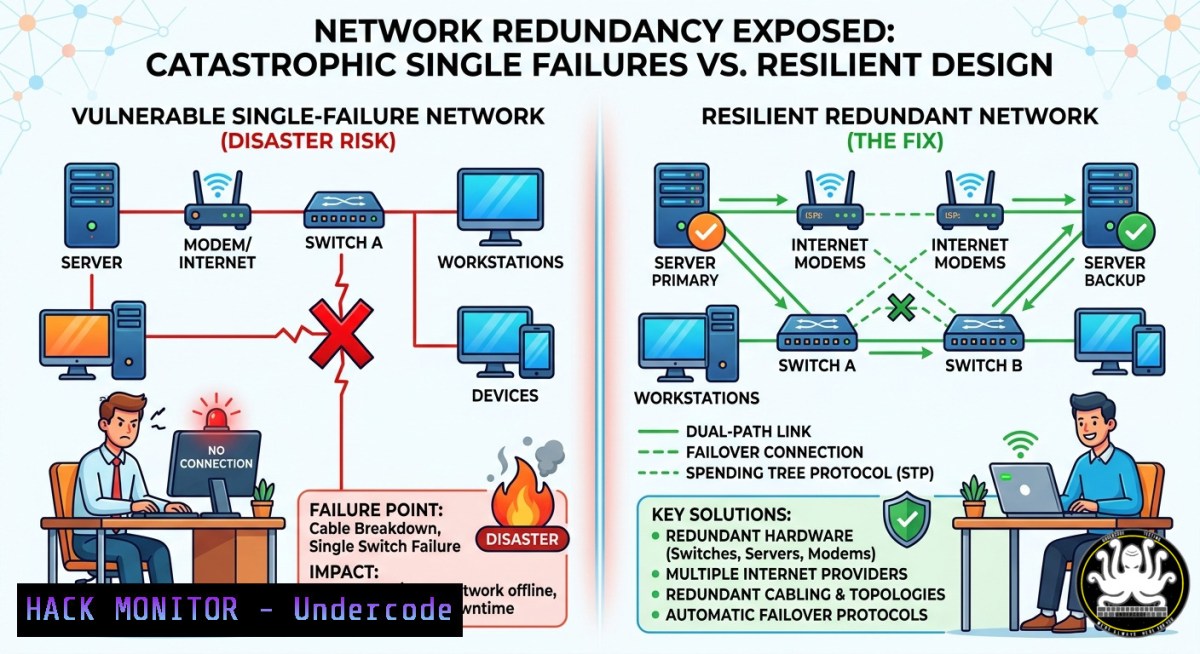
Network redundancy ensures continuous operation when a link, switch, or power supply fails – yet nearly 40% of local networks lack basic failover mechanisms. In cybersecurity, redundant paths not only boost availability but also mitigate man‑in‑the‑middle attacks by providing alternative route validation. This article dissects the poll question from Hacking Articles – “Which provides network redundancy in a local network environment?” – and delivers hands‑on hardening techniques across Linux, Windows, and cloud environments.
Learning Objectives:
- Differentiate between true redundancy technologies (dual backbones, mirroring) and false concepts (shadowing, duplexing) in Layer 2/3 networks.
- Implement NIC teaming and bridge bonding on Linux (bonding driver) and Windows (NIC Teaming) with failover validation commands.
- Harden local network redundancy against common attacks like STP manipulation and ARP spoofing using switch configurations and monitoring scripts.
You Should Know:
- Dual Backbones vs. Mirroring – The Real Redundancy Architects
The Hacking Articles poll lists four options: Shadowing, Dual backbones, Duplexing, Mirroring. Dual backbones is the correct answer for network redundancy – two independent distribution switches or core routers with parallel links, running STP (Spanning Tree Protocol) or ECMP (Equal‑Cost Multi‑Path). Mirroring (port mirroring/SPAN) copies traffic for analysis but does not provide failover. Shadowing is often confused with device hot‑standby (like VRRP), while duplexing refers to full‑duplex communication, not redundancy.
Step‑by‑step guide – implement dual backbone with STP on Linux bridges:
 Install bridge utilities
sudo apt install bridge-utils -y

Create two bridges representing backbone A and B
sudo brctl addbr backbone_a
sudo brctl addbr backbone_b

Add physical interfaces (e.g., eth0 to backbone A, eth1 to backbone B)
sudo brctl addif backbone_a eth0
sudo brctl addif backbone_b eth1

Enable STP on both bridges to prevent loops while allowing redundancy
sudo brctl stp backbone_a on
sudo brctl stp backbone_b on

Bring up interfaces
sudo ip link set up backbone_a
sudo ip link set up backbone_b

Verify STP status
sudo brctl showstp backbone_a
On Windows – configure NIC Teaming (LBFO) as a dual‑backbone equivalent:
 List available network adapters
Get-NetAdapter | Where-Object Status -eq 'Up'

Create a new NIC team (requires at least two adapters)
New-NetLbfoTeam -Name "BackboneTeam" -TeamMembers "Ethernet1","Ethernet2" -TeamingMode SwitchIndependent -LoadBalancingAlgorithm HyperVPort

Verify failover status
Get-NetLbfoTeam -Name "BackboneTeam" | Get-NetLbfoTeamMember
- Attack Vectors Against Redundant Networks – STP Manipulation
Attackers can spoof Bridge Protocol Data Units (BPDUs) to force a root bridge change, causing network reconvergence and enabling sniffing. Mitigation requires BPDU guard and root guard.
Step‑by‑step – detect and block rogue STP on Linux (using `bpfilter` and ebtables):
 Install ebtables for Layer 2 filtering
sudo apt install ebtables -y

Block all BPDUs (multicast 01:80:c2:00:00:00) from untrusted ports
sudo ebtables -A FORWARD -p 0x42 --proto 0x00 --dst 01:80:c2:00:00:00 -j DROP

Log attempts (forensics)
sudo ebtables -A INPUT -p 0x42 --dst 01:80:c2:00:00:00 -j LOG --log-prefix "BPDU_ATTEMPT "

Apply persistent rules (save)
sudo apt install ebtables-save -y
sudo ebtables-save > /etc/ebtables.rules
Cisco‑style hardening (simulated with open‑source tools – Open vSwitch):
 Install OVS
sudo apt install openvswitch-switch -y

Create bridge and set STP protocol
sudo ovs-vsctl add-br secure_bridge
sudo ovs-vsctl set bridge secure_bridge stp_enable=true

Enable BPDU guard on an access port
sudo ovs-vsctl set port eth0 other_config:bpdu-guard=true
- Linux Bonding Modes for Local Redundancy (Active‑Backup & LACP)
Linux bonding driver provides seven modes; mode 1 (active‑backup) and mode 4 (802.3ad LACP) deliver hardware‑level redundancy.
Step‑by‑step – configure active‑backup bonding:
 Load bonding module with mode 1
sudo modprobe bonding mode=1 miimon=100

Create bond interface
sudo ip link add bond0 type bonding
sudo ip link set eth0 master bond0
sudo ip link set eth1 master bond0

Assign IP
sudo ip addr add 192.168.10.100/24 dev bond0
sudo ip link set up bond0

Check failover (physically unplug eth0, watch /proc/net/bonding/bond0)
watch -n 1 cat /proc/net/bonding/bond0
LACP configuration (mode 4) – requires switch support:
 /etc/modprobe.d/bonding.conf
echo "options bonding mode=4 miimon=100 lacp_rate=1" | sudo tee /etc/modprobe.d/bonding.conf

Restart networking or reload module
sudo rmmod bonding && sudo modprobe bonding
sudo ifenslave bond0 eth0 eth1
- Windows Failover Cluster and Switch Embedded Teaming (SET)
For Hyper‑V environments, SET provides redundant paths at the virtual switch level.
PowerShell implementation:
 Create SET team (requires Windows Server 2016+)
New-VMSwitch -Name "RedundantSwitch" -NetAdapterName "Ethernet1","Ethernet2" -EnableEmbeddedTeaming $true

Verify team members and failover status
Get-VMSwitch -Name "RedundantSwitch" | Get-VMNetworkTeamAdapter

Simulate adapter failure (disable one adapter)
Disable-NetAdapter -Name "Ethernet1" -Confirm:$false
 Check connectivity – traffic shifts to Ethernet2
Test-Connection -ComputerName 192.168.10.1 -Count 5
- Cloud Hardening – Redundancy in Hybrid Local Networks
When extending local networks to AWS/Azure, use VPN tunnels and Direct Connect with failover routing.
AWS example – redundant VPN to on‑prem:
 AWS CLI create two Customer Gateways (different public IPs)
aws ec2 create-customer-gateway --type ipsec.1 --public-ip 203.0.113.10 --bgp-asn 65000 --region us-east-1
aws ec2 create-customer-gateway --type ipsec.1 --public-ip 203.0.113.11 --bgp-asn 65000

Create two VPN connections (each to a separate CGW) and attach to same Virtual Private Gateway
aws ec2 create-vpn-connection --customer-gateway-id cgw-xxx --vpn-gateway-id vgw-yyy --type ipsec.1
 Configure BGP on local router to prefer primary tunnel, fallback on secondary
 On Linux strongSwan for test:
sudo ip xfrm state | grep 'replay'  verify both tunnels active
Azure route‑based VPN with dual tunnels:
 Azure CLI
az network vpn-gateway create -g myRG -n myVPNGateway --vnet MyVNet --gateway-type Vpn --sku VpnGw1
az network vpn-gateway connection create -g myRG -n Conn1 --vpn-gateway myVPNGateway --shared-key "redundant2025" --connection-type IPsec
 Repeat for second connection with different local gateway IP
What Undercode Say:
- Key Takeaway 1: Dual backbones (parallel links with STP or LACP) are the only correct answer among the poll options for true network redundancy – mirroring is for monitoring, not failover.
- Key Takeaway 2: Attackers exploit reconvergence delays in redundant networks; always implement BPDU guard, root guard, and ARP inspection to prevent MITM during failover events. Combining Linux bonding, Windows SET, and cloud VPN failover creates a defense‑in‑depth redundancy posture.
Analysis: The Hacking Articles poll reveals a common misunderstanding – many IT professionals confuse traffic mirroring (SPAN) or duplexing (full‑duplex) with resilience. True local network redundancy requires physical path diversity and protocol‑level failover (STP, VRRP, or MLAG). From a blue team perspective, redundant networks reduce downtime but also double the attack surface if misconfigured (e.g., leaving backup links vulnerable to BPDU attacks). Training courses like “Network Redundancy for Security Analysts” (SANS SEC504) and vendor‑specific workshops (Cisco CCNA HA, Juniper JNCIS) are essential for bridging this knowledge gap.
Prediction:
By 2027, AI‑driven network redundancy will automatically re‑route traffic and patch STP vulnerabilities in real time using eBPF and in‑band telemetry. However, the human factor – misidentifying redundancy mechanisms like mirroring as failover – will persist, leading to a new class of “redundancy illusion” breaches. Expect regulatory pressure (e.g., NIS2, DORA) to mandate dual‑backbone architectures for critical local networks, pushing open‑source tools like FRRouting and Open vSwitch into enterprise compliance baselines.
▶️ Related Video (70% Match):
🎯Let’s Practice For Free:
IT/Security Reporter URL:
Reported By: UgcPost 7465228813115895808 – Hackers Feeds
Extra Hub: Undercode MoN
Basic Verification: Pass ✅
🎓 Live Courses & Certifications:
Join Undercode Academy for Verified Certifications
🚀 Request a Custom Project:
Secure, high-velocity infrastructure and disruptive technological engineering. Contact our engineering team for high-tier development and proprietary systems:
[email protected]


