Listen to this Post
Introduction:
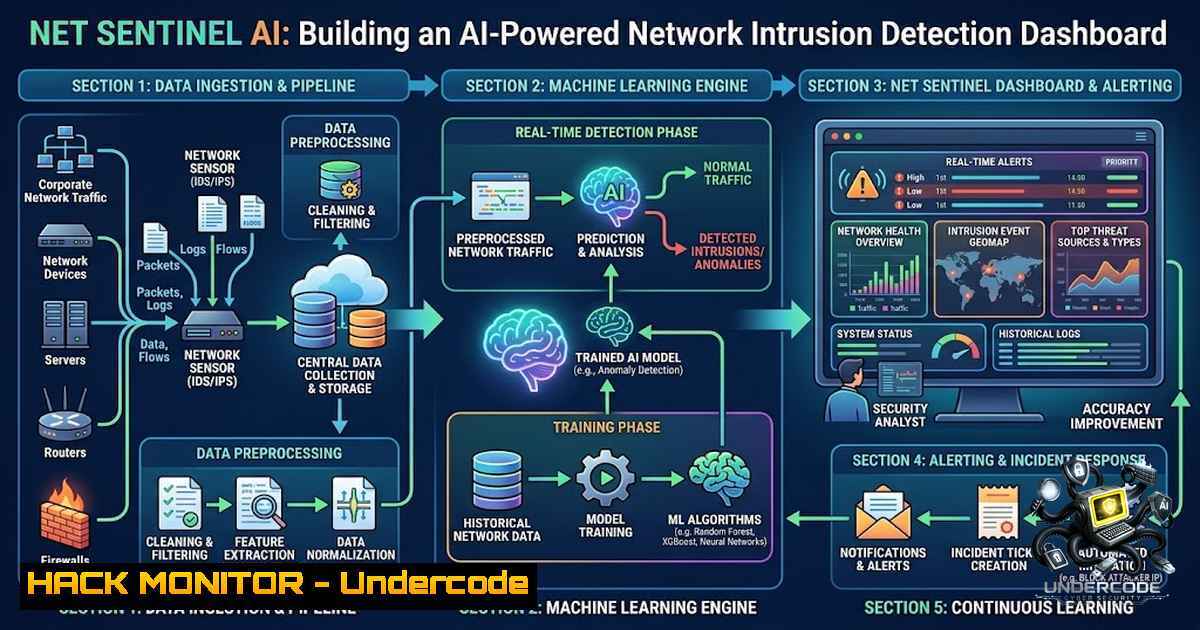
Net Sentinel AI is an AI-powered network intrusion detection system that captures real-time network packets, transforms them into bidirectional flows, extracts statistical traffic features, and classifies malicious activity using a Random Forest classifier. This project demonstrates the practical intersection of data analytics and cybersecurity—turning raw network data into actionable security intelligence through an interactive Flask-based dashboard. As organizations face increasingly sophisticated cyber threats, the ability to monitor login attempts, flag suspicious IPs, and detect anomalies in real time has become a critical defense capability.
Learning Objectives:
- Understand how machine learning can be applied to network traffic analysis for intrusion detection
- Learn to capture network packets and transform them into bidirectional flows with statistical features
- Build and deploy a Random Forest classifier to identify potentially malicious network activity
- Develop an interactive web dashboard for real-time security monitoring and KPI tracking
You Should Know:
1. Packet Capture and Bidirectional Flow Construction
Net Sentinel AI begins by capturing raw network packets from the network interface. The system then groups these packets into bidirectional flows—meaning it tracks communication in both directions between a source and destination IP. This flow-based approach is standard in modern intrusion detection because it captures the full context of a network conversation rather than isolated packets.
The pipeline follows this structure: Network Packets → Packet Capture → Bidirectional Flow Builder → Feature Extraction → Feature Vector → Random Forest Model → Traffic Prediction → Confidence & Risk Analysis → Web Dashboard.
Step-by-Step Guide (Linux):
 Install required packet capture utilities
sudo apt-get update
sudo apt-get install tcpdump wireshark-common

Capture live packets on interface eth0 for 60 seconds
sudo tcpdump -i eth0 -w capture.pcap -G 60 -W 1

View captured packets in human-readable format
tcpdump -r capture.pcap -1 -v | head -20
Step-by-Step Guide (Windows – using PowerShell):
 Install npcap (packet capture library) from https://npcap.com
 Use netsh to capture network traffic (basic)
netsh trace start capture=yes tracefile=C:\capture.etl maxsize=100

Stop the trace after capturing sufficient data
netsh trace stop

Convert ETL to readable format (requires Microsoft Message Analyzer or similar)
The bidirectional flow builder aggregates packets by (source IP, destination IP, source port, destination port, protocol) and computes statistics such as packet count, byte count, duration, and inter-arrival times. These aggregated flows become the foundation for feature extraction.
2. Feature Engineering Inspired by CICIDS2017
The feature extraction module calculates statistical characteristics inspired by the CICIDS2017 dataset—a benchmark for network intrusion detection. Features include flow duration, total packets in forward/backward directions, total bytes transferred, packet length statistics (mean, max, min, standard deviation), and flags indicating protocol-specific behaviors.
Example Python Feature Extraction Snippet:
import pandas as pd
import numpy as np

def extract_flow_features(flows):
features = []
for flow in flows:
feature_dict = {
'flow_duration': flow.duration,
'total_fwd_packets': flow.fwd_packets,
'total_bwd_packets': flow.bwd_packets,
'total_fwd_bytes': flow.fwd_bytes,
'total_bwd_bytes': flow.bwd_bytes,
'fwd_packet_length_mean': np.mean(flow.fwd_packet_lengths),
'bwd_packet_length_mean': np.mean(flow.bwd_packet_lengths),
'flow_packets_per_second': flow.total_packets / flow.duration if flow.duration > 0 else 0,
'flow_bytes_per_second': flow.total_bytes / flow.duration if flow.duration > 0 else 0,
}
features.append(feature_dict)
return pd.DataFrame(features)
Linux Command for Network Statistics:
 Monitor real-time network statistics
iftop -i eth0

View active network connections and their states
ss -tunap

Check packet drop rates and errors
netstat -i
The feature set is designed to capture both benign and malicious traffic patterns. For example, port scanning typically generates many small packets with short durations, while DDoS attacks produce high packet-per-second rates. The feature_columns.json file in the model directory defines exactly which features the Random Forest model expects during prediction.
3. Training the Random Forest Classifier
The machine learning component uses a Random Forest classifier—an ensemble learning method that builds multiple decision trees and aggregates their predictions. Random Forest is well-suited for intrusion detection because it handles high-dimensional feature spaces, resists overfitting, and provides feature importance rankings that help security analysts understand which traffic characteristics are most indicative of attacks.
Python Training Pipeline:
from sklearn.ensemble import RandomForestClassifier
from sklearn.model_selection import train_test_split
from sklearn.metrics import classification_report, confusion_matrix
import joblib

def train_model(X, y):
 Split data into training and testing sets
X_train, X_test, y_train, y_test = train_test_split(
X, y, test_size=0.2, random_state=42, stratify=y
)

Initialize Random Forest with 100 trees
rf_model = RandomForestClassifier(
n_estimators=100,
max_depth=20,
min_samples_split=5,
random_state=42,
n_jobs=-1
)

Train the model
rf_model.fit(X_train, y_train)

Evaluate on test set
y_pred = rf_model.predict(X_test)
print(classification_report(y_test, y_pred))

Save model for deployment
joblib.dump(rf_model, 'model/random_forest_model.pkl')

Extract feature importance
importance = pd.DataFrame({
'feature': X.columns,
'importance': rf_model.feature_importances_
}).sort_values('importance', ascending=False)
importance.to_csv('model/feature_importance.csv', index=False)

return rf_model
Linux Command to Monitor Model Training:
 Monitor system resources during training
htop

Check GPU availability (if using GPU-accelerated libraries)
nvidia-smi

Log training output to file
python train_model.py 2>&1 | tee training_log.txt
The model generates prediction confidence scores and calculates a basic traffic risk score for each flow. These scores are then passed to the web dashboard for visualization, enabling security teams to prioritize alerts based on risk severity.
4. Web Dashboard Development with Flask
The dashboard is built with Flask, a lightweight Python web framework, and serves as the primary user interface for security monitoring. It tracks real-time cybersecurity metrics including login attempt success/failure rates, security alerts as they happen, activity breakdowns by user and IP address, and flags suspicious users/IPs based on activity patterns.
Flask Application Structure:
app/
├── <strong>init</strong>.py  Application factory
├── models/  Database models
├── services/  Business logic and prediction services
├── static/  CSS, JavaScript, images
└── templates/  HTML templates
Step-by-Step Guide to Deploy the Dashboard:
 Clone the repository
git clone https://github.com/Harsh-Mishra25/Net-Sentinel-AI.git
cd Net-Sentinel-AI

Create a Python virtual environment
python3 -m venv venv
source venv/bin/activate  On Windows: venv\Scripts\activate

Install dependencies (create requirements.txt if missing)
pip install flask pandas numpy scikit-learn joblib scapy

Set environment variables
export FLASK_APP=app
export FLASK_ENV=development

Run the Flask application
flask run --host=0.0.0.0 --port=5000

For production, use gunicorn (Linux)
gunicorn -w 4 -b 0.0.0.0:5000 "app:create_app()"
Windows PowerShell Commands:
 Set environment variables in PowerShell
$env:FLASK_APP="app"
$env:FLASK_ENV="development"

Run Flask
flask run --host=0.0.0.0 --port=5000

Check if port 5000 is in use
netstat -ano | findstr :5000
The dashboard interacts with the trained model through a prediction service that takes flow features as input and returns classification results, confidence scores, and risk assessments. This creates a complete workflow from packet capture to actionable security intelligence.
5. API Security and Cloud Hardening Considerations
When deploying a security analytics dashboard, API security and cloud hardening are paramount. The dashboard exposes endpoints that could be exploited if not properly secured.
Recommended Security Hardening Practices:
- API Authentication: Implement JWT (JSON Web Token) or OAuth2 for all API endpoints
- Rate Limiting: Prevent brute-force attacks by limiting requests per IP
- HTTPS Enforcement: Always use TLS 1.2+ in production
- Input Validation: Sanitize all user inputs to prevent injection attacks
- CORS Configuration: Restrict cross-origin requests to trusted domains
Nginx Configuration for Reverse Proxy with SSL:
server {
listen 443 ssl http2;
server_name netsentinel.example.com;

ssl_certificate /etc/letsencrypt/live/netsentinel/fullchain.pem;
ssl_certificate_key /etc/letsencrypt/live/netsentinel/privkey.pem;

location / {
proxy_pass http://127.0.0.1:5000;
proxy_set_header Host $host;
proxy_set_header X-Real-IP $remote_addr;
proxy_set_header X-Forwarded-For $proxy_add_x_forwarded_for;
proxy_set_header X-Forwarded-Proto $scheme;
}
}
Linux Firewall Configuration:
 Allow only necessary ports
sudo ufw default deny incoming
sudo ufw default allow outgoing
sudo ufw allow 22/tcp  SSH
sudo ufw allow 443/tcp  HTTPS
sudo ufw allow 80/tcp  HTTP (for Let's Encrypt renewal)
sudo ufw enable

Check firewall status
sudo ufw status verbose
6. Evaluation and Model Performance
The evaluate.py script assesses the Random Forest model’s performance on test data. Key metrics include accuracy, precision, recall, and F1-score—each providing different insights into the model’s detection capabilities.
Example Evaluation Output:
precision recall f1-score support
Benign 0.98 0.97 0.97 5000
Malicious 0.95 0.96 0.95 1500

accuracy 0.97 6500
macro avg 0.96 0.96 0.96 6500
weighted avg 0.97 0.97 0.97 6500
Linux Command to Run Evaluation:
 Run the evaluation script
python ai/evaluate.py --model model/random_forest_model.pkl --test data/test_flows.csv

Generate confusion matrix visualization
python -c "import matplotlib.pyplot as plt; from sklearn.metrics import ConfusionMatrixDisplay; ..."
Feature importance analysis—saved to feature_importance.csv—reveals which traffic characteristics most strongly influence predictions. This insight helps security analysts understand attack patterns and refine detection rules.
What Undercode Say:
- Key Takeaway 1: Net Sentinel AI bridges the gap between theoretical cybersecurity knowledge and practical implementation. By building a functional intrusion detection system with a real-time dashboard, the project demonstrates how machine learning can transform raw network data into actionable security insights. The integration of packet capture, feature engineering, model training, and web visualization creates a complete security analytics pipeline.
-
Key Takeaway 2: The project’s use of Flask for the dashboard and Random Forest for classification represents a scalable approach to network security monitoring. Security teams can extend this foundation by adding more sophisticated models (deep learning for zero-day detection), integrating threat intelligence feeds, and implementing automated response actions. The dashboard’s focus on login attempts, IP-based activity tracking, and real-time alerts addresses core security operations center (SOC) requirements.
Analysis: This project exemplifies how data science and cybersecurity are converging. The ability to detect anomalies through statistical traffic analysis is becoming essential as perimeter-based security models give way to zero-trust architectures. Net Sentinel AI’s approach—feature extraction inspired by CICIDS2017, Random Forest classification, and interactive visualization—mirrors what enterprise security tools provide, but in an accessible, educational format. The internship experience highlights a growing industry need: professionals who understand both data analytics and security operations. As organizations collect more network telemetry, the demand for analysts who can derive meaning from this data will only increase. The project also underscores the importance of observability—making security events visible and actionable rather than buried in logs.
Prediction:
- +1 The democratization of AI-powered security tools through open-source projects like Net Sentinel AI will accelerate cybersecurity education and enable smaller organizations to deploy sophisticated threat detection capabilities without enterprise budgets.
-
+1 The integration of machine learning with network traffic analysis will become standard in next-generation firewalls and SIEM (Security Information and Event Management) platforms, reducing false positive rates and improving threat hunting efficiency.
-
-1 As AI-powered detection becomes more accessible, attackers will increasingly adopt adversarial machine learning techniques—crafting traffic that evades detection by mimicking benign patterns—creating an ongoing arms race between defenders and adversaries.
-
+1 The skills demonstrated in this project—combining data science, web development, and security—represent a high-growth career path, with organizations seeking professionals who can bridge the gap between security operations and data analytics teams.
-
-1 Organizations that rely solely on machine learning for intrusion detection without maintaining human oversight and threat hunting capabilities risk missing novel attacks that fall outside training data distributions.
▶️ Related Video (82% Match):
https://www.youtube.com/watch?v=2MVfZPuhJaE
🎯Let’s Practice For Free:
🎓 Live Courses & Certifications:
Join Undercode Academy for Verified Certifications
🚀 Request a Custom Project:
Secure, high-velocity infrastructure and disruptive technological engineering. Contact our engineering team for high-tier development and proprietary systems:
[email protected]
💎 Smart Architecture | 🛡️ Secure by Design | ⭐ Trusted by Thousands
IT/Security Reporter URL:
Reported By: https://lnkd.in/p/e6ejStGP – Hackers Feeds
Extra Hub: Undercode MoN
Basic Verification: Pass ✅


