Listen to this Post
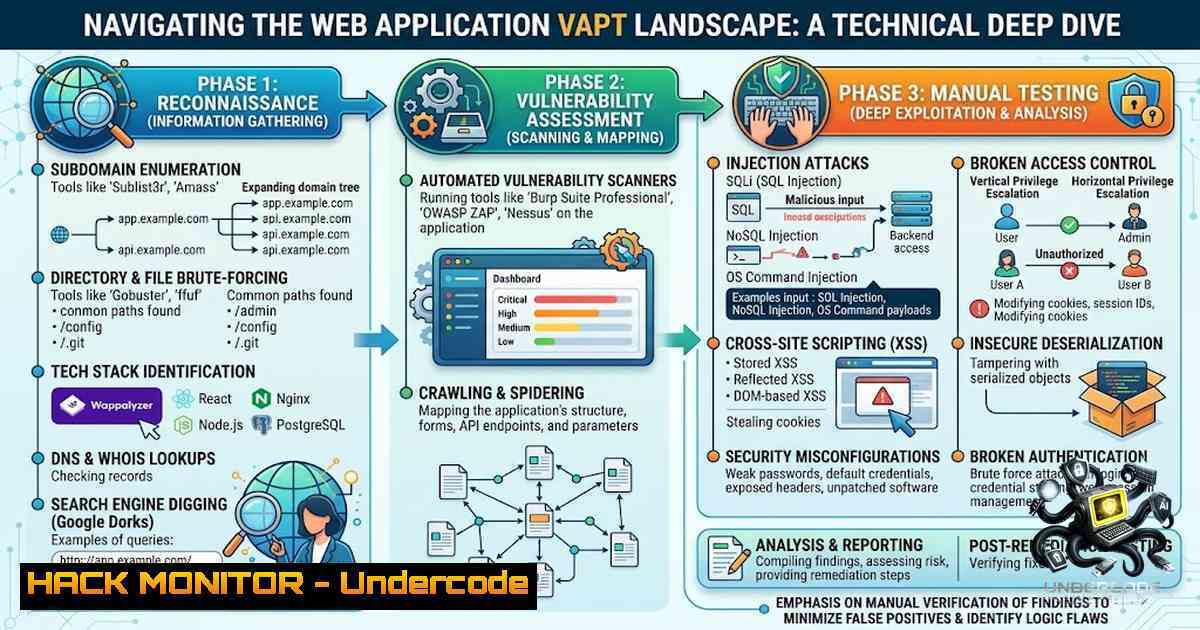
Introduction:
In the ever-evolving theater of cybersecurity, a proactive Vulnerability Assessment and Penetration Testing (VAPT) strategy remains the cornerstone of a robust security posture. The recent manual assessment of a web application, as detailed in a practitioner’s field report, highlights the critical balance between automated scanning and human intuition. This article dissects that engagement, extracting the technical methodologies, tool configurations, and security findings to provide a professional playbook for conducting thorough web application penetration tests, moving beyond simple scanning to true vulnerability validation.
Learning Objectives & Secrets:
- Objective 1: Mastering Active Reconnaissance. Learn how to leverage tools like Nmap, WhatWeb, and Gobuster to intelligently map the application’s attack surface and uncover hidden directories.
- Objective 2: Harnessing Automated Scanners. Go beyond the surface with Nikto and SQLMap, understanding their flags and configurations for efficient vulnerability discovery, while recognizing their limitations.
- Objective 3: The Art of Manual Validation. The secret is in the confirmation. We will explore how to manually verify findings to eliminate false positives, analyze cookie security, and dissect authentication flows for logic flaws.
1. Comprehensive Reconnaissance: Mapping the Terrain
The first phase of the VAPT engagement involved mapping the application’s infrastructure. The tester utilized a combination of tools to gather critical intelligence about the server, application, and network.
- Extended Post Content: The engagement began with a suite of reconnaissance tools to build a comprehensive picture of the target.
- Step-by-step guide explaining what this does and how to use it:
- Network Scanning with Nmap: Nmap is used to identify open ports, running services, and operating system fingerprints.
Perform a stealth SYN scan on common web ports
nmap -sS -p 80,443,8080,8443 -T4 -A -oA recon_scan <target_ip_or_domain>
– -sS: SYN scan (stealthy).
– -p: Specifies ports.
– -A: Enables OS and version detection, script scanning, and traceroute.
– -oA: Outputs results in all standard formats (.nmap, .xml, .gnmap).
2. Technology Fingerprinting with WhatWeb: This tool identifies the web server, frameworks, and CMS.
 Identify web technologies
whatweb -a 3 https://<target_domain>
– -a 3: Aggressive scanning, which is more thorough but more noticeable.
3. Directory Bruteforcing with Gobuster: Discover hidden files and directories. This is crucial for identifying sensitive paths.
 Brute-force directories using a common wordlist
gobuster dir -u https://<target_domain> -w /usr/share/wordlists/dirbuster/directory-list-2.3-medium.txt -x php,html,txt -o dir_gobuster.txt
– -u: Specifies the target URL.
– -w: Path to the wordlist.
– -x: File extensions to check.
– -o: Output file.
- Vulnerability Scanning and Analysis with Nikto & SQLMap
With a map of the application’s structure, the next step was to deploy automated vulnerability scanners. The findings from Nikto and SQLMap highlighted critical security deficiencies.
- Extended Post Content: The post mentioned the “Laravel framework and database information disclosure,” which is a classic finding in the early stages of testing.
- Step-by-step guide explaining what this does and how to use it:
- Nikto Web Server Scanner: Nikto is a powerful tool for identifying server misconfigurations, outdated software, and potential vulnerabilities.
Scan the target for vulnerabilities
nikto -h https://<target_domain> -ssl -Format html -o nikto_report.html
– -h: Target host.
– -ssl: For HTTPS targets.
– -Format: Output format.
2. SQL Injection Testing with SQLMap: While the tester reported SQLi was not confirmed, SQLMap is the standard tool for automation. It is often used with captured request data to test parameters.
 Test a specific parameter for SQL injection using a saved request file
sqlmap -r request.txt --batch --level=3 --risk=2 --output-dir=sqlmap_results
– -r: Load a request from a file (e.g., Burp Suite capture).
– --batch: Never ask for user input, use defaults.
– --level: Level of tests to perform (increases parameters).
– --risk: Risk of tests (from 1 to 3, where 3 is more intrusive).
3. Information Disclosure & Path Traversal Validation
A key finding was “Sensitive application paths identified” and “Laravel framework and database information disclosure.” This is a classic configuration flaw where debug modes or error handling expose internal structures.
- Extended Post Content: Information disclosure is a critical finding because it provides attackers with a blueprint of the application’s architecture.
- Step-by-step guide explaining what this does and how to use it:
- Analyzing Laravel Debug Mode: The `.env` file in Laravel applications often contains sensitive credentials. If debug mode is enabled, errors can reveal full server paths, database connection strings, and more.
- Manual Path Verification: Once paths are identified via Gobuster, they should be accessed manually. For example, if a `/backup` or `/logs` directory is found, attempt to access `https://
/logs/error_log` or https://<target>/backup/db.sql. If exposed, this is a high-severity finding. - Windows/Linux Command for Local Validation: If you’re performing a local file inclusion (LFI) test from a Linux machine against a Windows target, you might test both path formats:
Testing for LFI on Linux
https://<target>/index.php?page=../../../../etc/passwd
Testing for LFI on Windows
https://<target>/index.php?page=........\Windows\win.ini
4. Security Configuration Review: Cookies & .htaccess
The assessment included a review of `.htaccess` and cookie security. This is the “hardening” phase of the assessment.
- Extended Post Content: These reviews focus on how the application manages client-side state and server-side access controls.
- Step-by-step guide explaining what this does and how to use it:
- .htaccess Validation: ` .htaccess` files are used for URL rewriting and access control. An exposed `.htaccess` file can reveal how the server processes requests or its authentication mechanisms.
Attempt to access the .htaccess file directly
curl -i https://<target_domain>/.htaccess
– Look for Options, AuthUserFile, or `RewriteCond` directives. If readable, this is a security misconfiguration.
2. Cookie Security Audit:
- HttpOnly: Prevents JavaScript from accessing the cookie, mitigating XSS attacks.
- Secure: Ensures cookies are only sent over HTTPS.
- SameSite: Controls whether cookies are sent in cross-site requests.
Command: Use browser Developer Tools (F12) > Application > Cookies, or check viacurl:curl -I https://<target_domain> | grep -i set-cookie
- A secure response should show
Set-Cookie: session=...; HttpOnly; Secure; SameSite=Strict.
5. Authentication & Password Security Analysis
The post noted that “Authentication and password security reviewed.” Manual testing often discovers logic flaws that automated scanners miss.
- Extended Post Content: This is a manual analysis focusing on business logic, not just technical vulnerabilities.
- Step-by-step guide explaining what this does and how to use it:
- Password Policy Testing: Attempt to create an account with a weak password (e.g., “admin123”) to see if complexity requirements are enforced.
- Rate Limiting & Bruteforce: Using Burp Suite Intruder, attempt to brute-force the login page with a list of common passwords.
– Proxy Setup: Configure Burp Suite to intercept login requests.
– Intruder Attack: Send the intercepted request to Intruder. Set a payload position at the password parameter. Use a wordlist (e.g., rockyou.txt). Check for response length or server response codes. If there is no lockout or CAPTCHA, this is a critical vulnerability.
3. Remember-Me Functionality: If the application has a “Remember Me” function, analyze the cookie. Does it contain a static token or a cryptographic hash that can be predicted?
- Manual Testing: The Final Frontier for XSS and SQLi
The engagement’s conclusion that “SQL Injection was not confirmed” and “XSS was not confirmed” is just as important as finding a vulnerability. It demonstrates a thorough manual verification.
- Extended Post Content: The tester performed manual testing to validate the findings from automated tools. This is a core skill of a professional pentester.
- Step-by-step guide explaining what this does and how to use it:
- Manual SQLi Verification: After SQLMap runs, review the output. SQLMap may report a false positive. Manually attempt to trigger a time-based or error-based payload in the parameter to confirm.
Manual Time-Based SQL Injection
https://<target>/products?id=1' AND sleep(5)--
– If the page takes 5 seconds to load, the injection is confirmed.
2. Manual XSS Verification: Common scanners may find an input field. You must verify it. Insert a basic payload: <script>alert('XSS')</script>.
– If the alert fires, it’s confirmed. If the scanner flags it but the browser doesn’t execute it, it’s likely a false positive (e.g., HTML escaped output). Check the page source for the `<` character.
7. Optimizing the Toolchain: EyeWitness and Reporting
- Step-by-step guide explaining what this does and how to use it:
- EyeWitness for Reporting: This tool takes screenshots of web pages and generates a basic report for reconnaissance. It is often used to quickly identify interesting targets within a large list.
Provide a list of URLs to screen capture
eyewitness --web -f urls.txt --headless --max-retries 2 --timeout 5
– --web: Web mode.
– -f: File containing list of URLs.
– --headless: Runs Chrome in headless mode to take screenshots.
– This helps in creating a visual map of the application for the final report.
What Undercode Say:
- Key Takeaway 1: The Importance of Manual Verification. Automated tools are powerful, but they cannot replace the critical thinking of a human analyst. The confirmation that SQLi and XSS were not confirmed is a testament to the tester’s due diligence and skill in validating findings.
- Key Takeaway 2: Holistic Security Mindset. Security is not just about SQLi and XSS. The engagement correctly highlighted information disclosure, authentication logic, and server configuration (
.htaccess), proving a multi-layered approach is essential for real-world security.
Analysis:
Walid’s engagement reflects a mature approach to VAPT. The use of tools like Nmap and Gobuster for reconnaissance is standard, but the analysis of `.htaccess` and cookie flags (HttpOnly, Secure) often gets overlooked. The manual test for logic flaws in authentication is a high-value activity that differentiates a competent pentester from a script-kiddie. The findings regarding Laravel information disclosure are common in poorly configured frameworks, and the detailed review of all findings rather than just chasing a high-severity SQLi shows a comprehensive focus on security improvements. His declaration of “SQL Injection was not confirmed” is a mature result, demonstrating that even when a dangerous vulnerability is absent, the process of methodically checking and reporting is a professional success.
Prediction:
- +1: The current shift towards DevSecOps will integrate these VAPT tools directly into CI/CD pipelines, making continuous, automated scanning a baseline requirement.
- +1: The growing complexity of web frameworks will necessitate a stronger reliance on manual testing, increasing the demand for “purple team” professionals who can both attack and defend.
- -1: As AI coding assistants proliferate, we will see a surge in sophisticated, logic-based vulnerabilities that traditional scanners and even simple manual testing fail to catch, requiring a deeper adversarial mindset.
- -1: Without continuous skill development in manual testing, security professionals risk becoming overly reliant on tools and may miss critical business logic flaws that are not in the OWASP Top 10 list.
Conclusion:
The VAPT engagement described provides a snapshot of modern security practice. It underscores that effective penetration testing is a structured, multi-phased approach combining automated efficiency with the nuance of manual verification. By respecting the “not confirmed” results just as much as the “confirmed” ones, security professionals ensure they deliver accurate, actionable intelligence, helping organizations truly understand their risk posture.
▶️ Related Video (78% Match):
🎯Let’s Practice For Free:
🎓 Live Courses & Certifications:
Join Undercode Academy for Verified Certifications
🚀 Request a Custom Project:
Secure, high-velocity infrastructure and disruptive technological engineering. Contact our engineering team for high-tier development and proprietary systems:
[email protected]
💎 Smart Architecture | 🛡️ Secure by Design | ⭐ Trusted by Thousands
IT/Security Reporter URL:
Reported By: https://lnkd.in/p/eccRX-4A – Hackers Feeds
Extra Hub: Undercode MoN
Basic Verification: Pass ✅


