Listen to this Post
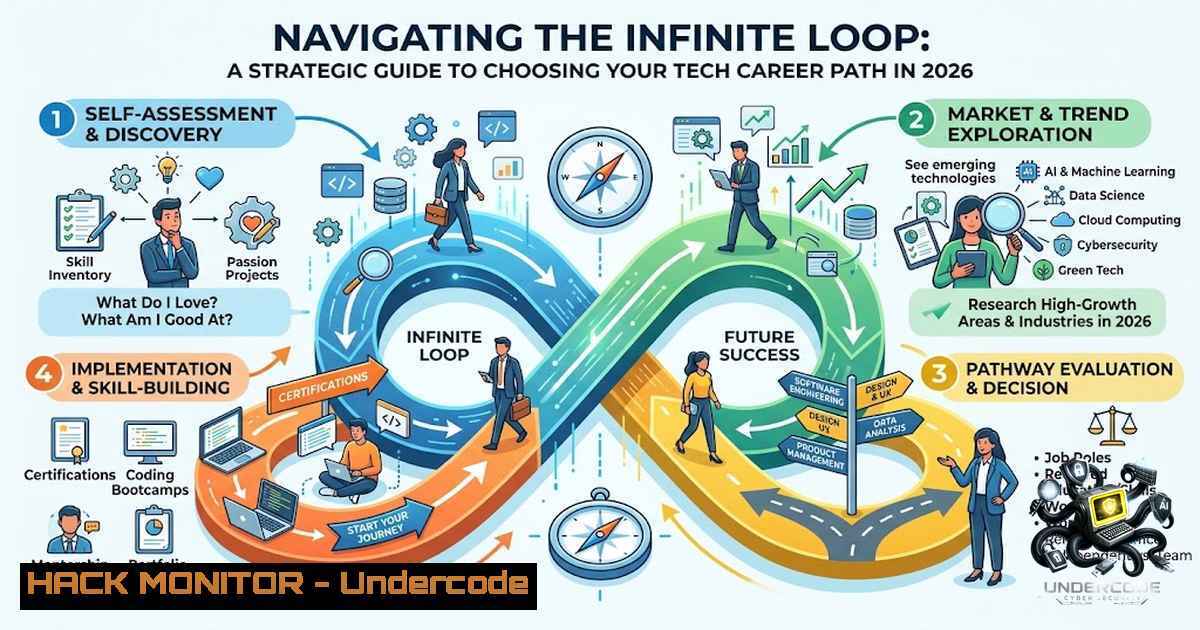
Introduction:
The technology sector has evolved beyond traditional coding roles into a vast ecosystem encompassing design, data science, cybersecurity, and infrastructure. For newcomers, the sheer volume of available career paths can lead to analysis paralysis, a phenomenon where too many choices hinder decision-making. This article serves as a technical roadmap, moving beyond generic advice to provide actionable steps for identifying and entering a tech specialization, supplemented by essential tools, commands, and career hacks for 2026.
Learning Objectives:
- Evaluate distinct non-coding and coding career tracks to align with personal strengths and market demands.
- Identify key certifications, tools, and operating system commands relevant to cybersecurity, cloud, and AI roles.
- Develop a strategic project-based learning plan to transition from a novice to an employable candidate.
You Should Know:
- Breaking Down the “Cybersecurity” Umbrella: From Theory to Terminal
While the post lists “Cybersecurity” and “Ethical Hacking” as single entities, the domain is highly stratified. To break in, you must understand the distinct layers. For example, a Security Analyst focuses on monitoring and incident response, while a Penetration Tester (Ethical Hacker) actively exploits vulnerabilities. Both require a strong grasp of networking and operating systems.
Step‑by‑step guide: Setting Up Your First Security Lab
To truly understand security, you need a safe environment to practice. Here is how to set up a basic virtual lab using VirtualBox and Kali Linux (the attacker) versus a vulnerable target like Metasploitable.
- Install VirtualBox: Download and install Oracle VirtualBox on your Windows/Linux machine.
- Download ISOs: Obtain the Kali Linux ISO and the Metasploitable 2 ISO (a deliberately vulnerable Linux system).
- Configure Network: In VirtualBox, set the network adapter for both VMs to “Host-Only” or “NAT Network” to isolate them from your main system but allow them to communicate.
- Check Connectivity: Once booted, open a terminal on Kali and ping the target machine to ensure connectivity.
– Linux Command: `ping -c 4
`
5. Run a Basic Scan: Use Nmap, the industry standard for network discovery.
- Linux Command: `nmap -sV -p- [bash]`
- Explanation: This scans all ports (<code>-p-</code>) and attempts to determine service versions (<code>-sV</code>) running on the target.
6. Analyze Results: The output will show open ports like 21 (FTP), 22 (SSH), 80 (HTTP), and 443 (HTTPS). These are your "attack surfaces."

<h2 style="color: yellow;">Windows Equivalent:</h2>

While Kali is Linux-based, Windows users can utilize the Windows Subsystem for Linux (WSL) to run these tools.
- Command (PowerShell Admin): `wsl --install` (to install a Linux distribution).
- Command (Inside WSL): `sudo apt update && sudo apt install nmap -y` (to install Nmap).

<h2 style="color: yellow;">2. The Data Science Pipeline: Beyond Jupyter Notebooks</h2>

The post lists "Data Science" and "Data Analysis." A common misconception is that these roles are purely about visualization. In reality, Data Engineering (the "E" and "L" of ELT) is often the most sought-after skill. Before you can analyze, you must acquire and clean the data.

Step‑by‑step guide: Extracting and Cleaning Data with Python (Pandas)
This tutorial assumes you have Python and pip installed. We will load a messy CSV file, clean it, and prepare it for analysis.

<h2 style="color: yellow;">1. Install Libraries:</h2>

<ul>
<li>Command: `pip install pandas requests`
2. The Script: Create a Python file named <code>data_cleaner.py</code>.</li>
</ul>

<h2 style="color: yellow;">3. Import and Load:</h2>

[bash]
import pandas as pd
 Load the dataset (replace with your file path)
df = pd.read_csv('messy_data.csv')
print(df.head())
4. Handle Missing Values: In data science, missing values skew results.
 Drop rows where 'Customer_ID' is missing
df.dropna(subset=['Customer_ID'], inplace=True)
 Fill missing 'Age' with the median
df['Age'].fillna(df['Age'].median(), inplace=True)
5. Remove Duplicates:
print(f"Duplicates before: {df.duplicated().sum()}")
df.drop_duplicates(inplace=True)
6. Export Clean Data:
df.to_csv('clean_data.csv', index=False)
print("Data cleaning complete!")
Security Note: When working with real-world data, ensure compliance with GDPR or CCPA by implementing data masking scripts before processing PII.
- Cloud & Infrastructure: The Linux Command Line Is Your New Best Friend
System Administration and Cloud Engineering rely heavily on the command line. Whether you are on AWS Linux or Ubuntu, you must manage services, users, and logs. The post mentions “System Administration,” which involves managing servers that run the code developers write.
Step‑by‑step guide: Essential Linux System Administration Tasks
These commands are crucial for any cloud or system admin role.
- User Management: Adding and managing users is a core task.
– Command: `sudo useradd -m -s /bin/bash john_doe`
– Command: `sudo passwd john_doe` (to set the password).
2. Service Management (Systemd): Modern Linux distributions use `systemd` to manage services.
– Check Status: `sudo systemctl status nginx` (checks if the web server is running).
– Restart Service: `sudo systemctl restart nginx` (applies new configurations).
– Enable on Boot: `sudo systemctl enable nginx` (ensures the service restarts after a reboot).
3. Log Analysis: Troubleshooting requires viewing logs. The `journalctl` command is the primary tool.
– Command: `sudo journalctl -u nginx -f` (follows (-f) the logs for the nginx service in real-time).
4. Firewall Configuration (UFW): Securing the server is paramount.
– Allow SSH: `sudo ufw allow 22/tcp`
– Allow HTTP/HTTPS: `sudo ufw allow 80/tcp` and `sudo ufw allow 443/tcp`
– Enable Firewall: `sudo ufw enable`
Cloud Specific: In a cloud environment, these tasks are often automated via Infrastructure as Code (IaC) tools like Terraform, but understanding the underlying OS is non-1egotiable.
- Artificial Intelligence & Prompt Engineering: The Art of the API
The post highlights “Prompt Engineering.” This is less about “talking to a chat bot” and more about managing AI APIs for production. To build a generative AI application, you need to understand how to structure prompts and manage tokens using Python.
Step‑by‑step guide: Making Your First AI API Call (OpenAI)
Here is a simple script to interact with the OpenAI API, a common task for AI engineers.
1. Install OpenAI:
- Command: `pip install openai`
2. Set Up API Key: Never hardcode your key. Use environment variables. - Linux/macOS: `export OPENAI_API_KEY=’your-key-here’`
– Windows (CMD): `set OPENAI_API_KEY=your-key-here`
3. The Python Script:
import os
from openai import OpenAI

client = OpenAI(api_key=os.environ.get("OPENAI_API_KEY"))

response = client.chat.completions.create(
model="gpt-4o-mini",
messages=[
{"role": "system", "content": "You are a technical recruiter helping someone choose a career path."},
{"role": "user", "content": "Based on my interest in puzzles and systems, should I choose cybersecurity or site reliability engineering?"}
],
max_tokens=150,
temperature=0.7
)

print(response.choices[bash].message.content)
4. Understanding Parameters: `temperature` controls randomness (0 is strict, 1 is creative). `max_tokens` limits the response length to manage costs.
5. Software Development: The Git Workflow
Regardless of whether you choose Frontend, Backend, or Mobile, you must master Git. It is the industry standard for version control.
Step‑by‑step guide: The Standard Git Workflow
This workflow is used in almost every software development job.
- Clone the Repository: Get the code from a remote server (like GitHub).
– Command: `git clone [repository-url]`
2. Create a Branch: Never work directly on the `main` branch.
– Command: `git checkout -b feature/add-login-functionality`
3. Make Changes and Stage: Add your new code or files.
– Command: `git add .` (stages all changes in the current directory).
4. Commit Changes: Save the changes with a meaningful message.
– Command: `git commit -m “feat: Add login endpoint validation”`
5. Push the Branch: Upload your changes to the remote repository.
– Command: `git push origin feature/add-login-functionality`
6. Pull Request: Now, navigate to GitHub/GitLab and create a “Pull Request” (PR) to merge your feature into main. This triggers code reviews.
What Undercode Say:
- Start with the “Why”: Before learning a tool (like Figma or Nmap), ask yourself why you want to solve problems in that domain. Your motivation will sustain you through the steep learning curve.
- The “T-Shaped” Strategy: In 2026, the market rewards T-shaped individuals—deep expertise in one core skill (the vertical bar) and a broad understanding of adjacent fields (the horizontal bar). For instance, a UX Designer who understands frontend limitations or a Security Analyst who knows cloud infrastructure is significantly more valuable.
- Your Portfolio is Your Resume: The days of relying solely on a degree are over. Whether it’s a GitHub repo of code, a Behance portfolio of designs, or a write-up of a lab hack, tangible evidence of your skills is the strongest currency in tech hiring.
Analysis:
The original post by Madubueze Chinonso serves as an excellent high-level compass for navigating the tech ocean. However, a compass alone doesn’t sail the ship. The success of a career switch relies on the transition from passive consumption (reading lists) to active creation (building projects). The “Day 12” milestone is crucial; it emphasizes consistency over intensity. A common failure point for new entrants is “tutorial hell”—watching endless videos without writing code or designing interfaces. The best way to overcome this is to set a specific project goal for each domain: e.g., “Build a personal portfolio using a Headless CMS” for Web Dev, or “Write a script to analyze server logs” for Data/Cloud. Furthermore, the advice to “not compare your beginning to someone else’s years of experience” touches on a psychological reality—imposter syndrome is highly prevalent in tech. By focusing on project-based learning and community engagement (like the post’s hashtags suggest), new learners build a feedback loop that mitigates this and accelerates tangible job readiness.
Prediction:
- +1 Entry-level tech hiring in 2026 will prioritize demonstrated “skill literacy” (e.g., certifications, GitHub portfolios) over four-year degrees, specifically for roles in AI Engineering and Cloud Security.
- +1 The integration of generative AI into the software development lifecycle (SDLC) will create a new category of roles focused on “AI Operations” (AIOps), automating the very infrastructure mentioned in the post.
- -1 We can expect a market oversaturation in “Frontend Development” and “Product Design” over the next 12 months, intensifying competition, while “DevOps” and “Data Engineering” will face a talent shortage due to their higher technical barriers.
- +1 The “No-Code/Low-Code” movement will evolve into a formal career track, creating “citizen developers” who bridge the gap between business operations and IT, diminishing the strict division between “technical” and “non-technical” roles.
- -1 The rapid pace of AI development will render “Prompt Engineering” as a standalone skill obsolete within two years, as language models improve at interpreting natural language without highly structured prompts.
▶️ Related Video (78% Match):
🎯Let’s Practice For Free:
🎓 Live Courses & Certifications:
Join Undercode Academy for Verified Certifications
🚀 Request a Custom Project:
Secure, high-velocity infrastructure and disruptive technological engineering. Contact our engineering team for high-tier development and proprietary systems:
[email protected]
💎 Smart Architecture | 🛡️ Secure by Design | ⭐ Trusted by Thousands
IT/Security Reporter URL:
Reported By: https://lnkd.in/p/e3S8nwud – Hackers Feeds
Extra Hub: Undercode MoN
Basic Verification: Pass ✅


