
Listen to this Post
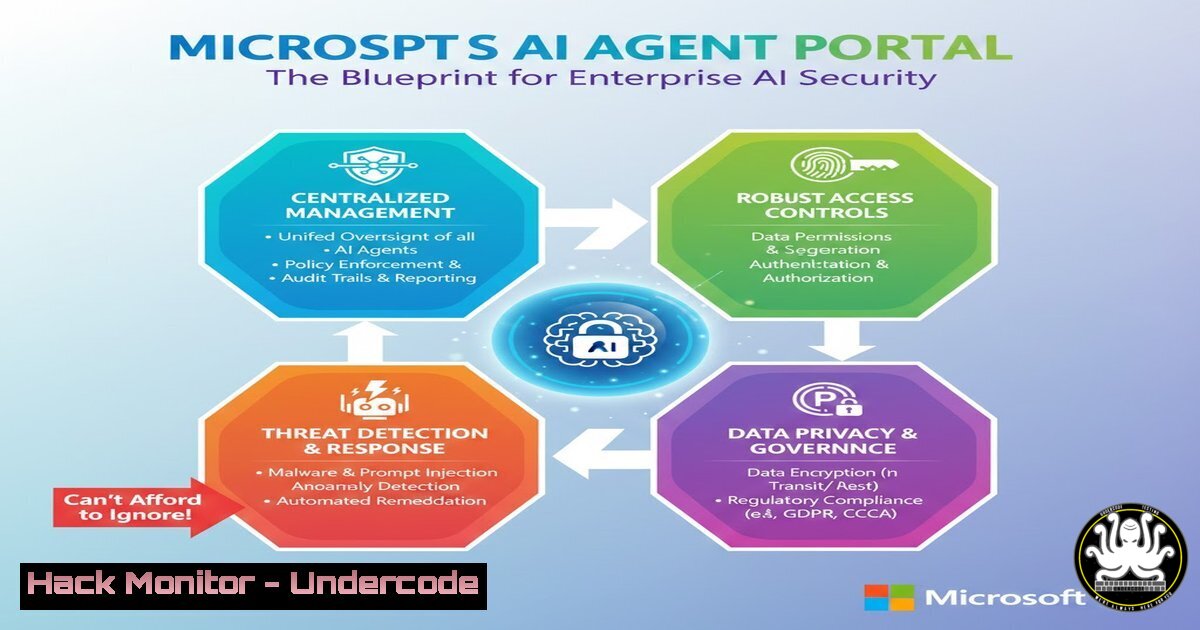
Introduction:
The rapid integration of AI agents into enterprise workflows presents a new frontier of both opportunity and risk. Microsoft’s conceptual AI Agent Portal, as visualized by security expert Derk van der Woude, provides a comprehensive framework for managing, securing, and governing these autonomous systems. This integrated approach is critical for organizations moving beyond experimental AI into full-scale, production-level deployment.
Learning Objectives:
- Understand the six core components of Microsoft’s proposed AI Agent Portal and their respective security functions.
- Learn the practical steps and commands for implementing security controls across the AI agent lifecycle.
- Develop a strategy for achieving centralized visibility and compliance for all AI agents within an enterprise environment.
You Should Know:
1. Agent Identity and Authentication via Microsoft Entra
The foundation of any secure AI ecosystem is verifiable identity. Microsoft Entra acts as the central registry for AI Agent IDs, ensuring that every autonomous system interacting with your digital estate can be uniquely identified and authenticated, just like a human user.
Step‑by‑step guide explaining what this does and how to use it.
Step 1: Create a Dedicated Security Group for AI Agents: In the Microsoft Entra admin center, navigate to Groups and create a new group named “AI-Agents-Registered”. This allows for bulk policy application.
Step 2: Register AI Agents as Service Principals: Each AI agent must be registered as an application/service principal in Entra. This creates its unique digital identity.
PowerShell (Microsoft Graph):
 Connect to Microsoft Graph
Connect-MgGraph -Scopes "Application.ReadWrite.All"
 Create a new app registration for the AI Agent
$params = @{
displayName = "Finance-Report-Agent-01"
signInAudience = "AzureADMyOrg"
}
New-MgApplication -BodyParameter $params
Step 3: Configure Conditional Access Policies: Apply Conditional Access policies to the “AI-Agents-Registered” group. Mandate compliant devices, approved network locations, and block legacy authentication protocols to prevent token theft and misuse.
2. Security Posture Management with Microsoft Defender
Once an agent has an identity, its actions and the security of the assets it accesses must be monitored. Microsoft Defender provides the security posture management and threat detection layer, treating AI agents as new types of endpoints.
Step‑by‑step guide explaining what this does and how to use it.
Step 1: Onboard AI Agent Host Servers to Defender for Endpoint: Ensure the servers/virtual machines hosting your AI agents are securely onboarded to Defender.
Linux Onboarding Script (Example Snippet):
 Download the onboarding package from the Microsoft 365 Defender portal
wget https://aka.ms/linux-onboarding-pack -O MDATP_onboarding.tar.gz
 Extract and run the installer
tar -xzf MDATP_onboarding.tar.gz
sudo chmod +x MicrosoftDefenderATPOnboarder.sh
sudo ./MicrosoftDefendantATPOnboarder.sh
Step 2: Create Advanced Hunting Queries for Agent Activity: Proactively hunt for anomalous agent behavior.
KQL Query Example (Defender Advanced Hunting):
DeviceProcessEvents
| where InitiatingProcessFileName =~ "python.exe" or InitiatingProcessFileName =~ "node.exe"
| where AccountName startswith "AIAGENT_"
| where FileName in~ ("powershell.exe", "curl", "wget", "nmap")
| project Timestamp, DeviceName, AccountName, FileName, ProcessCommandLine
| order by Timestamp desc
This query identifies common command-line tools being run by processes under AI Agent service accounts, which could indicate compromise or misuse.
3. Data Security and Governance with Microsoft Purview
AI agents are powerful data processors. Purview ensures they operate within the boundaries of your data loss prevention (DLP) and information protection policies, preventing accidental or malicious exfiltration of sensitive information.
Step‑by‑step guide explaining what this does and how to use it.
Step 1: Define Sensitive Information Types: In the Purview compliance portal, create or identify the Sensitive Information Types (e.g., “Customer Financial Data,” “IP Patents”) that your AI agents should not export.
Step 2: Create a DLP Policy for AI Agent Endpoints: Configure a DLP policy that targets the devices and servers where AI agents run.
Policy Action: Block the transfer of sensitive documents to external destinations (like unapproved cloud storage or email) when the activity is performed by a process associated with an AI Agent service principal.
Step 3: Apply Sensitivity Labels via PowerShell: Automatically encrypt sensitive files that AI agents generate or access.
 Connect to Security & Compliance Center
Connect-IPPSSession
 Apply a sensitivity label to a specific file or library
Set-Label -ContentPath "\sharepoint\AI-Agent-Reports\" -LabelId "8b817a78-82f0-4b38-b3a3-d6e268cdfa19"
4. Operational Control via Microsoft 365 Admin Center
The IT team requires a centralized plane to manage the lifecycle, resource allocation, and operational health of AI agents, similar to how they manage employee accounts and devices.
Step‑by‑step guide explaining what this does and how to use it.
Step 1: Assign Licenses to AI Agent Identities: In the Microsoft 365 admin center, locate the AI Agent service principals and assign the appropriate licenses (e.g., Microsoft 365 E5) to unlock security and compliance features.
Step 2: Monitor Agent Health and Activity: Use the integrated reports to monitor sign-in logs and activity for the AI agents. Set up alerts for multiple failed sign-in attempts, which could indicate a credential-based attack.
- The Central Nervous System: Security Dashboard for AI
This proposed dashboard (ai.security.microsoft.com) is the CISO’s window into AI-specific risk. It aggregates signals from Entra, Defender, Purview, and Copilot Studio to provide a unified risk score and overview.
Step‑by‑step guide explaining what this does and how to use it.
Step 1: Await General Availability: As noted in the original post, this portal is not yet live. The current action is to monitor the Microsoft Security blog for its official announcement.
Step 2: Develop an Inventory and Risk Matrix: In the interim, create a manual inventory of all AI agents in development or production. For each agent, document its purpose, data sources, permissions, and potential attack vectors. This will prepare you for rapid onboarding once the dashboard is available.
Step 3: Plan for API Integration: Anticipate that the dashboard will offer APIs. Plan to pull AI security posture data into your existing SIEM (like Sentinel) for correlation with other security events.
6. Orchestrating Intelligence with Copilot Studio
Copilot Studio is the creation and orchestration point for AI agents. Securing the studio itself is paramount, as a breach here could lead to the compromise of all downstream agents.
Step‑by‑step guide explaining what this does and how to use it.
Step 1: Implement Role-Based Access Control (RBAC): Strictly limit who within your organization has permissions to create or modify AI agents in Copilot Studio. Use the Principle of Least Privilege.
Step 2: Audit Agent Customizations and Plugins: Regularly review the custom prompts, data sources, and plugins attached to your agents. A malicious or poorly configured plugin could become a backdoor. Use the audit logs within the Power Platform admin center to track changes.
What Undercode Say:
- Integration is Non-Negotiable: The true value of this portal concept is not in the individual tools, but in their seamless integration. An isolated DLP policy or a standalone Defender alert is insufficient; the power comes from Entra identity context enriching a Purview DLP alert that is displayed in the central AI Security Dashboard.
- Shift-Left for AI Security: This framework forces a “shift-left” approach to AI security. Organizations must design security in from the agent’s inception—defining its identity, permissions, and data boundaries—rather than bolting it on as an afterthought, which is a recipe for vulnerability.
This conceptual portal represents the inevitable future of enterprise AI governance. It acknowledges that AI agents are not just tools but active participants in the IT ecosystem, requiring the same, if not a more rigorous, level of management and security as human users. The organizations that begin structuring their AI operations around this integrated model today will be vastly better positioned to scale safely and maintain compliance tomorrow.
Prediction:
The formal release and widespread adoption of integrated AI Security Portals, as conceptualized by Microsoft, will become the industry standard within two years. This will catalyze the emergence of “AgentOps” as a dedicated discipline within cybersecurity, focused solely on the lifecycle management and security of autonomous AI systems. Failure to adopt such a consolidated view will result in significant security gaps, leading to high-profile AI agent breaches involving data poisoning, prompt injection, and large-scale, automated data exfiltration.
🎯Let’s Practice For Free:
IT/Security Reporter URL:
Reported By: Derkvanderwoude My – Hackers Feeds
Extra Hub: Undercode MoN
Basic Verification: Pass ✅


